Cognitive Canvas
 chenyan104 downloads
Direct Canvas files into staged, step-by-step interactive HTML for presentations and screen recordings.
- Overview
- Scorecard
- Updates3
Reveal the structure. Direct the thought.
Cognitive Canvas turns an Obsidian Canvas into a directed, step-by-step interactive HTML experience for teaching, presentations, and screen recording.
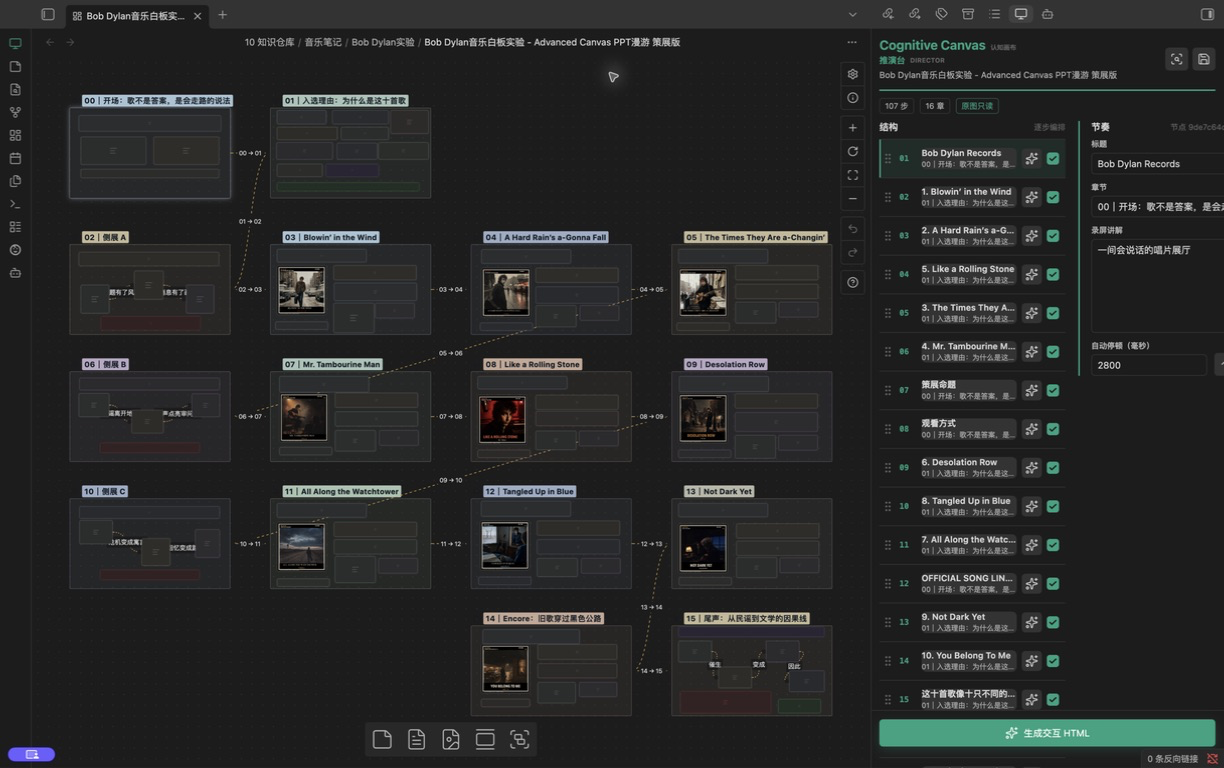
What it does
- Reads the active
.canvasfile without modifying it. - Derives a first-pass sequence from directed edges and spatial order.
- Lets you reorder, rename, group, emphasize, pause, or disable individual steps.
- Keeps narration notes beside the structure for recording preparation.
- Generates a self-contained interactive HTML file through a local Codex executable.
- Supports the optional
cognitive-canvasCodex Skill for enhanced generation and validation. - Follows Obsidian's light and dark appearance automatically.
Quick start
- Open a Canvas in Obsidian.
- Select the presentation icon in the ribbon, or run Open director from the command palette.
- Review the generated sequence in the Director panel.
- Drag steps into order and edit pacing or narration.
- Select Generate interactive HTML.
The source Canvas remains read-only throughout the workflow.
Requirements
- Obsidian 1.7.2 or later on desktop.
- A local Codex executable for HTML generation. The panel and direction workflow remain usable without it.
- Optional: the
cognitive-canvasSkill at~/.codex/skills/cognitive-canvas/SKILL.md.
On macOS, the default executable points to the Codex binary bundled with the ChatGPT desktop app. On Windows or Linux, set the executable name or full path in Settings → Cognitive Canvas.
Installation
Community plugins
Install Cognitive Canvas from Settings → Community plugins → Browse after the plugin is accepted into the directory.
Manual installation
Download main.js, manifest.json, and styles.css from the latest GitHub release and place them in:
<vault>/.obsidian/plugins/cognitive-canvas/
Reload Obsidian and enable Cognitive Canvas.
Privacy and external access
Cognitive Canvas contains no telemetry, analytics, advertising, or background network requests.
The plugin reads the active Canvas from your vault. It stores a Canvas snapshot, direction plan, generation request, and finished HTML in the output library configured in settings. The default library is ~/Documents/Codex/Cognitive Canvas, which is outside the vault and can be changed at any time.
HTML generation only starts after you select Generate interactive HTML. At that point the plugin launches the locally configured Codex executable and gives it access to the selected project's output folder. Codex may use your existing OpenAI account and network connection according to the terms and privacy settings of your Codex installation. The plugin does not collect or transmit that data itself.
Development
npm install
npm run check
npm run install:vault -- "/path/to/vault"
License
中文说明
**认知画布(Cognitive Canvas)**把静态 Obsidian Canvas 转化为可逐卡点亮、可交互、可录屏的独立 HTML。
核心能力
- 只读解析当前 Canvas,不修改原白板。
- 根据有向连线和空间位置生成初始推演顺序。
- 支持拖动排序、章节、标题、强调、自动停顿与步骤启停。
- 为每一步保存录屏讲解,便于导演式表达。
- 通过本机 Codex 生成单文件交互 HTML。
- 可选接入
cognitive-canvasSkill,获得更完整的生成与验收流程。 - 自动跟随 Obsidian 深浅模式。
使用方法
- 在 Obsidian 中打开一张 Canvas。
- 点击左侧功能区的演示图标,或在命令面板运行“打开推演台”。
- 在推演台中调整顺序、章节、节奏和讲解。
- 点击“生成交互 HTML”。
隐私说明
插件不包含遥测、分析、广告或后台联网请求。只有用户主动点击生成时,插件才会启动本机配置的 Codex,并允许它读取该项目的输出目录。默认输出资料库位于 ~/Documents/Codex/Cognitive Canvas,可在设置中修改。