Search...Search plugins and themes...
⌘K
Sign in
  • Get started
  • Download
  • Pricing
  • Enterprise
  • Account
  • Obsidian
  • Overview
  • Sync
  • Publish
  • Canvas
  • Mobile
  • Web Clipper
  • CLI
  • Learn
  • Help
  • Developers
  • Changelog
  • About
  • Roadmap
  • Blog
  • Resources
  • System status
  • License overview
  • Terms of service
  • Privacy policy
  • Security
  • Community
  • Plugins
  • Join the community
  • Discord
  • Forum / 中文论坛
  • Merch store
  • Brand guidelines
Follow us
DiscordTwitterBlueskyThreadsMastodonYouTubeGitHub
© 2026 Obsidian

Pandoc

oliverbalfouroliverbalfour508k downloads

Commands to export to Pandoc-supported formats like DOCX, ePub and PDF.

Add to Obsidian
  • Overview
  • Scorecard
  • Updates10

This is a Pandoc export plugin for Obsidian (https://obsidian.md).

It adds command palette options to export your notes to a variety of formats including Word Documents, PDFs, ePub books, HTML websites, PowerPoints and LaTeX among (many) others. This is all thanks to Pandoc.

This lets you write presentations, draft books, make webpages, and write assignments all in Markdown, and export to whichever format you fancy, all without leaving Obsidian.

Note: this plugin is in beta, and there are often minor formatting issues. Make sure to proof-read the output!
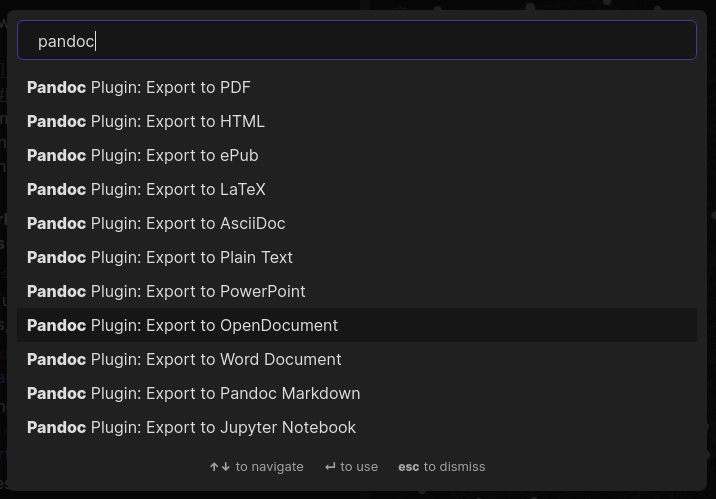
screenshot of command palette

Installation

Installation instructions are on the wiki, use the above link

Developer setup instructions are in development.md

Basic usage

  • Press Ctrl+P/Cmd+P to show the command palette
  • Search "Pandoc"
  • Choose your export format
  • If all goes well, it will say it was successful
  • If you exported a file called Pandoc.md as a Word Document, in your file explorer there will be a Pandoc.docx file in the same folder

Documentation

  • Using Pandoc templates
  • Using Pandoc citations
  • Combining/concatenating documents
  • Troubleshooting
  • Installation
66%
HealthFair
ReviewCaution
About
Export notes to Word, PDF, ePub, HTML, PowerPoint, LaTeX and many other formats using Pandoc directly from Obsidian. Write presentations, books, webpages or assignments in Markdown and produce ready-to-use outputs; proofread exported files for minor formatting issues.
ExportFormatsPDF
Details
Current version
0.4.1
Last updated
4 years ago
Created
5 years ago
Updates
10 releases
Downloads
508k
Compatible with
Obsidian 0.12.5+
License
MIT
Report bugRequest featureReport plugin
Author
oliverbalfouroliverbalfour
github.com/OliverBalfour/obsidian-pandoc
GitHuboliverbalfour
  1. Community
  2. Plugins
  3. Export
  4. Pandoc

Related plugins

Marp Slides

Create Marp presentations.

PDF Highlights

Extract highlights, underlines and annotations from your PDFs.

PDF break page

Add shortkey and command to insert a break page formating for pdf exports.

DOCX Exporter

Export notes to Microsoft Word docx files with mobile devices support.

Xournal++

Integration with Xournal++ for handwritten notes and annotations.

Importer

Import data from Notion, Evernote, Apple Notes, Microsoft OneNote, Google Keep, Bear, Roam, and HTML files.

Annotator

Read and annotate PDFs and EPUB files.

Text Extractor

A (companion) plugin to facilitate the extraction of text from images (OCR) and PDFs.

Markmind

Mind map, outline and PDF annotation tool. (Closed source)

Better Export PDF

Export your notes to PDF, supports export preview, add bookmarks outline and header/footer.