ZettelFlow
 Rafael Gómez Bermejo24k downloads
Create and manage your notes in a Zettelkasten way via Canvas.
- Overview
- Scorecard
- Updates52
Most plugins help you write. Almost none help you think.
Stop managing notes. Start managing knowledge. Obsidian is the store; ZettelFlow is the engine that makes the knowledge inside it evolve — it doesn't manage notes, it manages the processes that transform knowledge. It stands on four pillars:
- 🌱 Knowledge Lifecycle — every idea has a state (fleeting → permanent → evergreen); ZettelFlow knows the phase and proposes the next move.
- 🕸️ Semantic Knowledge Graph — relations with meaning: ask "show me every idea that contradicts this" and follow reasoning chains.
- 🔭 Knowledge Discovery — surface the unexpected: connections you didn't know you'd made, ideas worth challenging, a book outline hiding in a folder.
- 🩺 Knowledge Health — measure balance and richness, not volume: maturity, knowledge debt, a weekly review, a heatmap of ideas developed.
AI is one Action, never the product — every pillar works fully with AI disabled, and when it is on it proposes, never commits without your verdict: you accept, edit or reject every suggestion. Preserve people's work; simplify the paths: the canvas wizard you know remains the engine's front end while overlapping interfaces are consolidated with compatible access.
Our direction: useful from the first idea, deeper as your practice grows. You choose what deserves attention; recorded activity is not a measure of your understanding. The proposed Knowledge with purpose epic tracks purpose-led Cultivate and first value on your own material. The implementation is described below; real-device walkthroughs and the consented adoption pilot remain pending, not proven by automated tests.
Read the manifesto → · full documentation →
How it works, in one line
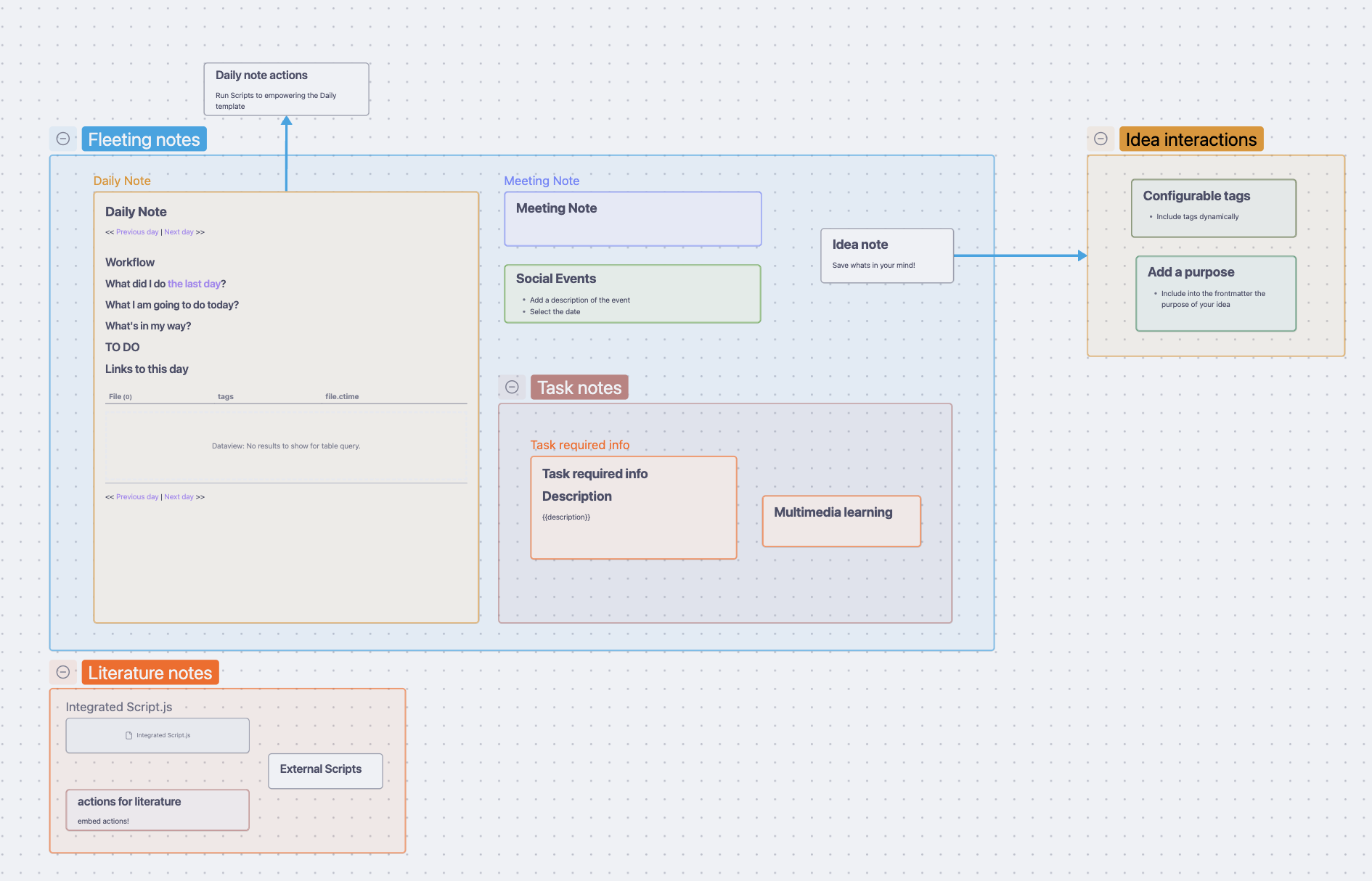
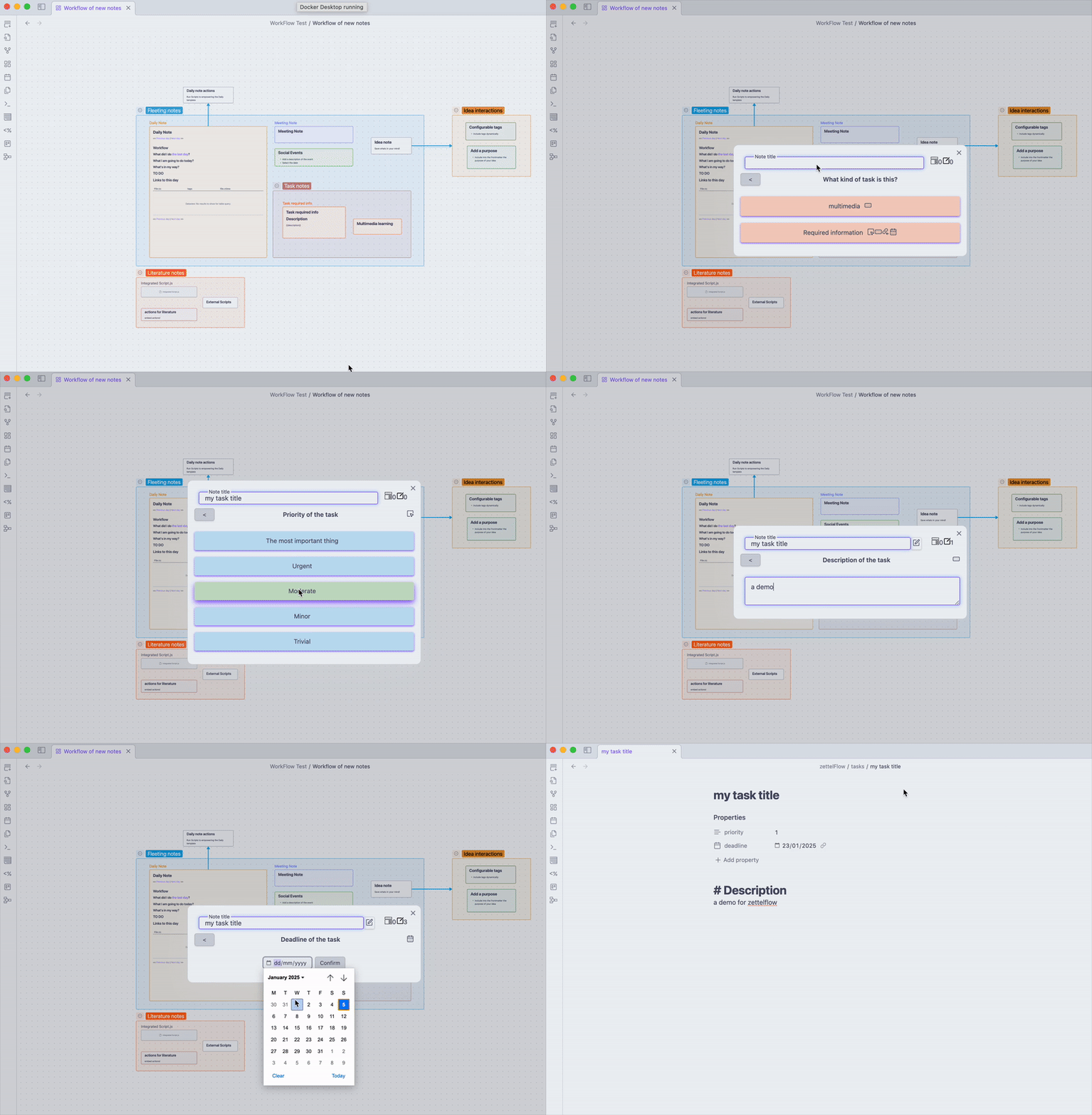
ZettelFlow turns an Obsidian Canvas into a guided note-creation wizard. Draw your workflow as a graph — steps as nodes, order as arrows — and the plugin walks you through it every time you create a note, filling in frontmatter, body content, dates, selectors, and more without you touching a template manually. Each step is a piece of the cognitive engine; each note lands already related, cross-checked and scored.
Zettelkasten toolkit
ZettelFlow is more than a note templater — it is a full Zettelkasten workflow. Beyond the canvas wizard, it ships a set of tools that grow and maintain your slip-box:
🎯 Knowledge with purpose — start with your own note or question, inspect bounded recorded context, write a provisional response, and save/pause/resume one inquiry locally. Evidence does not close your question: only you declare it sufficient for now. Markdown snapshots cite only material you explicitly marked as used and never overwrite an existing note. No AI or workflow setup needed; ordinary Cultivate remains available. See Cultivate.
🏠 ZettelFlow Home — open ZettelFlow, not Obsidian. A single front door: a greeting and "you've been thinking for N days", a one-click 3D-graph teaser, a growth nudge ("N fleeting notes ready to develop") that jumps straight to the latest capture, a Cultivate on-ramp (act on your next idea), your new ideas, main concepts, notes that deserve a review, suggested connections, and a "what to do next" list of prioritized recommendations (click to jump to the note). Read-only, offline — the state of your mind at a glance.
⚡ Quick capture — from thought to note in one keystroke. A command opens a single title prompt and writes a fleeting note to your Inbox — no canvas, no wizard, the fastest path to a first note. Home then nudges you to develop it later. Works on mobile; bind your own hotkey.
🌱 Cultivate — make one idea evolve. A guided thinking session picks your highest-leverage idea and walks you through small, real moves on it — connect an unlinked neighbour, challenge it with its contradiction, capture a question, advance its lifecycle state, add a source — each a one-click operation on the note. The session refines live as you go, and the metric (degree, maturity, state) is a consequence of the work. Offline; AI is never required. This is the engine that makes knowledge evolve, not just get stored.
⚖️ Agency review — see how much you're still deciding. A read-only Health → Agency tab that lists your recorded decisions newest-first with a compact header: the cognitive agency index and the accept/modify/reject breakdown of AI/derived suggestions, plus a one-line plain-language reading. Local, offline, nothing transmitted — a description of your verdict mix, never a grade.
🖼️ Shareable idea card — show how your thinking grew. One click on the Evolution timeline paints a before→after image of a note — first vs current state, claims gained, links, decisions and days — and saves it as a PNG to share. Built only from already-recorded data; nothing invented, nothing sent.
🔎 Ask your graph — query your thinking, not your frontmatter. A deterministic query surface over the meaning and structure of your slip-box: compose predicates —
state:permanent,relation:contradicts,degree>=5,orphan,unsourced,older-than:30— withAND/ORto answer questions Dataview can't, like "orphaned permanents older than 30 days that contradict X" — or compose one from menus with the guided term builder if you'd rather not memorise the grammar. Every result opens on click; view them as a list or a table; save a useful query — name it, reorder it, and pin it to Home as a live "N notes match …" card. Never AI, always offline.📝 Note-builder companion pane — a live preview of the note as you build it, plus suggested connections to existing notes so you can link before you file.
📖 Derived projects — turn a folder of notes into the structure of a book / course / article: one command clusters and orders them from the semantic graph into an outline (MOC) that links every source note. It organizes what you already know — graph-derived, offline, no AI.
🔑 Zettel ID action — stamp every note with a stable unique identifier (sortable timestamp or Luhmann-style Folgezettel branching like
21 → 21a → 21a1).One front door, four surfaces. The panels below live in four surfaces — Home, Health, Discovery and Graph — each with modes behind a segmented control, opened from a single ribbon button and as normal Obsidian tabs. Nothing is lost; every panel is a mode. See The four surfaces.
🩺 Slip-box health — one home for the state of your system. Connectivity % (connected / orphaned / unresolved) and a "today" panel (to process · contradictions · connections · open questions, each with a next action); a Knowledge Debt score (0–100) with a severity bar and a per-category drill-down (unreferenced · dangling · unsourced · open questions) each one click from a fix; a Knowledge balance read-out (references · questions · examples · conclusions · concepts) with nudges; and the orphan / dead-end lists. Read-only, offline — so knowledge-debt never piles up unseen. (The former standalone "dashboard" is folded in here.)
🧩 Systems Gallery — somewhere to start. Install a complete knowledge system in one click from the community browser: pick a folder and ZettelFlow writes a ready-to-run canvas plus its step notes (no clipboard, no manual paste), then Run now to use it immediately. Every system carries a difficulty badge (easy · medium · hard) so you can start where you're comfortable and grow into the richer ones. Start with the 🎓 ZettelFlow tour — a three-step guided system that teaches the whole workflow while you build a real note. A dozen shipped systems — Academic research · Zettelkasten v2 · PARA v2 · GTD · Reading · Writing · Software architecture KB · Meeting notes · Daily journal · Concept note · Decision journal · Inquiry — each composing the cognitive actions on creation (the medium/hard ones wire up the full relation · research · maturity pipeline), so a new note lands already related, cross-checked and scored. Offline, no AI. This is the one way to adopt a workflow — it replaces the old starter-flow and methodology-package installers.
🗺️ Map-of-content builder — gather notes by tag/folder into a MOC and refresh it safely; re-runs never touch your own prose.
✨ Connection resurfacing — "talk to your slip-box": for the note you're reading, see older, related notes worth revisiting, plus a daily spark of forgotten ideas.
🗓️ Second-brain review — one command generates a weekly review note: ideas created, orphans, forgotten ideas, and important-but-unreviewed notes over the last 7 days — each a click from a fix.
🔥 Thinking heatmap — a GitHub-style calendar of ideas developed (state advanced, source or connection added) over the last year — momentum, not note-count volume. Fed by a private, local, on-by-default journal (day → count only; no content, no network).
🔭 Morning discovery — up to three surprising connections: pairs of notes that share concepts but aren't linked yet, one click from relating them. Graph-structural, offline — the value of a slip-box is in the links you didn't already know about.
🗺️ Living knowledge map — detects your hubs and the notes that orbit each one, and regenerates as the vault changes so it never goes stale. Read-only, offline — the shape of your knowledge at a glance.
🕸️ Concept navigation — walk your vault like a wiki you wrote: focus a note, see its typed neighbours (in and out), click one to re-focus — Learning → Memory → Spacing effect → Anki, no folders. Ships with headless reasoning paths that read the graph as an argument (supports → expands → example → implements). Read-only, offline.
🌌 3D knowledge graph — see the shape of your thinking. Fly through an immersive Knowledge Galaxy: your slip-box as a 3D force-directed graph over a starfield, notes sized by connectivity, cluster-hued glow halos, links coloured by relation type; search-to-focus, filter by state, and a discovery lens that lights up orphans, dead-ends and contradictions in space. Click a node to open it, take a cinematic tour through your hubs, or export the view to a PNG / WebM clip to share. Read-only, offline; respects reduced-motion, and degrades to the 2D map on mobile. (Graph surface → 3D mode.)
❓ Open questions — every unanswered question in your vault, made first-class: each
question::with no answer yet, its asker(s), and the note most likely to answer it (ranked by shared graph context). Read-only, offline — a live thread instead of a dead end.🕰️ Evolution timeline — the conceptual history of an idea (not a text diff): a per-note sequence of its lifecycle state + claims, captured only on meaningful change. Local, bounded, opt-in (it stores note content) — see how a claim evolved from "AI replaces us" to "AI is a copilot".
⚖️ Evidence map (experimental) — ask "what do you think about this?" and get a grounded synthesis reconstructed only from your graph: what supports it, what contradicts it, the sourced evidence, the gaps — every row linked to the source note, no invented content, no AI required.
✂️ Atomicity split assist — turn a multi-topic note into linked atomic notes in one command, leaving the source as a hub.
🌱 Note lifecycle states — give every note a state (🌱 fleeting → 📝 literature → 💡 permanent → 🔬 developing → 📚 evergreen → 🪦 archived) and move it with a validated Change note state command; the state lives in plain, configurable frontmatter.
🧭 Knowledge phases for steps — tag each step in a flow with the stage of knowledge work it advances (Capture → Classify → Process → Connect → Develop → Review → Consolidate); the step builder groups your flow by phase, so a workflow reads as an arc of thinking. Distinct from a note's lifecycle state: a step has a phase, a note has a state.
⚡ Event-driven workflows — let a flow react to vault events (a note created, a property or tag change) instead of only running on demand. Opt-in and off by default, throttled, and loop-guarded so a flow can never retrigger itself; an optional
zfcondition gates each trigger.🧩 Visual workflow language (WHEN / IF / ACTION / WAIT) — compose a reactive flow on the canvas as a readable program: WHEN a vault event happens, IF a condition holds, run an ACTION, then WAIT for your confirmation. WAIT is a human-in-the-loop pause; the blocks are annotated on the canvas so a flow reads as an arc of thinking.
🧠 Knowledge actions — actions that reason about your slip-box, not just write to a note: detect an orphan, calculate maturity (0–100 from state, links, sources and age), find contradictions, find unanswered questions, suggest the next move (a concrete to-do: add a source, connect it, add an example, develop it), and run the thinking simulator (critical-thinking prompts adapted to a note's gaps — what if it's false? what evidence is missing? what contradicts it?) — deterministic, offline, over the knowledge model. They feed the knowledge-health layer.
🔗 Relation actions — actions that turn connection-making into a workflow step: find related and suggest link rank notes worth linking by shared graph context (co-citation + coupling), and create semantic relation writes a typed edge (supports, contradicts, …) to a target note. Graph-structural, deterministic, offline. To undo one, the Remove a relation command lists the active note's typed relations and deletes the one you pick, after a confirmation.
🔍 Research actions — actions that make sourcing and claim-checking part of the workflow: extract claims, compare claims (surface notes that agree with or contradict yours), find sources (suggest existing vault sources for an under-sourced note), and attach source. Over the claims-and-sources model, deterministic and offline.
🤖 AI actions — optional, off by default — AI is one action category, never the core, and it never writes for you — every completion is a proposal you accept, edit or reject. The whole plugin works fully with AI disabled. Opt in with your own OpenAI-compatible provider (endpoint + key + model — OpenAI, OpenRouter, LM Studio, Ollama…) to summarize, classify, and generate questions. No bundled key, no telemetry; the note content is sent only to the endpoint you configure. See AI provider setup.
New here? Open the community browser and install a system — it writes a ready-to-run canvas and its steps, and offers Run now. Everything else lives under Settings → ZettelFlow.
How it works
Canvas file  ──►  ZettelFlow wizard  ──►  Note in your vault
(your workflow)   (step-by-step UI)      (frontmatter + body merged)
- Design — Create a
.canvasfile. Each node is a step; arrows define the order. Mark one node as the root. - Configure — Right-click any canvas node → Edit ZettelFlow step to add actions (prompt, calendar, selector, tags…).
- Run — Click the ZettelFlow ribbon button → Create note (or bind a hotkey to the Open workflow command). ZettelFlow walks the canvas graph and builds the note.
Get started in 5 minutes
Fastest path:
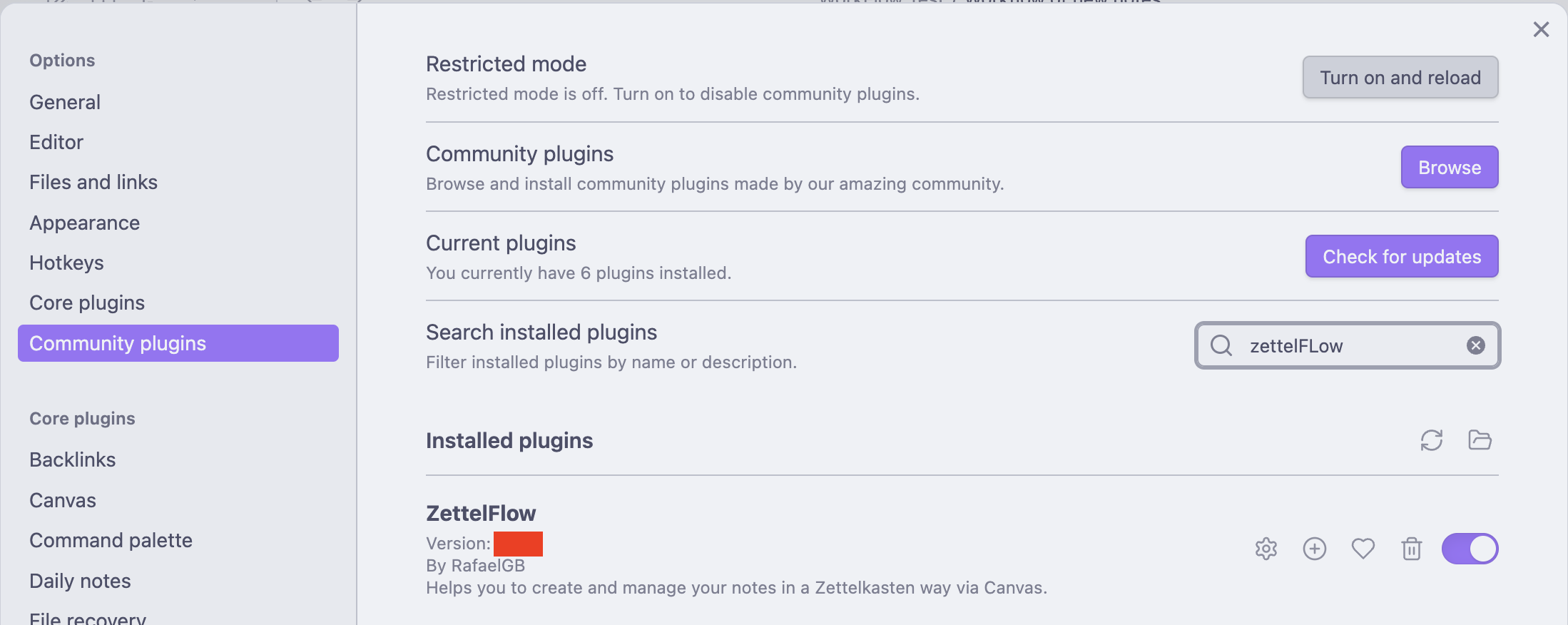
- Install ZettelFlow from the Obsidian community plugin browser.
- Click the ZettelFlow ribbon button (or run Open ZettelFlow from the command palette).
- On the welcome screen, click Start with my own idea, then choose an existing note or capture one.
- State a question, inspect selected material, write a response or gap, and Save progress. Optionally install a system from the existing gallery when you want a Canvas workflow.
Manual path (build your own flow):
- Create a
.canvasfile (e.g.flows/daily-note.canvas). - In Settings → ZettelFlow, set that canvas as the "new notes canvas".
- Add a note file to the canvas, right-click it → Create managed step, enable Root.
- Click the ribbon button → Create note — your first wizard run.
Stuck? Read the Getting started guide or open a Discussion.
Features
| Feature | Description |
|---|---|
| Knowledge with purpose | One saved inquiry inside Home → Cultivate: user-chosen note/purpose, selected-only or one-hop context, explicitly consulted references, human-controlled provisional resolution, local pause/resume and create-only Markdown snapshots with recoverable retries. Offline; no mandatory AI, methodology or Canvas setup. |
| Canvas-based flows | Use Obsidian's native canvas as the workflow engine — no custom DSL to learn. |
| Knowledge patterns | Templates that carry behavior — on creation a pattern runs its attached offline knowledge/relation actions through the standard pipeline. The shipped Permanent Note pattern wires find related · find contradictions · suggest links · calculate maturity, computed against your existing graph. Results are recomputed once, automatically, after the note is indexed, so a brand-new note lands already connected (on by default, offline). Additive & backward-compatible; legacy templates are unchanged. |
| 31 built-in actions | Prompt, Number, Checkbox, Calendar, Selector, Dynamic selector, Tags, Backlink, CSS classes, Task management, Script, Zettel ID, 🧠 knowledge actions — detect orphan, calculate maturity, find contradiction, find unanswered question, suggest next move, thinking simulator — 🔗 relation actions — find related, suggest link, create semantic relation — 🔍 research actions — extract claims, compare claims, find sources, attach source — and 🤖 optional AI actions (off by default) — summarize, classify, generate questions, challenge idea, synthesize, suggest connections. |
| Scriptable knowledge API | Your own JavaScript gets the same model ZettelFlow uses on itself: zf.knowledge exposes the offline analyses behind Home, Health and the recommendations — debt, balance, open questions, evidence maps, reasoning paths, ideas that grew without your judgement — with the live graph already bound, from any Script action, dynamic selector or vault hook. Read-only: it exposes no vault writer. zf.ai.propose() reuses the provider you configured and returns only what you accepted. The editors read that API rather than a copy of it: completions come from the live object your script will receive (so your own library scripts and an installed Dataview list themselves), hover shows signatures, syntax errors appear in the gutter, and insertable examples mean you never start from an empty editor. One button writes a zettelflow.d.ts into your scripts folder so VS Code knows the API too — your own library functions included. The Weekly focus community system ships as a worked example. |
| Script workbench | Try a script before it touches anything: pick the kind (step action, dynamic selector, property hook, condition), pick a real note to run it against, and see what it returned, what it would have written, and how long it took. Nothing is written — and every run, from anywhere, is recorded in a log you can read, filter and re-run. |
| Conditional edges | Label a canvas arrow if: frontmatter.type === "meeting" to branch the workflow at runtime — or compose the condition without code in a guided builder (field · operator · value pickers, live validation). When a condition hides an option, the wizard now says so and why ("state is permanent, and this branch needs fleeting") instead of making the branch disappear in silence. |
| Steps own their exits | Each arrow leaving a step answers three questions in a form — what it says, when it is open, in what order it appears and which one you land on — from the step editor ("Where does it go next?") or from the arrow itself on the canvas. Conditions stop being code drawn on the diagram; a previewed one-click migration moves existing labels into the step, and the arrow stays marked as conditional. |
| Colour means the phase | A node’s colour stops being decoration: it is the phase of the knowledge arc the step advances, from one map the canvas and the wizard both read. The step editor offers the colour with one click (never silently — a canvas you coloured is yours), each node carries badges for what it does (start of the flow · 3 questions · template · linked note · optional · conditional exits), and a legend on the canvas states what it all means. |
| Review this flow | A chip on the canvas reads the flow back to you: a step whose note was deleted (marked on the node itself, because it is the one that stops the wizard), steps nothing points at, dead ends, two options that read the same, a condition waiting on a key nothing writes. Facts, not a score — nothing is blocked, nothing is auto-fixed, and clicking a finding centres the node it is about. |
| Your flows have a role | A canvas is not just a file: it creates notes, edits the open note, runs on a folder, runs on an event or has no role at all — and the role is how you launch it. Settings lists them, changing one says what it costs first (who loses it, what moves), and event flows get their own folder so a canvas is never two things at once. |
| Triggers only where they fire | A flow reacts to vault events because it lives in the events folder, and the trigger can only be written on its first step — the one place the engine ever reads it from. Elsewhere the switch is simply not offered; a trigger you already wrote is still shown, with the reason it cannot fire. |
| Systems install into a role | The gallery's last question is how will you use this? — creates notes, edits the open note, runs on a folder, runs on an event, or just the files. It writes the one setting or folder that makes the system reachable, shows what it changes (and who loses a role) before writing anything, and tells you how it runs afterwards instead of naming a command. |
| Try a system before installing | The gallery walks a community system for you — its options, why a branch is closed, what it would ask, the note it would produce — and reads it back for dead ends and unreachable steps, without creating a single file. Scripts and AI actions are listed as what would run, never executed. |
| Settings you can read | Sixty-two options in one scroll became eight groups that say what you are doing — your flows, creating notes, your vault's vocabulary, thinking, AI, automation, advanced (folded) and about — with a line at the top stating what is on right now. Nine rows that configured nothing are gone, and three decisions that were split in two now ask once. |
| Rehearse a flow | Walk your own flow before anyone runs it: pick which flow on the board to start, take the options you would be offered, see the path traced on the canvas, read why a branch is closed, supply the frontmatter a condition would read, and end on the note it would have produced — including the linked note and where it would be filed. Scripts and AI actions are listed as what would run, never executed, and nothing is written. |
| Dynamic templates | Use {{title}}, {{date}}, {{frontmatter.key}}, {{canvas.name}} in step body templates. |
| Live body preview | See the rendered note body while editing a step's template (desktop). |
| Go back to any step | The breadcrumb is navigable: return to any step you already answered and the wizard discards only what came after it, so the note always matches the path you see. Discarding more than one step asks first — and says plainly when a step already did something that cannot be undone. Ctrl/Cmd+Z and Ctrl/Cmd+Shift+Z work inside the wizard. |
| See what will change | The wizard shows a diff, not just a result: which frontmatter keys it adds or changes (and from what), how much body it appends, and — when two steps set the same key — which one wins and what it overrode, instead of letting the merge decide in silence. Editing an existing note previews the insertion and every {{placeholder}} it will replace across the document, and asks before writing a single character. |
| Companion pane | Live note preview + connection suggestions while the wizard runs — link before you file. Each suggestion is a proposal you rule on: accept it, link it with your own words, or reject it — and your verdict is recorded in the judgement record, so the place where you make the most decisions finally counts towards your agency index. Optional reason and confidence; nothing is recorded if you never create the note. On a phone the pane collapses instead of disappearing. |
| Inline steps are first-class | A canvas box can carry a body template, not just actions — the quickest way to author a step is no longer the poorest one. The template language is insertable buttons rather than syntax to remember. |
| One flow, two connected notes | Turn on Linked note in a step (a toggle, a template picker and two dropdowns — no config files): walk the flow once and get both the literature note and the permanent note, related by meaning (inspired-by, supports, contradicts …) instead of a bare link. The wizard asks nothing extra — the pairing is part of the step — and it says where both notes will land and what the relation will be before writing. Create-only: an existing note is never touched. |
| Unfinished notes survive | Close the wizard mid-flow and nothing is lost: what you answered is kept locally, and the next time you open that canvas — or from a nudge on Home — you can resume exactly where you paused, or start fresh. Recorded results are restored, never re-run. Bounded, expirable, and one toggle turns it off. |
| Honest progress | The wizard says step 3 · about 2 left (derived from the longest remaining path in your flow graph, and silent when it cannot be known honestly) and shows where the note will be created — folder, unique prefix and all — before you commit. A breadcrumb shows the path you walked. |
| Zettel ID action | Stable unique IDs per note: sortable timestamp or Folgezettel branching (21 → 21a → 21a1). |
| Slip-box health | One home for the state of your system: connectivity % + a "today" panel (to process · contradictions · connections · open questions, each with a next action), a Knowledge Debt score (unreferenced · dangling · unsourced · open questions) with a drill-down and one-click fixes, a Knowledge balance read-out (references · questions · examples · conclusions · concepts) with nudges, and the orphan/dead-end lists. Read-only, offline. |
| ZettelFlow Home | The IDE-style front door: greeting + "thinking for N days", a one-click 3D-graph teaser, a growth nudge ("N fleeting notes ready to develop" → jump to the latest), a Cultivate on-ramp (act on your next idea), new ideas, main concepts, notes that deserve a review, suggested connections, and a "what to do next" prioritized recommendation list (click to navigate) — including ideas that grew without your judgement, so structural growth never passes for understanding. Read-only, offline. |
| Quick capture | A command opens a single title prompt and writes a fleeting note to your Inbox — the fastest path from a thought to a note (no canvas, no wizard). Mobile-friendly; bind your own hotkey. Home nudges you to develop it later. |
| Cultivate (thinking sessions) | A guided session that takes your highest-leverage idea and walks you through real moves on it — connect · challenge · question · advance state · add a source — each a one-click operation. Connect, challenge and add-a-source ask for your reading before they reveal theirs — what do you expect this to be related to? what is the strongest argument against it? — because the pause is where the thinking happens (skippable, and one toggle to turn off). Choose your own recipe (turn moves off in settings); a streak (days you exercised judgement, not days something happened) and a cultivation queue count show your momentum and how many ideas are waiting. The session refines live; the maturity/degree/state delta is a consequence of the work. Offline; AI optional. Home surface → Cultivate mode (or the cultivate command / ribbon). |
| Derived projects | Turn a folder of notes into an ordered book/course/article outline (MOC) — clustered and sequenced from the semantic graph, linking every source note. Graph-derived, offline, no AI. |
| Second-brain review | A command that generates a weekly review note — ideas created, orphans, forgotten ideas, important-but-unreviewed — each with a next action. |
| Thinking heatmap | A GitHub-style calendar of ideas developed (state advanced, source/connection added) over the last year, fed by a private on-by-default local journal (day → count only). |
| Morning discovery | Up to three unexpected connections — unlinked note pairs that share concepts — each one click from being related. Graph-structural, offline. |
| Living knowledge map | A read-only sidebar that detects your hubs and the notes clustering around them, regenerating as the vault changes. |
| Concept navigation | Walk your vault by typed relation (in + out) — focus a note, click a neighbour to re-focus, no folders. A Trace reasoning paths command opens a read-only lens of the argument chains leaving a note (supports → expands → example → implements), each note clickable. Offline. |
| Ask your graph | A deterministic query surface over your slip-box's meaning and structure (not frontmatter/tags like Dataview, and never AI): compose predicates — state:, relation:supports/contradicts, incoming:, folder:, degree>=, orphan, unsourced, older-than: … — with AND/OR to answer "orphaned permanents older than 30 days that contradict X". Results open on click as a list or table; compose terms from menus with the guided builder; save a query to name / reorder / pin it to Home. Read-only, offline. |
| 3D knowledge graph | An immersive Knowledge Galaxy — an interactive 3D force-directed graph of your slip-box over a starfield (Graph surface → 3D): nodes sized by connectivity and coloured by cluster with cluster-hued glow halos, links coloured by relation type; search-to-focus, state filter, and a discovery lens for orphans · dead-ends · contradictions. A one-click cinematic tour flies through your hubs; share your universe by exporting the view to a PNG or the time-lapse to a WebM clip. Read-only, offline; respects reduced-motion and Lite mode; 2D-map fallback on mobile. |
| Open questions | A vault-wide list of every unanswered question::, its askers, and candidate answering notes ranked by shared graph context. Read-only, offline. |
| Evolution timeline | The conceptual history of an idea — a per-note sequence of its lifecycle state + claim texts, captured only on meaningful change, oldest to newest. Share this idea exports a before→after image card (state change · claims gained · links · decisions · days). Local, bounded, opt-in. |
| Agency review | A read-only Health → Agency tab listing your recorded decisions newest-first with a compact header: the cognitive agency index and the accept/modify/reject breakdown of AI/derived suggestions, plus a one-line plain-language reading. Local, offline, nothing transmitted — a description of your verdict mix, never a grade. |
| Evidence map (experimental) | Compound thinking — a grounded synthesis of a note from your own graph (supports · contradicts · evidence · gaps), every row linked to its source note. No invented content, no AI. |
| Map-of-content builder | Gather notes by tag/folder into a MOC; re-runs update a managed region and keep your prose. |
| Connection resurfacing | Ranked older/related notes for the active note, with a daily-spark serendipity surface. |
| Atomicity split | Split a multi-topic note into linked atomic notes, leaving the source as an index/hub. |
| Note lifecycle states | Classify notes by phase (fleeting → … → archived) and change state with a validated command; state lives in configurable frontmatter (no lock-in). |
| Knowledge scope | Exclude config/template/tooling folders from the thinking system — one simple list of path prefixes. Notes under an excluded path never enter the index, so they drop out of the graph, health, discovery, Cultivate and Home all at once. |
| Vault hooks | Run a script automatically on folder-creation events or frontmatter property changes. Property hooks now have a cleaner manager: enable/disable each hook, give it a description, gate it with a run condition (event.newValue === 'done'), and test it on the active note (a dry-run that previews the changes without writing). |
| Event-driven workflows | Let a flow react to vault events (note created/modified, a property or tag change) instead of only running on demand — off by default, throttled, and loop-guarded. |
| Visual workflow language | Compose a reactive flow on the canvas: WHEN a vault event happens, IF a condition holds, run an ACTION, then WAIT for your confirmation — human-in-the-loop pauses, off by default and loop-guarded. |
| Action picker by capability | The action picker groups actions by cognitive capability (Manipulation · Relations · Knowledge · Research · AI) instead of a flat list. |
| Remove a relation | A command that lists the active note's typed relations and deletes the one you pick, after a confirmation naming the exact edge. Offline. |
| Community Hub | A tabbed community browser — Browse (systems, steps, actions; search + type/difficulty filters, linkable authors), Contribute (share your canvas as a system, suggest an idea, report a bug with your environment pre-filled, or open Discussions — all via GitHub, no account), Learn (curated links to the docs guides + manifesto), and Installed. Fully static and GitHub-backed — no server to run. |
| Community systems | Install a whole knowledge system in one click — the browser fetches a .zftemplate bundle and writes its canvas + step notes to a folder (no clipboard). Each system shows a difficulty badge (easy / medium / hard); a ZettelFlow tour system teaches the full workflow while you build a real note. A system that ships JavaScript says so before you install it, and names the steps that carry it. |
| .zftemplate export/import | Bundle a canvas and its step files into a single portable file to share with others. |
| Timings from this vault | A section of Health showing what ZettelFlow actually took on your machine, over your notes: building the index, reading notes for inline fields, the heaviest analysis. Facts and note counts — no score, no grade, no advice. A long pass says it is running and can be stopped. |
| What ZettelFlow changed | Everything ZettelFlow wrote to your vault lately — the note, the satellite beside it, the frontmatter a hook set while you were elsewhere, the canvas a role moved — grouped by what you ran. Undo takes a whole one back: created notes go to Obsidian's trash, properties return to their previous values. Previewed before it happens, and refused (by name) when you edited the note since. |
| Mobile support | Works on iOS and Android (isDesktopOnly: false) — the core loop (capture → cultivate → advance → health) is touch-friendly, and the 3D graph degrades to a navigable list (hubs first, each note one tap) instead of a blank. |
| Accessibility | Keyboard-operable surfaces — the segmented tabs are a WAI-ARIA tablist with arrow-key navigation, note names activate with Enter/Space, focus is always visible, and prefers-reduced-motion quiets the graph animation. |
Capabilities & privacy
ZettelFlow collects no telemetry and sends no personal data or vault contents anywhere. The plugin uses these capabilities:
- File system (vault). Reads canvas flow files and creates/edits notes (e.g. the Change note state command writes a single lifecycle property to the active note). All access goes through Obsidian's
Vault/FrontmatterServiceAPI — never a hardcoded path. Works on desktop and mobile. - Vault enumeration. ZettelFlow lists every markdown file path to build the offline knowledge model that health, discovery, the graph and Cultivate all read. Paths and metadata only, all local — and you can keep folders out of it with the knowledge scope.
- Network — two opt-in paths, nothing until you use them. The community gallery does read-only
GETs of the static catalog on GitHub (no backend, no account, no uploads), and the optional AI provider sends length-bounded note content to the single https endpoint you configure. Both are off until you open the browser or enable AI. - Dynamic code execution. The Script action, dynamic selectors, vault hooks and workflow-event conditions run JavaScript you write, with the plugin's access to your vault — including read-only access to the whole knowledge model via
zf.knowledge— so only run scripts you trust. No remote code is ever fetched or executed, and every runtime function is built in one audited module. - Clipboard — write only. The “copy” buttons put a step or action configuration on your clipboard as JSON. ZettelFlow never reads your clipboard.
See Capabilities & privacy for full details.
Contributing
- Bug? → Open a bug report
- Idea? → Open a feature request
- Question? → Start a discussion
- Code? → Read Contributing & conventions and open a PR.
Support
If ZettelFlow saves you time, consider supporting development: