Search...Search plugins and themes...
⌘K
Sign in
  • Get started
  • Download
  • Pricing
  • Enterprise
  • Account
  • Obsidian
  • Overview
  • Sync
  • Publish
  • Canvas
  • Mobile
  • Web Clipper
  • CLI
  • Learn
  • Help
  • Developers
  • Changelog
  • About
  • Roadmap
  • Blog
  • Resources
  • System status
  • License overview
  • Terms of service
  • Privacy policy
  • Security
  • Community
  • Plugins
  • Join the community
  • Discord
  • Forum / 中文论坛
  • Merch store
  • Brand guidelines
Follow us
DiscordTwitterBlueskyThreadsMastodonYouTubeGitHub
© 2026 Obsidian

Auto Link Title

zolrathzolrath354k downloads

Automatically fetches the titles of links from the web.

Add to Obsidian
  • Overview
  • Scorecard
  • Updates30

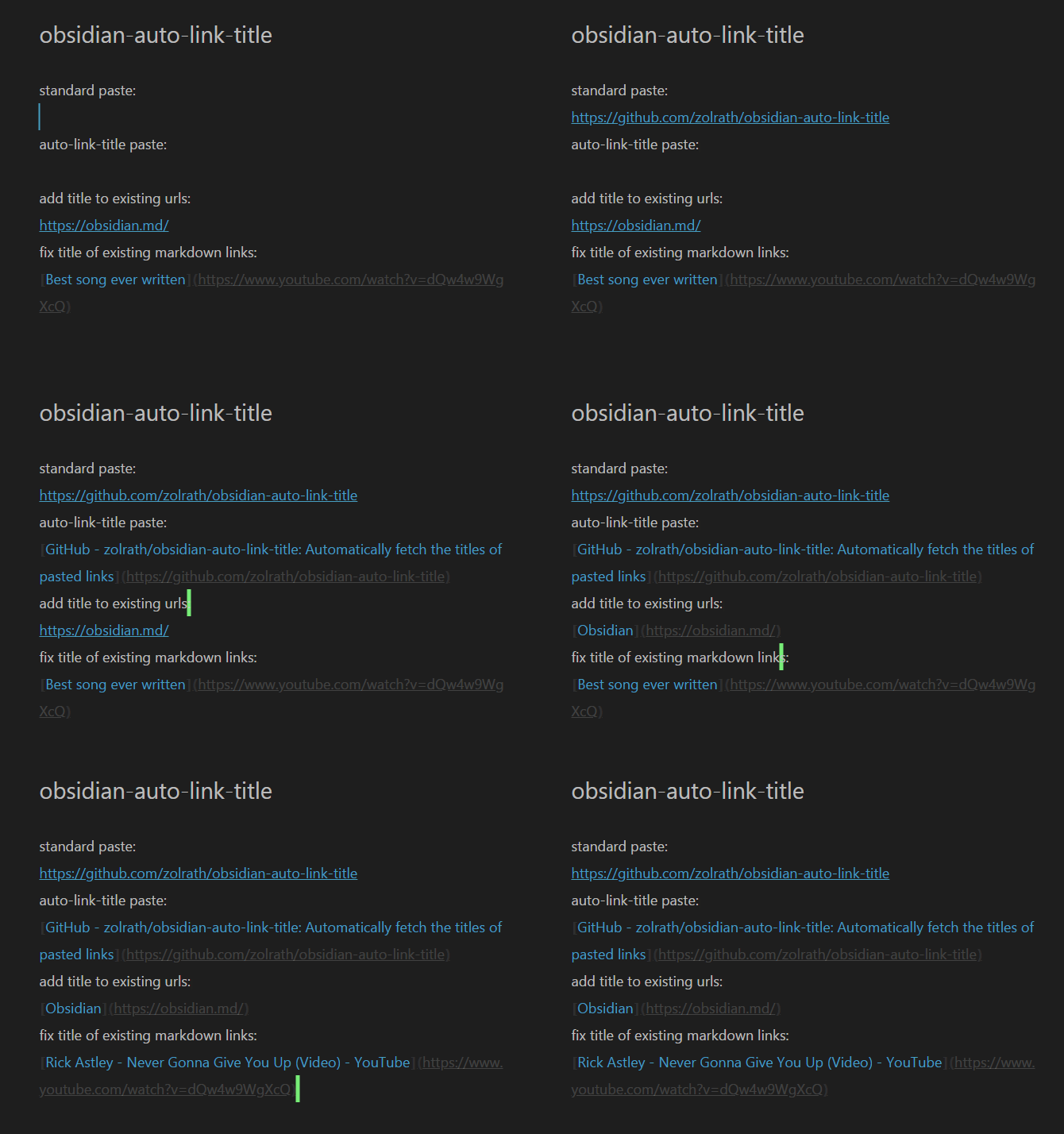
Auto linking example

Automatically Title New Links

This plugin automatically fetches the webpage to extract link titles when they're pasted, creating a markdown link with the correct title set.

For example:

When pasting https://github.com/zolrath/obsidian-auto-link-title the plugin fetches the page and retrieves the title, resulting in a paste of: [zolrath/obsidian-auto-link-title: Automatically fetch the titles of pasted links](https://github.com/zolrath/obsidian-auto-link-title)

Add Titles To Existing Raw URLs

Additionally, using ctrl-shift-e (Windows) or cmd-shift-e (OS X) you can enhance an existing raw link to a markdown formatted link with the proper title.

If your text cursor is within the url https://github.com/zolrath/obsidian-auto-link-title pressing ctrl-shift-e or cmd-shift-e converts the text to [zolrath/obsidian-auto-link-title: Automatically fetch the titles of pasted links](https://github.com/zolrath/obsidian-auto-link-title)

Overwrite Titles Of Existing Markdown Links

Additionally, using ctrl-shift-e (Windows) or cmd-shift-e (OS X) you can overwrite an existing title of a markdown link with the fetched title from the url.

If your text cursor is within [some plugin](https://github.com/zolrath/obsidian-auto-link-title) pressing ctrl+shift+e fetches the sites title and replaces it, resulting in [zolrath/obsidian-auto-link-title: Automatically fetch the titles of pasted links](https://github.com/zolrath/obsidian-auto-link-title)

Mobile Pasting

In order to paste the URL ensure you perform the Tap and Hold -> Paste action to paste the URL into your document.

Gboard

Google's Gboard keyboard has a Clipboard helper shortcut above the keyboard to quickly paste. Due to the implementation of that feature, it does not trigger the paste event, preventing this plugin from interacting with the text.

71%
HealthGood
ReviewCaution
About
Fetch webpage titles for pasted URLs and insert them as Markdown links with the correct title. Convert existing raw URLs or replace the text of existing Markdown links with fetched titles via a command.
LinksAutomationMarkdown
Details
Current version
1.5.5
Last updated
Last year
Created
5 years ago
Updates
30 releases
Downloads
354k
Compatible with
Obsidian 0.12.17+
License
MIT
Report bugRequest featureReport plugin
Author
zolrathzolrath
github.com/zolrath
GitHubzolrath
  1. Community
  2. Plugins
  3. Links
  4. Auto Link Title

Related plugins

Link Embed

Convert URLs in your notes into embeded previews.

Linter

Format and style your notes. Linter can be used to format YAML tags, aliases, arrays, and metadata; footnotes; headings; spacing; math blocks; regular Markdown contents like list, italics, and bold styles; and more with the use of custom rule options.

Advanced URI

Control everything with URI.

Waypoint

Easily generate dynamic MOCs in your folder notes using waypoints. Enables folders to show up in the graph view and removes the need for messy tags!

Consistent attachments and links

Move note attachments and update links automatically.

PodNotes

Write notes on podcasts with ease.

Note Linker

Automatically find and create new links between notes.

Templater

Create and use dynamic templates.

Smart Connections

AI link discovery copilot. See related notes as you write. Lookup using semantic (vector) search across your vault. Zero-setup local model for embeddings, no API keys, private.

Importer

Import data from Notion, Evernote, Apple Notes, Microsoft OneNote, Google Keep, Bear, Roam, and HTML files.