Search...Search plugins and themes...
⌘K
Sign in
  • Get started
  • Download
  • Pricing
  • Enterprise
  • Account
  • Obsidian
  • Overview
  • Sync
  • Publish
  • Canvas
  • Mobile
  • Web Clipper
  • CLI
  • Learn
  • Help
  • Developers
  • Changelog
  • About
  • Roadmap
  • Blog
  • Resources
  • System status
  • License overview
  • Terms of service
  • Privacy policy
  • Security
  • Community
  • Plugins
  • Themes
  • Discord
  • Forum / 中文论坛
  • Merch store
  • Brand guidelines
Follow us
DiscordTwitterBlueskyThreadsMastodonYouTubeGitHub
© 2026 Obsidian

Chat Stream

rpggiorpggio8k downloads

Create branching GPT chats using canvas notes.

Add to Obsidian
  • Overview
  • Scorecard
  • Updates17

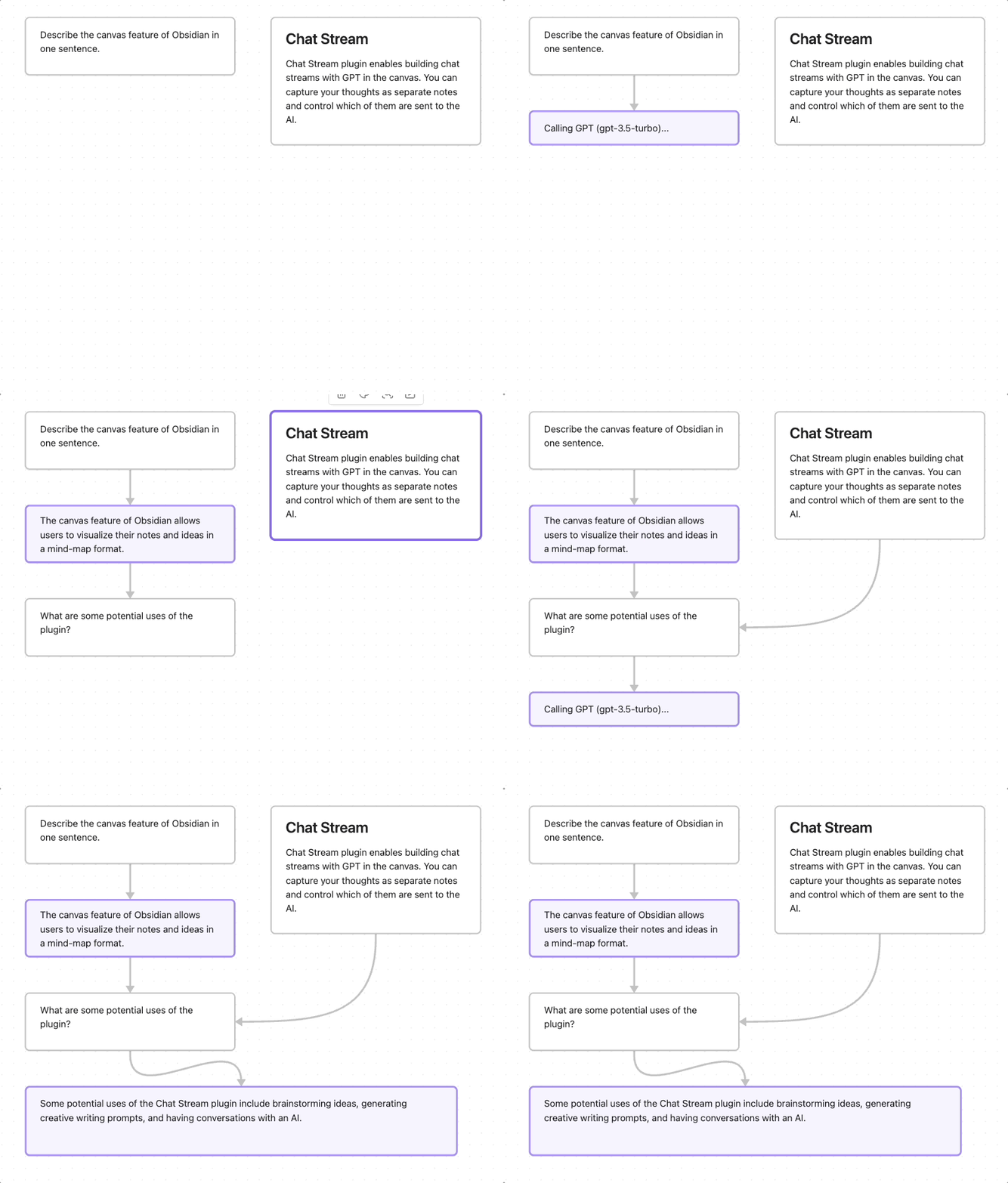
An Obsidian plugin for conversing with GPT AI via canvas notes. Ancestor notes/files are included in the chat context. You can quickly create chat streams, and control what other notes are sent to the AI.
Install

Install as community plugin

Or, add rpggio/obsidian-chat-stream to BRAT.

Chat Stream is supported only on desktop.

Setup

Add an OpenAI API key in Chat Stream settings.

Usage

  1. Select a note in the canvas
  2. Press Alt+Shift+G to generate new note from GPT using current note + ancestors
  3. To create next note for responding, press Alt+Shift+N.

AI notes are colored purple, and tagged with chat_role=assistant in the canvas data file.

Development

  1. Download source and install dependencies
     pnpm install
    
  2. In Obsidian, install and enable hot reload plugin
  3. Create symbolic link from this project dir to an Obsidian store
     ln -s . your-obsidian-store/.obsidian/plugins/chat-stream
    
  4. Start dev server
    pnpm run dev
    
  5. In Obsidian, enable Chat Stream Plugin and add OpenAI key in plugin settings.

Changes to code should automatically be loaded into Obsidian.

Attribution

  • Canvas plugin code from Canvas MindMap

Say thanks

If you love it you can send me a coffee thumbs-up so I know folks find it useful.

61%
HealthFair
ReviewCaution
About
Converse with GPT directly inside Canvas notes and generate new response notes that include the current note and its ancestor context. Create and manage chat streams and choose which notes to send to the AI for focused, contextual replies.
AICanvasIntegrations
Details
Current version
1.4.8
Last updated
2 years ago
Created
3 years ago
Updates
17 releases
Downloads
8k
Compatible with
Obsidian 1.1.10+
Platforms
Desktop only
License
MIT
Report bugRequest featureReport plugin
Sponsor
Support
Author
rpggiorpggio
github.com/rpggio
GitHubrpggio
  1. Community
  2. Plugins
  3. AI
  4. Chat Stream

Related plugins

Agent Client

Chat with Claude Code, Codex, Gemini CLI, and more via the Agent Client Protocol — right from your vault.

Smart Composer

AI chat with note context, smart writing assistance, and one-click edits for your vault.

Snipd Official

Sync Snipd podcast highlights to your vault with transcript, notes, AI summaries and metadata.

BMO Chatbot

Generate and brainstorm ideas while creating your notes using Large Language Models (LLMs) such as OpenAI's "gpt-3.5-turbo" and "gpt-4".

Local REST API & MCP Server

Unlock your automation needs by interacting with your notes over a secure REST API.

Advanced Canvas

Supercharge your canvas experience. Create presentations, flowcharts and more.

Copilot

Your AI Copilot: Chat with Your Second Brain, Learn Faster, Work Smarter.

Claudian

Embeds Claude Code/Codex as an AI collaborator in your vault. Your vault becomes agent's working directory, giving it full agentic capabilities: file read/write, search, bash commands, and multi-step workflows.

Smart Connections

AI link discovery copilot. See related notes as you write. Lookup using semantic (vector) search across your vault. Zero-setup local model for embeddings, no API keys, private.

BRAT

Easily install a beta version of a plugin for testing.