
- Overview
- Scorecard
- Updates83
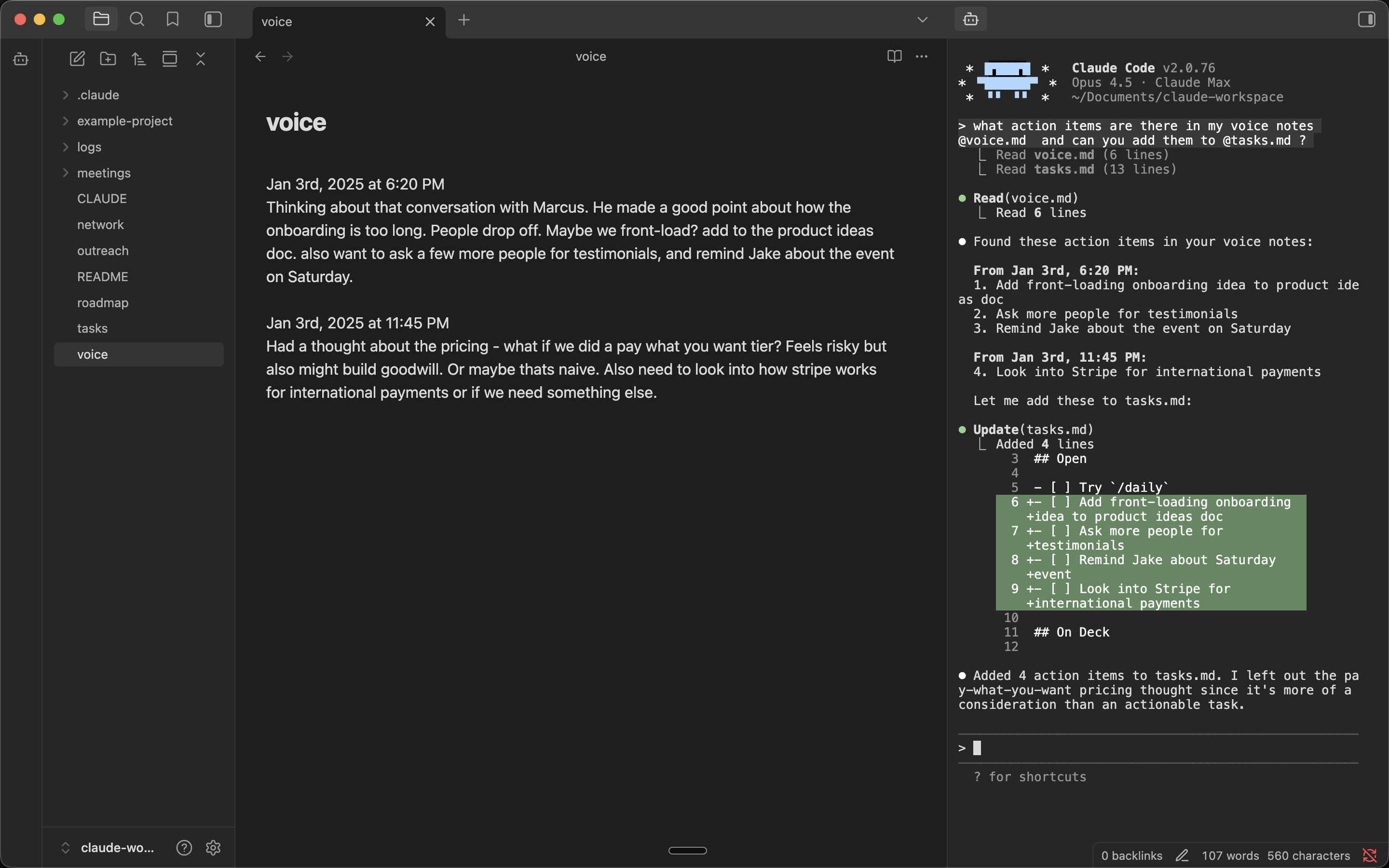
Run Claude Code (and other agent CLIs) in your Obsidian sidebar.
Built by Derek Larson - Pairs with Delegate commands →
Features
- Auto-launches your agent - Your default CLI starts automatically
- Multiple tabs - Run multiple agents side by side
- Embedded - Full terminal with an agent in your Obsidian sidebar
- Folder & file context menu - Right-click any folder to open your agent in that directory, or a file to send it the path
- YOLO mode - Launch your agent with YOLO mode via right-click menus
- Projects outside the vault - Open agent in project… opens an agent in any folder on your machine. Browse… adds one, and it stays in the list afterwards. Pick the project, then the CLI (your default is on top, so Enter twice opens it). With only one CLI installed, it opens straight away
- Multi-backend - Switch between Claude Code, Codex, Grok Build, OpenCode, GitHub Copilot, Cursor Agent, and Pi in settings, or via Switch CLI provider… in the command palette. Add any other CLI or wrapper script under Additional CLIs
Requirements
- macOS, Linux, or Windows
- Python 3
- An agent CLI — Claude Code (default), or any other supported backend
Installation
From Community Plugins (recommended)
Visit the plugin listing at community.obsidian.md/plugins/claude-sidebar and click Add to Obsidian. Then in Obsidian, click Install → Enable.
Windows: See Windows Setup below.
Manual Installation (Mac/Linux)
In your vault folder, run:
mkdir -p .obsidian/plugins/claude-sidebar && cd .obsidian/plugins/claude-sidebar && \
  curl -LO https://github.com/derek-larson14/obsidian-claude-sidebar/releases/latest/download/main.js && \
  curl -LO https://github.com/derek-larson14/obsidian-claude-sidebar/releases/latest/download/manifest.json && \
  curl -LO https://github.com/derek-larson14/obsidian-claude-sidebar/releases/latest/download/styles.css
Then in Obsidian: Settings → Community Plugins → Refresh → Enable "Claude Sidebar".
Manual Updating
In your vault folder, run:
cd .obsidian/plugins/claude-sidebar && \
  curl -LO https://github.com/derek-larson14/obsidian-claude-sidebar/releases/latest/download/main.js && \
  curl -LO https://github.com/derek-larson14/obsidian-claude-sidebar/releases/latest/download/manifest.json && \
  curl -LO https://github.com/derek-larson14/obsidian-claude-sidebar/releases/latest/download/styles.css
Then restart Obsidian or disable/re-enable the plugin.
Windows Setup
After installing the plugin (via Community Plugins or manually), add Windows-specific dependencies:
- Install Python 3 from python.org
- Install pywinpty into the Python the plugin will use:
py -m pip install pywinpty
Use py -m pip (not just pip) to avoid installing into a different Python interpreter than the one the plugin selects. If you see "pywinpty not installed" in the sidebar after installing, the error message will print the exact interpreter path — install pywinpty into that one.
- Pick whether to run your agent inside WSL or natively in
cmd.exe. Configure in Settings → Claude Sidebar → Shell (Windows only — Linux/macOS always runbash):
| Option | Spawns | Path translation |
|---|---|---|
| cmd.exe (default) | cmd.exe |
none |
| wsl.exe (WSL) | wsl.exe |
Windows paths → Linux paths via wslpath |
Use wsl.exe when your agent CLI, Node, or git toolchain lives in a WSL distro. Vault paths sent to the agent (file path command, selection context, drag-drop, image paste, wikilink references) are converted to Linux form before reaching the CLI. Translation respects a custom /etc/wsl.conf [automount] root, so paths still resolve if your C:\ mounts at /c/ instead of /mnt/c/.
Usage
https://github.com/user-attachments/assets/de98439a-8a1f-4a8a-9d02-44027d756462
- Click the bot icon in the left ribbon to open a tab
- Right-click the bot icon for YOLO mode, folder targeting, or resuming a conversation
- Right-click any folder for "Open here" or "Open here (YOLO)" - both name your current CLI
- Use Command Palette (
Cmd+P) for all commands:- Open terminal / New agent tab / Close agent tab
- New agent tab (other CLI)… - One-off tab on another CLI, default unchanged
- Open agent in project… - Start an agent in a project outside the vault
- Switch default CLI provider… - Change which CLI every new tab uses
- Toggle Focus: Editor ↔ Agent - Quick switch between editor and agent
- Run agent from this folder - Start the agent in the active file's directory
- Resume last conversation - Pick up where you left off (
--continue) - Send file path to agent / Send selection to agent
- Press
Shift+Enterfor multi-line input - Set your own hotkeys in Settings → Hotkeys
Platform Support
| Platform | Status |
|---|---|
| macOS | ✅ Supported |
| Linux | ✅ Supported |
| Windows | ✅ Supported |
Want to use it on iOS or Android? See Claude Anywhere.
How It Works
- xterm.js for terminal emulation
- Python's built-in
ptymodule for pseudo-terminal support (macOS/Linux) - pywinpty for Windows PTY support
Development
Testing in Obsidian
Symlink the repo into a scratch vault so edits load with no copy step. Reload after each change with Settings → Community plugins → toggle Claude Sidebar off/on:
ln -s "$PWD" /path/to/test-vault/.obsidian/plugins/claude-sidebar
To install a tested build into a real vault:
./install.sh /path/to/vault
PTY scripts
The PTY scripts (terminal_pty.py for Unix, terminal_win.py for Windows) are embedded as base64 in main.js for Obsidian plugin directory compatibility. To rebuild after modifying:
./build.sh
Contributing
Hit a bug or want to develop a new feature? Point your coding agent at CLAUDE.md in this repo. It will walk you through diagnosis, filing a report, or opening a PR.
License
MIT