YouTube Native
 encomjp2 downloads
Play YouTube links in notes with a native player, search YouTube from a side panel, and keep offline copies in your vault. Uses yt-dlp. Not affiliated with YouTube.
- Overview
- Scorecard
- Updates3
Starnote's YouTube features as an Obsidian plugin. YouTube links in notes become players that use the direct streams yt-dlp resolves, so YouTube's embedded iframe is never loaded. Desktop only.
The plugin is self-contained: it downloads and updates its own copy of yt-dlp on first use, and it needs no ffmpeg, so there is nothing to install besides the plugin.
Not an official YouTube product. This plugin is not affiliated with, endorsed by, or supported by YouTube, Google, or Obsidian. It is a wrapper around yt-dlp, an independent open-source fork of youtube-dl, and it may stop working whenever YouTube changes. You are responsible for how you use it; see the disclaimer.[^1]
[^1]: YouTube is a trademark of Google LLC. Obsidian is a trademark of Dynalist Inc. Their names are used only to describe what the plugin works with.
Features
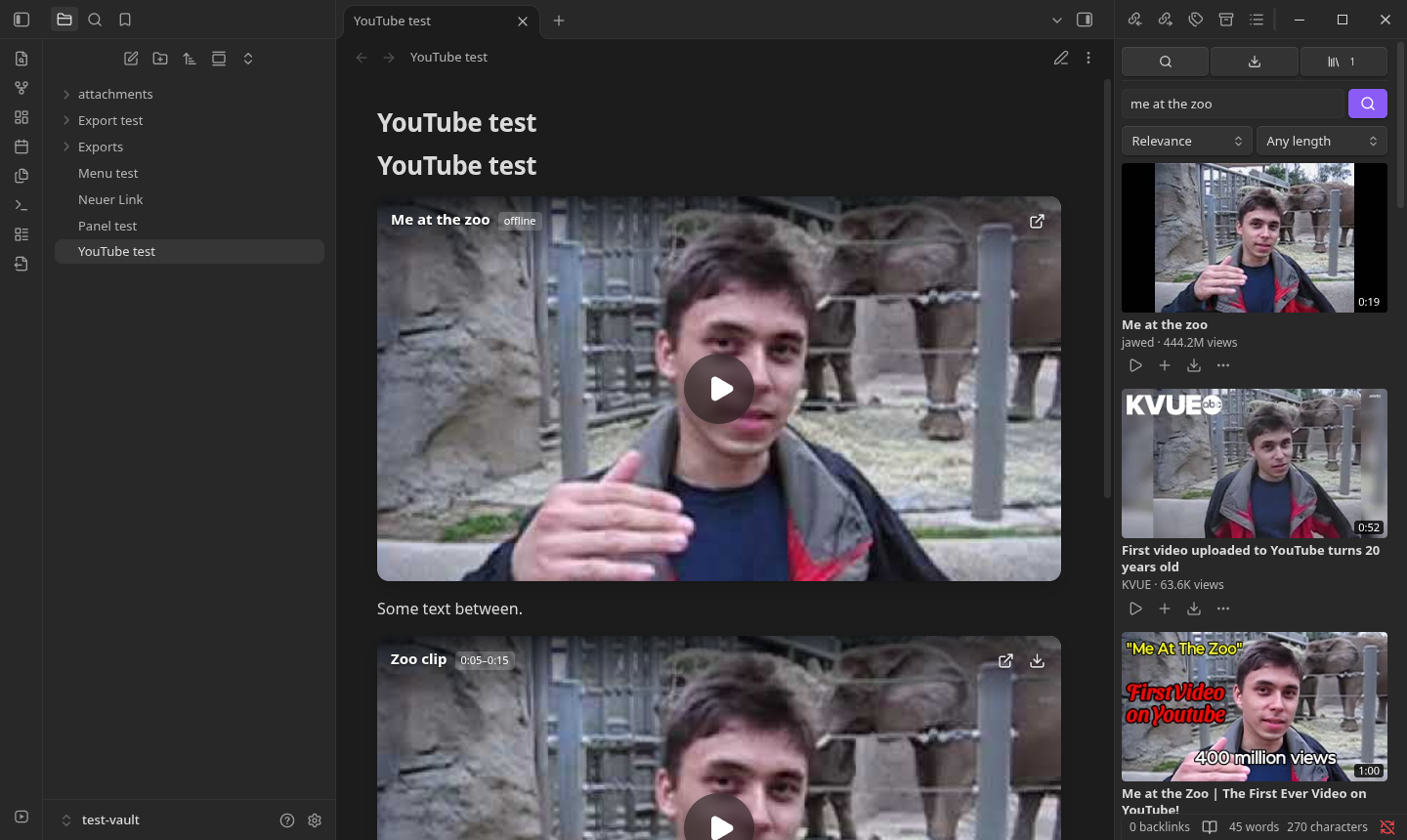
YouTube panel. The icon at the bottom of the left toolbar (or Open YouTube panel) opens a sidebar panel modelled on Starnote's media hub, with three tabs:
- Search: search YouTube (sort by relevance or newest, filter by length, Load more), or paste a video, playlist, or channel link to list it. Click a thumbnail to preview it in the panel's player; Insert, Insert + save offline, or Save to library. Results can be dragged into a note.
- Downloads: the offline-save queue (two at a time) with progress, cancel, retry, and links to the file and the note. The ribbon icon shows a count while downloads run.
- Library: every offline copy, to play, insert into a note, open on YouTube, or delete.
Note players. A YouTube link on its own line,
, becomes a borderless 16:9 player in Reading view and Live Preview: the thumbnail with the title, range, and actions overlaid, and a play button. It loads on click and plays the direct streams in the plugin's own player (separate audio is kept in sync): a seek bar with buffered progress, hover time, and the note's start/end range, volume, time, a speed and quality menu, picture-in-picture, and fullscreen with the same controls. Controls fade while playing; click toggles play, double-click toggles fullscreen. Keys (when the player has focus): Space/K play, ←/→ 5 s, J/L 10 s, ↑/↓ volume, M mute, F fullscreen, P picture-in-picture, 0–9 jump,</>speed,,/.frame step. Volume is remembered. Changing quality keeps the position and fullscreen. If no stream plays, the player offers Open on YouTube. Put the caret on the line, or use the Edit Markdown button, to edit the source.Real titles. Captions that are empty or still say
video/YouTube videoare replaced with the video's title from YouTube when the player is shown (setting), or for a whole note with Fill in YouTube titles in this note.Insert YouTube video. Accepts watch, share, Shorts, live, and embed links. Leave the title blank to use the real one.
Offline copies. Pick a quality with its size (
≈marks yt-dlp estimates) and download with progress and cancellation. As in Starnote, video and audio are kept as separate files in your attachment folder, so no ffmpeg is needed. The note's embed becomes a block that plays them together without a connection:```youtube-offline title: Me at the zoo video: attachments/Me at the zoo.f133.mp4 audio: attachments/Me at the zoo.f140.m4a source: https://www.youtube.com/watch?v=jNQXAC9IVRw ```
yt-dlp
On first use the plugin downloads the latest official yt-dlp release from GitHub (about 40 MB),
checks it against that release's SHA2-256SUMS, and keeps it in your user cache folder
(~/.cache/obsidian-youtube-native on Linux, or ~/.var/app/md.obsidian.Obsidian/cache/… for the
Flatpak), not in the vault. It is refreshed every 14 days while Keep yt-dlp updated is on. A path
in settings overrides it; a system yt-dlp is used only if the download is impossible.
Install
Obsidian directory
YouTube Native is listed in the official Obsidian plugin directory: community.obsidian.md/plugins/youtube-native. Install it from there, or from Settings → Community plugins → Browse once it appears for you.
BRAT (installs and keeps it updated)
- Install BRAT from Settings → Community plugins → Browse, and enable it.
- Run the command BRAT: Add a beta plugin for testing and enter
encomjp/obsidian-youtube, or click this link with BRAT installed. - Enable the plugin under Settings → Community plugins. BRAT then updates it with every release.
Manual
Copy main.js, manifest.json and styles.css from the latest release into your vault's plugin folder, so that
<vault>/.obsidian/plugins/youtube-native/main.js exists, then enable YouTube Native under
Settings → Community plugins. To build it yourself:
npm install
npm run build
mkdir -p "<vault>/.obsidian/plugins/youtube-native"
cp main.js manifest.json styles.css "<vault>/.obsidian/plugins/youtube-native/"
Development
npm run dev     # rebuild main.js on change
npm run check   # type-check
npm test        # unit tests (node --test)
Tested in Obsidian 1.14.4 (Flatpak, Linux): Reading view and Live Preview cards, playback with
separate audio, start/end ranges, title filling, the panel (search, preview, insert, queue, library),
and offline save and playback. Embeds pasted as nested links, ),
are recognised too.
Windows
Windows uses the official yt-dlp.exe (or yt-dlp_x86.exe / yt-dlp_arm64.exe), cached in
%LOCALAPPDATA%\obsidian-youtube-native. yt-dlp runs with UTF-8 output so non-ASCII titles and user
folders survive the ANSI code page; cancelling stops the whole process tree (taskkill /T), because
yt-dlp.exe runs Python in a child process; temporary folders are removed with retries while Windows
still holds a file open; and saved file names avoid reserved names (CON, NUL, …), trailing dots,
and over-long paths.
Work networks (HTTPS inspection, proxies)
Firewalls that inspect HTTPS (DPI) and antivirus "web shields" re-sign traffic with their own root
certificate, which IT installs into the operating system. yt-dlp normally trusts only its own bundled
list, so it would fail with CERTIFICATE_VERIFY_FAILED. The plugin runs yt-dlp with
--compat-options no-certifi so it uses the system certificate store (always on Windows; on Linux and
macOS as a retry, pointing it at the system bundle). Certificate checking is never disabled. If a
proxy is required for programs, set it under Proxy in the plugin settings.
src/youtube.ts holds the link, timestamp, caption, and insertion rules ported from Starnote;
src/formats.ts the yt-dlp output parsing; both are tested without Obsidian.
src/ytdlp.ts runs the executable, src/player.ts draws the card, src/livePreview.ts and the
post-processor in src/main.ts place it in notes.
Differences from Starnote
- Playback uses Obsidian's built-in Chromium media stack instead of VLC/mpv, so there is no YoutubeExplode or VLC fallback; the browser handoff remains the last resort.
- An offline copy is described by a
youtube-offlineblock in the note rather than a sidecar file. Renaming the saved files does not update the block. - YouTube's player policies still apply to use of its streams.
Disclosures
- Network use. The plugin contacts these services:
- YouTube (
youtube.com,i.ytimg.com): video titles (oEmbed), thumbnails, and, through yt-dlp, the video information and streams for the videos you play or save. - GitHub (
github.com/yt-dlp/yt-dlpreleases): to fetch yt-dlp and its checksum file (see yt-dlp).
- YouTube (
- Files outside your vault. yt-dlp is stored in your user cache folder (not the vault) and run as a program on your computer; temporary download folders are created and removed. Offline copies are saved inside your vault, in the attachment folder.
- No account, payment, ads or telemetry.
Support
If this saves you time, you can buy me a coffee.
Disclaimer
This plugin is an independent project. It is not affiliated with, endorsed by, sponsored by, or supported by YouTube, Google LLC, or Dynalist Inc. (Obsidian), and it is not affiliated with the yt-dlp or youtube-dl projects. All trademarks belong to their respective owners.
- How it works. The plugin is a user interface around yt-dlp. It downloads the unmodified, official yt-dlp release from GitHub and runs it on your computer to look up and fetch publicly available streams. It does not include, bypass, or circumvent DRM, paywalls, age or region restrictions, sign-ins, or any other technical protection measure.
- Your responsibility. You alone are responsible for how you use the plugin and the content you play or save with it. Use it only in compliance with YouTube's Terms of Service, the rights of content owners, and the copyright and other laws that apply to you. Save offline copies only of content you own, that is licensed for download, or that you otherwise have the right to copy, and only for your personal use. Your employer's or network's IT policies may also apply.
- No warranty. The software is provided "as is", without warranty of any kind, express or implied, including but not limited to merchantability, fitness for a particular purpose, and non-infringement. The plugin may stop working at any time, for example when YouTube changes its service.
- No liability. To the maximum extent permitted by law, the authors and contributors are not liable for any claim, damages, or other liability arising from the software or its use, including data loss, account suspension or termination, network or policy violations, or legal claims by third parties. See LICENSE (MIT).
- Not legal advice. Nothing in this project is legal advice. If you are unsure whether a use is permitted, ask a qualified lawyer or the content owner.