Search...Search plugins and themes...
⌘K
Sign in
  • Get started
  • Download
  • Pricing
  • Enterprise
  • Account
  • Obsidian
  • Overview
  • Sync
  • Publish
  • Canvas
  • Mobile
  • Web Clipper
  • CLI
  • Learn
  • Help
  • Developers
  • Changelog
  • About
  • Roadmap
  • Blog
  • Resources
  • System status
  • License overview
  • Terms of service
  • Privacy policy
  • Security
  • Community
  • Plugins
  • Themes
  • Discord
  • Forum / 中文论坛
  • Merch store
  • Brand guidelines
Follow us
DiscordTwitterBlueskyThreadsMastodonYouTubeGitHub
© 2026 Obsidian

Flexplorer

kh4fkh4f95k downloads

Enhance the file explorer with custom sorting, pinning, and hiding.

Add to Obsidian
Flexplorer screenshot
  • Overview
  • Scorecard
  • Updates67
logo
🗃️ Obsidian File Explorer Enhancer

<b>
    <a href="#-features">Features</a>&nbsp; •&nbsp;
    <a href="#%EF%B8%8F-usage">Usage</a>&nbsp; •&nbsp;
    <a href="#-install">Install</a>&nbsp; •&nbsp;
    <a href="#-credits">Credits</a>
</b>
<br><br>
<img alt="demo" src="https://raw.githubusercontent.com/kh4f/flexplorer/refs/heads/assets/demo.gif">

✨ Features

  • Custom sorting: manually arrange items via drag-and-drop
  • Per-folder sorting: use a different sorting mode for each folder
  • Pinning: keep important files at the top
  • Hiding: hide irrelevant files manually or by pattern
  • Mobile support: works the same way on mobile

📥 Install

  • Via the Obsidian Community: https://community.obsidian.md/plugins/flexplorer
  • Using the BRAT plugin: Add Beta Plugin → kh4f/flexplorer
  • Manually: download manifest.json, main.js, styles.css into vault/.obsidian/plugins/flexplorer/

🕹️ Usage
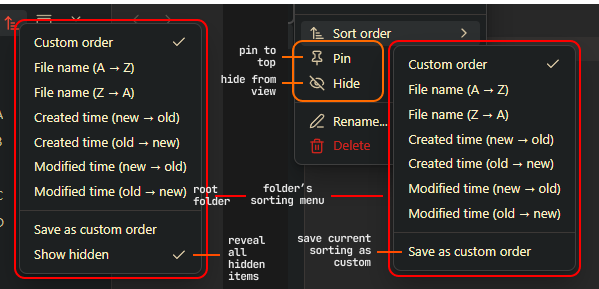
guide

💖 Credits

  • Inspiration: Obsidian Bartender, Custom File Explorer sorting, File Explorer++
  • Code contributions: @Mara-Li, @michalgregor, @MichalNawrocik
  • Bug reports & feature requests: @Zweikeks, @Azmoinal, @SublimePeace, @AE-SAY-WAY, @Anonym0usPlayer, @73mtq, @toya-co, @Succubyte, @RainyGrass, @akshatg
HealthExcellent
ReviewPassed
About
Organize files with per-folder sorting, manual drag-and-drop custom ordering, and pin or hide items to surface important notes. Use full mobile support to manage explorer order and layout on the go.
FilesFoldersSidebar
Details
Current version
5.0.0
Last updated
3 days ago
Created
2 years ago
Updates
67 releases
Downloads
95k
Compatible with
Obsidian 1.13.0+
Platforms
Desktop, Mobile
License
MIT
Report bugRequest featureReport plugin
Author
kh4fkh4f
GitHubkh4f
Xkh4fff
t.me
  1. Community
  2. Plugins
  3. Files
  4. Flexplorer

Related plugins

Custom File Explorer sorting

Manual or automatic config-driven reordering and sorting of files and folders in File Explorer.

File Explorer Note Count

See the number of notes in each folder within the file explorer.

File Tree Alternative

An alternative file tree view with separate folder and file panes.

Notebook Navigator

A better file browser and calendar inspired by Apple Notes, Bear, Evernote and Day One.

Quick Explorer

Perform file explorer operations (and see your current file path) from the title bar, using the mouse or keyboard.

Recent Files

Display a list of recently opened files.

Hide Folders

Quickly toggle the visibility of specific folders in the file navigator based on configured names. Useful for hiding attachment folders.

Reveal Active File Button

Add a button to the top of the File Explorer, to reveal the active file.

Novel word count

Display a word count, page count, creation date, or other statistics for each file, folder and vault in the File Explorer pane.

Multi Properties

Add properties to multiple notes at once. Either right-click a folder or select multiple notes and right-click the selection.