Custom File Explorer sorting
 sebastianmc212k downloads
Manual or automatic config-driven reordering and sorting of files and folders in File Explorer.
- Overview
- Scorecard
- Updates57
This is a simple version of README which highlights the basic scenario and most commonly used feature
Freely arrange notes and folders in File Explorer (https://obsidian.md plugin)
Take full control of the order of your notes and folders by:
- config-driven sorting with wide variety of options, allowing the fullest range of fine-grained ordering, or
- drag and drop via bookmarks integration.
The simplest usage scenario is to sort items via drag and drop:
Another typical scenario is to apply different sorting order per folder:
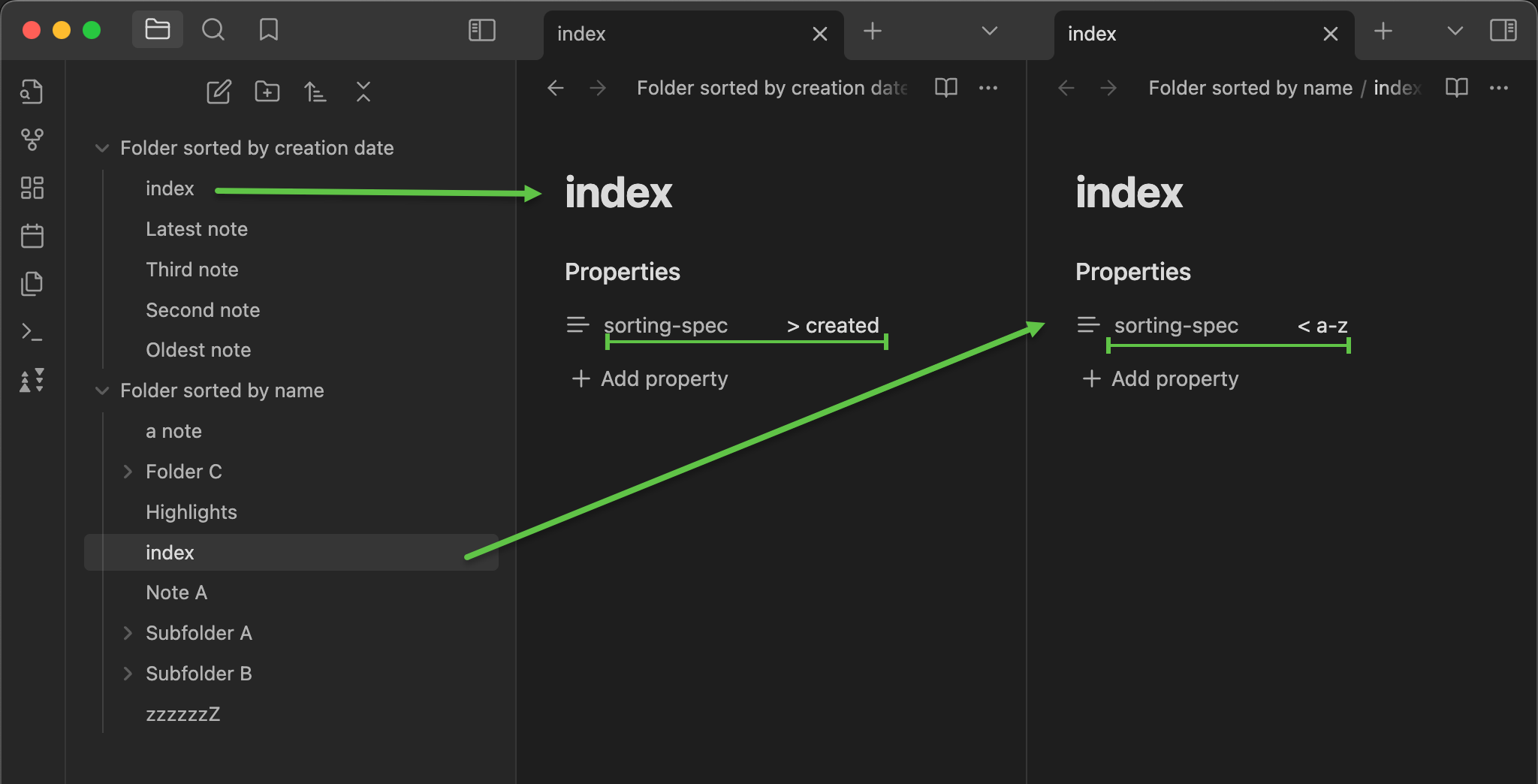
For detailed instructions and videos go to wiki documentation
More advanced capabilities available through config-driven sorting:
- treat folders and files equally or distinctively, you decide
- fine-grained folder-level or even notes-group-level specification
- support for fully manual order
- list notes and folders names explicitly in desired order
- use prefixes or suffixes notation only for more flexibility
- wildcard names matching supported
- extract numbers and dates from titles and sort by them
- group and sort notes and folders by notes custom metadata
- support for automatic sorting by standard and non-standard rules
- mixing manual and automatic ordering also supported
- order by compound numbers in prefix, in suffix (e.g. date in suffix) or inbetween
- Roman numbers support, also compound Roman numbers
- grouping by prefix or suffix or prefix and suffix
- different sorting rules per group even inside the same folder
- simple to use yet versatile configuration options
- configuration stored directly in your note(s) front matter
- use a dedicated
sorting-spec:key in note properties (aka metadata aka frontmatter aka YAML)
- use a dedicated
- folders not set up for the custom order remain on the standard Obsidian sorting
- support for imposing inheritance of order specifications with flexible exclusion and overriding logic
Basic scenario 1: set the custom sorting order for a specific folder
Create a new note named sortspec in the folder for which you want to configure the sorting
In the top of the new note put the following YAML front matter text:
---
sorting-spec: |
  order-desc: a-z
---
Click the ribbon button ( or
or  on phone) to tell the plugin to read the sorting specification and apply it.
The sorting should be applied to the folder. On desktops and tablets the ribbon icon should turn (
on phone) to tell the plugin to read the sorting specification and apply it.
The sorting should be applied to the folder. On desktops and tablets the ribbon icon should turn ( )
)
!!! Done! !!!
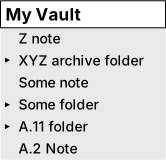
You should see the files and sub-folders in your folder sorted in reverse alphabetical order, folders and files intermixed
An illustrative image which shows the reverse alphabetical order applied to the root folder of some vault:
Remarks
Remarks:
- your new
sortspecnote should look like this except for the syntax highlighting, which could differ- you will notice that the folders and files are treated equally and thus intermixed
- the behavior depends on what files and subfolders you have in your folder
- changing the sorting order via the standard Obsidian UI button won't affect your folder, unless...
- ...unless you deactivate the custom sorting via clicking the ribbon button to make it
- for clarity: the underlying file name of the note
sortspecis obviouslysortspec.md- in case of troubles refer to the TL;DR section of advanced README.md
- feel free to experiment! The plugin works in a non-destructive fashion, and it doesn't modify the content of your vault. It only changes the order in which the files and folders are displayed in File Explorer
- indentation matters in YAML -> the two leading spaces in
order-desc: a-zare intentional and required- this common example only touches the surface of the rich capabilities of this custom sorting plugin. For more details go to advanced version of README.md
Basic scenario 2: explicitly list folders and files in the order which you want
This comes from the suggestion by TheOneLight in this discussion
Take the instructions from the Basic scenario 1 above and replace the YAML content with:
---
sorting-spec: |
  My first folder name
  My second folder name
  My first file name
  My second file name
  // ... and continue so in the desired order
---
This will enforce the order as you listed inside the YAML
Editing multi-line properties in the new YAML properties editor (Obsidian 1.4 and newer)
The newly introduced YAML properties editor (Obsidian 1.4 and newer) can make editing the multi-line text properties tricky and confusing. There are short videos here How to create or edit a multi‐line property in Obsidian? which could be helpful:
- how to edit the multi-line text properties in Obsidian properties editor (
shift+enterdoes the magic here) - how to edit the multi-line text properties in Obsidian
source view mode(the classic way, as you did prior to Obsidian 1.4)
Basic automatic sorting methods
The list of automatic sorting orders includes:
order-asc: a-z- alphabetical order, aka natural- 'a' goes before 'z' and numbers are treated specifically and 2 goes before 11
order-desc: a-z- reverse alphabetical order, aka reverse natural, aka descending alphabetical- 'z' goes before 'a' and numbers are treated specifically and 11 goes before 2
order-asc: true a-z- true alphabetical order- 'a' goes before 'z' and numbers are treated as texts and 11 goes before 2
order-desc: true a-z- true reverse alphabetical order, aka descending true alphabetical- 'z' goes before 'a' and numbers are treated as texts and 11 goes before 2
order-asc: created- by creation date- the oldest notes go first. Sub-folders pushed to the top, alphabetically
order-desc: created- by creation date, descending- the newest notes go first. Sub-folders pushed to the bottom, alphabetically
order-asc: advanced created- by creation date, also for folders- the oldest notes and sub-folders go first
- for sub-folders the creation date of the oldest contained note is taken as folder's creation date
- sub-folders not containing any notes are pushed to the top, alphabetically
order-desc: advanced created- by creation date, descending, also for folders- the newest notes and sub-folders go first
- for sub-folders the creation date of the newest contained note is taken as folder's creation date
- sub-folders not containing any notes are pushed to the bottom, alphabetically
order-asc: modified- by modification date- the most dusty notes go first. Sub-folders pushed to the top, alphabetically
order-desc: modified- by modification date, descending- the most recently modified notes go first. Sub-folders pushed to the bottom, alphabetically
order-asc: advanced modified- by modification date, also for folders- the most dusty notes and sub-folders go first
- for sub-folders the modification date of the most dusty contained note is taken as folder's modification date
- sub-folders not containing any notes are pushed to the top, alphabetically
order-desc: advanced modified- by modification date, descending, also for folders- the most recently modified notes and sub-folders go first
- for sub-folders the modification date of the most recently modified contained note is taken as folder's modification date
- sub-folders not containing any notes are pushed to the bottom, alphabetically
Remarks: In the above list the
-ascstems fromAscendingand-descstems fromDescending. Theorder-desc:andorder-asc:can be replaced with more concise<and>variants, for example< a-zinstead oforder-asc: a-z
...and additional orders and modifiers:
standard,ui selected- apply whatever order is selected in Obsidian UI of File Explorerby-bookmarks-order- reflect the order of selected group of items in Bookmarksfiles-firstorfolders-first- self explainingvsc-unicodeorunicode-charcode- tricky for geeksby-metadata:modifier to use specific metadata for sortingusing-extractor:in connection withby-metadata:to use only part of metadata value, for example a date in specified format,separator to specify two levels of sorting. When combining folder-level and group-level sorting this allows for up to 4 sorting levelsadvanced recursive modifiedoradvanced recursive created- advanced variants ofadvanced modifiedandadvanced created. Use with care on larger vaults because the deep scanning of folder descendants can have impact on performance on mobile devices
Patterns to extract numbers or dates from file and folder titles
\R+,\.R+or\-R+for Roman numbers\d+,\.d+or\-d+for plain numbers or compound plain numbers\a+to extract the last word from title\[yyyy-mm-dd],\[yyyy-dd-mm],\[dd-Mmm-yyyy],\[mm-dd-yyyy],\[dd-mm-yyyy],\[Mmm-dd-yyyy],\[yyyy-Www (mm-dd)],\[yyyy-Www]or\[yyyy-WwwISO]to extract dates in various formats
Sorting by note name and note name with file extension
If a folder contains files of various types, e.g. images and .md notes you can extend
the sorting rules onto file name extensions and, for example, push JPG files before PNG.
Use the a-z. or true a-z. syntax to enable that behavior for alphabetical or true alphabetical order.
Manual sorting
The manual ordering of notes and folders can have two meanings:
- by drag & drop, and this is done via Bookmarks integration, enabled by default, or
- by explicitly listing files and folders in the desired order. This is done via the sorting configuration. Refer to the TL;DR section of advanced README.md for examples and instructions
Ribbon icon
Click the ribbon icon to toggle the plugin between enabled and suspended states.
States of the ribbon icon on large-screen devices (desktops, laptops and tablets like iPad):
- Custom sorting NOT applied. Plugin suspended or enabled, but the custom sorting was not (yet) applied.
- Plugin active, custom sorting applied.
 Syntax error in custom sorting configuration.
 Plugin suspended. Critical error like File Explorer view not available.
- (Only on large-screen mobile devices like iPad).
Plugin enabled. but the custom sorting was not applied.
On small-screen mobile devices (phones) the icon is static:
- The icon acts as a button to toggle between enabled and disabled. Its appearance doesn't change
For more details on the icon states refer to Ribbon icon section of the advanced-README.md
Small screen mobile devices remarks
- you might need to activate the custom sorting on your mobile separately, even if on a shared vault the custom sorting was activated on desktop
- the Obsidian command palette being easily available (swipe down gesture on small-screen mobiles) allows for quick steering of the plugin via commands: sort-on and sort-off. This could be easier than navigating to and expanding the ribbon
- the ribbon icon is static () and doesn't reflect the state of custom sorting.
You can enable the plugin state changes notifications in settings, for the mobile devices only
Installing the plugin
From the official Obsidian Community Plugins page
The plugin could and should be installed from the official Obsidian Community Plugins list at https://obsidian.md/plugins or directly in the Obsidian app itself. Search the plugin by its name 'CUSTOM FILE EXPLORER SORTING'
For other installation methods refer to Installing the plugin section of advanced-README.md
Credits
Thanks to Nothingislost for the monkey-patching ideas of File Explorer in obsidian-bartender
...and before you go, maybe you'd like the visual separators in File Explorer?
Do you want to have a nice-looking horizontal separators in File Explorer like this?
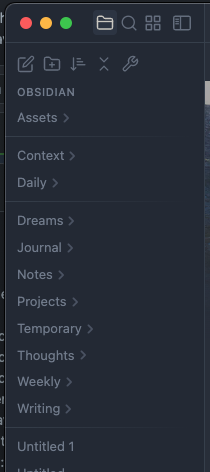
If so, head on to Instruction and more context
by @replete
Quick & easy!
This feature is not dependent on the Custom Sorting plugin. At the same time I'm mentioning it here because it is a side effect of a discussion with @replete. We were considering a direct support of the Separators in the plugin. Eventually this boiled down to a very concise and smart CSS-snippet based solution, independent of the plugin. Go, see, copy to the CSS-snippets in Obsidian and enjoy the more grouped look