Search...Search plugins and themes...
⌘K
Sign in
  • Get started
  • Download
  • Pricing
  • Enterprise
  • Account
  • Obsidian
  • Overview
  • Sync
  • Publish
  • Canvas
  • Mobile
  • Web Clipper
  • CLI
  • Learn
  • Help
  • Developers
  • Changelog
  • About
  • Roadmap
  • Blog
  • Resources
  • System status
  • License overview
  • Terms of service
  • Privacy policy
  • Security
  • Community
  • Plugins
  • Themes
  • Discord
  • Forum / 中文论坛
  • Merch store
  • Brand guidelines
Follow us
DiscordTwitterBlueskyThreadsMastodonYouTubeGitHub
© 2026 Obsidian

Hide Folders

jonasdoesthingsjonasdoesthings35k downloads

Quickly toggle the visibility of specific folders in the file navigator based on configured names. Useful for hiding attachment folders.

Add to Obsidian
  • Overview
  • Scorecard
  • Updates17

A simple plugin for obsidian.md that hides configured folders, with the ability to toggle their visibility.
This can be used for hiding attachments folders when you don't need them.

Installation

Search in the community plugins menu of Obsidian for "Hide Folders" look for the right plugin ("by JonasDoesThings"), there you can install the latest stable version.
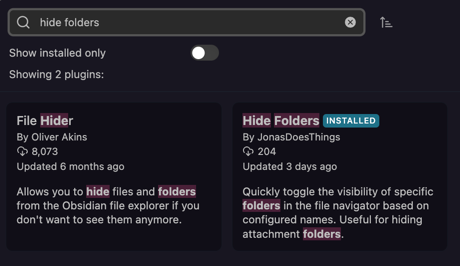
Screenshot of the Plugin Installation Menu

Configuration

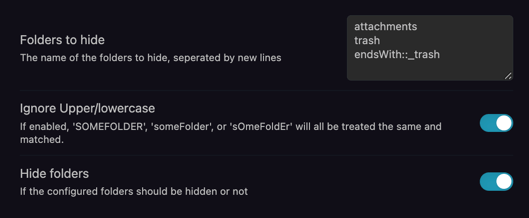
Enter the list of folder names to hide in the settings menu, one folder per line. You can match folders using three ways:

  • Exact folder-names (for example attachments)
  • All folders starting with a specific string (for example startsWith::_ to filter out all folders whose name starting with a _)
  • All folders ending with a specific string (for example endsWith::_trash to filter out all folders whose name is ending with _trash)

Screenshot of the Plugin Settings Screen in Obsidian.md

You can then also use a sidebar button to quickly toggle the visibility without having to enter the settings menu:

Screenshot of the Plugin's Sidebar Button in Obsidian.md

Using the command palette is also supported:

Screenshot of the Plugin's Command Palette Action in Obsidian..md

Development

Setup

  • Clone this repo.
  • pnpm i to install dependencies
  • pnpm dev to start compilation in watch mode.

Building

  • pnpm build to do a one-off build of the project, which produces the files needed for manually installing the plugin.

Manually installing the plugin

  • Copy over the outputted main.js, manifest.json from the dist/ folder to your vault VaultFolder/.obsidian/plugins/obsidian-hide-folders/.
    -> Watch Out! You cannot copy-over the raw main.ts. You need to run a build first and then copy over the produced main.js.

Support my work

I am maintaining free open source tools like this in my free-time.
If I helped you, and you want to give back, you can buy me a coffee (green tea).

License

MIT License, see LICENSE.md

71%
HealthExcellent
ReviewCaution
About
Hide configured folders in the file explorer to declutter your vault. Configure exact names or startsWith/endsWith patterns, then toggle visibility with a sidebar button or the command palette.
FoldersSidebar
Details
Current version
1.5.2
Last updated
2 months ago
Created
4 years ago
Updates
17 releases
Downloads
35k
Compatible with
Obsidian 0.15.0+
Platforms
Desktop, Mobile
License
MIT
Report bugRequest featureReport plugin
Sponsor
Buy Me a Coffee
Author
jonasdoesthingsjonasdoesthings
jonasdoesthings.com/
GitHubjonasdoesthings
  1. Community
  2. Plugins
  3. Folders
  4. Hide Folders

Related plugins

Flexplorer

Enhance the file explorer with custom sorting, pinning, and hiding.

Custom File Explorer sorting

Manual or automatic config-driven reordering and sorting of files and folders in File Explorer.

File Explorer Note Count

See the number of notes in each folder within the file explorer.

File Tree Alternative

An alternative file tree view with separate folder and file panes.

Portals

Pin folders and tags as customizable tabs with icons, colors, and folder notes for easier navigation.

Trash Explorer

Restore and delete files from the Obsidian .trash folder.

File Explorer++

Hide and pin files and folders in the file explorer using custom filters.

Auto Folder Collapse

Automatically collapses subfolders when a parent folder is collapsed

File Hider

Hide files and folders from the file explorer.

Notebook Navigator

A better file browser and calendar inspired by Apple Notes, Bear, Evernote and Day One.