Search...Search plugins and themes...
⌘K
Sign in
  • Get started
  • Download
  • Pricing
  • Enterprise
  • Account
  • Obsidian
  • Overview
  • Sync
  • Publish
  • Canvas
  • Mobile
  • Web Clipper
  • CLI
  • Learn
  • Help
  • Developers
  • Changelog
  • About
  • Roadmap
  • Blog
  • Resources
  • System status
  • License overview
  • Terms of service
  • Privacy policy
  • Security
  • Community
  • Plugins
  • Join the community
  • Discord
  • Forum / 中文论坛
  • Merch store
  • Brand guidelines
Follow us
DiscordTwitterBlueskyThreadsMastodonYouTubeGitHub
© 2026 Obsidian

Vertical Tabs

oxdcoxdc63k downloads

Offer an alternative view that displays open tabs vertically, allowing users to group and organize tabs for a better navigation experience.

Add to Obsidian
  • Overview
  • Scorecard
  • Updates55

Subscribe to the Beta Program for exclusive early access to the latest updates!

Subscription ($1.99/m) is only required to download beta versions. Once installed, you may use it as long as you want.


To get started with Vertical Tabs, you can take a quick look at the feature tour to get a glimpse of all the features. If you want to jump right in and start using Vertical Tabs, the quick start guide is a good start point.

Productive users of Obsidian often find themselves juggling a large number of open notes, and the default horizontal tab layout can make it challenging to locate and switch between them. As more notes are opened, tabs become narrower, making titles harder to read. This can lead to decreased productivity and increased frustration.

Vertical Tabs offers a solution by introducing a vertical list of tabs, allowing users to group and organize tabs for more efficient navigation.

As the workspace manager for Obsidian, Vertical Tabs provides many handy features like per-tab zooming, zen mode, tab history browser, and an extended keyboard tab switcher. Additionally, it supports advanced tab navigation with customizable presets, such as IDE mode, which delivers a VSCode-like experience with ephemeral tabs and automatic tab deduplication. Users can also create personalized tab navigation strategies for finer control.
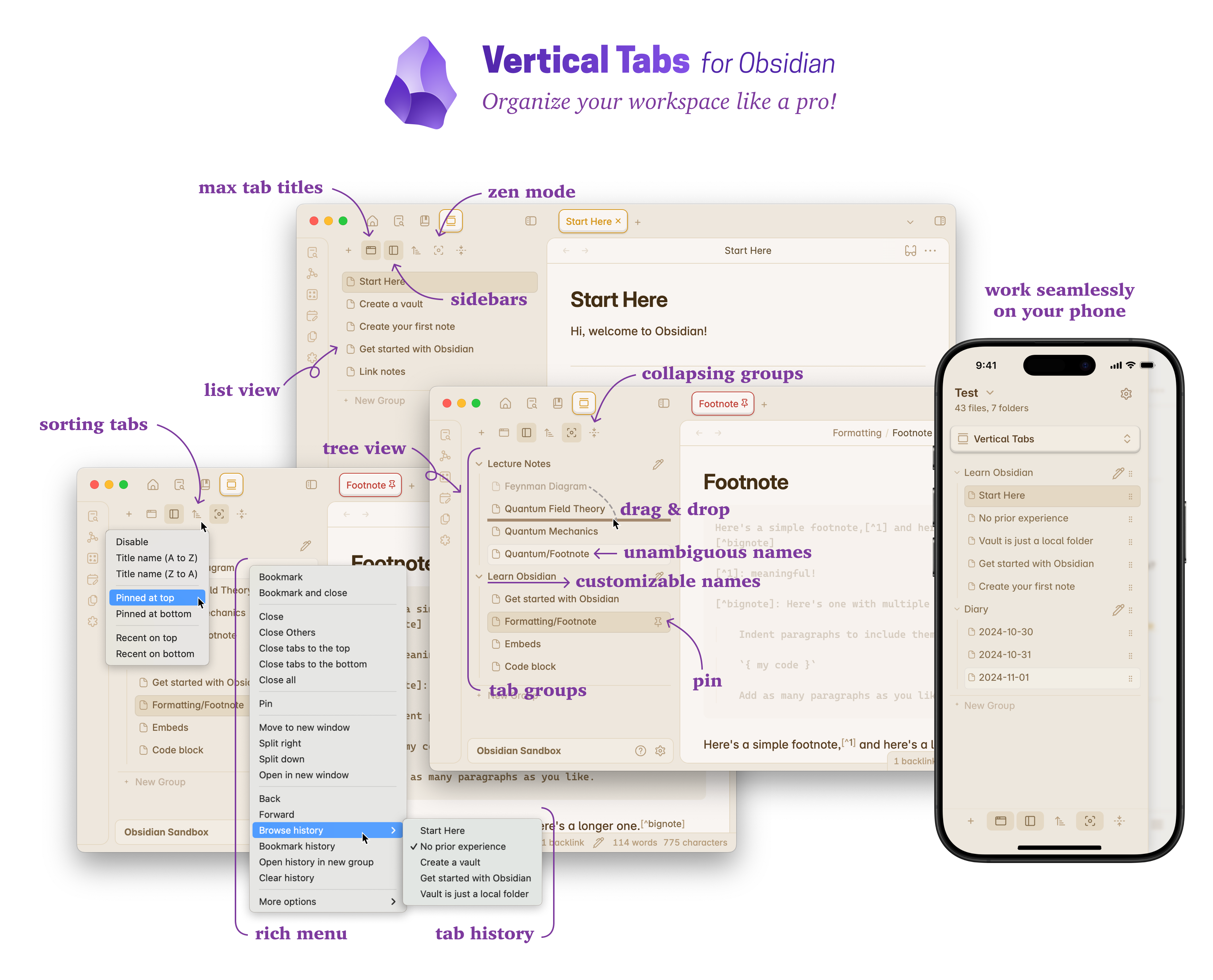
Screenshot

82%
HealthExcellent
ReviewCaution
About
Display a vertical list of open notes to organize and navigate many tabs more clearly. Group tabs, use per-tab zoom and zen mode, browse tab history, and use an extended keyboard tab switcher; enable IDE mode for VSCode-like ephemeral tabs and automatic deduplication.
NavigationWorkspacesUtilities
Details
Current version
0.16.8
Last updated
4 days ago
Created
2 years ago
Updates
55 releases
Downloads
63k
Compatible with
Obsidian 1.6.2+
License
MIT
Report bugRequest featureReport plugin
Sponsor
Ko-fi
Author
oxdcoxdc
github.com/oxdc
GitHuboxdc
  1. Community
  2. Plugins
  3. Navigation
  4. Vertical Tabs

Related plugins

Homepage

Open a specified note, canvas, or workspace on startup, or set it for quick access later.

Open Tab Settings

Adds options to customize how tabs are opened, including open in new tab by default, preventing duplicate tabs, and more.

Notebook Navigator

Replace the default file explorer with a clean two-pane interface featuring folder tree, tag browsing, file previews, keyboard navigation, drag-and-drop, pinned notes, and customizable display options.

Recent Files

Display a list of recently opened files.

TagFolder

Show tags as folder.

Remember cursor position

Remember cursor and scroll position for each note.

Strange New Worlds

Reveal networked thought and the strange new worlds created by your vault.

Hover Editor

Transform the Page Preview hover popover into a fully working editor instance.

Natural Language Dates

Create date-links based on natural language.

Reveal Active File Button

Add a button to the top of the File Explorer, to reveal the active file.