Share Note
 Alan Grainger114k downloads
Instantly share/publish a note, with the full theme and content exactly like you see in Obsidian. Data is shared encrypted by default, and only you and the person you send it to have the key.
- Overview
- Scorecard
- Updates113
Instantly share / publish a note. Notes are shared with your full theme and should look identical to how they look in your Obsidian vault.
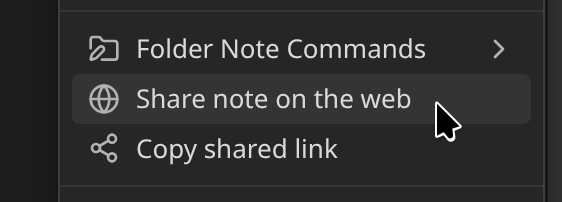
To share a note, choose Share Note from the command palette, or click the ⋮ menu in any note and choose Share note on the web
- 🚥 System Status
- 🆘 I need help! Go here first for help and troubleshooting
- 🚀 Request new features / see the roadmap
Server stats

Full theme support
Uploads using your current theme, along with all your options and custom CSS snippets.
Supports all Obsidian content types:
Images!

Dataview queries!
Here's an example inline Dataview query. It will be correctly rendered when sharing:
The answer is `= 7 + 8`!
The answer is 15!
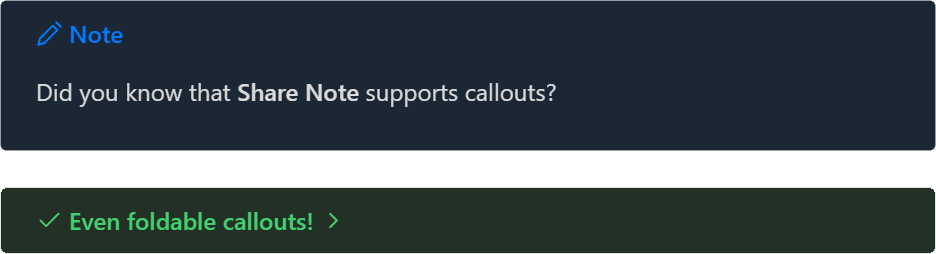
Callouts!
Links between notes!
If your shared note links to another note which is also shared, that link will also function on the shared webpage.
Code blocks!
function doYouEven(haveToAsk) {
  return 'Of course we can do it!'
}
Checkboxes! Tags!
Project Manhattan: #in-progress #behind-schedule
- Start project
- Procrastinate
- Finish project
Internal links
Share a table of contents and jump around your document.
Usage
Use the Share Note command from the Command Palette. You can map it to a hotkey to make things faster.
The first time a file is shared, the plugin will automatically upload all your theme styles. The next time you share a file, it will use the previously uploaded theme files.
If you want to force the theme CSS to update, use the command Force re-upload of all data for this note.
Let readers save your note
Turn on Include Markdown source in shared notes in the plugin settings and your shared pages get a 💾 Save note button. A reader with Obsidian and the Share Note plugin can click it to save a copy of the note straight into their own vault, images included. It is off by default because the Markdown source shows things the rendered page hides, such as frontmatter and %% comments %%. Encrypted notes keep the source encrypted. You can override it per note with a share_source checkbox property. See the docs for details.
Encryption
The content of your note is encrypted by default. What this means is that you can read the note, and the person you send it to can read the note, but nobody else can read the content - not even the hosting server.
🛈 Encryption is optional, and can be turned on/off for individual notes, or for all notes, whatever you prefer.
🛈 Encryption applies to the note text content. It does not apply to attachments, which are stored unencrypted. Share Note is not a file sharing service, it's a *note sharing service. If you want encrypted file sharing, it's not the right tool for you.
🧑💻 How it works
When you share an encrypted note, you'll get a share link that looks like this:
https://share.note.sx/4earajc8#PtC3oQDjDQK9VP7fljmQkLBA/rIMb2tbFsGoG44VdFY
This part is the link to the file:
https://share.note.sx/4earajc8
If you click on it, you'll see a message that says "Encrypted note", because you haven't provided the decryption key.
The decryption key is the second part of the share link after the # symbol:
#PtC3oQDjDQK9VP7fljmQkLBA/rIMb2tbFsGoG44VdFY
When you combine those two things together, the note is able to be decrypted and you can see the content:
https://share.note.sx/4earajc8#PtC3oQDjDQK9VP7fljmQkLBA/rIMb2tbFsGoG44VdFY
The decryption key only exists inside your vault, and is only known to you and whoever you send the link to. Nobody else can read the content.
You may optionally share an unencrypted version of a note by using the frontmatter checkbox property share_unencrypted = ✅. This note you are currently reading is shared unencrypted.
If you decide you want to share most notes unencrypted by default, then you can encrypt an individual note by using a frontmatter checkbox called share_encrypted.
Self-hosting
If you want to self-host your own server, you can use this docker image: https://github.com/note-sx/server
Disclosures
This section covers items that Obsidian's plugin scorecard flags for transparency, as recommended by Obsidian's Developer Policies.
Network requests
All requests to the Share Note server (default https://api.note.sx, or your self-hosted instance) go through Obsidian's requestUrl() API, which is the recommended cross-platform HTTP client. These are necessary for the core sharing/upload/delete operations.
The two fetch() calls in src/note.ts are used only to read local vault assets via Obsidian's app:// protocol:
- Image attachments embedded in a shared note.
- Theme fonts and images referenced from
url(...)declarations in CSS.
requestUrl() does not handle the app:// scheme, so native fetch() is required for these local reads. These calls never reach a remote server.
Runtime base64 encoding
The plugin uses btoa()/atob() in two places:
src/crypto.ts— encoding the AES-GCM symmetric key and ciphertext to base64 strings for transport and storage. This is standard cryptographic serialization, not string obfuscation.- The bundled
data-uri-to-bufferdependency usesatob()to decode inlinedata:URIs found in CSS — used to extract embedded fonts and images for upload alongside the shared note.
No code is ever loaded, evaluated, or transformed at runtime. No API keys, URLs, or strings are hidden via base64.
Clipboard access
The plugin writes the share URL to the system clipboard when you use the "Copy shared note link" command, so you can paste it into other applications.
The clipboard is never read.
Troubleshooting
See here: Troubleshooting