Search...Search plugins and themes...
⌘K
Sign in
  • Get started
  • Download
  • Pricing
  • Enterprise
  • Account
  • Obsidian
  • Overview
  • Sync
  • Publish
  • Canvas
  • Mobile
  • Web Clipper
  • CLI
  • Learn
  • Help
  • Developers
  • Changelog
  • About
  • Roadmap
  • Blog
  • Resources
  • System status
  • License overview
  • Terms of service
  • Privacy policy
  • Security
  • Community
  • Plugins
  • Join the community
  • Discord
  • Forum / 中文论坛
  • Merch store
  • Brand guidelines
Follow us
DiscordTwitterBlueskyThreadsMastodonYouTubeGitHub
© 2026 Obsidian

YAOS

kavinsoodkavinsood14k downloads

Simple real-time sync powered by your own Cloudflare Worker.

Add to Obsidian
  • Overview
  • Scorecard
  • Updates16

A zero-terminal, real-time sync engine for Obsidian, powered by your own Cloudflare Worker.

Your notes sync live across devices, with CRDT merge semantics instead of conflicted-copy workflows, delayed file sync, or database-heavy self-hosting.

YAOS syncing a note across desktop and mobile in real time

Deploy to Cloudflare

No terminal, no .env files, no database setup required.

How it compares

Most ways to sync Obsidian pick a trade-off. YAOS picks none.

Conflicts Real-time Self-hosted No terminal Free
iCloud / Dropbox Conflicted copies No No Yes Yes
Obsidian Sync Rare Delayed No Yes $96/yr
Git / LiveSync Manual Varies Yes No Yes
Relay / Screengarden No Yes No Yes Freemium
YAOS CRDT merge Yes Yes Yes $0

YAOS uses Yjs CRDTs to keep one live vault state moving across devices instead of asking them to take polite turns uploading files and hoping nothing collides.

If you want the official, fully managed experience, pay for Obsidian Sync and support the team. If you want a fast, self-hosted, local-first alternative that you fully control, this is YAOS.

Get started

YAOS has two parts: an Obsidian plugin and a small Cloudflare server you deploy to your own account. The Worker setup page walks you through the remaining steps, so you don't need to memorize this.
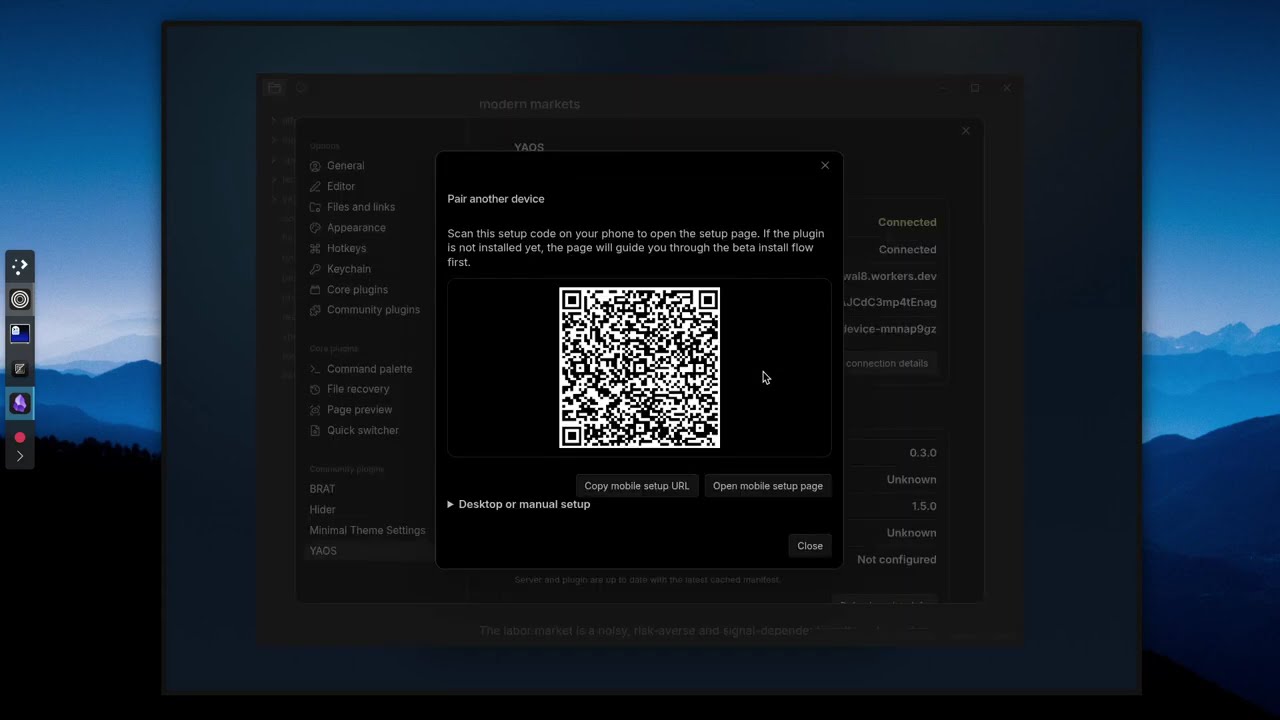
Watch the setup walkthrough

1. Deploy your server Click Deploy to Cloudflare above. Cloudflare creates a Worker in your account.

2. Claim your server Open the Worker URL. Click Claim to lock the server to you and generate your setup token.

3. Install the plugin YAOS is in the Obsidian Marketplace review queue. To install today, add it through BRAT: open BRAT settings → Add Beta plugin → paste kavinsood/yaos.

4. Connect your vault From the claim page, open the setup link or scan the QR code. YAOS fills in the connection details automatically.

That's it. Your vault is syncing.

Attachments and snapshots

Text sync works out of the box. To sync images, PDFs, and other attachments, add a Cloudflare R2 bucket — it takes about a minute.
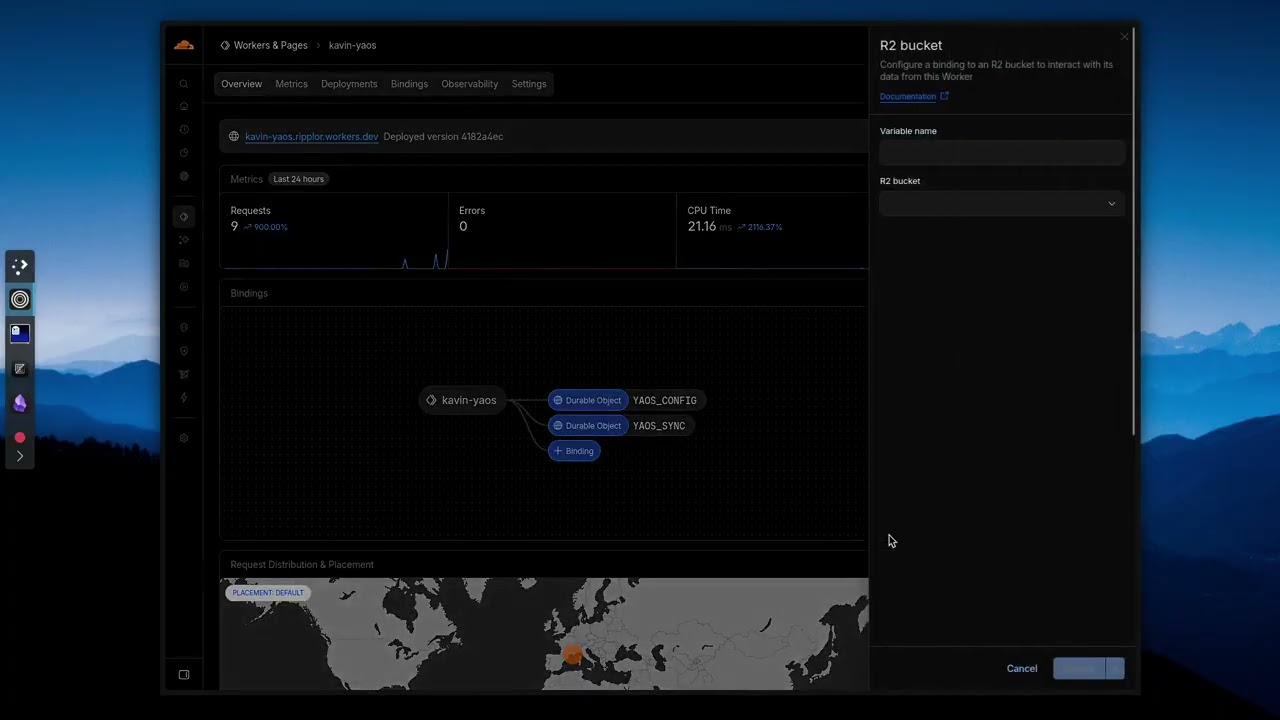
Watch the R2 setup video

R2 also enables daily automatic snapshots and on-demand point-in-time backups. You can browse snapshots, diff against current state, and selectively restore individual files. If you skip R2, text sync still works — you just won't have attachment sync or snapshots.

Updating your server

YAOS is designed to be zero-terminal, but because you own your infrastructure, you control when updates apply.

A one-time setup installs a GitHub Actions workflow in your deployment repo. After that, updates are a single click.

  1. One-time: click Initialize updater in YAOS settings → Advanced. GitHub opens with a pre-filled workflow file. Commit it.
  2. Update: YAOS notifies you when a new version ships. Click Open update action → Run workflow with update.
  3. Rollback: same workflow, change action to revert.

Some releases require manual migration steps. The updater will abort with a clear warning — read the release notes before retrying. Re-clicking Deploy to Cloudflare is not a safe update path for a stateful server; YAOS uses a Git-driven workflow so the same Worker identity, Durable Object bindings, and history are preserved.

Works with scripts and AI agents

Because Obsidian vaults are just local Markdown files, YAOS plays unusually well with scripts, CLI tools, and AI agents that edit files directly on disk. The CRDT state stays aligned with the filesystem, so changes from any source — git, shell scripts, agents writing to disk — propagate cleanly across devices instead of falling back to conflicted-copy workflows.

If you're building agentic workflows on top of Obsidian vaults, YAOS gives you the sync infrastructure so you don't have to wire up your own.

How it works

YAOS keeps your vault as normal local files, while also maintaining a shared real-time state for sync.

  1. Each markdown file gets a stable ID and a Y.Text CRDT for its content.
  2. All per-file CRDTs live inside one shared vault-level Y.Doc — this keeps cross-file operations transactional. A folder rename is atomic across all files; the vault structure can't tear.
  3. Live editor edits flow through a Yjs + CodeMirror binding.
  4. Each vault maps to one Durable Object sync room. The shared state survives server restarts and hibernation.
  5. Offline edits are stored in IndexedDB and merge on reconnect.
  6. Attachments sync separately via content-addressed R2 storage instead of being forced through the text CRDT.
  7. Daily and on-demand snapshots exist as a safety net.

In practice, that means your vault still exists locally as normal files, Obsidian keeps behaving like Obsidian, and YAOS keeps the disk mirror and the shared CRDT state aligned instead of asking devices to take polite turns uploading files later.

Engineering

This repository keeps deep architecture notes under engineering/. These aren't afterthoughts — they capture the design rationale, trade-offs, and failure modes behind a production CRDT sync engine on Cloudflare Workers.

  • Monolithic vault CRDT — Why one vault-level Y.Doc, what we gain (ACID cross-file transactions), and what we consciously trade off.
  • Filesystem bridge — How noisy Obsidian file events are converted into safe CRDT updates with dirty-set draining and content-acknowledged suppression.
  • Checkpoint + journal persistence — The storage-engine rewrite that removed full-state rewrites and introduced state-vector-anchored delta journaling.
  • Attachment sync — Native Worker proxy uploads, capability negotiation, and bounded fan-out under Cloudflare connection limits.
  • Zero-config auth — Browser claim UX, obsidian://yaos deep-link pairing, and env-token override behavior.
  • Zero-ops update pipeline — Why detached deploy repos need bootstrap injection, reusable workflows, and migration safety gates.
  • Warts and limits — Canonical limits, safety invariants, and the pragmatic compromises currently in production.

Limits

YAOS is optimized for personal or small-team note vaults, not for arbitrarily huge text archives. The monolithic Y.Doc design gives excellent real-time ergonomics and simpler cross-file behavior, but it creates a practical ceiling for very large vaults.

If your vault is normal notes, drafts, research, and attachments, YAOS is a great fit. If you want to sync giant text dumps or archival datasets, a simpler file-sync tool is a better choice.

Rule of thumb: around 50 MB of raw text (not counting attachments like images and PDFs) is a comfortable target.

Configuration

After enabling, go to Settings → YAOS.

Setting Description
Server URL Your Worker URL (e.g. https://sync.yourdomain.com)
Sync token Filled automatically by the setup link after claiming
Device name Shown to other devices in live cursors and presence
Exclude paths Comma-separated prefixes to skip (e.g. templates/, .trash/)
Max text file size Skip text files larger than this for live document sync
Sync attachments Enable R2 sync for images, PDFs, and other non-markdown files
Max attachment size Skip attachments larger than this (default 10 MB)
Parallel transfers Number of simultaneous attachment upload/download slots
Show remote cursors Display cursor positions and selections from other devices
Edits from other apps Control how YAOS handles changes from git, scripts, or other editors
Debug logging Verbose console output for troubleshooting

Manual connection and Advanced sections are available in the settings UI when you need to inspect or override connection details.

Commands

Access via command palette (Ctrl/Cmd+P):

Command Description
Reconnect to sync server Force reconnect after network changes
Force reconcile Re-merge disk state with CRDT
Show sync debug info Connection state, file counts, queue status
Clear local server-receipt state Clear this device's local server receipt candidate and historical receipt timestamp
Take snapshot now Create an immediate backup to R2
Browse and restore snapshots View snapshots, diff against current state, selective restore
Reset local cache Clear IndexedDB, re-sync from server
Nuclear reset Wipe all CRDT state everywhere, re-seed from disk

Troubleshooting

"Unauthorized" errors: Token mismatch between plugin and server. Check both match exactly.

"R2 not configured": The server doesn't have a YAOS_BUCKET binding yet. See the R2 setup video.

Cloudflare deploy/dashboard issues: If build queue or dashboard behavior is flaky, see server troubleshooting notes, including the wrangler.toml R2-binding fallback.

Sync stops on mobile: Use "Reconnect to sync server" command. Check you have network connectivity.

Files not syncing: Check exclude patterns. Files over max size are skipped. Use debug logging to see what's happening, and then raise an issue on GitHub.

Conflicts after offline edits: CRDTs merge automatically but the result depends on operation order. Review merged content if needed.

Server receipt is unknown or waiting: Reconnect first. If local cache replay timed out, wait for the vault to finish loading and reconnect again. If you recently reset, reclaimed, or migrated the server, run Clear local server-receipt state from the command palette; Phase A receipt state cannot automatically detect every same-vault server reset.

Diagnostics: Use Show sync debug info for local inspection. Safe diagnostics exports redact server URL, vault ID, device name, and vault paths; filename-inclusive diagnostics require explicit confirmation before writing.

Current limits

YAOS currently syncs Markdown text through the CRDT engine and attachments through R2 when configured. It does not try to sync every .obsidian setting/plugin file. Empty folders are not synced in v0 because the CRDT tracks files and blob references, not folder-only objects. Avoid running another live file-sync engine such as iCloud, Dropbox, Syncthing, or Git auto-sync against the same vault at the same time unless you understand the interaction.

License

0-BSD

Acknowledgements: The initial landing page design was heavily inspired by and utilizes assets from the excellent folks at superwhisper. Huge thanks to their creator for permitting temporary use while we fully redesign. (P.S. They are hiring!).

79%
HealthExcellent
ReviewCaution
About
Sync your Obsidian vault in real time across devices via a Cloudflare Worker, eliminating conflicted copies and delayed file sync. Store attachments and enable point-in-time backups with optional Cloudflare R2. Setup doesn't require a database, or the terminal!
SyncingAttachmentsBackup
Details
Current version
1.6.1
Last updated
4 weeks ago
Created
3 months ago
Updates
16 releases
Downloads
14k
Compatible with
Obsidian 1.5.0+
License
0BSD
Report bugRequest featureReport plugin
Author
kavinsoodkavinsood
github.com/kavinsood
GitHubkavinsood
  1. Community
  2. Plugins
  3. Syncing
  4. YAOS

Related plugins

Remotely Save

Sync notes between local and cloud with smart conflict: S3, Dropbox, webdav, OneDrive, Google Drive, Box, pCloud, Yandex Disk, Koofr, Azure Blob Storage.

GitHub

GitHub Sync

Sync vault to personal GitHub.

GitHub

GitHub Gitless Sync

Sync a GitHub repository with vaults on different platforms without requiring git installation

Self-hosted LiveSync

Sync vaults securely to self-hosted servers or WEBRTC.

Rsync

Sync notes and automate backups using Rsync.

Remotely Sync

Security fixes for the remotely-save unofficial plugin allowing users to synchronize notes between local device and the cloud service. Not backwards compatible.

Cloud sync

Sync your notes to multiple cloud storage services and provide end-to-end encryption protection.

Local GPT

Local Ollama and OpenAI-like GPT's assistance for maximum privacy and offline access.

Consistent attachments and links

Move note attachments and update links automatically.

Local images plus

A reincarnation of Local Images to download images in Markdown notes to local storage.