Vivid
 a-znk32 downloads
Turn AI replies and Markdown notes into interactive charts, sortable tables, KPI cards, and diagrams, with one-click export to native Obsidian Bases and Canvas boards.
- Overview
- Scorecard
- Updates4
✨ Vivid
Turn flat ChatGPT & Claude replies — and everyday Markdown notes — into interactive charts, sortable super-tables, KPI cards, and study quizzes.
Export any AI table or diagram in one click into native Obsidian .base databases and .canvas whiteboards — 100% offline, plain-text safe, with live YAML property bindings and clickable [[Wikilinks]].
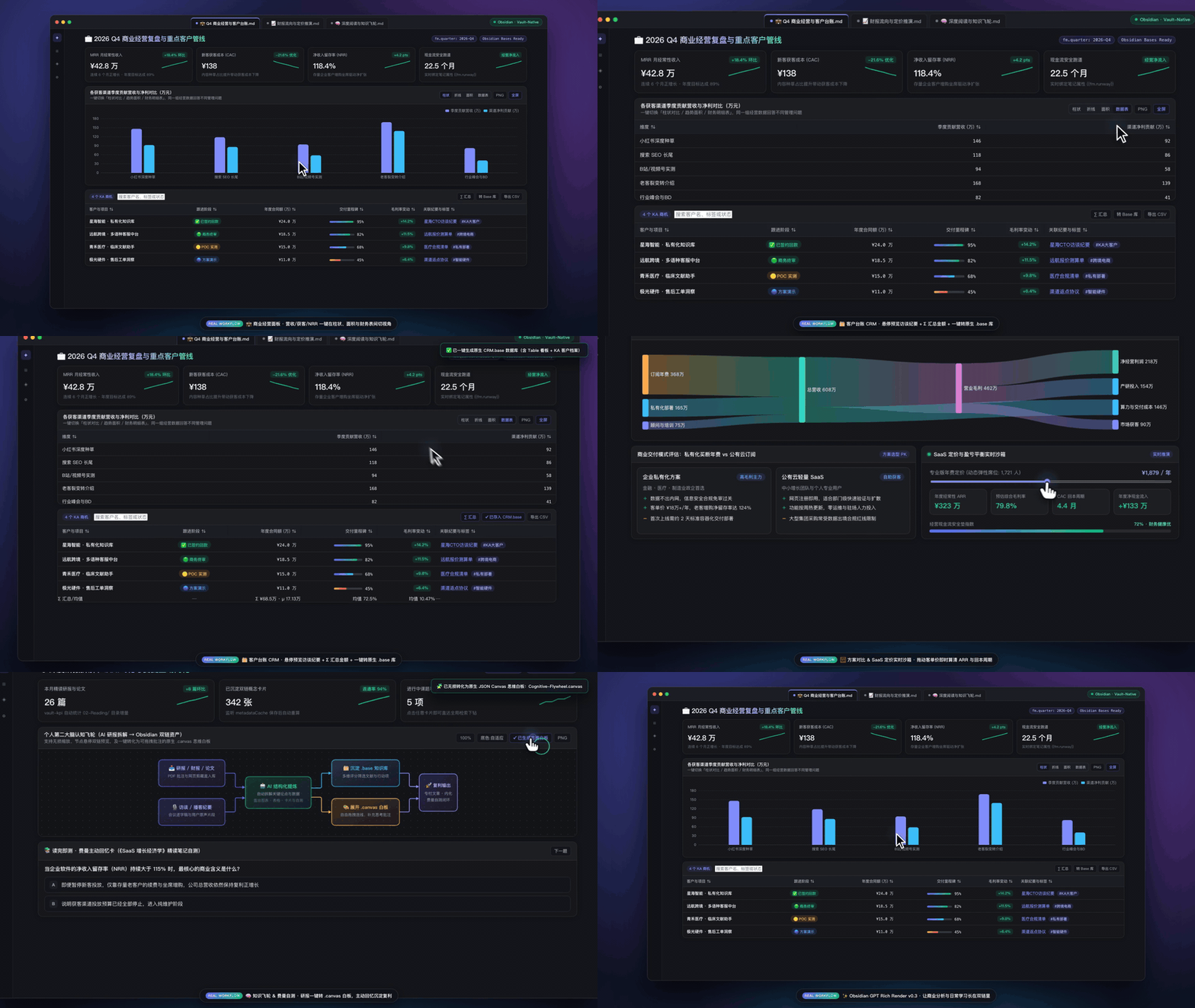
🎬 Watch 60fps Video Demo · 💬 Drop a 1-Sentence Idea / Q&A · 🎨 Paste a Weird Snippet (30s Fix)
Why Vivid?
Most visualization plugins stop at painting isolated diagrams inside a single note. Vivid connects rich GPT/Claude UI rendering directly with five Vault-Native Obsidian integrations:
| Vault-Native Integration | Problem Solved | Interactive Workflow |
|---|---|---|
1. Super-Table → Native .base Database |
AI comparison & literature tables get trapped inside one note without cross-note filtering | Click 转 Base 库 (To Base) on any table to generate typed YAML frontmatter child notes + an Obsidian .base file (Table & Cards views) |
2. SVG & Timeline → Native .canvas Whiteboard |
Static diagrams cannot be rearranged, annotated, or connected in Canvas | Click 转 Canvas (To Canvas) to convert SVG flows or roadmaps into JSON Canvas 1.0 .canvas boards — auto-linking [[Note]] nodes to real Vault files |
3. Zero-SQL Live Vault Analytics (vault-chart, vault-kpi) |
Complex DataviewJS scripts break or go stale as your vault grows | Reads Obsidian's native metadataCache locally to aggregate folders, #tags, and YAML Properties (Bar, Pie, Sankey), drilling down into Global Search on click |
4. Embedded [[Wikilinks]] & #tags Inside Visuals |
Links inside generated tables/diagrams are normally dead text | Write [[Note|Alias]] or #tag inside tables, timelines, comparison cards, and SVG <text> nodes to enable native Page Preview popovers and click-to-open navigation |
5. Reactive {{fm.key}} Property Binding |
Updating frontmatter metrics forces manual edits in note charts | Interpolates {{fm.property | fallback}} across kpi, chart, gpt-table, and gpt-ui blocks (preserving inline code literals) and refreshes on metadata save |
Live Showcase
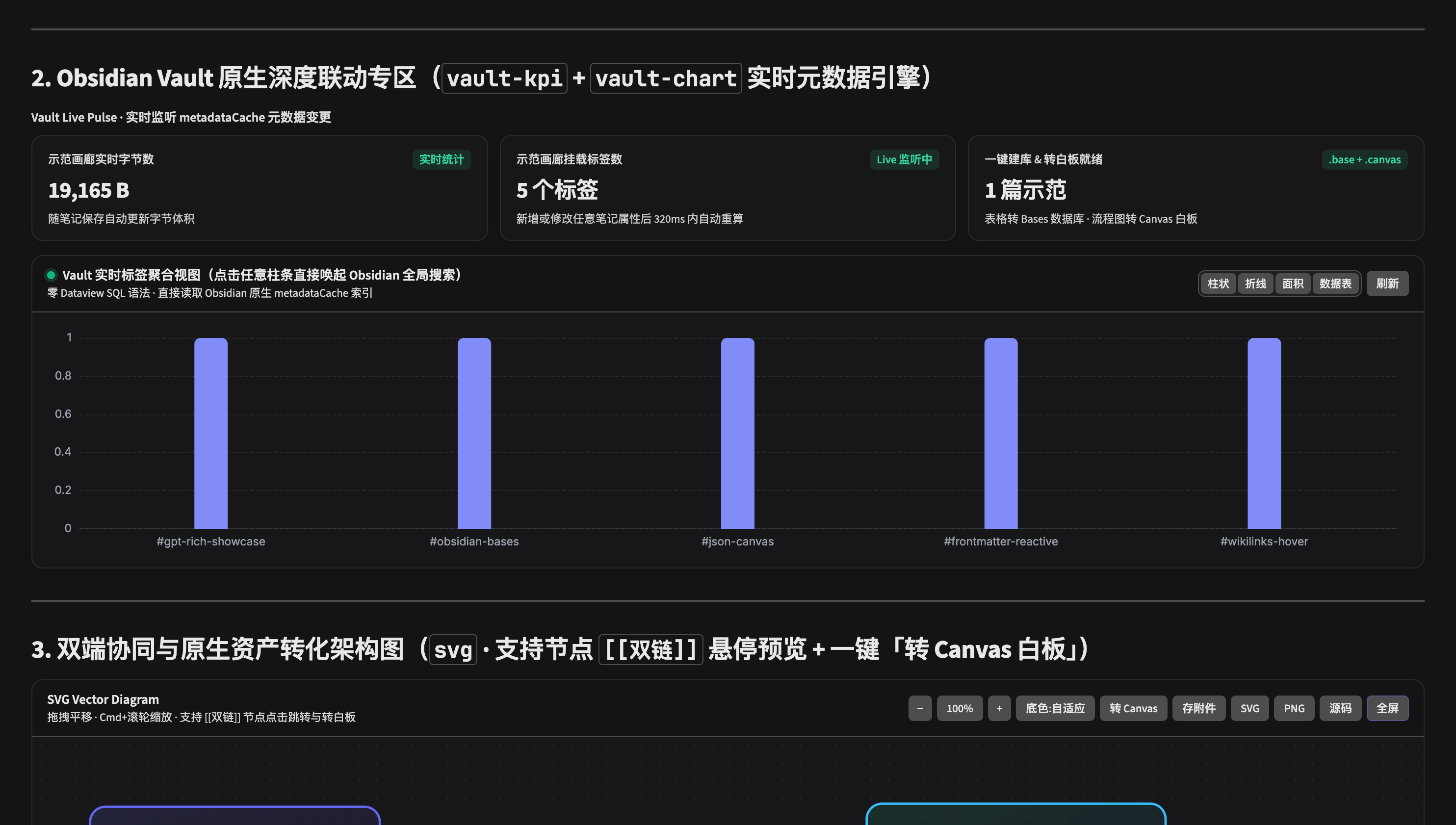
Full Interactive Component Suite
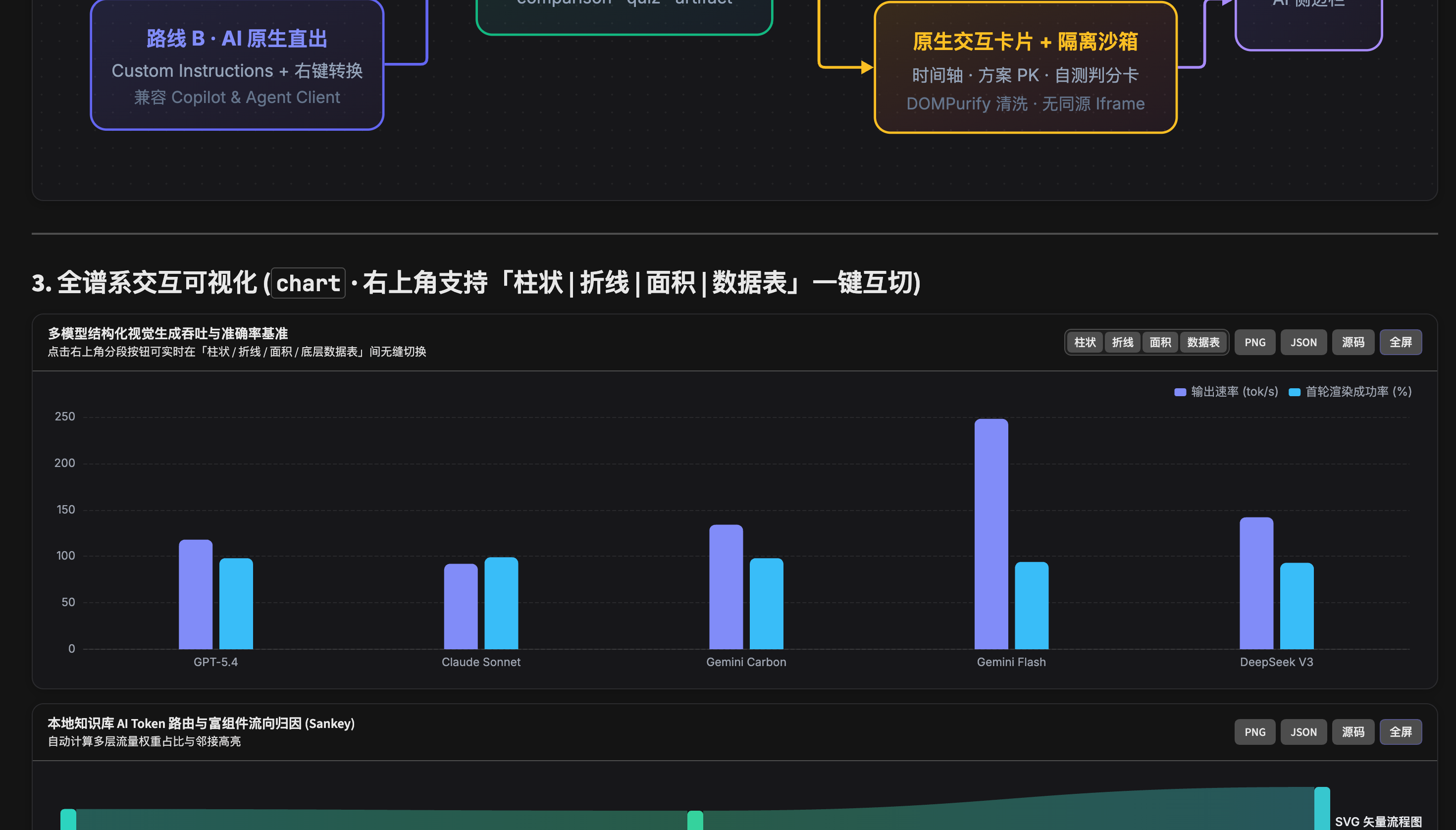
1. Offline Apache ECharts (chart, gpt-chart, echarts)
Supports bar, horizontalBar, line, area, pie, doughnut, radar, sankey, heatmap, gauge, treemap, and native ECharts option specs — with one-click switching between Bar | Line | Area | Underlying Data Table, 2x PNG export, and lightbox fullscreen zoom.
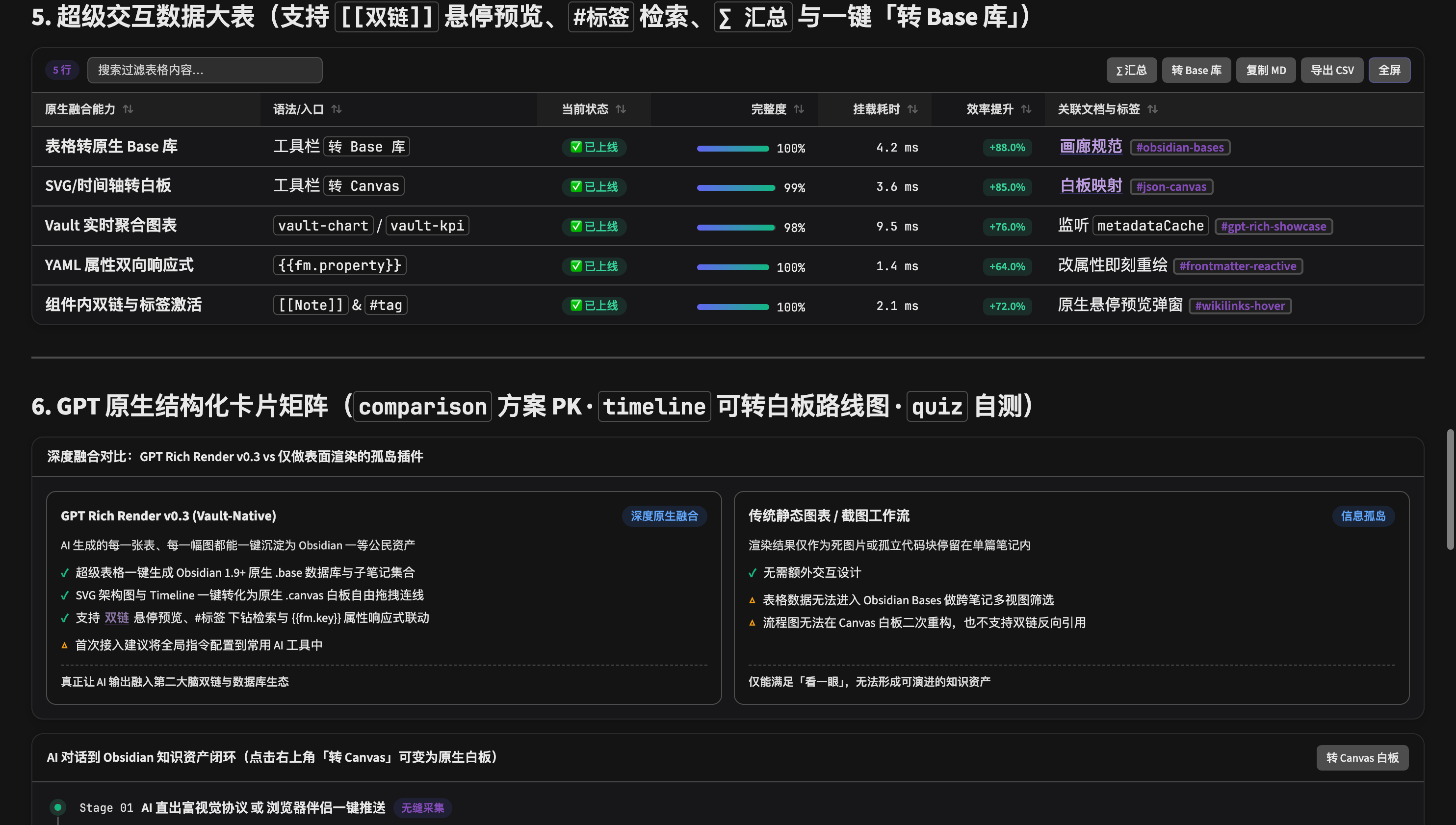
2. Automatic Super-Tables (Standard Markdown Tables & gpt-table)
Automatically upgrades Markdown tables in Reading View and AI chat sidebars with instant keyword search, unit/currency-aware numeric sorting, ∑ summary footers (avg / sum), percentage progress bars, delta pills (+18.5% / -12.0%), semantic status badges, CSV/Markdown export, and .base export.
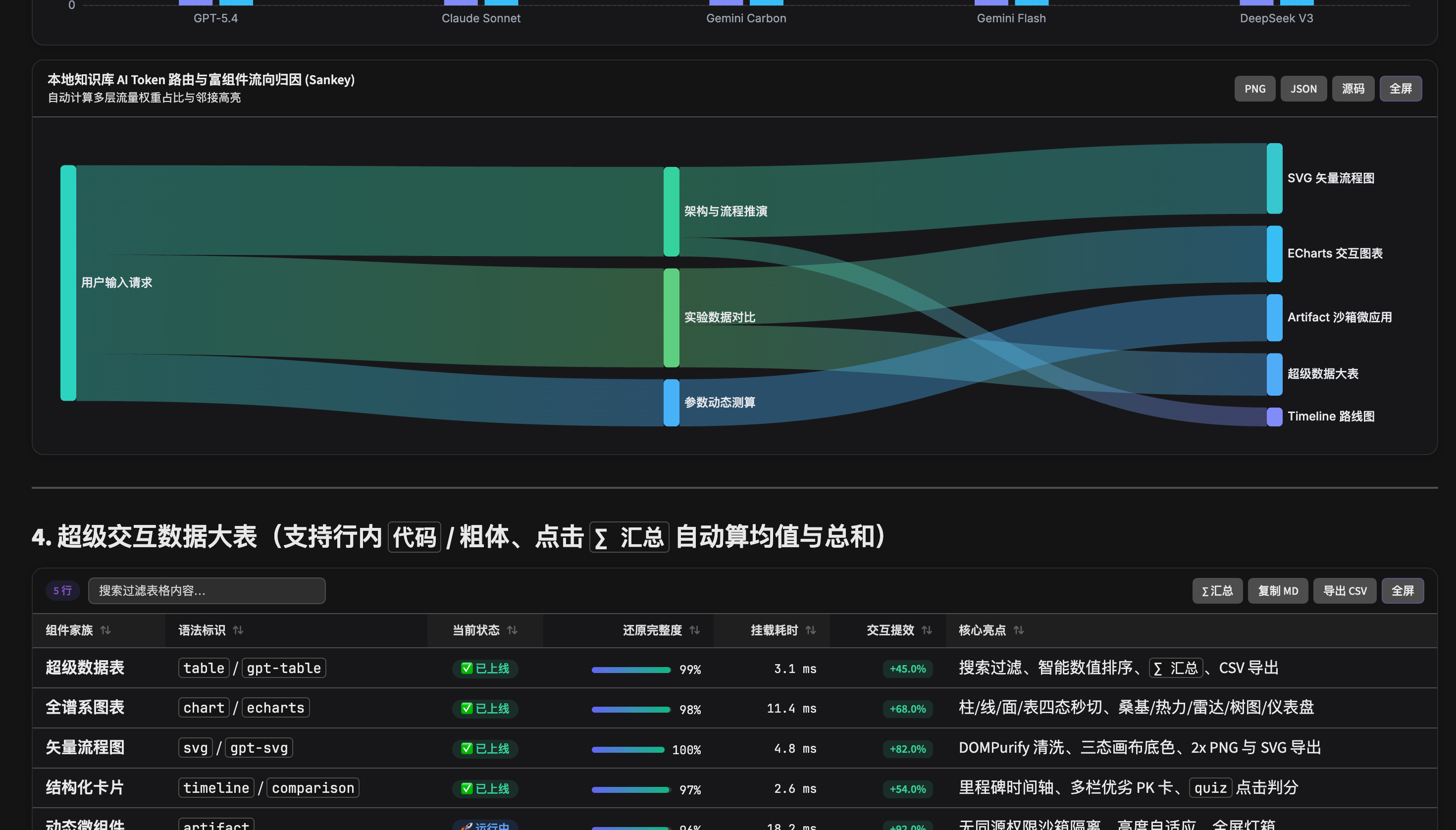
3. Structured Cards, Quizzes & Sandboxed Artifacts (kpi, timeline, comparison, quiz, artifact)
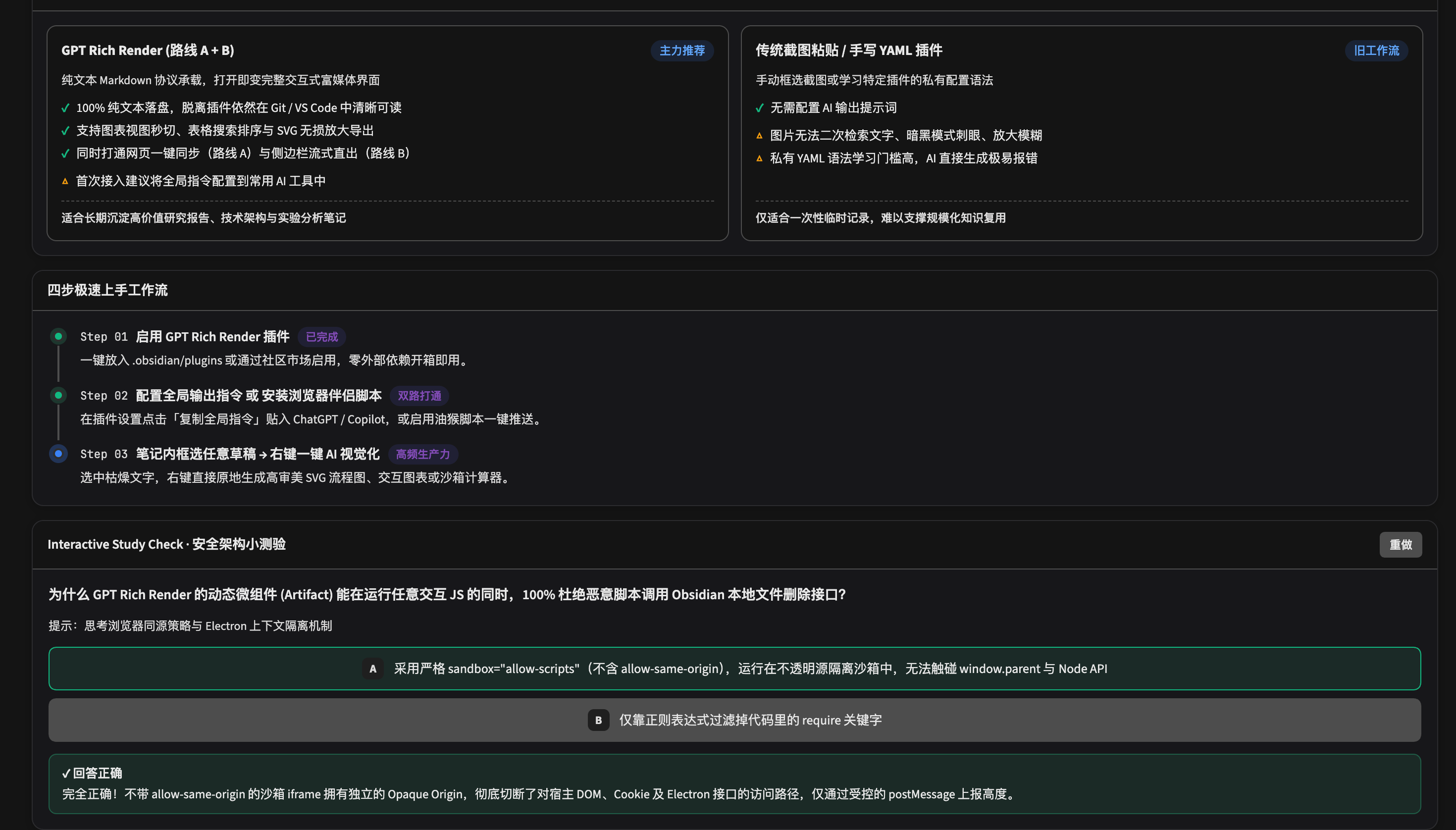
Includes responsive KPI sparkline cards, vertical roadmaps, side-by-side comparison grids, interactive self-check quizzes, and live HTML/CSS/JS widgets isolated inside opaque-origin <iframe sandbox="allow-scripts"> containers.
Syntax Quick Reference (100% Local-First Plain Text)
- KPI Cards with Reactive Property Binding (
kpi/metrics):```kpi [ { "label": "Stage", "value": "{{fm.stage | v1.0}}", "delta": "+12.8%", "trend": "up", "sparkline": [60, 75, 88, 96] } ] ``` - Live Vault Metadata Analytics (
vault-chart/vault-kpi):```vault-chart { "type": "sankey", "title": "Knowledge Flow: Folder -> Tag", "sourceBy": "folder", "targetBy": "tag", "limit": 12 } ``` - Charts (
chart/echarts): Standard JSON with{ type, labels, datasets }or{ type, data }or full EChartsoption. - Pan-Zoom Sanitized Diagrams (
svg): Standard<svg>...</svg>with drag-to-pan,Cmd/Ctrl + Wheelzoom, Light/Dark/Auto backdrops, attachment snapshots,2x PNGexport, and JSON Canvas export. - Sandboxed Micro-Apps (
artifact/html-preview): Self-contained HTML/CSS/JS snippets auto-styled with Obsidian theme CSS variables.
Installation & Workflows
1. Install from Obsidian Community Plugins (Recommended)
- Open Settings → Community plugins in Obsidian (if Restricted mode is enabled, click Exit Restricted mode → Turn on community plugins).
- Click Browse, search for
Vivid(bya-znk) — or open the Obsidian Community Directory listing. - Click Install, then click Enable.
- Open examples/Vivid-Showcase.md inside a note or run
Cmd/Ctrl + P→Vividto try every interactive block right away.
Directory Status: Vivid (
0.3.3) is live in Obsidian's official Community Plugins catalog. Until Obsidian staff finish their initial manual code review, the listing shows Obsidian's standard "not been manually reviewed by Obsidian staff" notice.
2. Alternative Install Methods
- Obsidian BRAT: Open BRAT → Add Beta plugin → enter
Yuki-zik/obsidian-vivid→ enable Vivid. - Manual Release Install: Download
main.js,manifest.json, andstyles.cssfrom GitHub Releases into<YourVault>/.obsidian/plugins/vivid/.
3. Companion Integrations (Optional)
- Browser Companion (
browser-companion/): Chrome/Edge MV3 extension and Tampermonkey script that add aSend to Obsidian ✨button onchatgpt.comandclaude.aiviaobsidian://vivid-import. - AI System Prompt (
GPT-CUSTOM-INSTRUCTIONS.md): Run commandCopy GPT Rich Instructions(Cmd/Ctrl + P) and paste into ChatGPT Custom Instructions or Obsidian Copilot / Agent Client so streamed AI responses render live as charts, super-tables, and diagrams. - Editor Selection Transform: Highlight text in the editor, right-click, and convert it into SVG, Chart, Super-Table, or Artifact (uses your configured API key or copies the structured prompt to clipboard in zero-API-key mode).
4. Build from Source
git clone https://github.com/Yuki-zik/obsidian-vivid.git
cd obsidian-vivid
npm install
npm run lint
npm test
npm run build
Open examples/Vivid-Showcase.md inside Obsidian to test every block type.
Feedback, Ideas & Quick Bug Drop
Running into an AI snippet that renders oddly, or wishing for a new chart/export workflow? Pick whichever feels easiest — one sentence or a pasted snippet is plenty:
- 💬 Casual Wishlist & Q&A (GitHub Discussions) — No template required. Vote on ideas, ask usage questions, or show off your dashboards.
- 🎨 30-Second Render Fix (Paste a Weird Snippet) — Drop the raw Markdown/JSON block or a screenshot; no console logs needed.
- 💡 Feature Wish (1-Box Idea Form) — Tell us what visual block or Obsidian integration would help your daily notes.
Privacy, Permissions & Network Disclosure
- 100% Offline Core & Local-First Storage: Apache ECharts and
DOMPurifyare bundled directly insidemain.js. There are zero external CDN loads, zero telemetry, and zero analytics. Your notes stay plain-text Markdown, standard SVG, and standard JSON. - Vault Enumeration & Vault Write: Used locally on user notes solely to power
vault-chart/vault-kpilive metadata aggregation (app.vault.getMarkdownFiles()+metadataCache) and user-triggered exports (.base,.canvas,.svgsnapshots, or browser imports viaapp.vault.create). - Clipboard Access: Invoked only when you click copy buttons (
Copy MD,JSON,Copy HTML,Copy SVG Source, orCopy Prompt) or explicitly invoke theimport-gpt-clipboard-as-notecommand. - Optional External AI Endpoint: Network requests (via Obsidian's
requestUrl) occur only if you manually enter your own OpenAI-compatible API Base URL & API Key in plugin settings and trigger an editor right-click visual transform command. - Security Hardening: Every SVG passes strict
DOMPurifysanitization andDOMParsermounting (noinnerHTML), and every HTML artifact executes inside<iframe sandbox="allow-scripts" referrerpolicy="no-referrer">withoutallow-same-origin.
License
Released under the MIT License.