Shared Tasks

Share tasks between vaults, end-to-end encrypted, without uploading your notes.
- Overview
- Scorecard
- Updates9

Shared Tasks for Obsidian
Shared tasks inside your private notes. By OpenLFCP (Open Local-First Collaboration Protocol).
Website: openlfcp.org
Beta. Plugin ID shared-tasks; for the current version, see the
latest release.
Quick start
- Install. In Obsidian 1.13.4 or later, open Settings → Community plugins → Browse, search for "Shared Tasks", install it and enable it.
- Share. Run "Shared Tasks: Create collaboration". Put the cursor on a task and run "Shared Tasks: Share task under cursor".
- Invite. Run "Shared Tasks: Invite collaborator" and send the one-time link privately. The other person runs "Join collaboration", then "Insert shared object".
Step by step, with everyday use and troubleshooting: the user guide.
What it does
- Share one task, not your vault. Put the cursor on a task and share it; the rest of the note stays on your device.
- Invite with a one-time link. The other person joins with it, from their own vault, with "Read" or "Read + write" access.
- Works offline. Edit while offline; changes sync when you are back, and edits on both sides are kept.
- Markdown stays Markdown. A shared task is an ordinary task line in
the Obsidian Tasks syntax (
📅 2026-10-20,✅), with a small<!-- lfcp-ref: … -->comment that links it. - Shared sections (preview). Share a heading with everything under it: tasks, subtasks, paragraphs and lists, in order. Whatever is added to the section later is shared too. This is off by default; see Shared sections.
Install
Shared Tasks needs Obsidian 1.13.4 or later.
From Community plugins (recommended):
- Settings → Community plugins. If "Restricted mode" is on, turn it off.
- Click "Browse" and search for Shared Tasks (directory page).
- Install it, then enable it.
Pre-release builds, with BRAT:
- Install and enable BRAT from Settings → Community plugins.
- Run "BRAT: Add a beta plugin for testing" from the command palette.
- Enter
openlfcp/obsidian; if BRAT asks for a version, pick the latest. - Enable "Shared Tasks" in Settings → Community plugins.
By hand: from the
latest release,
download main.js, manifest.json and styles.css into a new folder
<vault>/.obsidian/plugins/shared-tasks/, then enable "Shared Tasks" in
Settings → Community plugins.
Upgrading from 0.1.0, which was called "OpenLFCP": see docs/releases/0.2.0.md.
Your first shared task
New here? The step-by-step guide covers setup and everyday use, including what to do when something goes wrong.
Two people, each with their own vault and Shared Tasks installed. The commands are in the command palette.
- Create a collaboration. Run "Shared Tasks: Create collaboration",
give it a name only you see, and keep the suggested server
(
wss://sync.openlfcp.org/v1/ws, see "Which server"). - Share the task. Put the cursor on a task, for example
- [ ] Prepare API contract 📅 2026-10-20, run "Shared Tasks: Share task under cursor" and pick the collaboration. Alfcp-refcomment appears under the task; nothing else in the note changes. - Invite. Run "Shared Tasks: Invite collaborator", pick the collaboration and "Read + write", and copy the link. The link is a secret: anyone who has it can join until it is used. Send it privately.
- The other person joins and inserts the task. In their vault they run "Shared Tasks: Join collaboration", paste the link, then put the cursor on an empty line in any note and run "Shared Tasks: Insert shared object" to place the same task there.
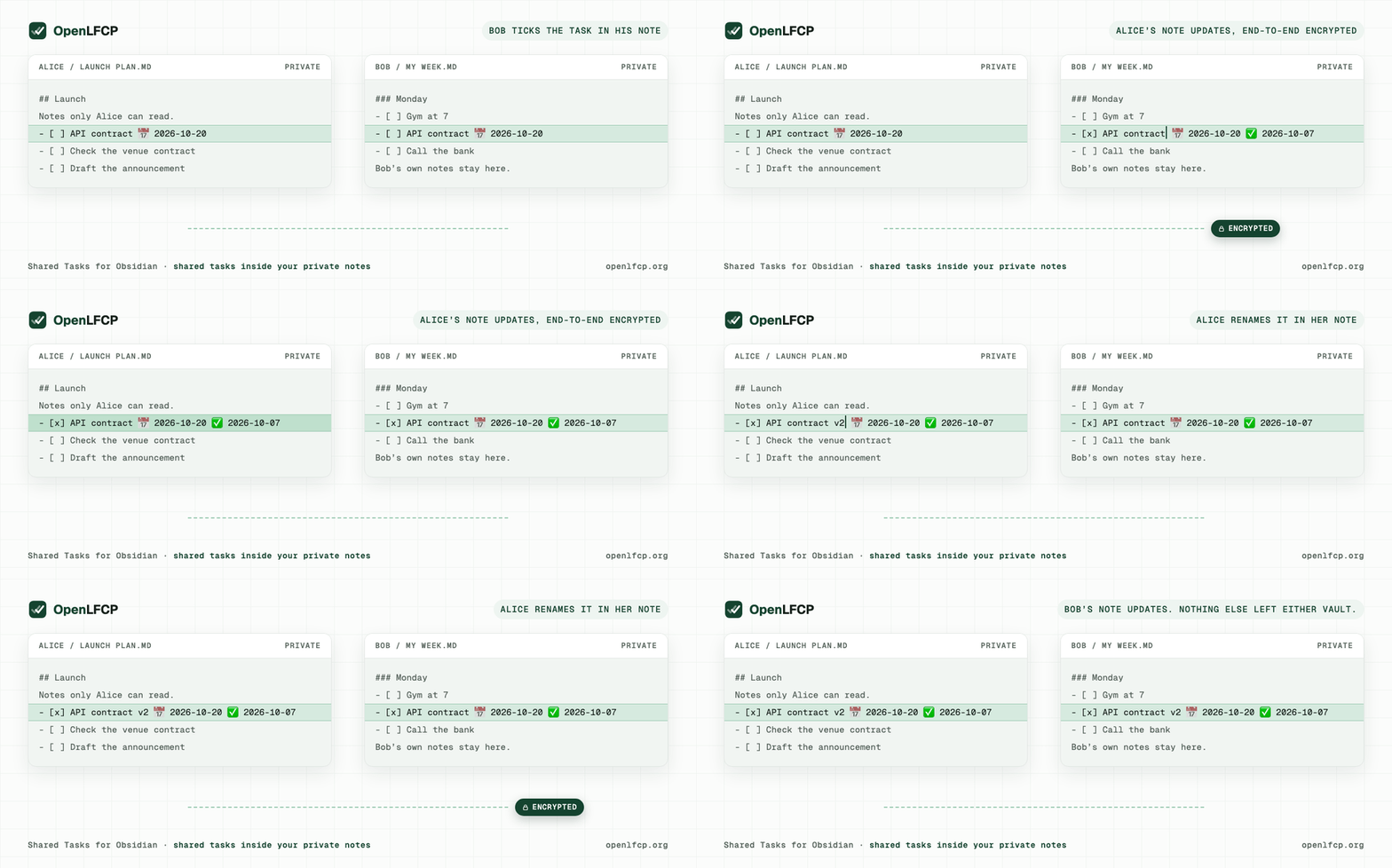
- Tick it. When either of you ticks the task (
- [x]), the other note shows it done, with its✅date, within seconds.
The full walkthrough, with what to expect at each step: docs/demos/two-vault-demo.md.
Many tasks at once
- "Shared Tasks: Share selected tasks" shares every task line you
selected. With nothing selected, it shares the tasks under the heading
at the cursor, down to the next heading of the same or a higher level.
You pick the collaboration once; each task becomes a shared task of its
own, nested ones included. Tasks already shared are skipped, and tasks
with a broken
lfcp-refare left alone. One notice says how many were shared. - "Shared Tasks: Insert all tasks from collaboration" places, at the cursor, every task of a collaboration that this note does not show yet, in the order they were created.
Everyone invited to a collaboration sees every task in it, including tasks you add later. Each command handles at most 200 tasks; above that it does nothing and says so. A list shared this way is not itself shared: its order and heading, and tasks added to it later, stay local in each note. To share a section as a whole, use a shared section (below).
Shared sections (preview)
A shared section is a heading and everything under it, down to the next heading of the same or a higher level. Everyone in it keeps the section in their own note, edits it, and sees the others' changes. Its order, nesting and paragraphs are shared, and so is whatever is added inside it later. Each section has its own collaboration and its own key.
Shared sections are a preview for Shared Tasks 0.4, off by default. Turn
them on with "sectionsPreview": true in the plugin's data.json. The
shared sections guide covers sharing,
inviting, joining and inserting, what the marks mean, conflicts, removing
access, detaching and repair.
In the note, a shared section carries one comment after its heading, one at its end, and one beside each task, paragraph and list item. Live Preview hides them. Source mode shows them, and so does "Show or hide sharing metadata". "Copy readable text (without sharing metadata)" copies the text without them.
What's shared, what stays private, what the server sees
| Shared with your collaborators | The tasks you share: title, status, dates, priority, tags. For a shared section: its heading's title and everything under it (tasks, paragraphs, list items, their order and nesting), including what is added later. Comments inside a section (%% … %%, <!-- … -->) stay on your device unless you choose to share them in the settings. End-to-end encrypted: only members of the collaboration can read them. |
| Stays private | Everything else in your vault, including the text around a shared task or outside a shared section, and your keys, which never leave your device. Each vault has its own identity, a key pair, not an account. |
| The server sees | Encrypted data it cannot read, plus the metadata it needs: public keys, collaboration IDs, who may read or write, sizes and counts of changes, and your IP address when you connect. Details: the server's privacy note. |
Which server
"Create collaboration" suggests the free public beta server of the
OpenLFCP project, wss://sync.openlfcp.org/v1/ws. Read its
privacy note
and terms
first. Or run your own:
openlfcp/server has a container
setup in deploy/.
Change the suggestion in Settings → Shared Tasks → "Default server".
A collaboration stays on the server it was created on, and people who join use the server named in the invitation. More: docs/guides/choosing-a-server.md.
If the server lost data (it was restored from an older backup), Shared Tasks repairs it from your device: it hosts a lost collaboration there again, sends back the changes the server no longer has, and shows one short notice. Your collaborators' devices do the same, so whoever connects first brings the server up to date.
If the server no longer has a collaboration and refuses to host it again, or no longer lets you read it, Shared Tasks shows one notice and "Resource status" says why, for example "Not hosted by wss://…". Syncing that collaboration stops (Shared Tasks does not keep retrying), and your tasks stay on this device. Restarting Obsidian asks the server again.
Offline and conflicts
Edit shared tasks offline as usual. Changes wait on your device and are sent when the server is reachable again. Edits to different fields merge: if you rename a task while your collaborator moves its date, both changes arrive.
If you both change the same field while apart, nothing is lost and no
conflict text is written into your note. The note shows one of the two
values, the status bar says "Shared Tasks: 1 shared task has a conflict",
and the task line gets a marker naming the field. Example: you mark the task in
progress ([/]) and your collaborator cancels it ([-]). Put the cursor on
the task, run "Shared Tasks: Resolve shared task conflict", pick status
and the value to keep; both notes then show it.
Compatibility
- Obsidian 1.13.4 or later.
- Tested by hand on macOS with Obsidian 1.14.4: the two-vault demo, on a build before 0.2.0 (record); the 0.2.0 BRAT install was checked on 2026-10-07.
- The automated platform smoke (build, tests and the two-vault E2E against the real server) passes on macOS, Windows and Linux for 0.2.0. Windows and Linux have not been tested by hand yet.
- Mobile (iOS, Android) is not tested.
- Tasks use the Obsidian Tasks plugin's emoji syntax for dates, priority and completion, and the projection tests cover it. Running together with the Tasks plugin itself has not been tested.
Limitations
Beta software. Not for data you need to protect yet.
- Data on the public server can be lost, including recent changes after the server is restored from a backup; keep your vault, which holds the full data of every collaboration.
- A collaboration cannot move to another server.
- Invitations offer "Read" and "Read + write" only. For tasks shared one by one, there is no member management in the plugin yet. For a shared section, "Remove access…" in its details removes someone's future access; copies they already received cannot be erased.
- An invitation is a link (no QR code); a copied link stays on the clipboard.
- Decrypted shared tasks are stored unencrypted on each device, like the rest of your vault, and Obsidian's secret storage is shared by every plugin on the device.
All known limitations, verified: the release notes of Shared Tasks, OpenLFCP MVP 0.1 and server 0.2.0.
Network use
The plugin connects only to the sync servers of your collaborations, over
WebSocket (wss://). It sends only end-to-end encrypted data and the
protocol metadata a server needs (public keys, Resource IDs, sizes); the
server also sees your IP address. There is no account, no telemetry and no
payment.
What the plugin accesses
- Your notes, locally. At startup the plugin looks through every
Markdown note of the vault for its markers (
lfcp-comments: task refs, and the boundaries and node markers of shared sections), using Obsidian's content cache. Notes with a marker are synchronized; notes without one are not touched. Afterwards it reacts to note changes as you make them. None of your notes leaves the vault: only the shared tasks you chose go out, end-to-end encrypted. - The clipboard, written only when you ask: "Copy link" in the invitation dialog, "Copy readable text (without sharing metadata)", "Copy shared section", and copying a diagnostics report. When you copy from a shared section in Reading view, the plugin leaves its status marks out of what you copied. The plugin never reads the clipboard.
- A file in your vault, only when you save a diagnostics report there ("Export diagnostics…"). The report is shown in full before you copy or save it, holds no note text or secrets, and is never sent.
- The network, only
wss://connections to the servers of your collaborations (see "Network use"). - Local storage on this device: IndexedDB for the sync state, and Obsidian's secret storage for the keys; neither is inside the vault.
- Bundled WebAssembly. The plugin ships Automerge (the CRDT engine) as
WebAssembly inside
main.js, stored compressed and decoded when the plugin starts. Nothing is downloaded at run time.
Support
- Bugs and questions: GitHub issues.
- Security vulnerabilities: [email protected], or a private security advisory; not a public issue.
- Everything else: [email protected].
For developers
This repository is the Obsidian editor adapter and product UI for OpenLFCP.
It consumes sdk-ts, the Shared Objects Profile, and the Markdown
reference format. It owns Markdown scanning, the projection engine,
CodeMirror integration, commands, the Resource Explorer, plugin settings,
and editor conflict presentation.
Scope
The plugin implements the OpenLFCP MVP 0.1 product slice on
sdk-ts: sharing Tasks between vaults over the MVP 0.1 subset of
LFCP-WIRE-01 at mvp-0.1-baseline.8, not every deferred WIRE-01 feature
(see .github: docs/release/deferred-wire-01-features.md (in openlfcp/.github)). Desktop only is
tested; mobile is not.
Documents
- docs/OBSIDIAN-ARCHITECTURE-01.md: architecture of the Obsidian adapter.
- The Markdown ref grammar it implements is normative and lives in
spec: integration/MARKDOWN-REFS-01.md.
Status
Plugin bootstrap (LFCP-058): the plugin loads, registers its commands and has a settings tab.
lfcp-refmarkers (LFCP-060, done before LFCP-059 on purpose): parsing, diagnostics and serialization per MARKDOWN-REFS-01, insrc/core/refs.The TypeScript SDK in the plugin (LFCP-059), in
src/core/lfcp:- a per-vault install with its own identity and an install marker that locks writing on any copied, wiped or rolled-back state;
- IndexedDB storage and
app.secretStoragesecrets; - one sync session per server, opened on demand;
- the local Resource registry;
- start and stop with the plugin (never blocked on the network).
Vault-level change events (
src/core/vault), collected for projection scanning whatever made them (LFCP-059).Markdown ↔ Shared Object projection (LFCP-061, LFCP-062,
src/core/projection): edits to bound Tasks (title, status, due, scheduled, completion date, priority, tags) become Shared Objects intents through the SDK, and shared changes are rendered back into every note that projects them. Conflicts show in the status bar and the editor, never in the text. See docs/architecture/projection.md.Collaboration commands (LFCP-065,
src/core/collab,src/obsidian/ui): create, join, share the task under the cursor, insert a shared task, invite (Read or Read + write, one-time links), Resource status, detach, and resolving a shared conflict. See docs/architecture/collaboration.md.
Demo
docs/demos/two-vault-demo.md walks through
the canonical two-vault demo in real Obsidian. node scripts/demo-vaults.mjs
prepares the vaults and the server config outside this repository.
Layout
| Path | What it is |
|---|---|
manifest.json, versions.json |
Obsidian community-plugin manifest (id shared-tasks) and its app-version map |
scripts/release-assets.mjs, .github/workflows/release.yml |
The release: assets built and checked from a bare version tag; see docs/devel/release.md |
src/main.ts |
Entry point; bundled into main.js by scripts/build.mjs (esbuild) |
src/obsidian/ |
The thin Obsidian adapter: plugin lifecycle, commands, settings tab. The only code that imports obsidian |
src/core/ |
Obsidian-free modules, reusable by other editor adapters |
src/core/lfcp/ |
The LFCP runtime over the SDK: install and marker, secret slots, sessions, registry |
src/core/vault/ |
Vault-level file change hub |
src/core/projection/ |
Markdown → Shared Object projection, the mutation guard |
test/ |
Vitest unit tests; test/mocks/obsidian.ts stands in for the Obsidian API; test/fixtures/refs/ holds golden lfcp-ref fixtures |
spec.lock |
The openlfcp/spec tag and commit the tests read MARKDOWN-REFS-01 and spec fixtures from ($LFCP_SPEC_DIR, or ../spec) |
scripts/check-boundaries.mjs |
Fails if code outside the adapter imports obsidian, reaches into src/obsidian/, or uses Node in src/ |
obsidian is a devDependency for types only: the app provides it at
runtime. The plugin does not reimplement any LFCP protocol logic: it uses
the TypeScript SDK (the @openlfcp/* npm packages, at exact versions). The boundary
check also refuses Automerge, @noble, HPKE, CBOR and COSE libraries,
@openlfcp/wire/cbor and the Node-only @openlfcp/storage-node in src/,
and keeps fake-indexeddb test-only.
Build from a clean checkout
The plugin builds from the @openlfcp/* npm packages at the exact
versions in package.json (locked in pnpm-lock.yaml); no sibling sdk-ts
checkout is needed. A tag release refuses any other setup, such as a
link: to a local sdk-ts (scripts/check-release-deps.mjs).
pnpm install --frozen-lockfile
pnpm run build       # typecheck src and bundle main.js
pnpm run lint        # Biome and the boundary check (with its self-test)
pnpm run typecheck   # src and tests
pnpm test
main.js is about 1.9 MB, minified. Most of it is Automerge's wasm, stored
deflated and inflated at load (the community-plugin format ships one
script; see the local-state note).
Requires Node.js 24 or later and pnpm 10. To try the plugin in Obsidian, see docs/devel/testing/load-in-clean-vault.md.
License
Apache License 2.0. See LICENSE.