Semantic JSON
 syntaxasspiral388 downloads
Turn your canvases into easy no-code JSON data structures. Share with LLMs.
- Overview
- Scorecard
- Updates4
⚡Features
- Intuitive JSON: Watch your beautiful data structure self-assemble in real-time IDE
- Enhanced imports ⇄ exports: unified import with auto-detection, beautiful canvas imports, and clean pure JSON exports
- Auto-compile on save: Canvas files arrange their contents intelligently instead of scrambling
- Flexible AI Integration: Optional LLM-based color-coded semantic ID assignment with support for local and cloud providers
- Intelligent file detection: Works with
.canvas,.json,.jsonl - Diff stability: Git only tracks meaningful changes, LLMs output/consume coherent structure, humans see legible visual feedback
- CLI tool: Included for batch processing or CI pipelines with unified
--importcommand - Spec-compliant: Pure JSON Canvas extension—no custom properties, works with all Canvas tools
🎯 Why this Plugin?
Obsidian's default handling of the JSON array in Canvas files incidentally discards visually encoded meaning, forcing readers to reconstruct intent. This plugin recompiles the z-index, preserving its semantics as legible, deterministic JSON across four dimensions:
- 📍 Position (x, y) → Linear reading sequence (top-left to bottom-right)
- 📦 Containment (bounding boxes) → Hierarchical structure (groups + children)
- 🎨 Color (node/edge colors) → Semantic taxonomy (Canvas color indices 1-6)
- ➡️ Directionality (arrow endpoints) → Information flow topology (source → sink)
This greatly enhances collaboration between human and machine intelligence.
- JSON Canvas format becomes a lingua franca for the shared visuospatial grammar that people and AI already use natively.
- Obsidian Canvas becomes a full WYSIWYG authoring tool for this richly contextual JSON format.
🌐 Installation
Early Access / Beta Installation
Use BRAT (Beta Reviewer's Auto-update Tool) to install:
- Install BRAT from Obsidian Community Plugins
- Open Command Palette → "BRAT: Add beta plugin"
- Paste: https://github.com/SyntaxAsSpiral/semantic-json
- Add & enable the plugin
Manual Installation
- Download the latest release from GitHub Releases
- Extract to
<vault>/.obsidian/plugins/semantic-json/ - Reload Obsidian
- Enable "Semantic JSON" in Community Plugins settings
🎮 Usage
Commands (via Command Palette)
- 💫 "Compile active canvas": Recompiles the
.canvasfile in-place preserving semantic structure - 🧠 "Assign semantic ID values": Uses language model analysis to assign semantic IDs, optional taxonomy, and a legend node (requires configuration)
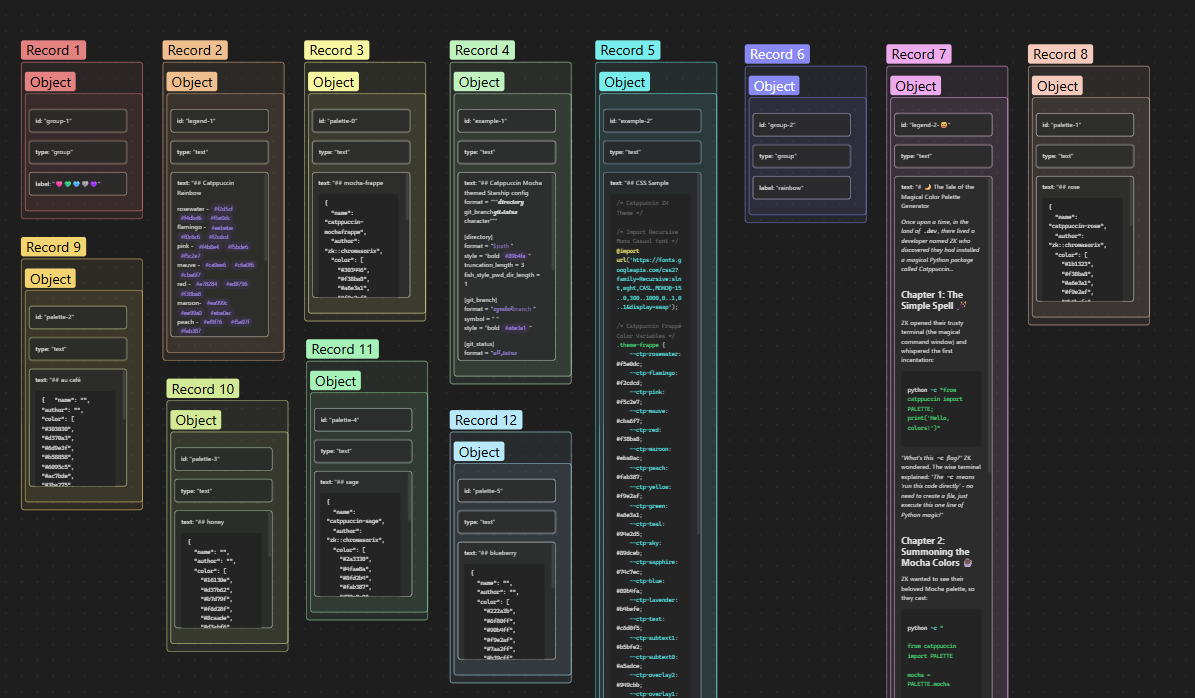
- 📥 "Import to canvas": Auto-detects JSON/JSONL format and creates enhanced visual scaffolding with hierarchical coloring and rainbow gradients (example)
- 📤 "Export as pure JSON": Strips Canvas metadata, exports clean data artifact (
.pure.json)

Settings
- 🪄 Auto-compile on save (default: enabled): Automatically reorder canvas files when saved
- 🎨 Color sort nodes (default: enabled): Group nodes by color within same spatial position
- 📲 Color sort edges (default: enabled): Group edges by color within same topology
- 🔗 Flow sort nodes (default: disabled): Group nodes by directional flow topology then sort spatially
- 🏠 Group orphan nodes (default: disabled): Group orphan nodes together first before sorting spatially
- 🧠 Language model integration (default: disabled): Enable language model semantic ID assignment with support for local (LM Studio, Ollama) and cloud providers (OpenAI, Anthropic, OpenRouter)
📖 What is JSON Canvas?
JSON Canvas is an open file format for infinite canvas data, originally developed for Obsidian Canvas. It promotes longevity, readability, interoperability, and extensibility using the .canvas extension and a simple JSON structure with nodes and edges. Infinite canvas tools organize information spatially like a digital whiteboard.
Compilation Process
- Hierarchical ordering: Groups followed immediately by their contents, depth-first traversal
- Content-based sorting: Nodes sort by semantic content (text/file name/URL/label) instead of random IDs
- Color taxonomy: Optional color grouping preserves visual categories (enabled by default)
- Flow topology sorting: Optional directional flow analysis—arrows define sequence, superceding positional sorting for nodes (disabled by default)
- Topology-based edge sorting: Edges ordered by connected node positions (or flow depth when flow sorting enabled)
This transforms spatial diagrams into linear narratives that preserve visual semantics, making flow diagrams, system architectures, and knowledge graphs immediately legible to readers in JSON without spatial reconstruction.
🧪 Examples
See examples/ for a self-documenting test. The test card canvas is pre-sorted in the repo, so opening it in Obsidian and saving will scramble the entries, demonstrating exactly what this plugin fixes. The JSON version shows it stripped of Canvas metadata.
Contributing
Issues and PRs welcome!
License
MIT