Property Board
 NaleVex70 downloads
Create .board files with property-driven board views.
- Overview
- Scorecard
- Updates3
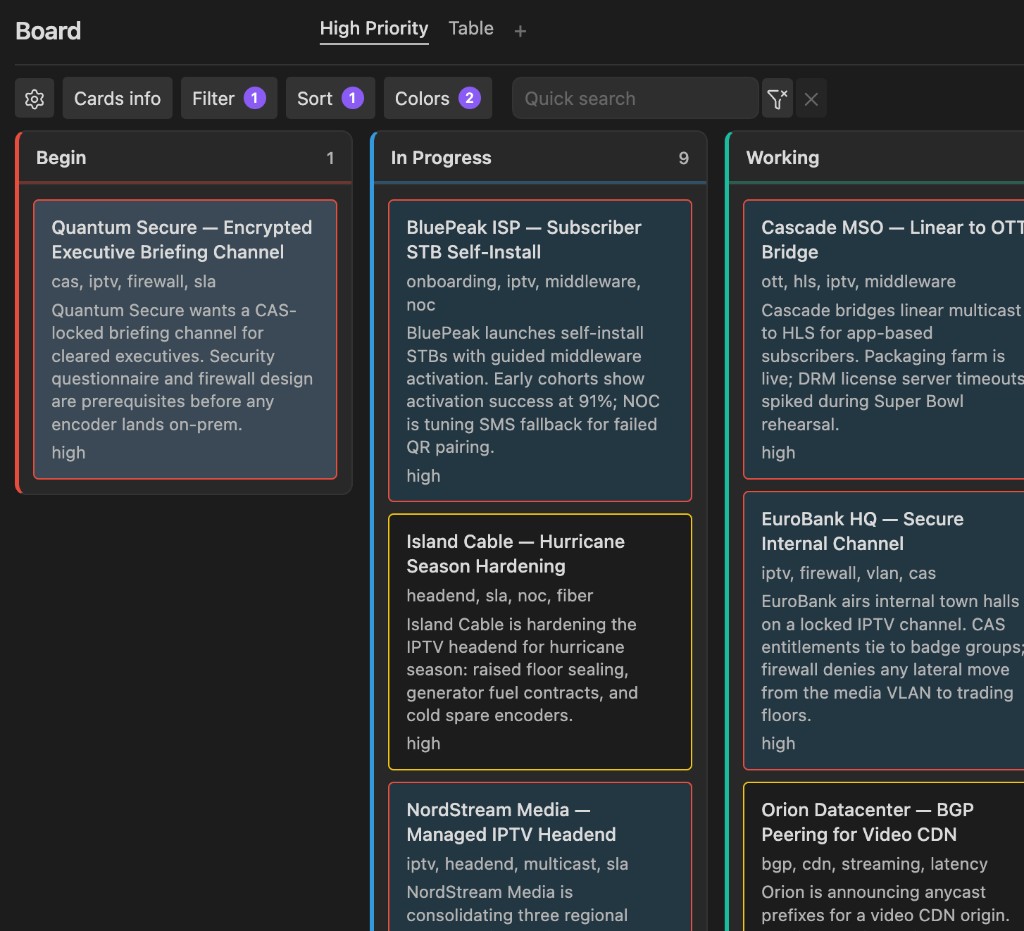
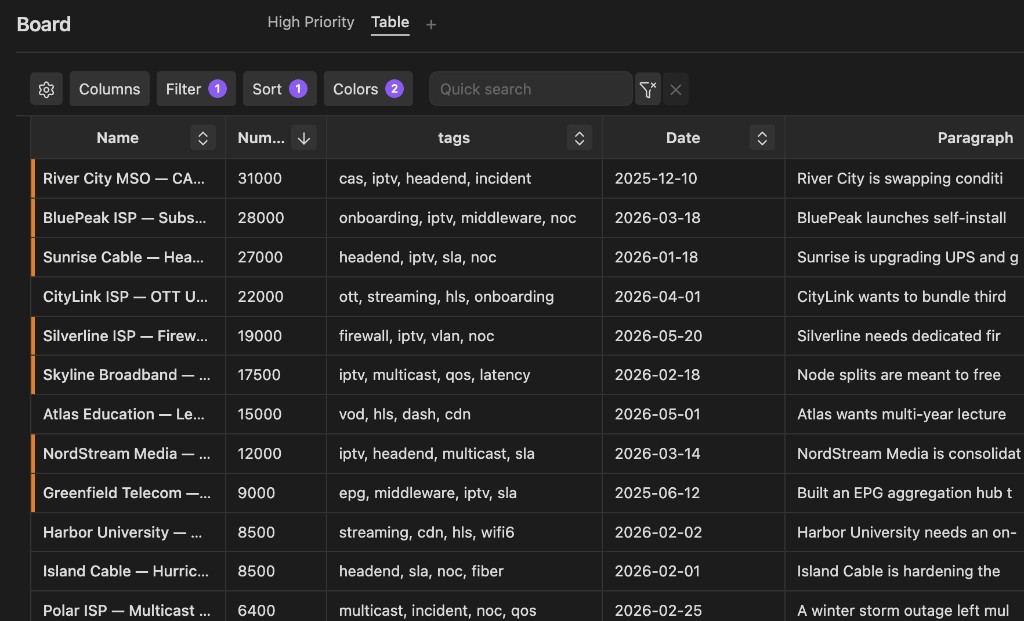
Build Kanban and table boards from your notes’ frontmatter properties.
Each board is a .board file in your vault. Pick a trigger property (for example status), and matching notes appear as cards or rows—grouped by that property’s values. Move a Kanban card to update the property on the note.
Repository: https://github.com/NaleVex/obsidian_property_dashboard
Features
- Boards as vault files — Settings and views live in a
.boardfile next to your notes, not buried in plugin settings - Properties as the source of truth — Columns come from a frontmatter key; empty or unknown values land in an Unknown column
- Kanban and table on one board — Multiple named views share the same scope and trigger property
- Rich card and column fields — Show properties, file metadata, or slices of the note body (paragraph fields)
Roadmap
- Card view
- Formula fields
- More language translations
Suggestions and issues are welcome.
Installation
Community plugins
Install from Obsidian: Property Board — or search Property Board under Settings → Community plugins → Browse.
Manual (development)
- Clone this repository into your vault's
.obsidian/plugins/property-board/folder. - Run
npm installandnpm run dev(ornpm run buildfor production). - Enable Property Board under Settings → Community plugins.
Always develop plugins in a separate dev vault, not your main vault.
Usage
- Create a board via the ribbon icon or command palette: Create new board.
- Open the board file (or it opens automatically after create).
- Use the header gear to configure:
- Trigger property — frontmatter key used for grouping (e.g.
status) - Limit to — entire vault, siblings of the board file, or a specific folder
- Values — ordered column list (e.g.
todo,in-progress,done)
- Trigger property — frontmatter key used for grouping (e.g.
- Add frontmatter to notes you want on the board:
---
status: in-progress
---
- Add more Kanban or Table views with the + tab control if needed.
Notes without the trigger property are excluded. Notes with the property but an empty or unrecognized value appear in the Unknown column.
Board file format
Boards are JSON files with a .board extension, for example:
{
  "version": 1,
  "name": "New Board",
  "settings": {
    "triggerProperty": "status",
    "limitTo": { "mode": "all" },
    "values": ["todo", "in-progress", "done"]
  },
  "views": [
    { "id": "…", "type": "kanban", "name": "Kanban" }
  ],
  "activeViewId": "…"
}
limitTo modes:
| Mode | Meaning |
|---|---|
all |
All markdown notes in the vault |
siblings |
Notes in the same folder as the board file |
folder |
Notes under a specific vault folder path |
Development
npm install
npm run dev    # watch mode
npm run build  # production bundle
Deploy to test vault
npm run deploy
By default this builds the plugin and copies main.js, manifest.json, and styles.css to:
vault/.obsidian/plugins/property-board/
(in this repo’s local vault/ folder)
Override the vault path:
OBSIDIAN_VAULT=/path/to/vault npm run deploy
# or
npm run deploy -- /path/to/vault
To copy without rebuilding (after npm run dev):
npm run deploy:skip-build
License
Copyright (C) 2026 NaleVex.
This project is licensed under the GNU General Public License v3.0. See LICENSE for the full text.
If you fork or redistribute this plugin, you must:
- Keep this project under GPL-3.0
- Preserve copyright and license notices
- Clearly state any changes you made
- Credit the original project: https://github.com/NaleVex/obsidian_property_dashboard
Support
If you'd like to support this project, you can send crypto to:
 BTC BTC |
bc1q33r5yfcw9stjzkvs86qpmp6fclgt4mukm2q7m0 |
 ETH ETH |
0x596E874308D59769820Cc4038645E43a603DecC1 |
 USDT (TRC-20) USDT (TRC-20) |
THXNhyPo9pwcEBUmUsWiLWDZ4BtqPSQbpC |
 SOL SOL |
EWAM8kDe3KwszupkitbtBhWJfEd1tbyjwCCEK1DgCfB |
 TON (GRAM) TON (GRAM) |
UQCsPSejXHfRcnEgbxK0PLfUbbNnicK4Av8ldKHS80J-OPGu |
If you'd like to use something else, please ask me.