- Overview
- Scorecard
- Updates24
Multi-purpose time trackers for your notes!
🤔 Usage
To get started tracking your time with Super Simple Time Tracker, open up the note that you want to track your time in. Move the cursor to the area you want the tracker to reside in, and then open your command palette and execute the Super Simple Time Tracker: Insert Time Tracker command.
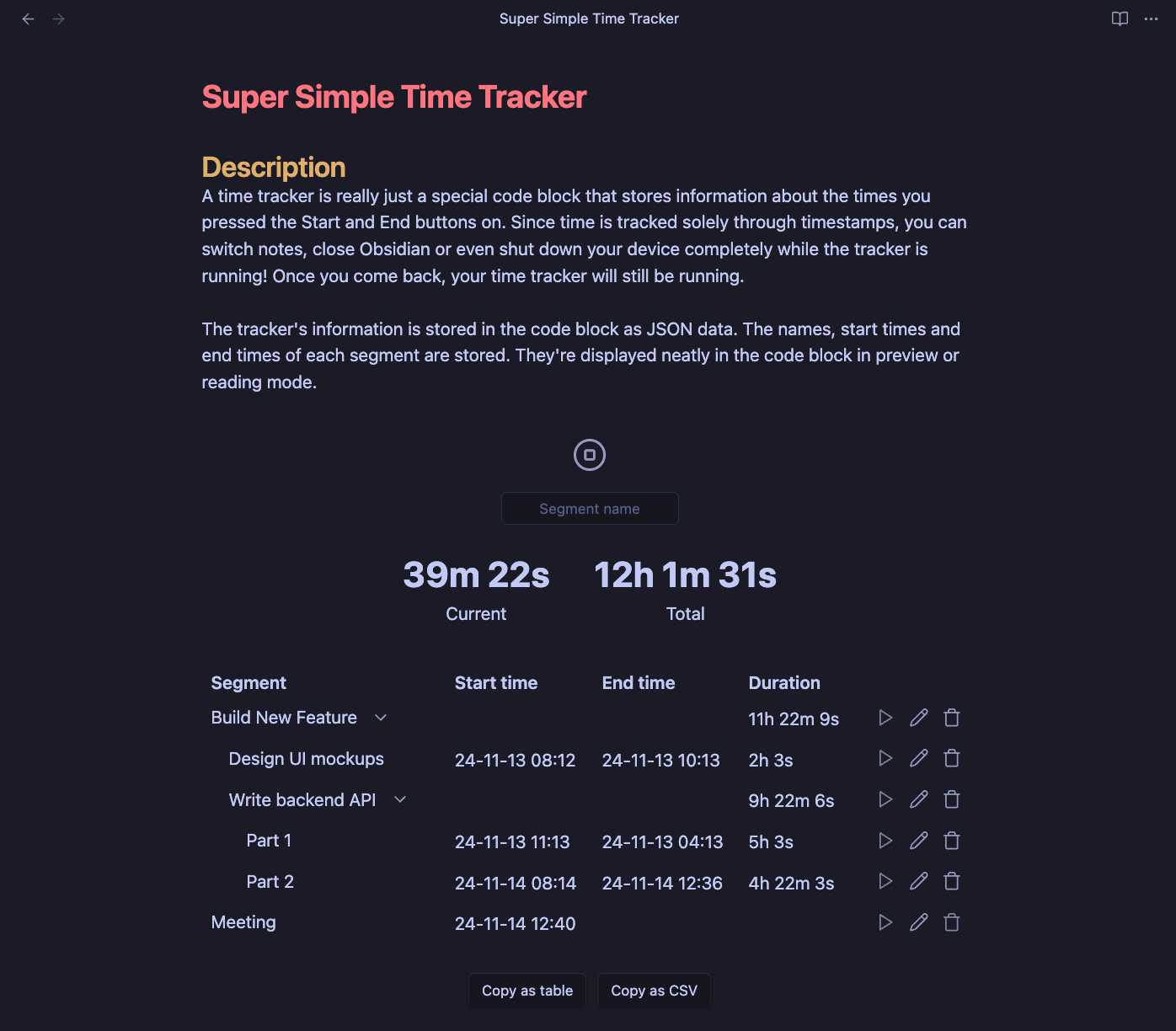
When switching to live preview or reading mode, you will now see the time tracker you just inserted! Now, simply name the first segment (or leave the box empty if you don't want to name it) and press the Start button. Once you're done with the thing you were doing, simply press the End button and the time you spent will be saved and displayed to you in the table.
Need help using the plugin? Feel free to join the Discord server!
🔍 JavaScript API
Super Simple Time Tracker has a public API that can be used with plugins like Dataview. The API can be accessed using the following JavaScript code based on Obsidian's app object:
app.plugins.plugins["simple-time-tracker"].api;
The following is a short example that uses DataviewJS to load all trackers in the vault and print the total duration of each tracker. You can also find this example in action in the test vault.
// get the time tracker plugin api instance
let api = dv.app.plugins.plugins["simple-time-tracker"].api;

for (let page of dv.pages()) {
    // load trackers in the file with the given path
    let trackers = await api.loadAllTrackers(page.file.path);

    if (trackers.length)
        dv.el("strong", "Trackers in " + page.file.name);

    for (let { section, tracker } of trackers) {
        // print the total duration of the tracker
        let duration = api.getTotalDuration(tracker.entries);
        dv.el("p", api.formatDuration(duration));
    }
}
A full list of the functions exposed through the API can be found in the code. Proper documentation for the API will be added in the future.
🧑🤝🧑 Companion Plugins
- Time Tracker Statistics is a companion plugin by the-quotient which provides daily and monthly statistics views across your whole vault based on your Super Simple Time Tracker data.
- Dataview and its JavaScript API DataviewJS can be used to access the Super Simple Time Tracker API, which allows extracting and modifying tracker data through code.
👀 What it does
A time tracker is really just a special code block that stores information about the times you pressed the Start and End buttons on. Since time is tracked solely through timestamps, you can switch notes, close Obsidian or even shut down your device completely while the tracker is running! Once you come back, your time tracker will still be running.
The tracker's information is stored in the code block as JSON data. The names, start times and end times of each segment are stored. They're displayed neatly in the code block in preview or reading mode.
🙏 Acknowledgements
If you like this plugin and want to support its development, you can do so through my website by clicking this fancy image!