Time Tracker Statistics
 the-quotient1k downloads
Provides statistics views across your whole vault for the Super Simple Time Tracker by Ellpeck.
- Overview
- Scorecard
- Updates11
This is a statistics companion plugin for the Super Simple Time Tracker by Ellpeck. It collects the time tracked in all notes of your vault and summarises it in daily, weekly, monthly and yearly reports: time per category, per entry and per note, compared against your daily targets. An interactive dashboard shows the same data as charts.
- Summarises tracked time without the need for custom scripts or coding.
- Identifies the relevant period from the name of the note that contains the code block:
- Daily:
YYYY-MM-DD(e.g.,2026-02-01.md). - Weekly:
YYYY-Www(e.g.,2026-W05.md). - Monthly:
YYYY-MM(e.g.,2026-02.md). - Yearly:
YYYY(e.g.,2026.md).
- Daily:
- Automatically groups tracked entries into categories based on file tags defined in your settings.
- You can add a target time for a category and the reports will show you how much you deviated from it. Weekends are excluded from the target automatically, and you can mark public holidays, vacation days and sick days, either in the dashboard or in the monthly note, so the deviation calculation takes them into account.
- Optionally shows the dashboard charts below the tables in your notes.
Different Views
All code blocks have a refresh button next to their title. Entries are assigned to the day on which they were started, in your local time zone.
Targets are only counted up to today, so the deviation of the current week, month or year shows where you stand right now instead of counting days that haven't happened yet.
1. Daily Statistics
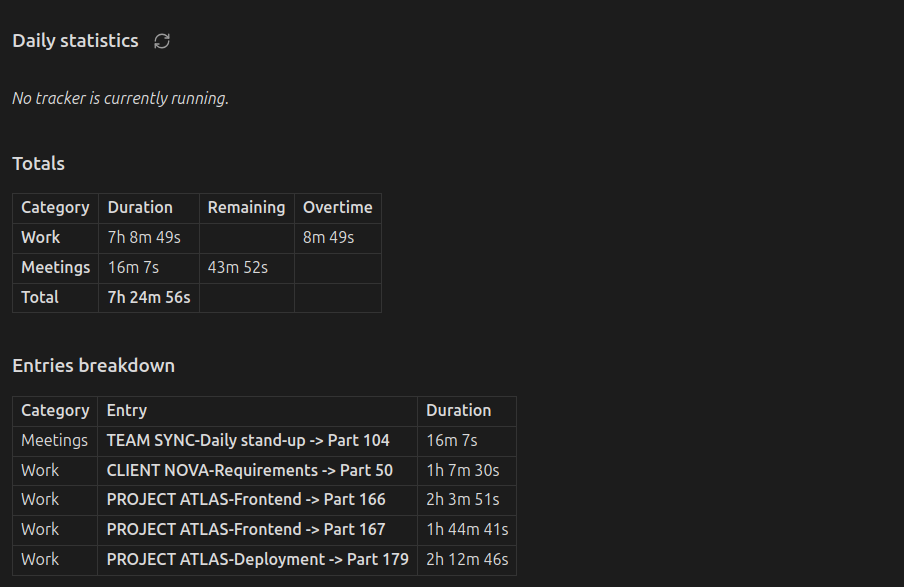
Provides a summary of all time tracked for a specific calendar day.
- Command:
Insert daily statistics. - Code Block:
simple-time-tracker-statistics-day.
Includes:
- Running Tracker: Displays a link to any active tracker found in the vault.
- Totals Table: Duration, remaining time and overtime per category based on your set targets, and the deviation. On weekends and on days marked as off, vacation or sick, there is no target, so all work time counts as overtime. With the daily target period set to Week so far, a Week so far column is added and remaining time, overtime and deviation cover the week up to that day.
- Entries Breakdown: A detailed list of every entry, showing the source file and sub-entry hierarchy.
2. Weekly Statistics
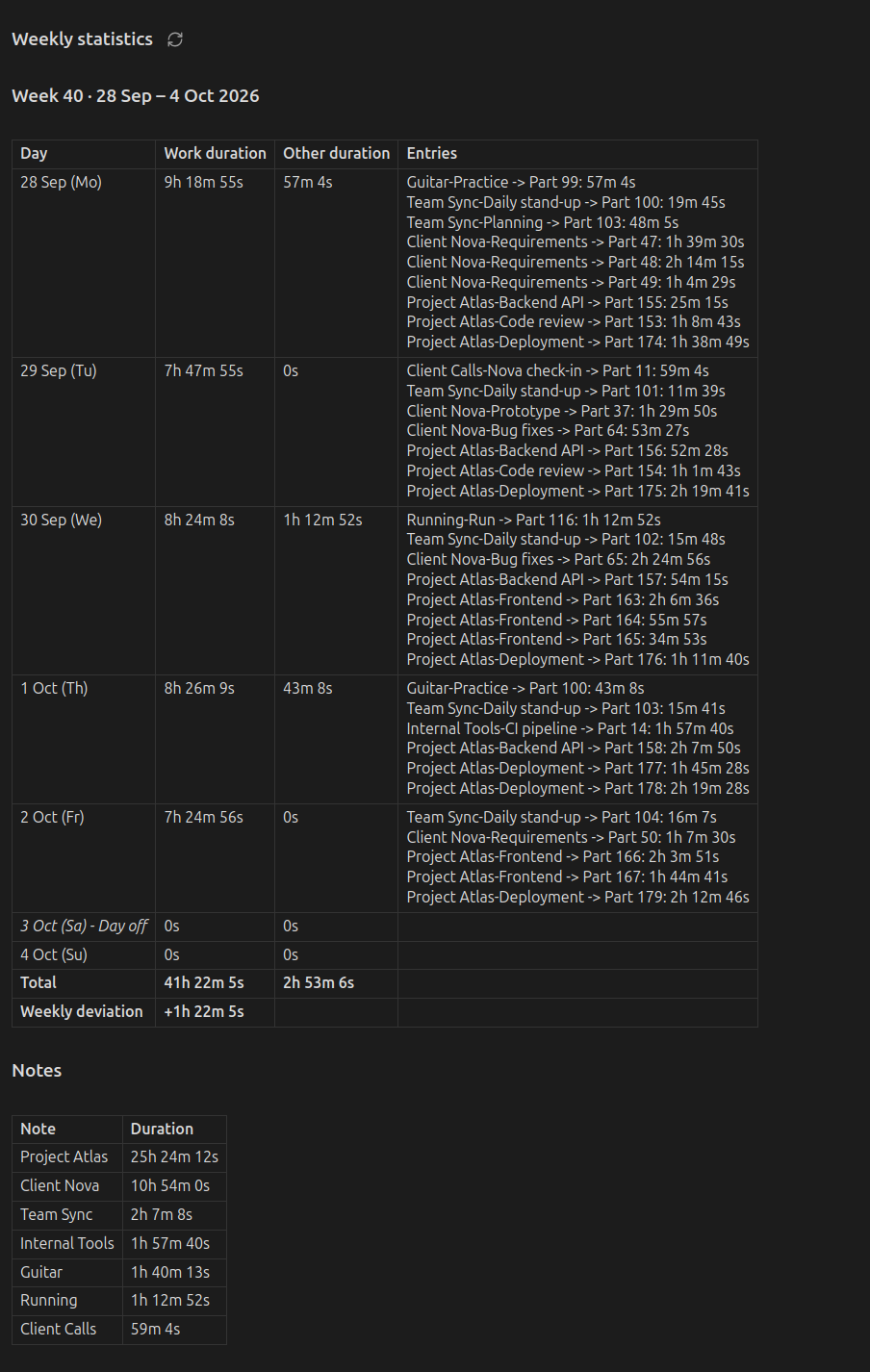
All days of one week with their work time, other time and entries.
- Command:
Insert weekly statistics. - Code Block:
simple-time-tracker-statistics-week.
Includes:
- Week Table: One row per day, marked days off included, with the weekly total and deviation.
- Notes: The time per note in that week.
Weeks are numbered according to the First day of week setting: ISO weeks (week 1 contains 4 January) when weeks start on Monday, US weeks (week 1 contains 1 January) when they start on Sunday.
3. Monthly Statistics
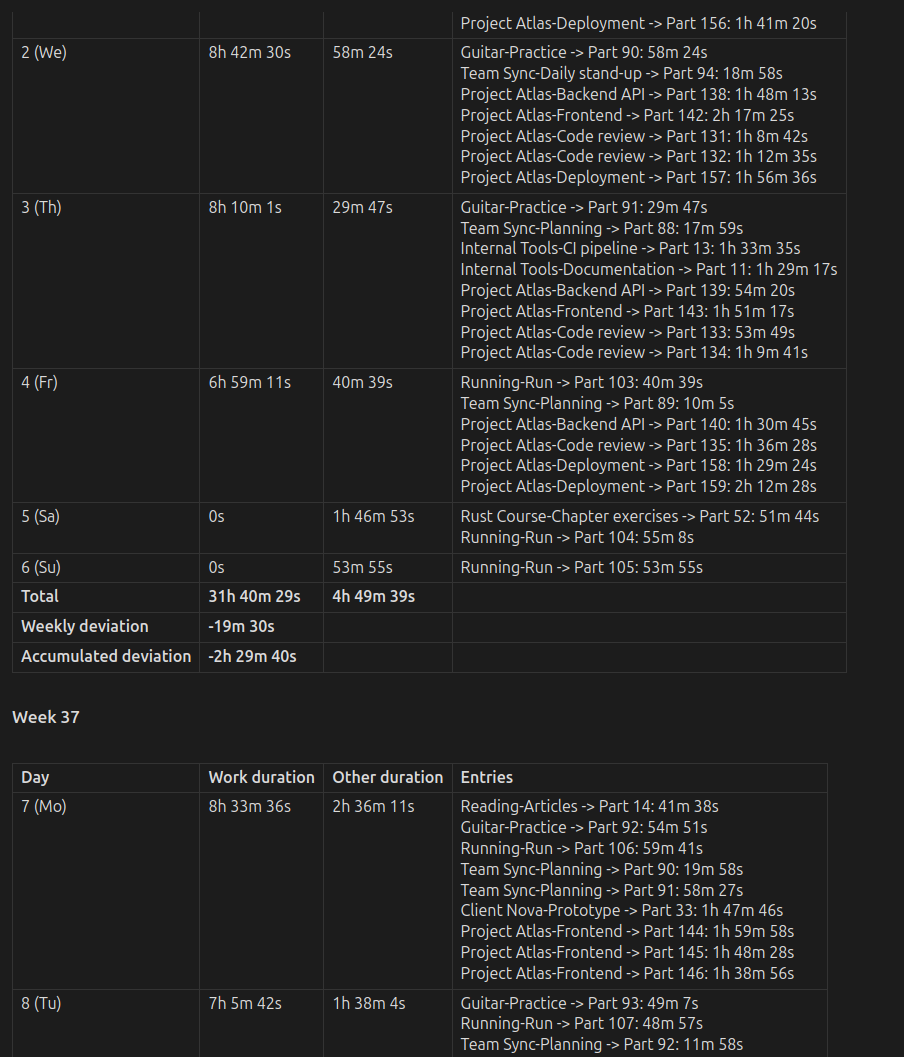
A comprehensive report grouping entries by week and calculating long-term time balances.
- Command:
Insert monthly statistics. - Code Block:
simple-time-tracker-statistics-month.
Includes:
- Carry-Over: The deviation carried over from the previous month (see Automatic Carry-Over).
- Week Tables: One table per week with the weekly deviation and the accumulated deviation of the month.
- End of Month Summary: The deviation of the month itself and the total accumulated deviation including the carry-over, the number of days off, vacation and sick days, and the time per note.
The monthly note also stores your days off, see Managing Time Off.
4. Yearly Statistics
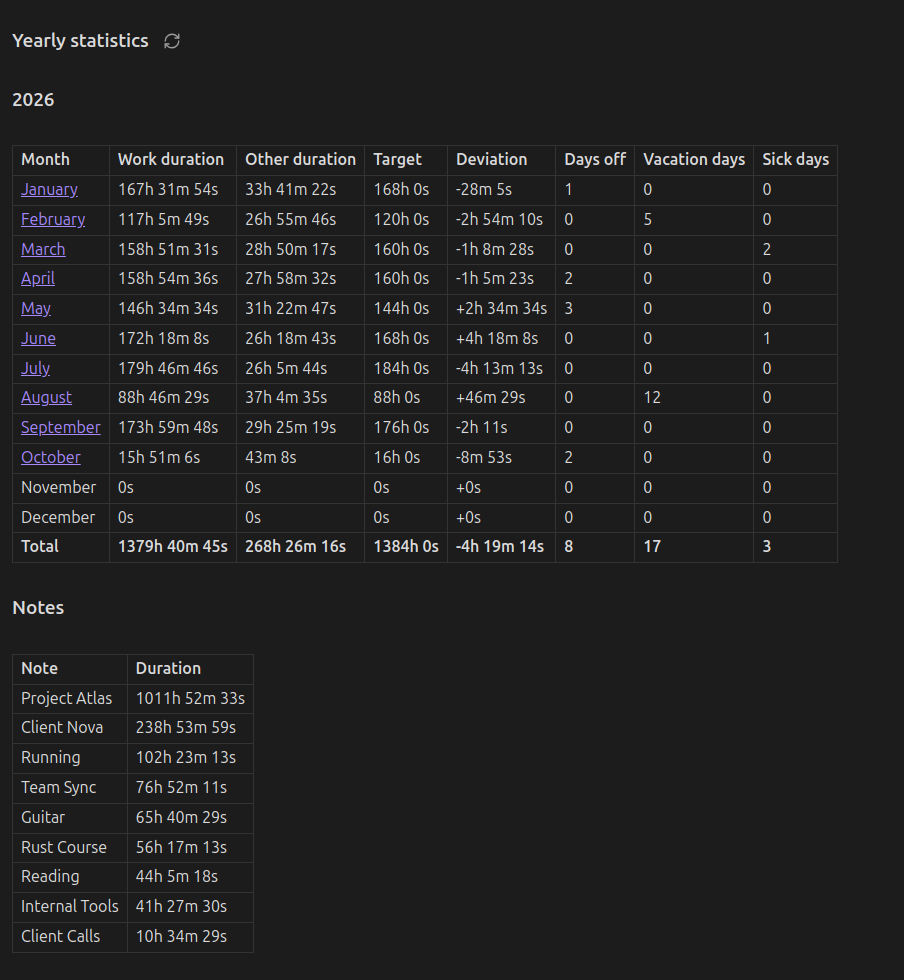
An overview of the whole year, one row per month.
- Command:
Insert yearly statistics. - Code Block:
simple-time-tracker-statistics-year.
Includes:
- Month Table: Work time, other time, target, deviation and the number of days off, vacation and sick days per month, with a link to each monthly note.
- Notes: The time per note in that year.
The yearly deviation covers that year only. The monthly notes carry the balance over from one year to the next.
Charts in Notes
Turn on Show charts in notes in the settings to add the dashboard charts (heatmap, bar chart and distribution) below the tables of every code block. The tables stay at the top. Clicking a day or month in a chart opens it in the dashboard. The option is off by default.
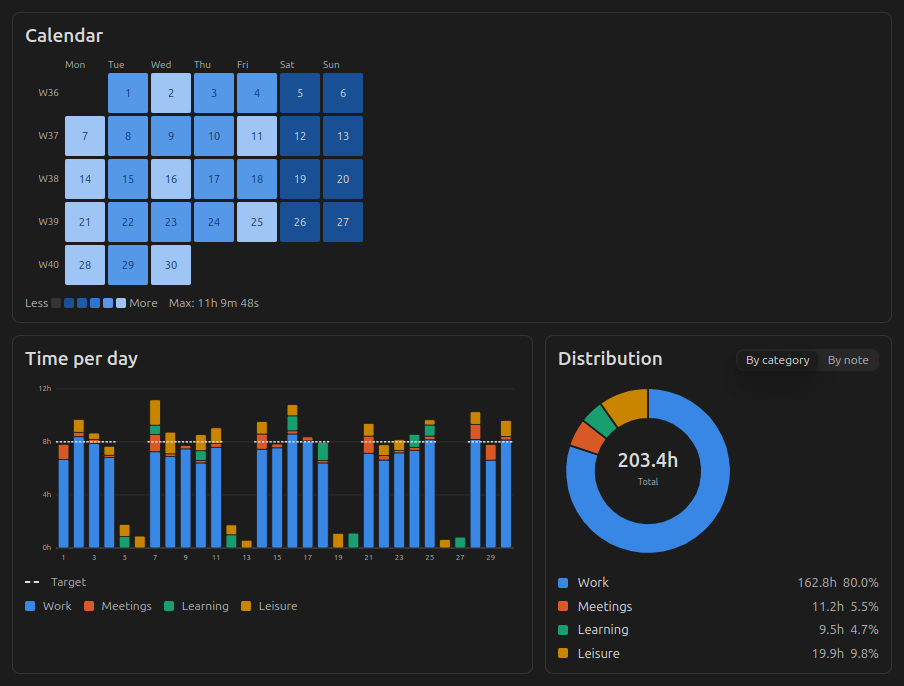
5. Statistics Dashboard
A popup window with interactive charts for the whole vault. It works independently of any note, so you can use it alongside the code blocks or instead of them.
- Command:
Open statistics dashboard(also available from the ribbon icon) opens the Day view. To jump straight to a view, useOpen statistics dashboard: year view,… month view,… week viewor… day view. - Views: Year, Month, Week and Day. Navigate with the arrow buttons, the left/right arrow keys or Today.
Each view includes:
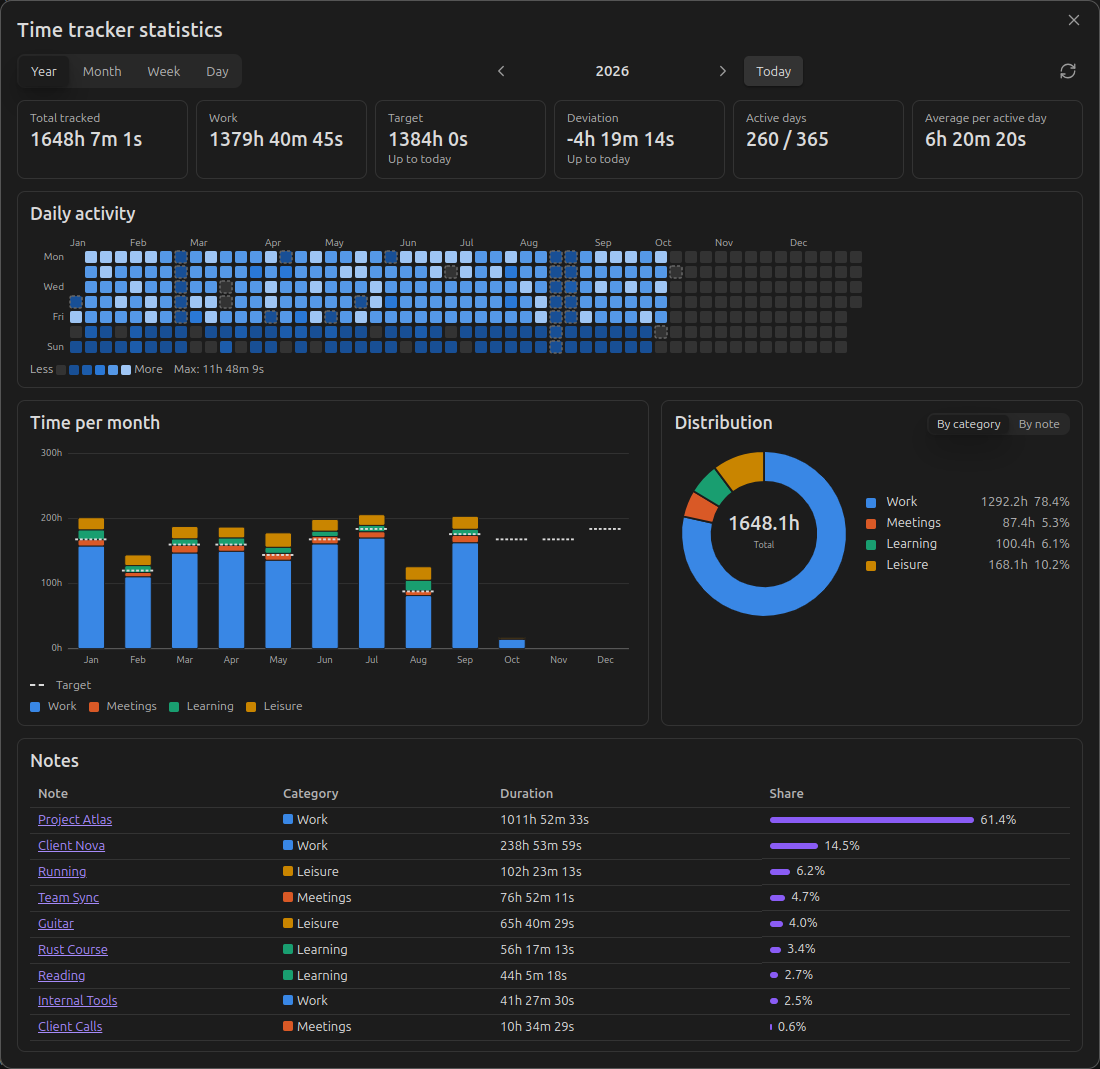
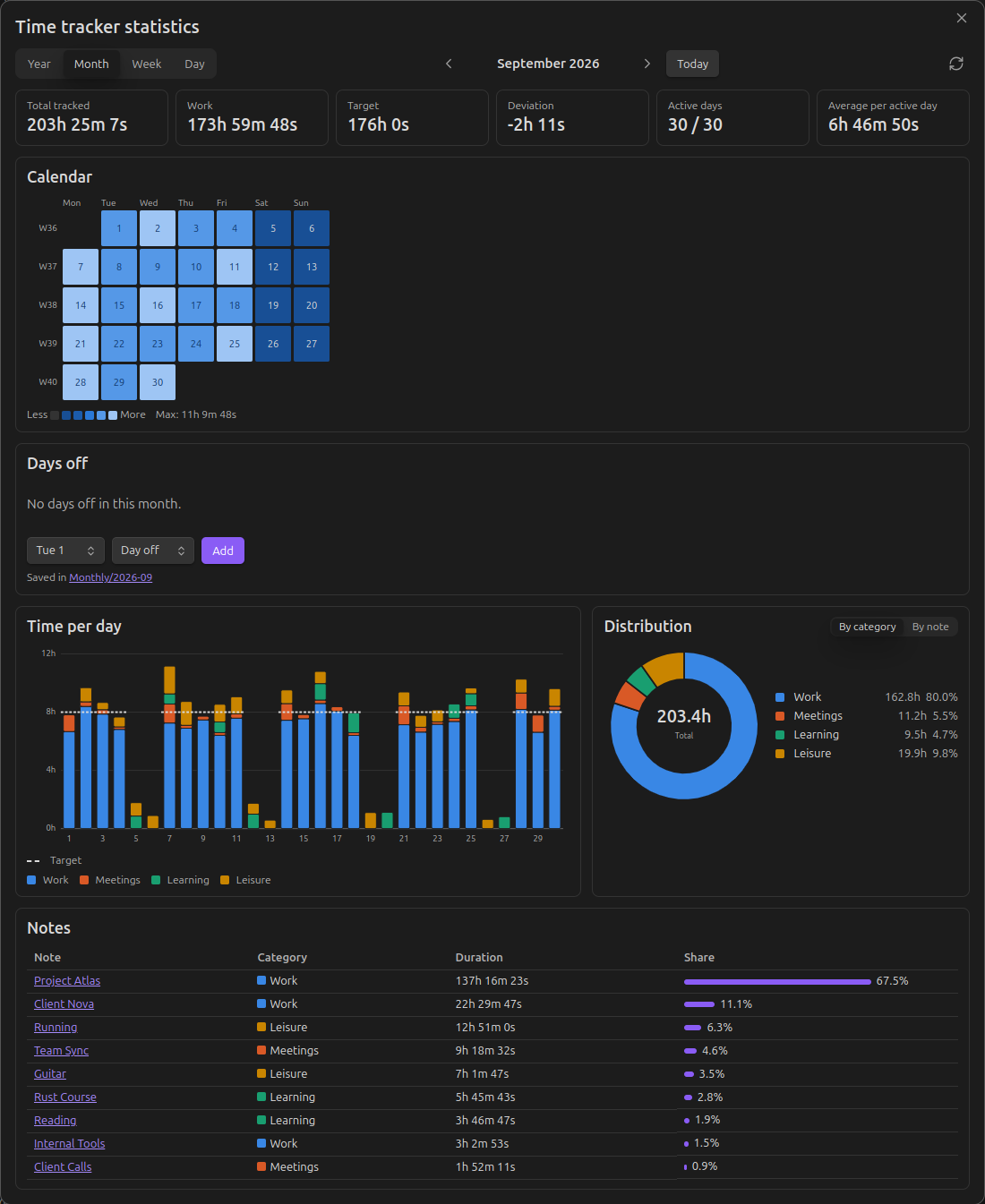
- Summary tiles: Total tracked time, work time, target, deviation of the period, accumulated deviation including the carry-over from the monthly notes, active days and daily average. For the current period, target and deviation are counted up to today.
- Heatmap: A calendar of daily totals (Year, Month), or the time tracked per hour (Week: per day, Day: per category). Days off are outlined and empty weekend days are greyed out.
- Bar chart: Time per month, day or hour, stacked by category, with the daily target marked. Weekends have a grey background.
- Distribution: A donut chart of the tracked time by category or by note.
- Table: Time per note, or every entry of the day in the Day view.
- Days off: Mark a day as workday, day off, vacation or sick in the Day view, add and remove days off in the Month view, or see the number of days off of the year, and the vacation days left, in the Year view. Plan year in the Month and Year views opens the year planner (see Managing Time Off).
Click a day in a heatmap or bar chart to open it in the Day view, or a month bar in the Year view to open that month. Hourly charts split entries by clock time, so an entry that runs past midnight appears on both days.
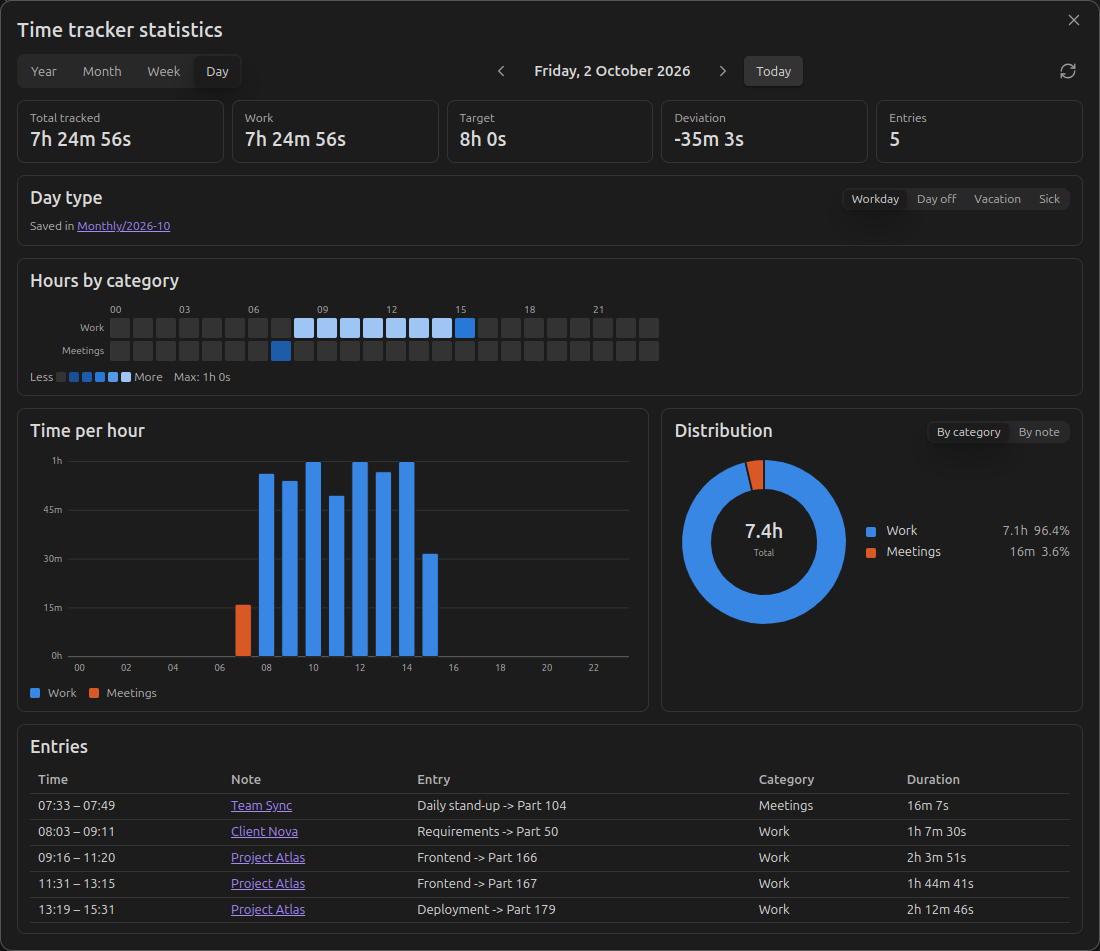
Day view
Hours by category, time per hour and every entry of the day.
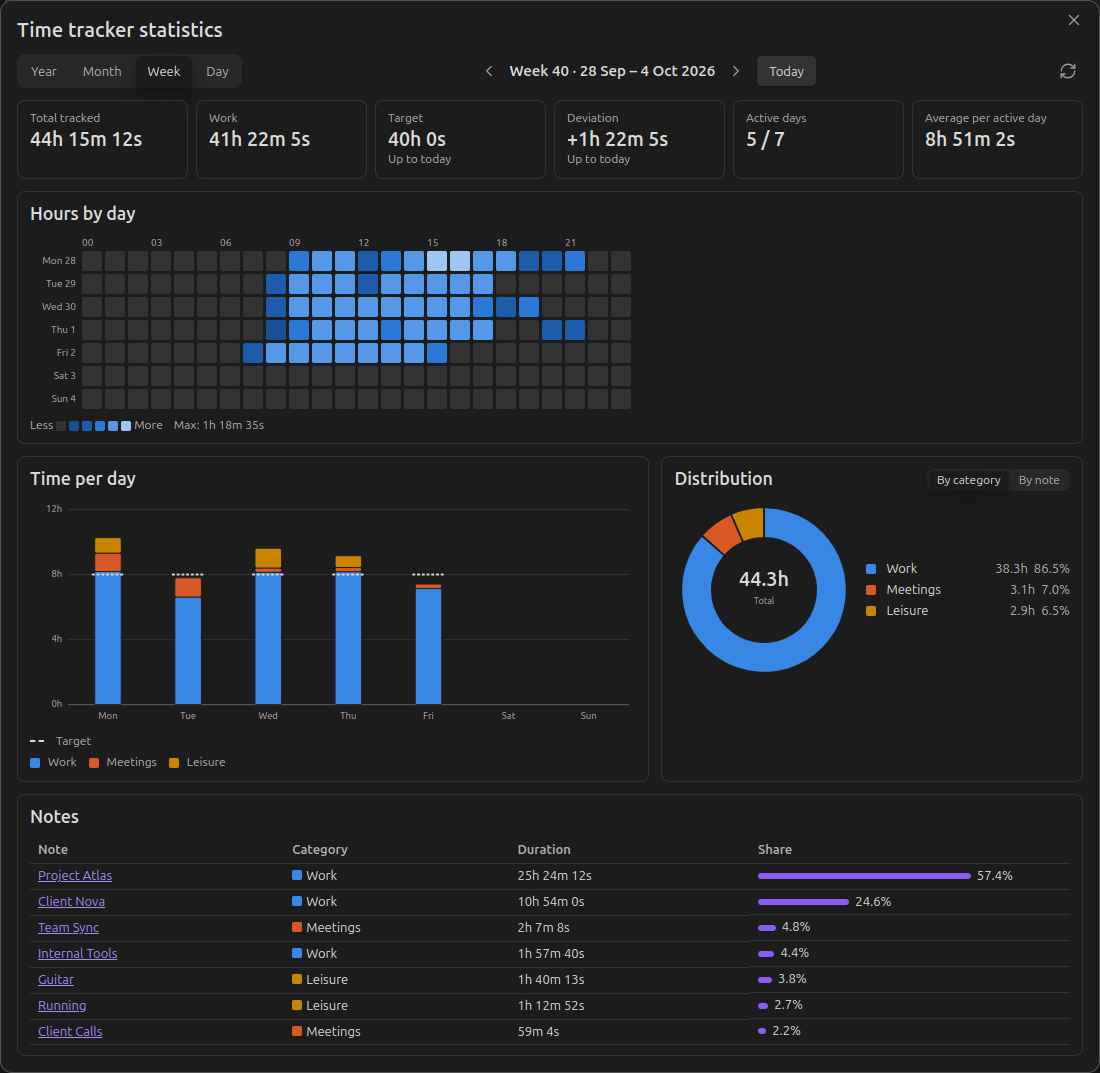
Week view
An hour-by-day heatmap shows when you worked; the bars compare each day with the daily target.
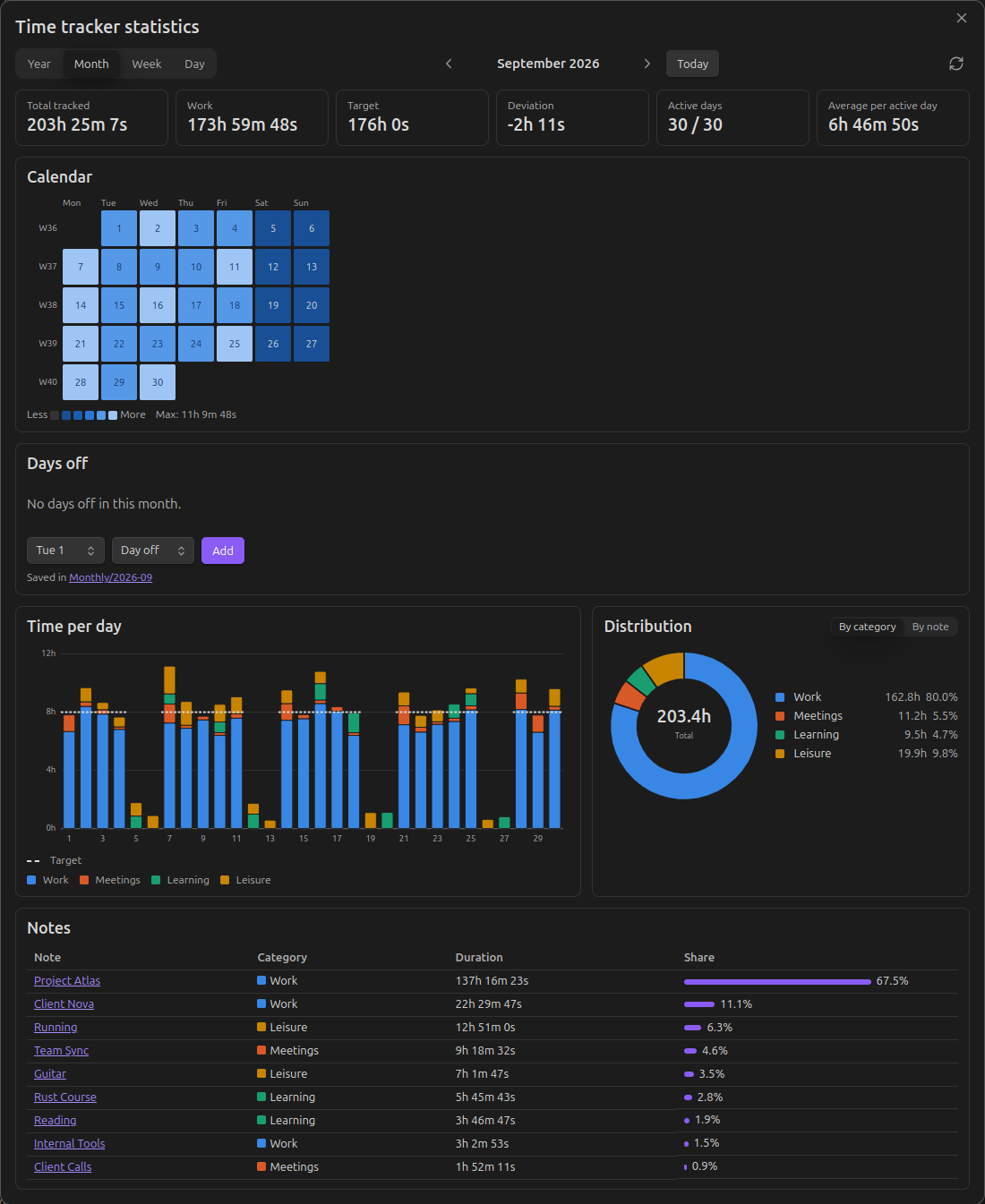
Month view
A calendar heatmap of daily totals. Hover over any cell or bar for details.
Year view
A contribution-style heatmap of the whole year and the time per month against the monthly target.
Distribution by note
Managing Time Off
The daily work target only applies from Monday to Friday. Saturdays and Sundays never add to the target. You can exclude further days from your standard work obligations to keep your deviation accurate.
Days off are stored in the code block of the monthly note (YYYY-MM.md) and apply to all views: the daily, weekly, monthly and yearly code blocks as well as the dashboard. There are two ways to set them:
- In the dashboard: Use the Day type card in the Day view or the Days off card in the Month view. The change is written to the monthly note right away. If the month has no note yet, one is created in the Monthly notes folder set in the settings, with
deviation = auto. - In the year planner: Run
Plan days off for the yearor click Plan year in the Month or Year view of the dashboard. It shows the twelve months of a year. Choose Day off, Vacation, Sick or Workday and click or drag over the days to mark them; marking a day again with the same type makes it a workday. Weekends are shaded and skipped. With a region set under Public holidays in the settings, the holidays of that region are outlined and Fill public holidays marks those on weekdays as days off; days already marked as vacation or sick keep their type. With Vacation days per year set, the planner and the Year view show how many vacation days are left; with Carry over vacation days on, the days left at the end of a year are added to the next year. The changes are written to the monthly notes when you click Save, with a new note for a month that has none; Cancel or closing the planner discards them. - In the code block: Edit the lists of the monthly statistics block directly.
A day can only have one type. Setting a new type replaces the old one.
Configuration Parameters
| Parameter | Type | Description |
|---|---|---|
deviation |
auto | number |
Deviation carried over from the previous month. auto calculates it from the previous month's note (see below). A number (in milliseconds) sets it manually, e.g. copied from the Total accumulated deviation (ms) row of the previous month's summary. |
vacationDays |
number[] |
Days of the month to be excluded from work targets (e.g., [1, 2, 3]). |
sickDays |
number[] |
Dates marked as sick leave; reduces the work target. |
daysOff |
number[] |
Public holidays or other non-working days. Weekends don't need to be listed. |
Automatic Carry-Over
With deviation = auto (the default for newly inserted blocks and for notes created by the dashboard), the plugin looks for the previous month's note by its file name (e.g. 2026-09.md for 2026-10.md) and uses that month's total accumulated deviation as the starting value. The link to the source note is shown above the first week.
- If the previous note also uses
auto, the plugin keeps going back month by month. - The chain stops at the first note with a numeric
deviation, or at the first month without a note (which counts as0). - Past months are recalculated with your current category targets. If your targets changed, set a numeric
deviationin the first month with the new targets to freeze the earlier values.
Settings
Categories
To make the statistics meaningful, map your vault's tags to categories. The plugin comes pre-configured with two default categories: Work (target 08:00:00) and Leisure (target 00:00:00).
- Define a Category: Give it a name.
- Assign Tags: Add the tags you use to indicate the files associated with the category. By default, Work looks for
#workand Leisure looks for#leisure. Notes without a matching tag are grouped as Other. - Set Targets: Enter a target in
HH:mm:ssformat and choose whether it applies per day or per week. If left blank, the target defaults to00:00:00. A weekly target is spread evenly over the five weekdays, so20:00:00per week equals04:00:00per day, and a day off, vacation or sick day reduces the week by one fifth. - Work Tracking: Every category with a target above
00:00:00counts as work, and so does a category without a target that fills other targets (see Target Rules). The daily target is the sum of these targets. All other categories are shown as "Other duration".
Target Rules
Turn on Target rules to let the time of one category fill the target of other categories. The option is off by default and hides the rules; turning it off again ignores them without deleting them. A category can only fill categories with a target, but it doesn't need a target itself.
For each category, choose the categories it fills. Its time first fills their remaining target, in the chosen order, and only the time left counts for its own target. Example with the categories Duty (#work/duty, target 04:00:00) and Qualification (#work/qualification, target 04:00:00), where Qualification fills Duty:
| Tracked duty | Tracked qualification | Duty | Qualification |
|---|---|---|---|
| 2h | 5h | full (2h filled by qualification) | 1h remaining |
| 4h | 5h | full | 1h overtime |
| 5h | 2h | 1h overtime | 2h remaining |
So duty only gets overtime from duty time, and qualification only once both targets are full.
A category without a target that fills others, e.g. Tool development filling Duty, then Qualification, has no target of its own: its time reduces the remaining target of the categories it fills, and only the time left after they are full counts as overtime. Such a category counts as work time. Recording more duty later moves the qualification time back to its own target. The rules change the remaining time and overtime per category in the daily statistics; the daily target and the deviation stay the same, since they count all work time together.
Daily Target Period
By default, the remaining time, overtime and deviation in the daily statistics only cover that day. Set Daily target period to Week so far to calculate them from the first day of the week up to that day instead. The target is the daily target times the target days of the week so far, and the target rules are applied to the time of the whole week so far. This suits targets that only need to balance out over the week, e.g. duty on some days and qualification on others. Combined with weekly category targets, e.g. 20:00:00 duty and 20:00:00 qualification per week, the daily statistics on Friday compare the week with the full 20 hours each. The Target and Deviation tiles of the dashboard's Day view follow the same setting.
Other Settings
| Setting | Default | Description |
|---|---|---|
| First day of week | Monday | Start of the week in the weekly reports and the dashboard. Also decides how weeks are numbered (ISO or US). |
| Monthly notes folder | Vault root | Where the dashboard creates new monthly notes. Existing monthly notes are found anywhere in the vault. |
| Public holidays | None | Region whose public holidays the year planner outlines and can mark as days off: Germany nationwide or one of its states. Computed in the plugin, without a network request. Holidays of only parts of a state (Corpus Christi in parts of Saxony and Thuringia, Assumption Day in parts of Bavaria) are not included. |
| Vacation days per year | Empty | Your yearly vacation allowance. The year planner and the Year view show the vacation days left. |
| Carry over vacation days | Off | Adds the vacation days left at the end of a year to the next year's allowance, e.g. 6 of 35 (30 + 5 carried over) · 29 left. Days taken beyond the allowance reduce the next year's. Turning it on shows First year counted (the carry-over starts there, default the current year) and Days carried into the first year. |
| Show charts in notes | Off | Adds the dashboard charts below the tables of the code blocks. |
| Target rules | Off | Shows the target rules and applies them. |
| Daily target period | Day | Whether the daily statistics compare a day with its own target or the week so far with its target. |
Prerequisites
- Simple Time Tracker: Required for the underlying data and API.
- Dataview: Required for the plugin to scan and aggregate data.
Network Use
After an update to a new major version (e.g. 2.0.0), the plugin fetches that release's notes once from the GitHub API (api.github.com) to show them in a notice. No other data is sent or received.