Search...Search plugins and themes...
⌘K
Sign in
  • Get started
  • Download
  • Pricing
  • Enterprise
  • Account
  • Obsidian
  • Overview
  • Sync
  • Publish
  • Canvas
  • Mobile
  • Web Clipper
  • CLI
  • Learn
  • Help
  • Developers
  • Changelog
  • About
  • Roadmap
  • Blog
  • Resources
  • System status
  • License overview
  • Terms of service
  • Privacy policy
  • Security
  • Community
  • Plugins
  • Join the community
  • Discord
  • Forum / 中文论坛
  • Merch store
  • Brand guidelines
Follow us
DiscordTwitterBlueskyThreadsMastodonYouTubeGitHub
© 2026 Obsidian

Text to Speech

Johannes TheinerJohannes Theiner40k downloads

Hear your notes.

Add to Obsidian
  • Overview
  • Scorecard
  • Updates15

Plugin for Obsidian

Features:

  • Start playback for note from statusbar and ribbon
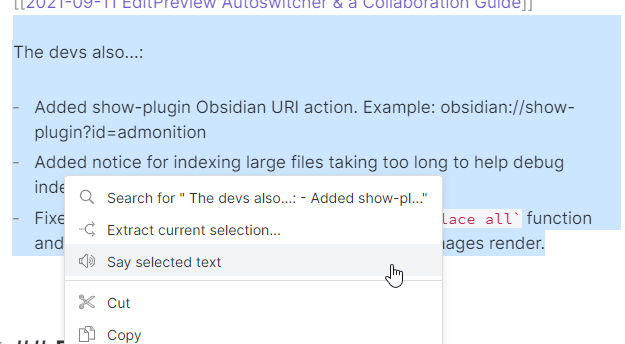
  • Only speaking selected text in edit mode: Selection Demo
  • usable with other plugins (currently RSS Reader)

You can create language specific voices, the plugin will try to identify the language used. If it is not identified correctly you can overwrite this behaviour by having lang: {languageCode} in the Frontmatter. The language code can be seen in the settings and is a two letter ISO 639-1 code.

This plugin will NOT work on android due to this bug in the Webview.

Adding languages

This plugin uses the native API of your Operating System, to add a new language reference the documentation accordingly:

  • Windows 10
  • MacOS
  • iOS

Installing the plugin

  • Settings > Community plugins > Community plugins > Browse and search for Text to Speech

API

You can use this plugins API to add Text to Speech capabilities to your plugin.

This uses the @vanakat/plugin-api package.

You can find the API documentation here: API Documentation

const tts = pluginApi('tts');
await tts.say(title, text, language);//language is optional, use a ISO 639-1 code
tts.pause();
tts.resume();
tts.stop();
tts.isSpeaking();
tts.isPaused();
74%
HealthGood
ReviewSatisfactory
About
Play entire notes from the status bar or ribbon, or speak only selected text while editing. Detect language automatically and override it with lang: {languageCode} in frontmatter; use native OS voices (Android not supported) and expose a plugin API for other plugins.
Status barLanguagesAudio
Details
Current version
0.6.0
Last updated
5 months ago
Created
4 years ago
Updates
15 releases
Downloads
40k
Compatible with
Obsidian 1.11.1+
License
GPL-3.0
Report bugRequest featureReport plugin
Author
Johannes TheinerJohannes Theinerjoethei
joethei.xyz
GitHubjoethei
  1. Community
  2. Plugins
  3. Status bar
  4. Text to Speech

Related plugins

Japanese Manuscript Counter

Displays the number of Japanese characters and their equivalent in 400-character manuscript paper in real time. Provides an accurate count taking into account line breaks, paragraphs, and character breaks.

CJK Count

A word counter that only counts Chinese, Japanese and Korean (CJK) characters.

Day Planner (OG)

Day planning from a simple task list in a Markdown note (bare bones, preserves the features and behavior of the original plugin).

Colored Text

Color the selected texts.

Better Word Count

Count the words of selected text in the editor.

Plugin Update Tracker

Know when installed plugins have updates and evaluate the risk of upgrading.

Reading Time

Add the current note's reading time to the status bar.

Workspaces Plus

Quickly switch and manage workspaces.

Completed Task Display

Controls for displaying or hiding completed tasks.

Dictionary

A multilingual dictionary that shows word definitions in the sidebar and popover synonyms.