Media Extended
 Aiden Liu384k downloads
Integrate, manage video or audio directly in your notes, with enhanced playback and timestamp support. (Closed source)
- Overview
- Scorecard
- Updates137
Media Extended
A Media Integration Plugin for ObsidianTransform your Obsidian into a powerful video note-taking tool.
[!WARNING] License Change: Future releases of v4 will be closed source. The original codebase up to version 3 remains open source under the MIT license and can be found in the
v3branch. For details, see v4 release notes
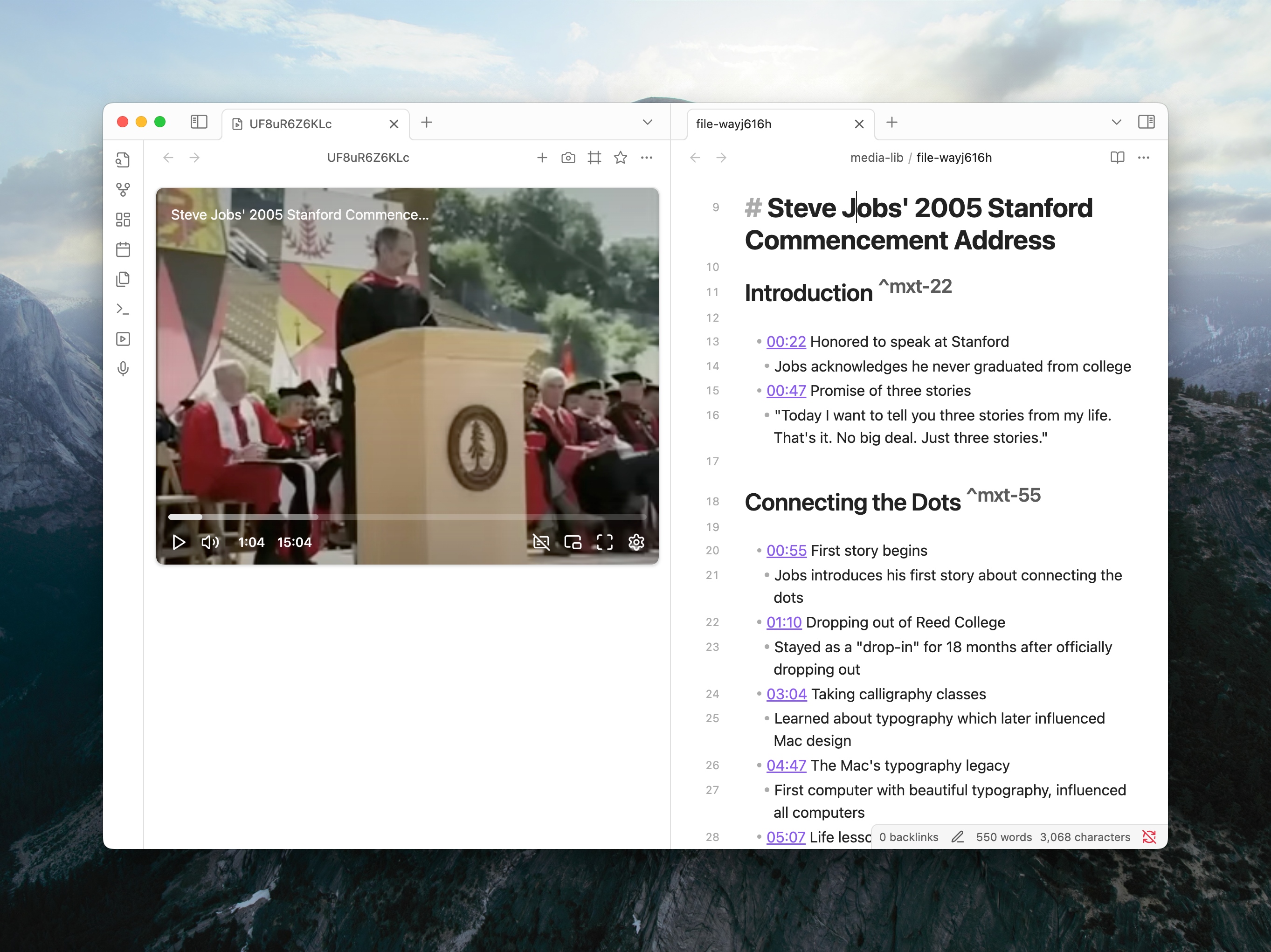
Overview
Media Extended is a plugin that integrates media playback and management into Obsidian. Whether you're a student, researcher, or content creator, this plugin makes it easier to incorporate, control, and reference audio and video materials directly within your digital notebook, preserving Obsidian's philosophy of plain-text, future-proof note-taking.
⭐ Key Features
| Feature | Description |
|---|---|
| Broad Media Support | Open and play local media files, remote URLs, and videos from services like YouTube and Vimeo directly in Obsidian. |
| Advanced Playback Control | Control playback with global hotkeys without leaving your notes. Pin a player to avoid tab clutter. |
| Timestamped Notes | Insert links to specific moments in your media with a single click or command. Clicking the timestamp jumps to the exact moment. |
| Screenshot Capture | Capture screenshots from videos, with options to crop, and embed them in your notes with a timestamp link back to the source. |
| Interactive Transcripts | Link transcripts (.srt, .vtt) to your media. Click to navigate, search the full text, and copy timestamped quotes. |
| Live Recording Timestamps | While using Obsidian's audio recorder, drop timestamp markers into your notes that automatically become clickable links when the recording is saved. |
| Customizable Templates | Tailor the format of inserted timestamps and screenshot links to fit your personal note-taking workflow. |
| Powerful Linking | Create media links and embeds with fragments for start/end times (#t=...), looping, and auto-play for precise control. |
📋 Disclosures
[!IMPORTANT] File System Access This plugin may access files outside of Obsidian vaults when you store media files on external drives, portable disks, or cloud storage services like OneDrive. This access is necessary to play media files that aren't stored directly within your vault.
[!IMPORTANT]
Network Access This plugin requires network access to stream media from online services (YouTube, Vimeo, etc.) and to connect to hosted WebDAV services for remote media storage. Network connections are only made to services you explicitly configure or link to.
🚀 Quick Start
Try it now: With Media Extended installed, copy the URL below and paste it into your browser's address bar to open Steve Jobs' 2005 Stanford Commencement Address directly in Obsidian.
obsidian://mx-open?url=https%3A%2F%2Fwww.youtube.com%2Fwatch%3Fv%3DUF8uR6Z6KLc
For detailed guides, please refer to the Documentation.
🆘 Support
If you have questions or issues about the plugin, please post them to our community: https://mx.aidenlx.site/community
For bug reports, use the GitHub Discussions Q&A category: https://github.com/aidenlx/media-extended/discussions/categories/q-a