Search...Search plugins and themes...
⌘K
Sign in
  • Get started
  • Download
  • Pricing
  • Enterprise
  • Account
  • Obsidian
  • Overview
  • Sync
  • Publish
  • Canvas
  • Mobile
  • Web Clipper
  • CLI
  • Learn
  • Help
  • Developers
  • Changelog
  • About
  • Roadmap
  • Blog
  • Resources
  • System status
  • License overview
  • Terms of service
  • Privacy policy
  • Security
  • Community
  • Plugins
  • Themes
  • Discord
  • Forum / 中文论坛
  • Merch store
  • Brand guidelines
Follow us
DiscordTwitterBlueskyThreadsMastodonYouTubeGitHub
© 2026 Obsidian

NerdFont Icon Picker

xavwexavwe2k downloads

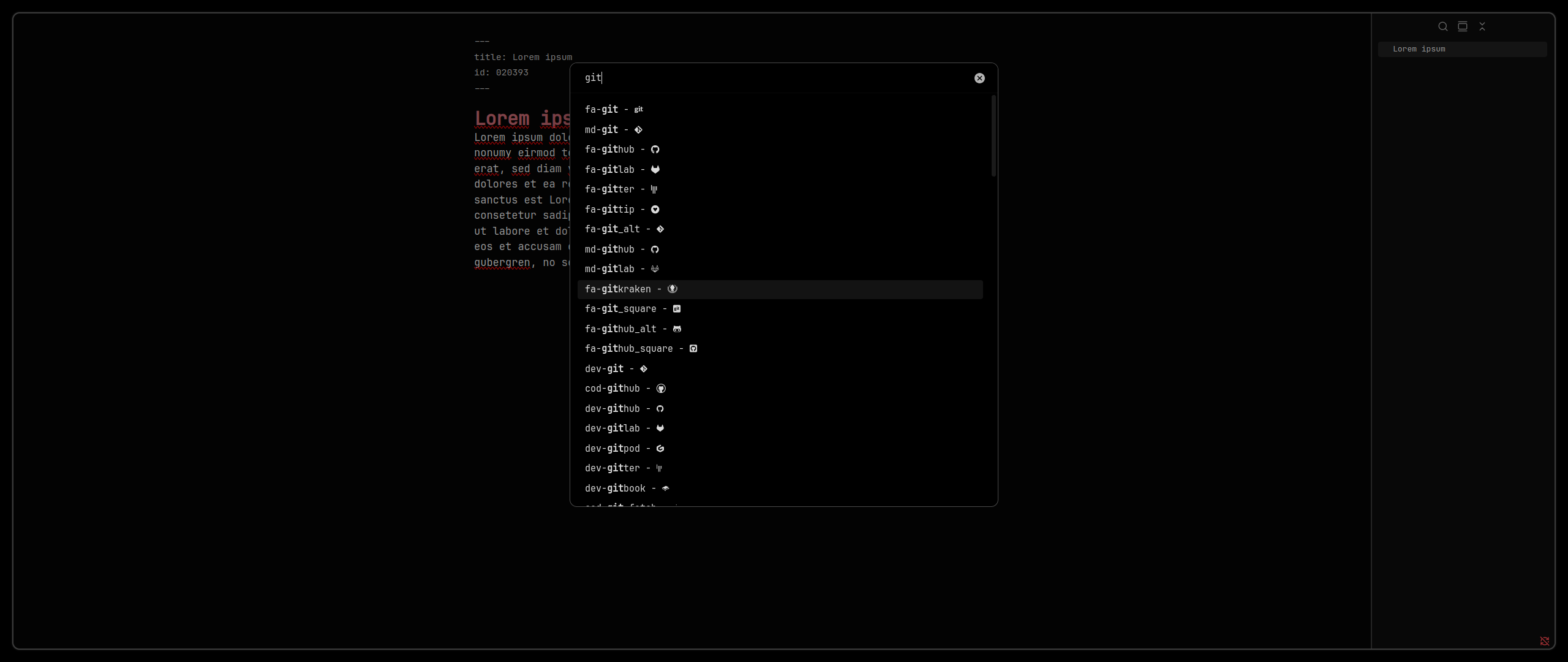
Search and insert nerdfont icons.

Add to Obsidian
  • Overview
  • Scorecard
  • Updates3

The NerdFont Icon Picker is a plugin for Obsidian. It adds an easy-to-use Nerd Font icon picker to Obsidian.

Requirements

  • you need a Nerd Font as your text and interface font

Without plugin

  • install Nerd Font
  • go to Settings > Appeareance > Font
  • set text and interface font to Nerd Font

With plugin

  • I recommend to use the Custom Font Loader for mobile support

Installation

Plugin Store (recommended)

  • search for Nerdfont Icon Picker

Using BRAT plugin

  • use BRAT plugin

Manual

  • download source code from latest release
  • unpack it into path/to/vault/.obsidian/plugins

Getting started

  • just use command palette or assign hotkey
  • have fun ;-)
75%
HealthGood
ReviewSatisfactory
About
Add a searchable Nerd Font icon picker to Obsidian for quick insertion of icons into notes and interface elements. Set a Nerd Font as your text and interface font to render icons correctly.
IconsFontsAppearance
Details
Current version
1.0.2
Last updated
9 months ago
Created
Last year
Updates
3 releases
Downloads
2k
Compatible with
Obsidian 0.15.0+
Platforms
Desktop, Mobile
License
MIT
Report bugRequest featureReport plugin
Author
xavwexavwe
www.xavwe.dev
GitHubxavwe
  1. Community
  2. Plugins
  3. Icons
  4. NerdFont Icon Picker

Related plugins

Minimal Theme Settings

Control the colors and fonts in Minimal Theme.

Link Favicons

See the favicon for a linked website.

Callout Manager

Easily create and customize callouts.

Inline Callouts

Add inline callouts/badges/icons to notes.

Iconize

Add icons to anything in Obsidian, including files, folders, and text.

Custom Icons

Enhance your workspace with customizable icons for documents and folders.

Hider

Hide interface elements such as tooltips, status bar, titlebar, and more.

Style Settings

Adjust theme, plugin, and snippet CSS variables.

Iconic

Customize your icons and their colors directly from the UI, including tabs, files & folders, bookmarks, tags, properties, and ribbon commands.

Lapel

Show the heading levels in the gutter of the editor.