
- Overview
- Scorecard
- Updates16
Customize metadata (property) entries icon.
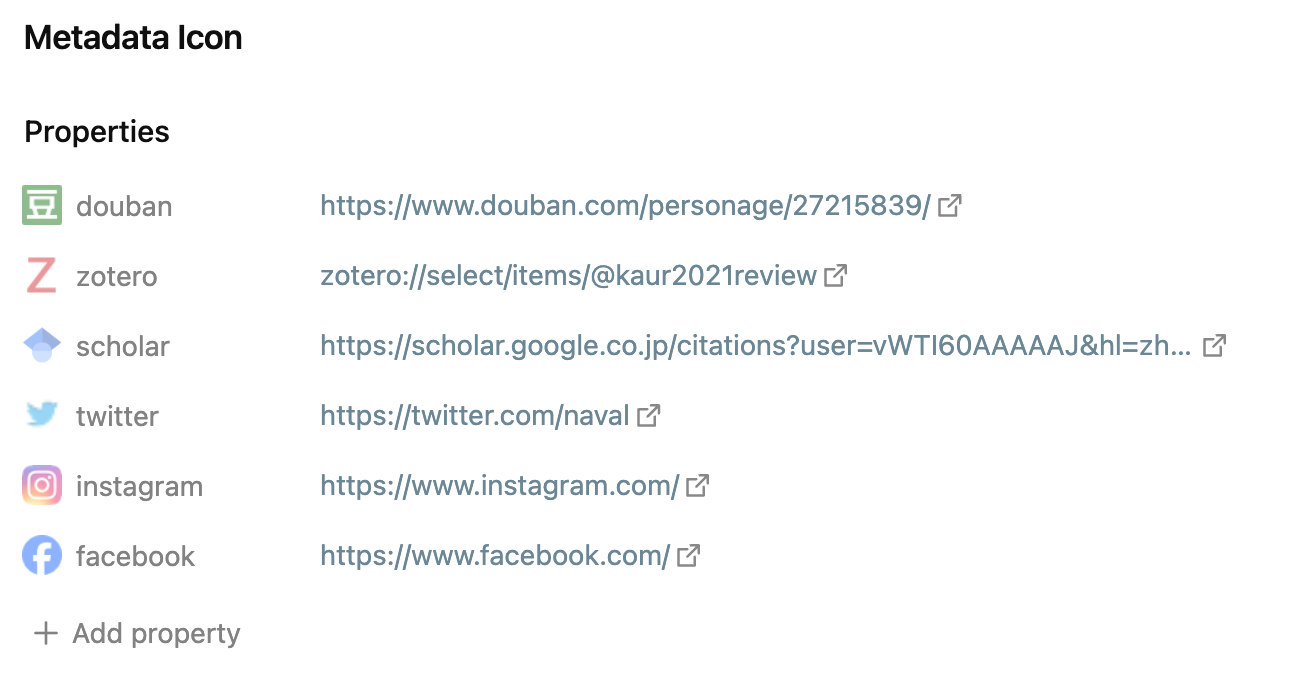
Links support online URLs, local file paths, and base64-encoded images.
- Online URLs: Must start with
http://orhttps://.- e.g.
https://www.facebook.com/favicon.ico.
- e.g.
- Local files: Can be a relative file path within the Obsidian vault, or a relative file path from the root directory of the computer.
- e.g.
.obsidian/svg/Benature.svg,D:/Figures/Benature.png,/Users/Benature/Pictures/Benature.jpg.
- e.g.
- Base64-encoded images: Must start with
data:.
Support
If you find this plugin useful and would like to support its development, you can sponsor me via Buy Me a Coffee ☕️, WeChat, Alipay or AiFaDian. Any amount is welcome, thank you!

Install
Install from plugin community
click to install, or:
- Open Obsidian and go to Settings > Community Plugins
- Search for
Metadata Icon - Click
Install
Install by BRAT Plugin
- First install BRAT Plugin:
- In BRAT Plugin, click
Add Beta plugin - Enter https://github.com/Benature/obsidian-metadata-icon
- Enable
Metadata IconinCommunity plugins
Manually install
- Download latest version in Releases
- Copy over
main.js,manifest.jsonto your vaultVaultFolder/.obsidian/plugins/metadata-icon/ - Reload plugins in
Community pluginsand enableMetadata Icon
How to build
git clone https://github.com/Benature/obsidian-metadata-iconclone this repo.npm iinstall dependenciesnpm run devto start compilation in watch mode.npm run buildto build production.
HealthFair
ReviewRisks
About
Customize metadata property icons across your vault to give fields visual cues and faster recognition. Assign icons using http/https URLs, relative or absolute local file paths, or data: base64-encoded images.Details
Current version
0.0.16
Last updated
2 years ago
Created
3 years ago
Updates
16 releases
Downloads
7k
Compatible with
Obsidian 0.15.0+
Platforms
Desktop, Mobile
License
MIT
Sponsor