Colored Bases Properties
 Rafaël Jafferal16k downloads
Color property lists and formula properties in Bases.
- Overview
- Scorecard
- Updates12
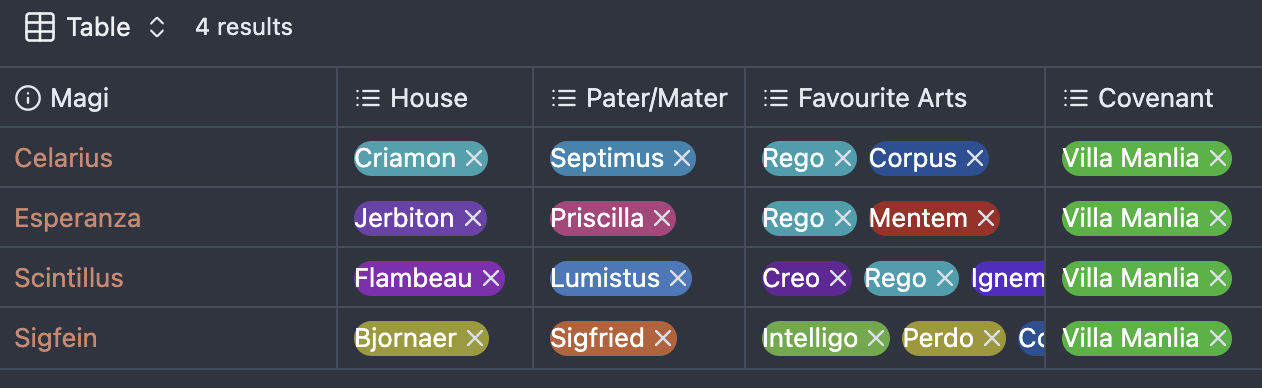
An Obsidian plugin that automatically detects and colors property values in Bases files, embedded bases, supporting list properties (multi-select pills), formula properties (rendered values), and inline tags.
Features
- Multiple Property Support: Colors list properties (multi-select pills) and formula properties (rendered values)
- Property Type Toggles: Enable/disable coloring for each property type independently
- Cross-Context Support: Works in Bases view, file properties pane, embedded bases, and markdown views
- Embedded Bases Support: Colors properties within embedded bases while respecting individual property type settings
- Inline Tags Support: Colors markdown tags (#tag) with automatic detection and consistent coloring
- Consistent Coloring: Generates consistent colors for each unique property value using a hash-based algorithm
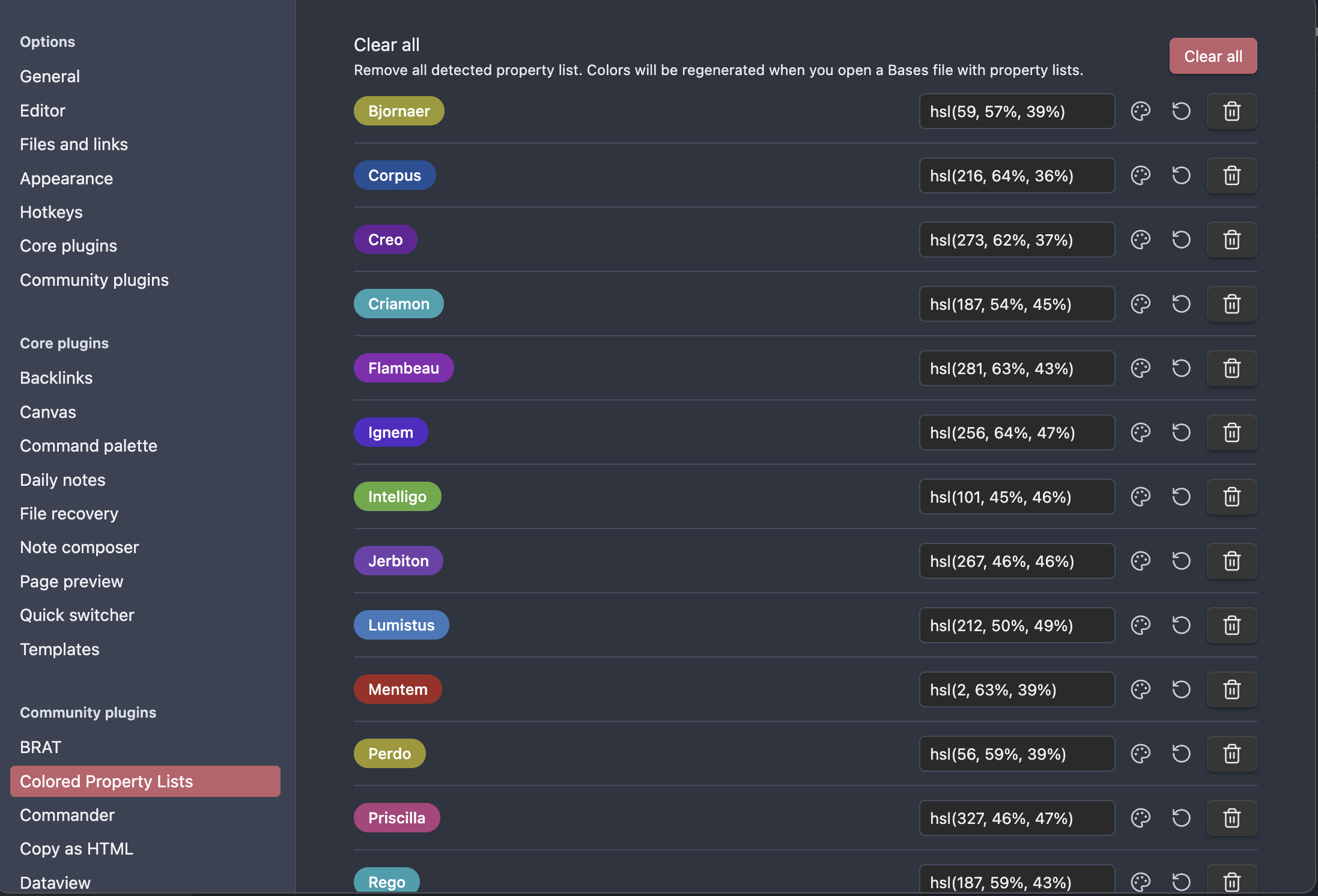
- Visual Settings: Clean settings interface with visual property previews showing actual colors
- Color Customization:
- Manual color entry in hex or HSL format
- Visual color picker with preview and OK/Cancel buttons
- Reset button to restore automatically calculated colors
- Real-time Updates: Colors update immediately when changed in settings
- Performance Optimized: Debounced processing to avoid performance issues during rapid typing
How it Works
- Detection: The plugin scans for:
.multi-select-pillelements (list properties).bases-rendered-valueelements (formula properties).internal-embed.bases-embedelements (embedded bases)span[class*="cm-tag-"]elements (inline tags)
- Color Generation: Each unique property value gets a consistent color generated from its text content using HSL color space
- Smart Processing: Respects individual property type settings (e.g., embedded bases only colors list properties if list property coloring is enabled)
- Styling: CSS rules are dynamically injected to color the properties with the generated or custom colors
- Settings Management: All detected values appear in the plugin settings where you can customize their colors
Settings
The plugin settings provide a clean interface for managing property colors:
Property Types
- Color list properties: Toggle to enable/disable coloring of list properties (enabled by default)
- Color formula properties: Toggle to enable/disable coloring of formula properties (disabled by default)
- Color embedded bases: Toggle to enable/disable coloring of properties within embedded bases (enabled by default, respects individual property type settings)
- Color inline tags: Toggle to enable/disable coloring of inline tags in markdown (enabled by default)
Property Colors
- Visual Previews: Each setting shows a colored property preview on the left side
- Color Input: Text field for manual color entry (supports both hex and HSL formats)
- Color Picker: Palette button opens a modal with visual color picker and live preview
- Reset Button: Restore the automatically calculated default color
- Delete Button: Remove a property value from settings
- Clear All: Remove all detected values (they'll be regenerated when you open Bases files)
Installation
Manual Installation
- Download the latest release from the releases page
- Extract the files to your vault's
.obsidian/plugins/obsidian-colored-property-lists/folder - Enable the plugin in Obsidian's Community Plugins settings
For Development
- Clone this repository into your vault's
.obsidian/plugins/folder - Run
npm installto install dependencies - Run
npm run buildto compile the plugin - Enable the plugin in Obsidian's settings
Development
npm run dev- Start compilation in watch modenpm run build- Build the plugin for productionnpm run lint- Run ESLint to check code quality
Credits
This plugin was inspired by the excellent Colored Tags plugin by Pavel Frankov, which provides similar functionality for tags.
The plugin was developed with the assistance of GitHub Copilot and Claude Sonnet 4.
License
This project is licensed under the GPL3 - see the LICENSE file for details.
Support
If you find this plugin useful, consider:
- ⭐ Starring the repository
- 🐛 Reporting issues or suggesting features
- 🤝 Contributing improvements
API Documentation
For Obsidian plugin development, see the official API documentation.
Release history
- 0.1.0 : first version published on Github
- 0.1.1 : correction brought to manifest.json to satisfy community plugin requirements
- 0.2.0 : added coloring of formula properties
- 0.3.0 : major refactoring and feature expansion
- Code Architecture: Refactored duplicate logic into reusable, configuration-driven system for easier maintenance and extensibility
- Embedded Bases Support: Added support for coloring properties within embedded bases (respects individual property type settings)
- Inline Tags Support: Added support for coloring inline markdown tags (#tag) with automatic detection and debounced processing to avoid partial tag coloring during typing
- Enhanced Character Support: Improved sanitization to preserve "+" and "-" characters in property names
- 0.3.1 : fixed color flickering issue during fast scrolling by preventing duplicate CSS rule processing for the same property within a single processing cycle
- 0.3.2 : additional logic improvements in the code
- 0.3.3 : added support for file.tags properties
- 0.3.4 : implements the observations from Obsidian reviewer. In particular, uses Obsidian native color picker in the settings.
- 0.3.5 : improves color picking validation in the settings.
- 0.3.6 : improves detection of scrolling event.
- 0.3.7 : addresses Obsidian community plugin review observations:
- Replaces
builtin-modulesnpm package with native Node.jsnode:moduleequivalent - Removes
!importantfrom CSS rules by using increased selector specificity (bodyprefix) - Adds GitHub artifact attestation for
main.jsandstyles.cssin the release workflow - Adds
package-lock.jsonlockfile for reproducible builds
- Replaces
HealthGood
ReviewPassed
About
Color property values in Bases files, embedded bases, and markdown views, including multi-select pills, formula-rendered values, and inline tags. Generate consistent hash-based colors per value, toggle property-type coloring, customize colors with visual previews or hex/HSL entry, and apply real-time, performance-optimized updates.Details
Current version
0.3.7
Last updated
5 months ago
Created
Last year
Updates
12 releases
Downloads
16k
Compatible with
Obsidian 0.15.0+
Platforms
Desktop, Mobile
License
GPL-3.0