Local Fonts
 flowing-abyss8k downloads
Load fonts from a folder in your vault and apply them to text, interface, headings, code and emoji.
- Overview
- Scorecard
- Updates8

Load fonts from a folder in your vault and apply them to text, interface, monospace, headings and emoji. Works on desktop and mobile, and makes no network requests.
How it works
Point the plugin at a folder and it reads every .ttf, .otf, .woff and .woff2 file
inside, including subfolders. Family name, weight, style, script coverage and colour
format all come from the font file itself, so filenames are irrelevant in normal use.
Fonts load through resource URLs instead of base64, so the browser fetches only the weights a note actually displays. A folder holding forty faces typically loads a dozen.
Variable fonts stay variable. A file carrying a weight axis is declared across its whole range, so every weight your theme asks for is drawn from the real design. A single value would leave the browser faking bold from one instance, which smears the outlines.
The default folder is fonts in your vault root. Any vault-relative path works, hidden
ones like .fonts included, which keeps a font collection out of your note tree.
[!WARNING] Obsidian Sync excludes hidden files and folders, so anything under a folder whose name starts with a dot stays on the device it was added to. Sync that folder some other way, or keep the fonts somewhere visible. See Hidden files and folders for details.
Adding fonts
Create the folder next to .obsidian in your vault root and drop font files into it:
📂 My Vault
├── 📁 .obsidian/
└── 📂 fonts/
    ├── 📁 IBM Plex Sans/
    │   ├── 🔤 Regular.woff2
    │   ├── 🔤 Regular.ttf
    │   └── 🔤 Bold.woff2
    ├── 📁 IBM Plex Mono/
    │   └── 🔤 Regular.otf
    └── 📁 Noto Color Emoji/
        ├── 😀 COLRv1.woff2
        └── 😀 SVG.woff2
Names are up to you, folders included. Faces are grouped by the family name read from each file, so a flat folder works just as well as this one.
Then open Settings → Local Fonts. Families appear in the dropdowns after the folder is scanned. Scanning runs in the background, and only files that changed since last time are read again. Opening these settings checks the folder too, so a font you just dropped in shows up without restarting Obsidian.
Filenames matter in one situation. When a .woff2 cannot be decoded, the plugin looks
for a file with the same name and a different extension and reads metadata from that
instead. Keeping foo.woff2 and foo.ttf named alike preserves that fallback.
You can keep the same face in several formats. The plugin picks one per platform, preferring a format the current engine can render, then woff2 over woff over otf over ttf, then the smaller file.
Settings
Fonts folder takes a vault-relative path.
Text, Interface, Monospace and Headings each take a family from the fonts you have, or leave the theme alone. Assignments are independent: you can choose several ordinary roles together, then add or clear Emoji without changing those choices. Unassigned roles retain Obsidian's native font inheritance.
Emoji adds a colour font to standard native font paths throughout Obsidian, independently of the other choices. Its face is limited to emoji code points, leaving ordinary letters, digits and punctuation to the font chosen for each surface. Settings sync between devices; the font files must also be present on each device.
In normal mode, a font set in Appearance or by a theme can take precedence over a plugin
choice. Hard override forces assigned fonts with !important on the corresponding
standard surfaces when a theme sets font-family directly. Icon elements stay untouched.
Diagnostics
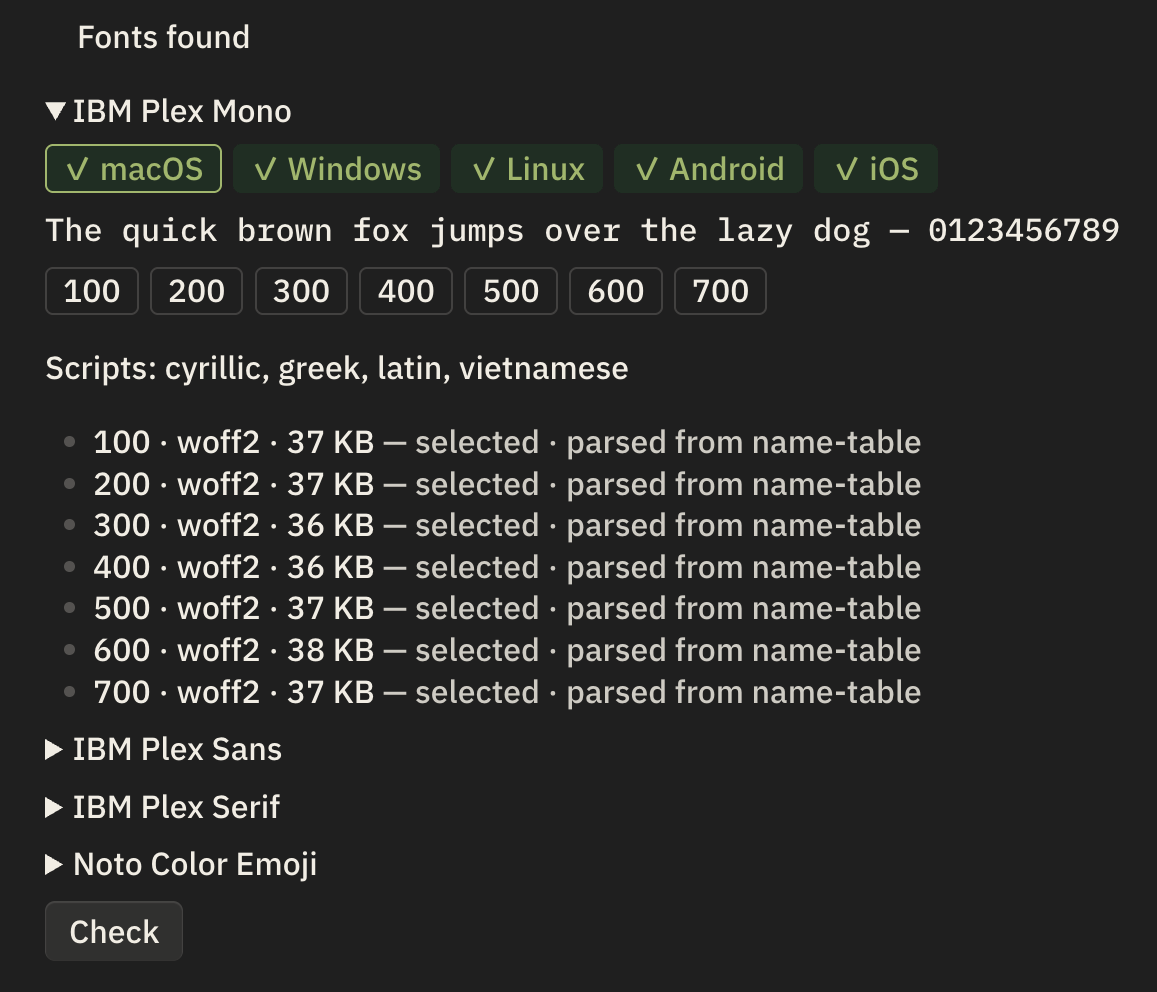
Every family gets a card listing the weights it has, the scripts it covers, and the operating systems that can render it. Each face shows its format, file size, colour format, and whether the plugin selected it for this device. The sample line is drawn in the family itself, and it loads only once you expand the card.
The Check button asks the current device to load each assigned local font, then inspects the requested font stacks of representative open views. It reports a load failure, an unverified load, and whether another family precedes the selection. It cannot confirm which font drew every character; glyph coverage and browser fallback still decide that.
The Rescan button re-reads every file in the folder from scratch. Change detection normally compares each file's size and modification time, which is quick enough to run whenever these settings open. One case slips past it, a font replaced in place by one of exactly the same size and modification time, which restoring from a backup or copying with timestamps preserved can produce. Press Rescan when a font changed on disk and the card still describes the old one.
Emoji formats
Colour emoji fonts come in incompatible flavours, and the two engines Obsidian runs on cover different ones. Chromium, which powers desktop and Android, renders COLRv1 and ignores OT-SVG. WebKit on iOS renders both.
One file often cannot serve every platform. Put more than one build of the same emoji family in the folder and the plugin chooses per device. The card reports which build it picked.
Google's Noto Color Emoji ships as a COLRv1 .woff2, an OT-SVG build, and a 25 MB .ttf
carrying both. Any combination of those works.
Limitations
The desktop test matrix covers Obsidian 1.0.3 and the latest stable release on Windows, macOS and Linux. Android tests drive the real app in an emulator, covering Obsidian 1.8.10 and the latest stable release. iOS requires the real-device verification procedure; Check can report loading and requested stack order, but final glyph rendering still needs inspection on an iOS device.
Emoji on iOS depend on which colour formats your files carry. When they fail, the card shows which format is missing.
Installation
Open Settings → Community plugins, browse for Local Fonts, then install and enable it. You can also install it straight from the plugin page.
To install a build by hand, download main.js, manifest.json and styles.css from the
latest release, put them
in a local-fonts folder inside your vault's .obsidian/plugins/ directory, and restart
Obsidian. BRAT does the same thing and
keeps it updated from this repository.