MNEMOTOAD
 Jason P.8 downloads
Remember what you've yet to compose. Archive sounds, sketch MIDI motifs and arrange them in your vault.
- Overview
- Scorecard
- Updates2

MNEMOTOAD
Remember what you’ve yet to compose.
A local-first Obsidian plugin that keeps your sounds, sketches your musical ideas
and arranges them into pieces, all as plain Markdown in your vault.
Download · Quick reference (PDF) · User guide · Release notes
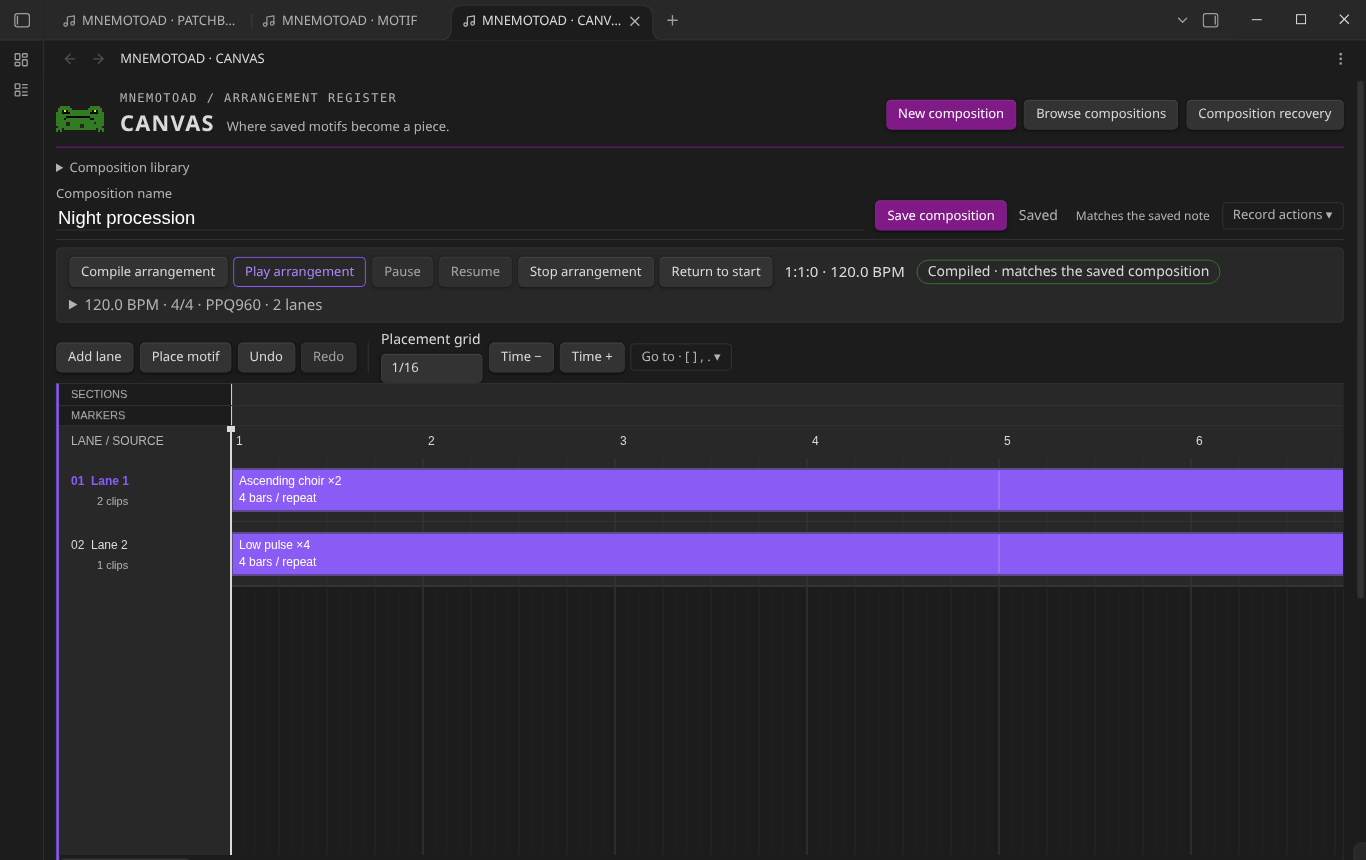
From a sound to a song
MNEMOTOAD follows the path an idea actually takes, through three connected modules:
| Step | What it’s for | |
|---|---|---|
| 1 | Keep the sound in PATCHBOOK | Instruments, patches and effects chains, with the settings that made them sing. |
| 2 | Write the phrase in MOTIF | A piano roll for the riff, the hook, the eight bars you hummed in the car. |
| 3 | Arrange the piece in CANVAS | Lay saved motifs on lanes, repeat them, shape sections, and listen. |
| 4 | Take it to your DAW | Export standard MIDI and finish the track wherever you produce. |
MNEMOTOAD works alongside a DAW; it is not one. It doesn’t host instrument plugins or render audio files. It remembers the music so you can make it.
 |
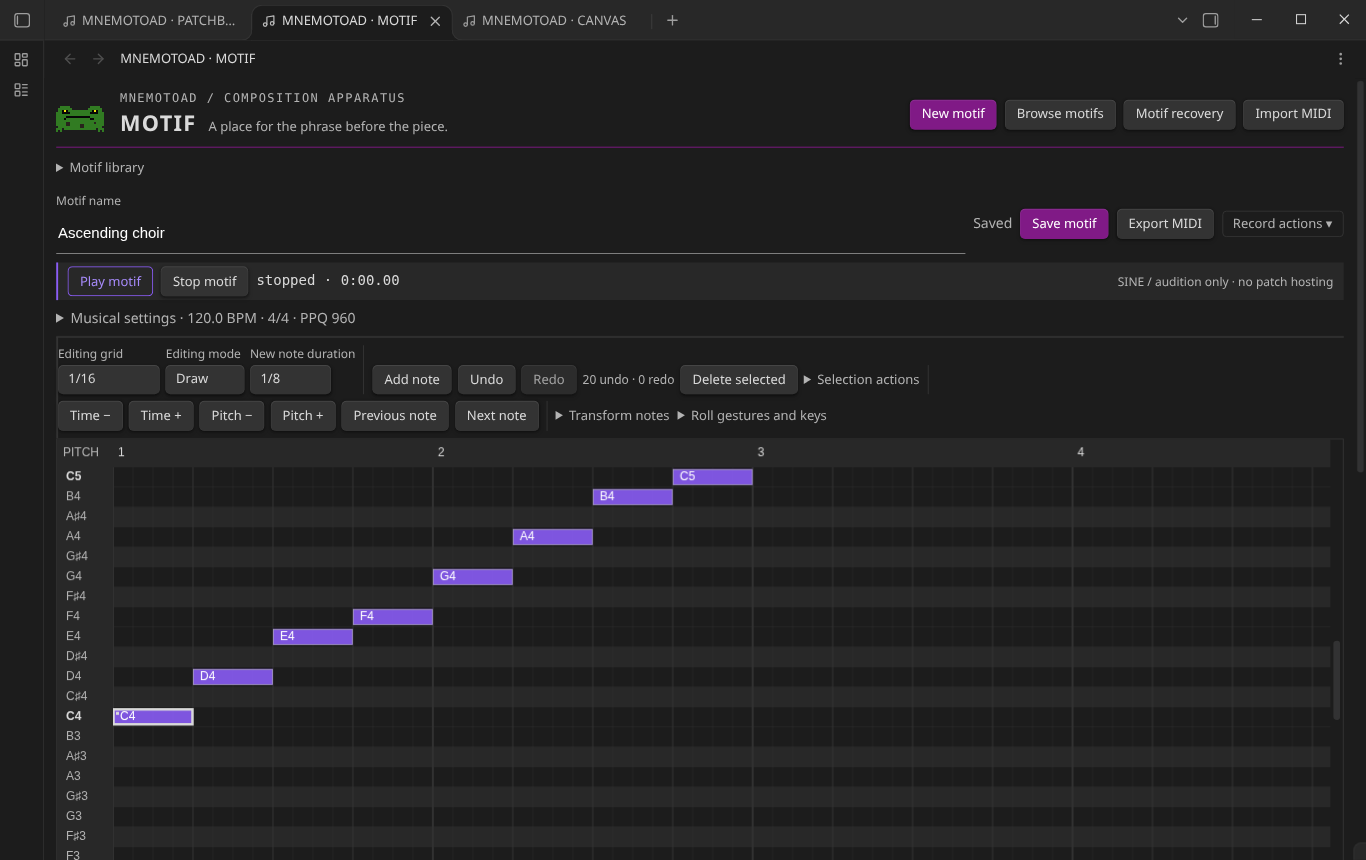 |
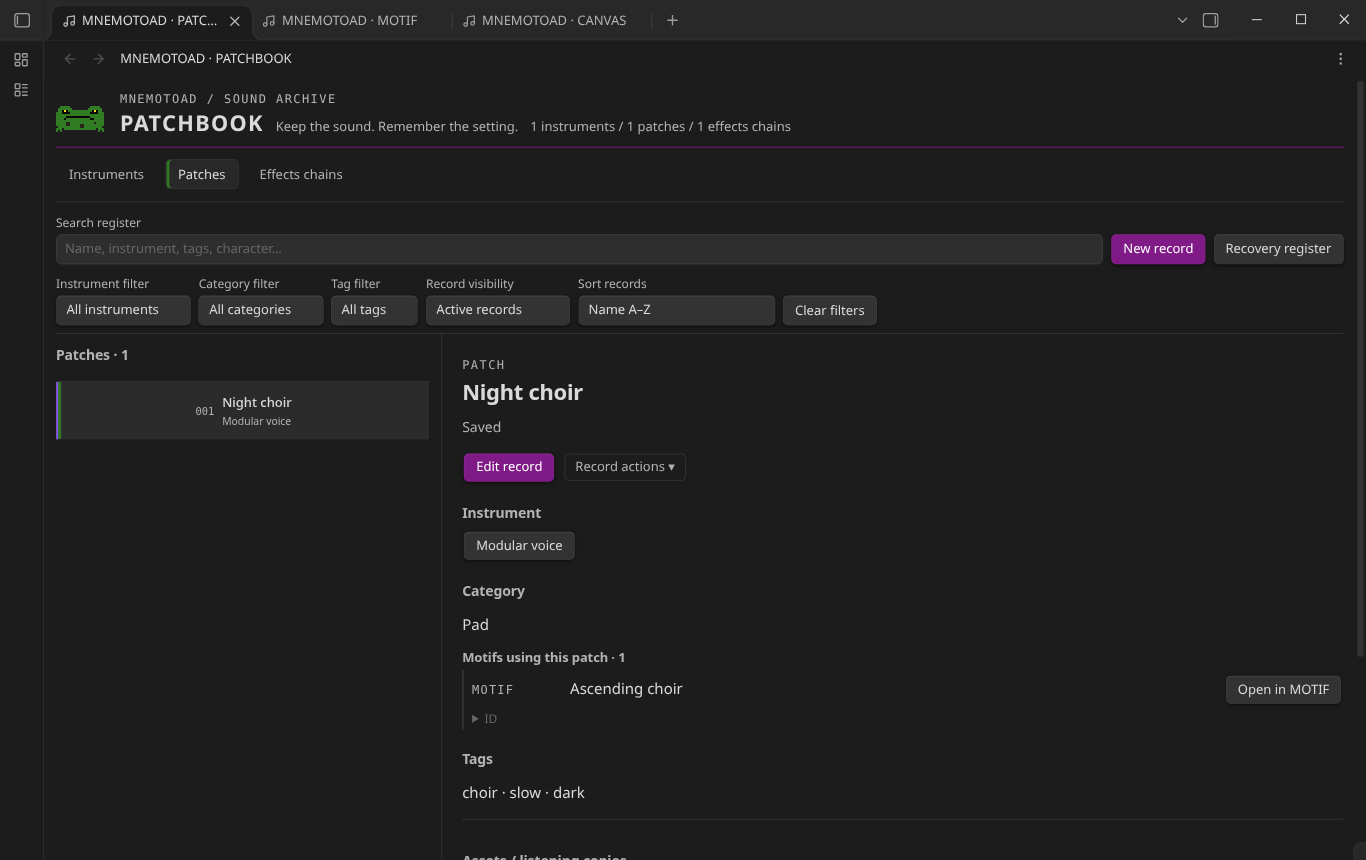
| PATCHBOOK: every patch knows its instrument, its effects and the motifs that use it. | MOTIF: draw, nudge and audition a phrase, then save it as a note. |
Features
🎛️ PATCHBOOK: the sound library
- Three registers: instruments, patches and effects chains.
- Instruments record the manufacturer, type, platform or format, description and tags.
- Patches record their instrument, category, character, parameters and tags, and link to effects chains.
- Effects chains are ordered stages with parameter notes.
- Search, filter by instrument, category, tag or visibility, and sort. Records can be archived without being deleted.
- Link existing vault files (audio, screenshots, preset files), or import a confirmed copy of a local file. Preview one audio file at a time. Preset files are only inspected, never executed.
- Each patch lists the motifs that use it.
🎹 MOTIF: the phrase workshop
- A piano roll: draw, move and resize notes, select several, and build chords. Edit any note exactly in bar:beat:tick and ticks.
- Transformations: transpose, quantize starts and set velocity, with full undo and redo.
- Tempo, meter and PPQ per motif (new motifs use 120 BPM, 4/4, 960 PPQ).
- Audition with a simple sine tone, for checking a phrase. It is not a synthesizer.
- MIDI import: choose one track and channel. The source PPQ is kept, and anything that can’t be represented is reported before import.
- MIDI export to a new file.
- Link a motif to a PATCHBOOK patch, and jump between the two.
🗺️ CANVAS: the arrangement table
- Lanes of saved motifs, placed by exact bar:beat:tick, with repetitions. Clips can be moved, duplicated, deleted or moved between lanes.
- Sections, markers and references to recordings in the vault, for organisation only. They never change the MIDI.
- Compile to exact MIDI events, audition the arrangement (play, pause, resume, stop), and export multitrack MIDI (Type 1).
- Source-revision protection: when a saved motif changes, CANVAS asks you to review and acknowledge the change before compiling again. An arrangement never changes behind your back.
Quick reference
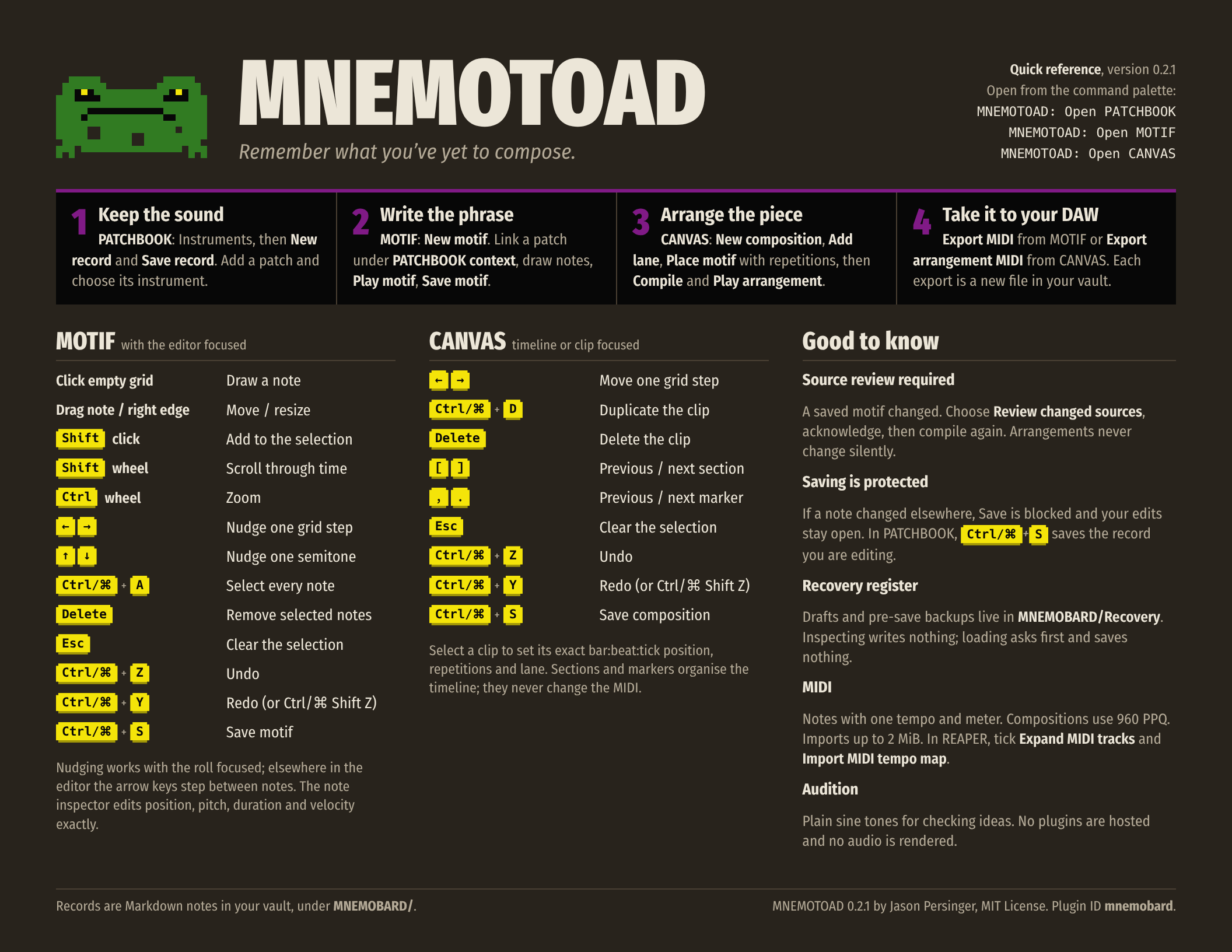
A one-page, dark-mode card with the workflow, every keyboard shortcut and the essentials. Download the PDF to print or keep beside your piano roll.
Installation
MNEMOTOAD is not in the Obsidian community plugin directory yet. Install it manually; it takes about a minute.
- Download
main.js,manifest.jsonandstyles.cssfrom the latest release. Each release lists SHA-256 checksums. You can also build them withpnpm install && pnpm build. - Copy them into
<vault>/.obsidian/plugins/mnemobard/. The folder name is the plugin ID; see Compatibility identifiers. - In Settings → Community plugins, turn off Restricted mode if prompted, then enable MNEMOTOAD.
Requirements: Obsidian 1.15.0 or later, on desktop (the plugin is marked desktop-only). Validated on Linux; Windows and macOS have not been validated yet.
Upgrading from MNEMOBARD 0.1.0 or MNEMOTOAD 0.2.0: replace the three files in the same folder and restart Obsidian. Records, settings, recovery checkpoints, hotkeys and open views carry over; nothing is migrated or rewritten.
Basic usage
- MNEMOTOAD: Open PATCHBOOK → Instruments → New record → Save record. Then create a patch and choose its instrument.
- MNEMOTOAD: Open MOTIF → New motif. Under PATCHBOOK context, link the patch. Add notes, Play motif, then Save motif.
- MNEMOTOAD: Open CANVAS → New composition → Add lane → Place motif, and set the repetitions. Then Compile arrangement, Play arrangement and Save composition.
- Export with Export MIDI (MOTIF) or Export arrangement MIDI (CANVAS).
The user guide covers everything else.
Your data, your vault
Storage. Records are Markdown notes with YAML front matter; motifs and compositions also carry a fenced JSON data block. They live under MNEMOBARD/ in your vault:
Instruments/,Patches/andEffects Chains/Motifs/andCompositions/Assets/for imported copiesExports/andRecovery/
Your own writing in a note’s body, and any unknown front-matter fields, are kept on every save. MNEMOTOAD never modifies, moves or deletes your audio, presets or imported MIDI.
Backup and recovery.
- Saving is explicit (a Save button or Ctrl/Cmd+S) and protected. If a note changed on disk since you opened it, Save is blocked and your edits are kept.
- Unsaved drafts and pre-save backups are written as checkpoints in
MNEMOBARD/Recovery/. They are never deleted or pruned automatically. - The recovery register in each module lets you search and inspect checkpoints read-only. Loading one needs explicit confirmation and only opens an unsaved draft.
- Your vault is your backup unit: back it up as you would any other notes.
MIDI interoperability
- Data: notes, with one tempo and one meter per motif or composition, at exact integer ticks. Compositions use 960 PPQ.
- Import limits: 2 MiB, 128 tracks and 50,000 events.
- Export: always a new file. Arrangement exports are Type 1: a conductor track, then note tracks for the lanes that contain notes, keeping the composition’s full length.
- Tested in REAPER 7.84 on Linux: tick Expand MIDI tracks and Import MIDI tempo map when importing. REAPER trims each item to its last note; the file keeps the full length. Other DAWs have not been tested.
Privacy and local-first behaviour
No account, telemetry, analytics, network access or synchronisation. MNEMOTOAD makes no network requests.
MNEMOTOAD reads and writes inside your vault, and only when you act. Files outside the vault are read in exactly two cases, and only for a file you choose yourself in the system file picker:
- PATCHBOOK → Manage assets → import a local file: the chosen file is read once, and a copy is written into your vault after you confirm the destination.
- MOTIF → Import MIDI → choose a local MIDI file: the chosen file is read for preview and import.
The original file is never modified, moved or deleted, and nothing outside the vault is ever written. Preset and other files are never executed.
Known limitations
- MNEMOTOAD is not a DAW. Audition uses sine tones and is not equivalent to an external synthesizer. MIDI export contains no rendered audio.
- Instrument and patch records are organisational references; sounds are not hosted or loaded.
- Fixed tempo and meter; no controllers, program changes or pitch bend.
- Windows, macOS and screen-reader use have not been validated.
- Internal storage identifiers keep the former name MNEMOBARD for compatibility (below).
- More in the user guide and known issues.
Compatibility identifiers
The product was named MNEMOBARD before 0.2.0. These identifiers keep that spelling so existing vaults keep working:
| Identifier | Reason |
|---|---|
Plugin ID mnemobard |
Keys the plugin folder, settings and enabled state |
View types mnemobard-* |
Saved layouts reopen views by type |
Command IDs mnemobard:open-* |
Hotkeys are bound to them |
Folder MNEMOBARD/ |
Existing records live there |
Front-matter keys mnemobard_*, data blocks mnemobard-motif / mnemobard-composition |
The storage format |
Recovery formats mnemobard-recovery, mnemobard-editor-draft |
Existing checkpoints stay readable |
MIDI conductor track name MNEMOBARD conductor |
Part of the exact exported bytes |
Development
pnpm install
pnpm check          # typecheck + lint + tests + production build
pnpm dev:vault      # deploy into the marked disposable dev-vault/
pnpm dev:obsidian   # isolated Obsidian for native checks
See DEVELOPMENT.md, ARCHITECTURE.md and AGENTS.md. The brand colours and the mascot are described in BRAND.md. The quick reference is generated by scripts/quick-reference.mjs.
MNEMOTOAD by Jason Persinger · MIT License
Bundled third-party code (yaml, ISC; midi-file, MIT) is listed in THIRD_PARTY_NOTICES.md.