MermaidMaker
 akitaroh1k downloads
Inline GUI editor for Mermaid diagrams. Wikilinks, tags, math and rich markdown work inside nodes.
- Overview
- Scorecard
- Updates2
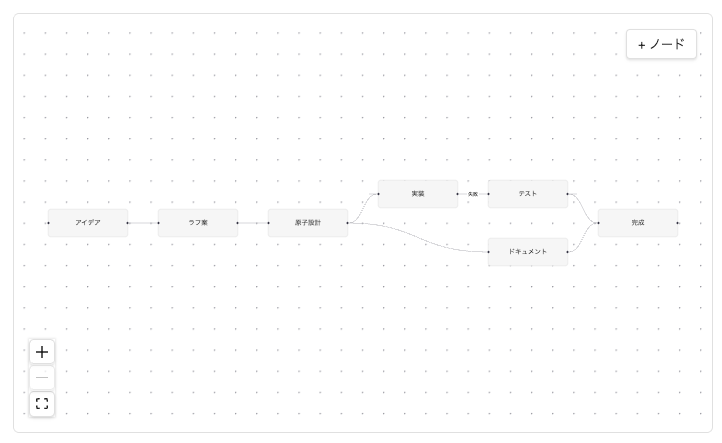
Inline GUI editor for Mermaid diagrams. Drag nodes, click
[[wikilinks]]inside them, edit visually — all without leaving your note.
This plugin turns Mermaid code blocks into a visual canvas where you can
drag nodes, add/delete/connect them, and edit labels — without switching to
an external tool. Node labels render as real Obsidian markdown, so
[[wikilinks]], #tags, $math$ and bold/italic all work inside the
diagram.
The world's first inline GUI Mermaid editor for Obsidian.
Features
- 🖱 Drag nodes on a visual canvas, positions are saved as a Mermaid comment so the file stays portable Mermaid
- ➕ Add / remove nodes and edges with a toolbar button or Delete key
- ✏️ Edit labels by double-clicking a node
- 🔗
[[wikilinks]]clickable inside nodes — Obsidian's standard link click / hover preview / unresolved styling all work #tags,$math$,**bold**etc. render inside nodes- 📐 dagre auto-layout for newly added nodes
- 💾 Two-way sync: edits write back to the Mermaid block, external Mermaid text edits flow back into the canvas
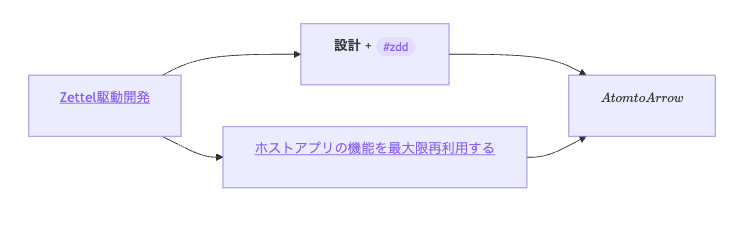
Node labels are rendered through Obsidian's MarkdownRenderer, so wikilinks, tags, math and bold all work inside the diagram.
The plugin is opt-in: regular ```mermaid blocks are untouched, only
```mermaid-maker blocks are processed.
Quick start
%%editable%%
graph LR
  A[Start] --> B[Auth]
  B --> C[End]
- Add
%%editable%%as the first line inside a```mermaid-makerblock. - Switch the note to Reading view (
cmd+e/ctrl+e). - The diagram becomes an editable canvas. Drag, double-click, use the
+ Nodebutton (currently labeled in Japanese — i18n pending).
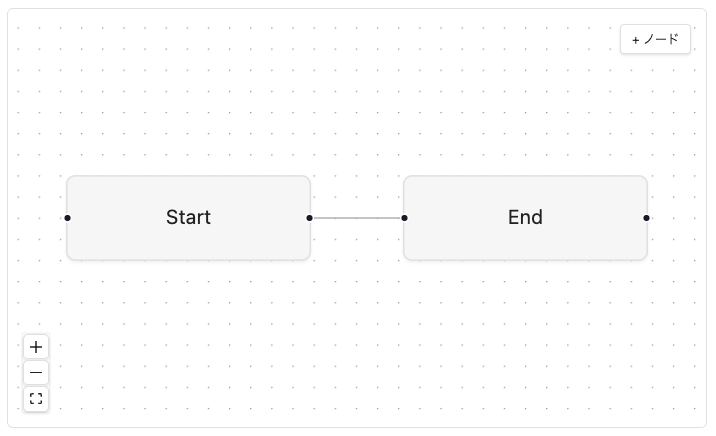
Without %%editable%% the block is rendered read-only with rich labels
(wikilinks etc. still work).
Install
Via BRAT (recommended for now)
The plugin is in beta. The fastest way to try it is via BRAT:
- Install the BRAT plugin from Obsidian Community Plugins.
- Open BRAT settings → Add Beta plugin.
- Enter
Akitaroh/obsidian-mermaid-makerand click Add Plugin. - Enable MermaidMaker under Community plugins.
Manual install
- Download
main.js,manifest.jsonandstyles.cssfrom the latest release. - Create
<vault>/.obsidian/plugins/mermaid-maker/and drop the three files in. - Enable in Settings → Community plugins.
Official Community Plugin store
Submission planned for late May 2026 after a short beta. Watch the repo for updates.
Usage notes
Special characters in labels
If your label contains [, ], (, ), {, }, | or " (e.g.
wikilinks), use quoted form in your Mermaid source:
A["[[note]]"]  ✅
A[[[note]]]    ❌ — Mermaid parses [[..]] as subroutine shape
The plugin auto-quotes when you edit via the GUI — but if you write markdown directly, follow this convention.
Where positions are stored
After dragging, the plugin appends a comment line like:
%% mm-pos: A=10,20 B=200,30
This is invisible to other Mermaid renderers (it's a comment), so your diagrams remain portable.
Reading view vs Live Preview
GUI editing is Reading view only. In Live Preview (the default editor
mode), you'll see a hint ✏️ GUI 編集は読み取りビューで利用できます.
This is intentional — Live Preview's CodeMirror widget doesn't sandbox
React mounts well.
Known limitations (beta)
- Edge labels (
A -->|label| B) display but can't be edited via GUI yet - Node shape selector is not yet in the UI; shape is preserved from
Mermaid source (
[box]/(rounded)/((circle))/(((double)))) - Mermaid
flowchartvariants beyondgraph LR/graph TDare not supported - File rename detection isn't optimal yet (resolved links update, but surrounding logic can lag)
Architecture
Source code in src/.
Implemented with Zettel-driven development:
atoms/quote-extractor.ts— find"..."labels in Mermaid sourceatoms/markdown-renderer.ts— ObsidianMarkdownRenderer.renderadapteratoms/label-measurer.ts— measure rendered HTML for Mermaid layoutatoms/placeholder-injector.ts— splice placeholders into Mermaid sourceatoms/mermaid-loader.ts— load Obsidian's bundled Mermaidatoms/dagre-layout.ts— auto layout for new nodesatoms/xyflow-mounter.tsx— React + xyflow GUI canvas mountatoms/markdown-write-back.ts— debounced safe write back to editoratoms/label-edit-modal.ts— Obsidian modal for label editingarrows/mm-codeblock-render.ts— Stage 2b: rich labels in Mermaid SVGarrows/mm-editable-flow.ts— Stage 3: full GUI editor flow
Inspirations
- Mehrmaid — pioneered rich-markdown labels inside Mermaid nodes inside Obsidian (read-only)
- Excalidraw for Obsidian — the canonical embedded React canvas plugin pattern
- obsidian-enhancing-mindmap — bidirectional markdown ⇄ visual sync inside Obsidian
Contributing
Issues and PRs welcome. Please open an issue first for discussion of larger changes.
License
MIT — see LICENSE.