EPUB Reader with TTS
 usero2-endofday864 downloads
Read EPUB files with cross-platform System TTS.
- Overview
- Scorecard
- Updates4
A powerful and fully-featured EPUB reader plugin for Obsidian that brings your books to life with advanced Text-to-Speech (TTS) integration, immersive reading modes, and intelligent sentence tracking.
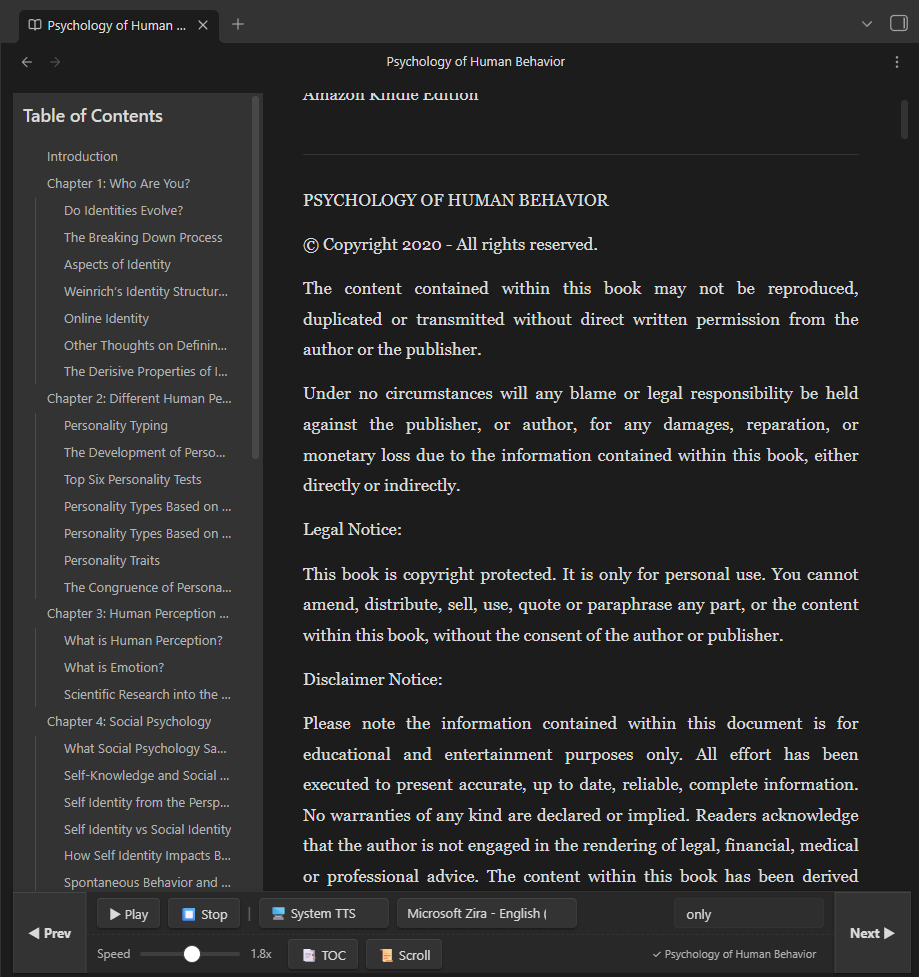
✨ Features
📖 Immersive EPUB Reading
- Native Rendering: Open and read any
.epubfile directly inside Obsidian. - Scroll vs. Page Mode: Seamlessly toggle between continuous vertical scrolling or comfortable per-chapter pagination.
- Smart Page Turning: Use the Prev and Next buttons to flip pages (scroll by exactly one screen height). If you reach the end of a chapter, it intelligently jumps to the next one!
- Table of Contents (TOC) Sidebar: Click the 📑 TOC button to toggle a handy Table of Contents pane right next to your reading view. Navigate between chapters effortlessly with a single click.
- Remember Reading Position: Close your book and come back later—the plugin automatically remembers exactly which chapter and scroll position you left off at, whether you're in Scroll or Page mode, so you never lose your place!
- In-Book Search: Use the search box in the toolbar to quickly find text. The results dropdown intelligently positions itself so it's never cut off.
🗣️ Advanced Text-to-Speech (TTS)
- Robust TTS Engine: Uses your operating system's native offline voices for maximum stability and privacy.
- Live Text Highlighting: The text being spoken is dynamically highlighted on the screen and automatically scrolls into view.
- Start From Cursor: Click anywhere on a sentence and hit Play — the TTS will instantly start reading from where you clicked!
- On-the-fly Speed Control: Adjust the reading speed (0.5x to 3.0x) instantly without stopping playback.
- Smart Paragraph Skipping: When the TTS is active, clicking Prev or Next will skip the audio backwards or forwards by one sentence/paragraph, letting you navigate audio without losing context.
⚙️ Customizable Interface
- Toolbar Positioning: Prefer the controls at the top or bottom of the screen? Go to the plugin settings and move the toolbar to fit your reading style.
- Automatic State Saving: Your preferred Voice, Speed, and Toolbar position are remembered automatically for your next reading session.
🚀 How to Use
- Open an EPUB: Drag and drop an
.epubfile into your Obsidian vault, and click on it to open the reader. - Start Listening: Click the ▶ Play button in the toolbar. The plugin will extract the text, highlight the current sentence, and begin reading. The button will automatically turn into a ⏸ Pause button while playing.
- Select a Starting Point: If you want to start reading from the middle of the chapter, use your mouse to select or click on the text you want, then press ▶ Play.
- Change Voice: Use the dropdown in the toolbar to switch between the voices installed on your system.
- Adjust Speed: Drag the speed slider left or right. The speed updates immediately, even while the audio is playing.
- Skip Sentences: While the audio is playing or paused, press ◀ Prev or Next ▶ to jump to the previous or next paragraph.
- Change Chapters/Pages: If you press ⏹ Stop to exit TTS mode, the ◀ Prev and Next ▶ buttons will return to their normal behavior: turning the page or jumping to the next chapter.
- Toggle View Mode: Click the 📜 Scroll / 📄 Page button to switch between reading a single chapter at a time or the entire book continuously.
- Navigate with TOC: Click 📑 TOC to open or close the Table of Contents sidebar. Click any chapter title to jump directly to it.
- Search Text: Type into the Search box and hit Enter to find specific words or phrases. Click on a result to instantly jump to that section.
- Resume Reading: Just close the file when you're done. When you open the book again, you'll be taken back to exactly where you left off!
🛠️ Plugin Settings
You can configure the plugin by going to Obsidian Settings > Community Plugins > EPUB Reader + TTS Settings:
- Toolbar Position: Choose whether the playback controls stick to the Top or Bottom of the screen. (Note: You may need to close and reopen your EPUB for this to take effect).
📝 Release Notes
Version 1.0.3
- Show/Hide Toolbar Feature: Added a convenient toggle button (☰) at the top-left corner to completely hide the toolbar and maximize vertical reading space.
- UI Layout Optimization: Further reduced toolbar padding and button sizes to make the reading interface even more compact and mobile-friendly.
- Enhanced Android TTS Stability: Resolved an edge-case bug where skipping or turning pages on Android would result in a false TTS "interrupted" error state.
Version 1.0.2
- Mobile Experience Upgrade: The toolbar now has a compact layout specially designed for mobile devices, making reading and navigation much more comfortable.
- Lightning Fast Performance: Implemented "Lazy Loading" for continuous scrolling mode. EPUBs now open instantly regardless of how many chapters they have!
- Android TTS Fix: Resolved an issue where the Text-to-Speech engine would not start on Android devices.
- Combined Play/Pause Button: The play and pause buttons are now elegantly combined into a single toggle to save space.
- Streamlined Engine: Removed Google TTS dependency to rely 100% on the highly stable offline System TTS.
Version 1.0.1
- Reading Progress Management: Added a new section in Settings to manage saved reading progress. You can now reset progress per-book or clear all books at once.
- Smooth UI Experience: Resetting progress no longer causes the settings page scrollbar to jump.
- Contextual Snippets: The reading progress now automatically captures and displays a short text snippet from your current position, making it easier to see exactly where you left off.
❤️ Support & Donate
If this plugin has improved your Obsidian workflow, saved you time, or you just want to support its continued development, please consider donating!
Your support is incredibly appreciated, helps fix bugs, and keeps this project alive and growing. 🙏
https://buymeacoffee.com/endofday
Built with ❤️ for the Obsidian Community
HealthGood
ReviewSatisfactory
About
Read EPUBs natively inside Obsidian with scroll or paginated modes, a clickable table of contents, in-book search, and automatic restoration of your last chapter and scroll position. Listen with integrated TTS (system or Google), enjoy live sentence highlighting, start-from-cursor playback, instant speed control, and smart paragraph skipping.Details
Current version
1.0.3
Last updated
3 months ago
Created
3 months ago
Updates
4 releases
Downloads
864
Compatible with
Obsidian 1.0.0+
Platforms
Desktop, Mobile
License
MIT
Sponsor