Embedded-Omnisearch
 Fozi3k downloads
Inline search UI powered by Omnisearch, with configurable page size, highlight color, and highlight opacity.
- Overview
- Scorecard
- Updates8
Embedded-Omnisearch
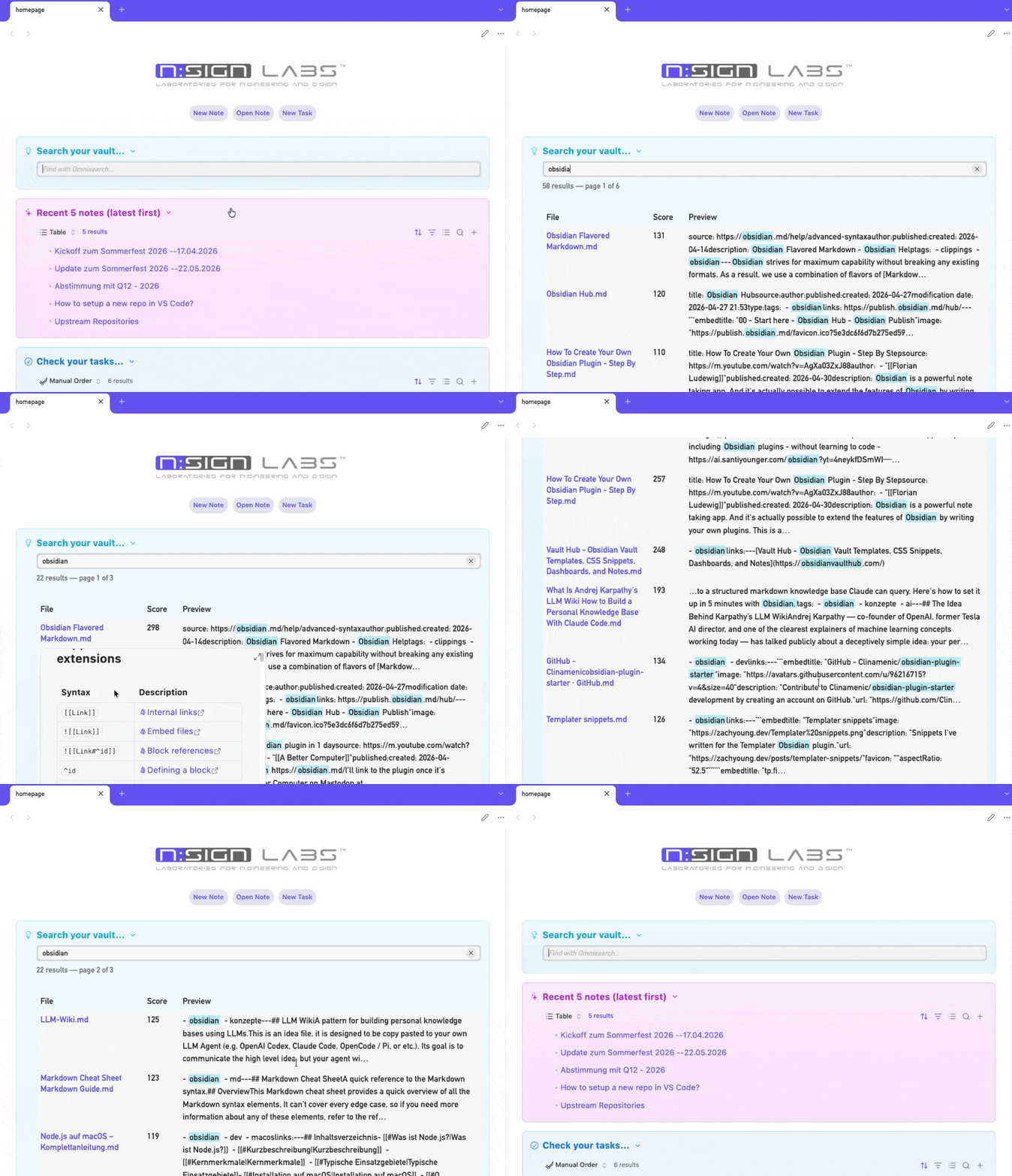
An Obsidian plugin that renders a compact, inline search UI directly inside a note. It is powered by the Omnisearch API and includes plugin settings for default page size and highlight appearance.
Features
- Inline vault search inside any note via a fenced code block.
- Automatically switches notes containing an embedded search block into preview mode when needed.
- Accent-insensitive term matching with configurable highlight color and opacity.
- Paginated results with configurable page size.
- Results rendered as a compact table with file name, relevance score, and excerpt preview.
- Opens clicked results in preview mode.
- Keyboard shortcuts:
Enterto search,Escapeto clear. - Clear button with dynamic visibility.
- Hold
Altover a result row to show the full file path as a popover. - Debounced search input (350 ms).
- Plugin settings page for default results per page, highlight color, and highlight opacity.
- Code-block-level
pageSizeoverride that takes precedence over the global default. - Proper lifecycle management with registered views refreshed when settings change.
Requirements
- Obsidian v1.0.0 or later.
- Omnisearch community plugin, installed and enabled.
Disclosures
- This plugin does not send telemetry.
- This plugin does not make network requests.
- This plugin does not access files outside the current Obsidian vault.
- This plugin requires the Omnisearch community plugin to be installed and enabled.
Installation
Via Obsidian Community Plugins (recommended)
Either search for "Embedded-Omnisearch" in Settings > Community plugins > Browse or add it directly from the Obsidian Community and click on "Add to Obsidian".
Usage
Add a fenced code block with the language identifier embedded-omnisearch to any note:
```embedded-omnisearch
```
Open the note in Reading View or Live Preview. The code block is replaced by a search field.
If you open a markdown note containing an embedded-omnisearch code block, the plugin will also try to switch that leaf to preview mode automatically so the embedded UI becomes visible.
Configuration
You can set options inside the code block. Currently supported:
| Option | Default | Description |
|---|---|---|
pageSize |
Plugin setting | Number of search results per page. |
Example:
```embedded-omnisearch
pageSize: 20
```
Plugin Settings
The plugin settings page provides defaults for the embedded search UI:
| Setting | Default | Description |
|---|---|---|
Results per page |
10 |
Default page size for embedded searches. |
Highlight color |
#cca300 |
Base color used for highlighted matches. |
Highlight opacity |
35% |
Opacity of the highlight background. |
How It Works
- The plugin registers a Markdown code block processor for the language
embedded-omnisearch. - When Obsidian renders such a block, the plugin creates a
SearchViewcomponent attached to the block's DOM element. - The plugin watches active markdown leaves and switches notes containing an embedded search block to preview mode when needed.
- On each query the view calls
globalThis.omnisearch.search(query)and renders the results as a styled table. - Each result shows the linked file name, a rounded relevance score, and an excerpt with accent-insensitive highlighted matches.
- Highlight color and opacity are exposed through plugin settings and applied via the
--eo-highlight-colorCSS variable. - Results are split into pages;
</>buttons navigate between pages. - Clicking a result link opens the file in preview mode.
- Holding
Altwhile hovering a result row displays the full vault path in a small popover. - All DOM event listeners use Obsidian's
registerDomEventand are cleaned up when the component unloads.
Customization
Styles
The plugin ships its own styles.css using Obsidian CSS variables (--background-secondary, --text-normal, --text-muted, --background-modifier-border, etc.), so it adapts to any theme automatically.
You can override any class in an Obsidian CSS snippet. Key classes:
.eo-wrap— outer wrapper.eo-input-wrap— search field container.omnisearch-input-field— search input field.eo-clear— clear button.eo-status— status / result count line.eo-results— results container.eo-results-grid— result grid.eo-results-row/.eo-results-cell— result rows and cells.eo-results-link— clickable note link.eo-page-bar/.eo-page-btn/.eo-page-info— pagination.eo-popover— Alt+hover path popover
Highlight Appearance
The plugin applies highlight color and opacity through the --eo-highlight-color CSS variable, which is updated from the plugin settings page. You can still override that variable in a custom CSS snippet if needed.
Troubleshooting
The code block shows raw text instead of the search UI
- Make sure the plugin is enabled in Settings → Community plugins.
- The note must be in Reading View or Live Preview. The plugin will try to switch notes with embedded search blocks out of Source mode automatically, but it can only do that for normal markdown leaves.
"Omnisearch API not available"
- Omnisearch must be installed and enabled.
- Wait for Obsidian to finish loading all plugins on startup.
Some notes do not appear in results
- Omnisearch indexing may not be complete yet.
- Check Omnisearch exclusion settings.
- The notes must actually contain the searched terms.
Path popover does not appear
- Hold the
Altkey while hovering over a result row. - Results must already be rendered.
Files
| File | Purpose |
|---|---|
manifest.json |
Plugin metadata (id, version, description). |
main.js |
Plugin code: embedded search UI, settings, highlighting, pagination, preview enforcement, and popover behavior. |
styles.css |
CSS using Obsidian variables for automatic theme compatibility. |
License
MIT
Credits
scambier for the great Omnisearch plugin.