Conflict Manager
 Armen Abrahamyan525 downloads
Review and resolve sync conflicts from any cloud service.
- Overview
- Scorecard
- Updates20
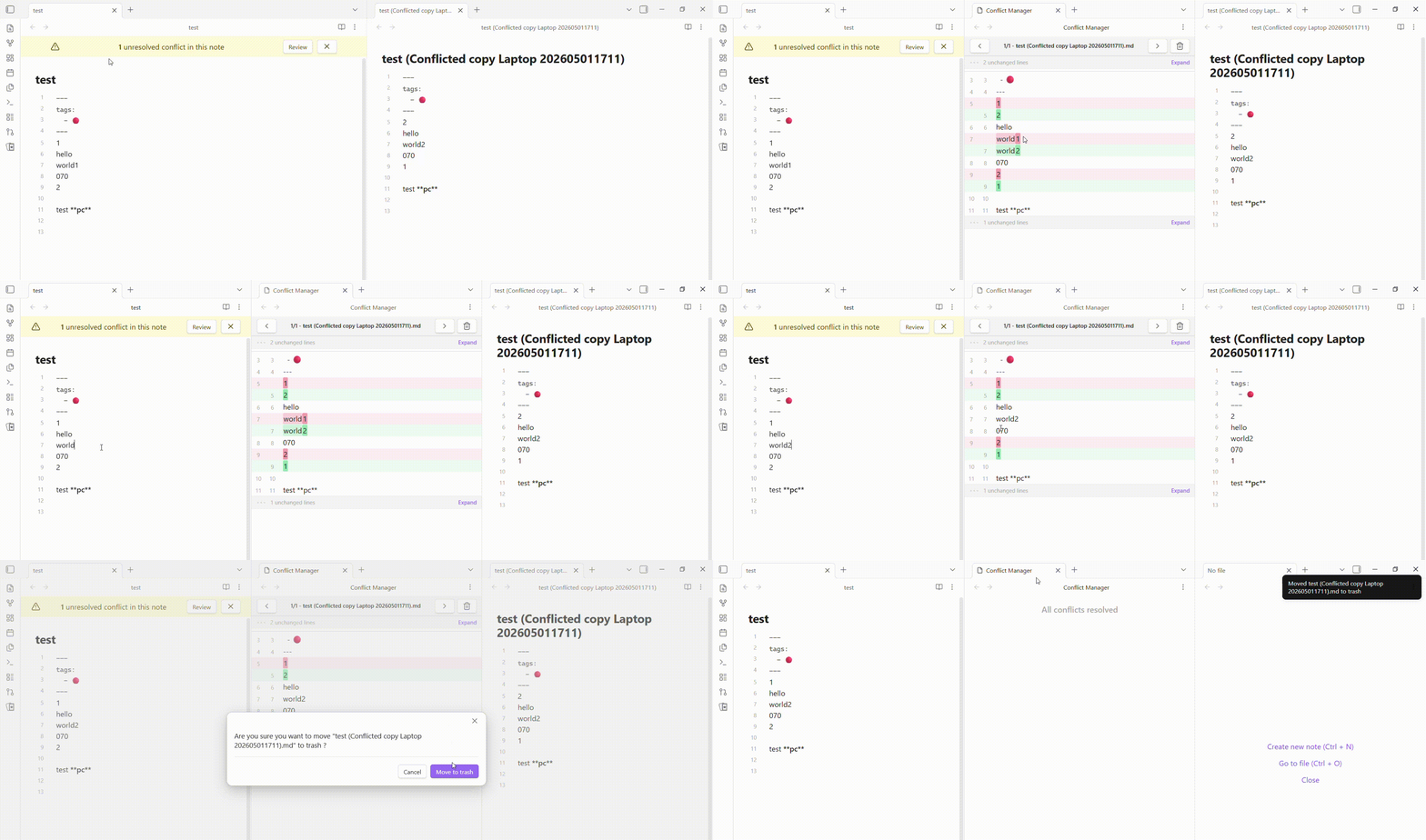 A simple plugin for conflict resolution. No more hunting through your file system. Just open your file, hit Review, and Resolve.
Features
- Alert Banner: A top banner alerts you that your current file contains unresolved sync conflicts.
- Diff Viewer: Review differences between the original file and conflict files using an intuitive split-pane layout.
- Status Bar Indicator: Quickly view the status of conflicts in the vault.
Installation
- Open Settings > Community plugins in Obsidian.
- Find Conflict Manager.
- Select Install, then Enable.
FAQ
When copying and pasting multiple lines in Obsidian, an extra line break is inserted.
Go to Settings > Editor > Convert pasted HTML to Markdown and toggle it off.
Releasing
- Update the version in
manifest.json,package.jsonandversions.json. - Commit the change:
git commit -m "chore: prepare version <current_version>" git push origin main - Create and push the tag:
git tag -a <current_version> -m "<current_version>" git push origin <current_version> - Wait for the release workflow to finish.
- Open the main page of the repository and select Releases in the right sidebar.
- Select Edit (pencil icon) next to the draft release.
- Add release notes, then select Publish.
Contributing
If you have any issues/suggestions, please open an issue on the repository. If you'd like to contribute to the code, please fork the repository and submit a pull request.
HealthExcellent
ReviewSatisfactory
About
A simple plugin for conflict resolution.
No more hunting through your file system. Just open your note, hit Review, and Resolve.Details
Current version
1.2.3
Last updated
6 days ago
Created
4 months ago
Updates
20 releases
Downloads
525
Compatible with
Obsidian 1.7.2+
Platforms
Desktop only
License
MIT