Automatic Table Of Contents
 johansatge160k downloads
Create a table of contents in a note that updates itself when the note changes.
- Overview
- Scorecard
- Updates23
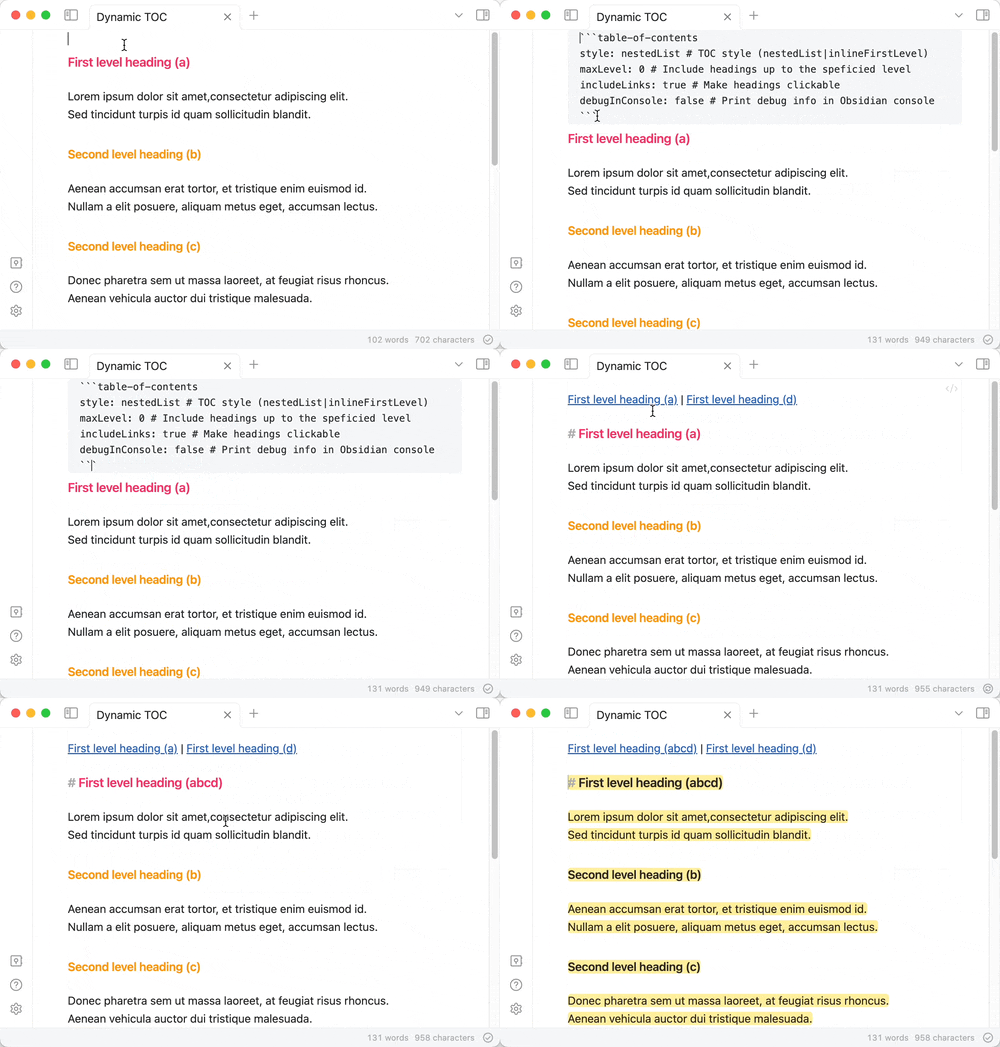
An Obsidian plugin to create a table of contents in a note, that updates itself when the note changes
- Installation
- Usage and options
- Limitations and known bugs
- Publish a new version
- Changelog
- License
- Contributing
Installation
From Obsidian (easiest)
Install the plugin from the Community plugins section in the app settings.
From git
Clone the plugin in your .obsidian/plugins directory:
cd /path/to/your/vault/.obsidian/plugins
git clone [email protected]:johansatge/obsidian-automatic-table-of-contents.git
From source
Download the latest release and unzip it in the .obsidian/plugins/automatic-table-of-contents directory.
Usage and options
Insert a codeblock with the table-of-contents (or its short version toc) syntax.
```table-of-contents
option1: value1
option2: value2
```
Alternatively, two commands are available in the command palette:
- Insert table of contents
- Insert table of contents (with available options)
Available options
Most options can have a default value configured in the plugin settings (Settings → Community plugins → Automatic Table of Contents). These defaults will be used for all tables of contents in your vault, unless overridden in individual codeblocks.
The following options are available:
| Option | Default value | Description |
|---|---|---|
title |
None | Title to display before the table of contents (supports Markdown) |
style |
nestedList |
Table of contents style (can be nestedList, nestedOrderedList or inlineFirstLevel) |
minLevel |
0 |
Include headings from the specified level (0 for no limit) |
maxLevel |
0 |
Include headings up to the specified level (0 for no limit) |
include |
All | Include headings with a regexp (example: /Some heading/i) |
exclude |
None | Exclude headings with a regexp (example: /Some heading/i) |
includeLinks |
true |
Make headings clickable |
hideWhenEmpty |
false |
Hide TOC if no headings are found |
debugInConsole |
false |
Print debug info in Obsidian console |
Limitations and known bugs
- The table of contents may not be generated correctly if the document doesn't implement a correct titles hierarchy (level 1 title then level 3 without a level 2 in between, for instance)
- HTML & markdown that may be in the document headings are stripped when
includeLinks: true(see #24 & #27) - LaTeX equations are not rendered correctly when
includeLinks: true(see #13) - Links might not behave correctly if the same title is present several times on the page (see #57)
- Generated table of contents is not foldable (see #23)
- The table of contents is based on a codeblock so it can be updated; it doesn't generate real Markdown in the document (see #10) so it won't be visible when exporting, or on Obsidian Publish (see #31) and links might not work in PDFs (see #12)
Publish a new version
- Build the plugin with
npm run build(--watchduring dev) - Push a commit with the new version number as message with:
- The relevant changelog in
README.md - The new version number in
manifest.json - The updated
main.js(withnpm run build)
- The relevant changelog in
- Tag the commit with the version number
- Publish a new GitHub release with:
- The version number as title
- The changelog from
README.mdas description main.jsandmanifest.jsonfrom as attachments- Set as the latest release checked
Changelog
This project uses semver.
| Version | Date | Notes |
|---|---|---|
1.8.0 |
2026-02-07 | Introduce global settings (@stevedoyle) (fix #38, #83) |
1.7.3 |
2025-05-25 | Fix default include & exclude values (fix #73) |
1.7.2 |
2025-05-03 | Fix italic stripping (fix #43) |
1.7.1 |
2025-05-02 | Fix # in wikilinks (fix #64) |
1.7.0 |
2025-04-27 | Add include & exclude options (fix #46) |
1.6.1 |
2025-02-23 | Inline title when style:inlineFirstLevel (fix #59) |
1.6.0 |
2025-02-23 | Ignore empty headings (fix #60) |
1.5.1 |
2025-01-18 | Rename command for readability (fix #53) |
1.5.0 |
2024-11-24 | Add hideWhenEmpty option (fix #51) |
1.4.0 |
2024-05-19 | Add nestedOrderedList style (@bjtho08) (fix #41) |
1.3.3 |
2024-05-16 | Compute the right min level when style:inlineFirstLevel (fix #39) |
1.3.2 |
2024-02-18 | Harden headings stripping |
1.3.1 |
2024-02-18 | Strip headings for readability (fix #24, #27) |
1.3.0 |
2024-02-17 | Introduce title option (fix #5, #32) |
1.2.0 |
2024-01-19 | Introduce toc shorthand trigger (fix #19) |
1.1.0 |
2024-01-03 | Introduce minLevel option (@ras0q) (fix #11) |
1.0.6 |
2023-11-02 | Escape special characters (fix #3) |
1.0.5 |
2023-11-01 | Fix plugin activation on mobile (fix #17) |
1.0.4 |
2023-10-31 | Support pages with no first level headings (fix #6) |
1.0.3 |
2023-09-30 | Fix readme |
1.0.2 |
2023-09-25 | Fix output sometimes displaying undefined headings |
1.0.1 |
2023-09-09 | Fix reference to global App instance |
1.0.0 |
2023-08-27 | Initial version |
License
This project is released under the MIT License.
Contributing
Bug reports and feature requests are welcome! More details in the contribution guidelines.