VoiceComment
 engenharick2 downloads
Record voice notes as MP3 and insert the player right where you started recording: in a note, or inside an Excalidraw drawing.
- Overview
- Scorecard
- Updates2
Record a voice note and drop the MP3 player right where you started recording — in a Markdown note, or inside an Excalidraw drawing.
Assign a shortcut to VoiceComment: Start/stop recording (Settings → Hotkeys) — Alt+R is a good one — talk, then press it again. The plugin deliberately ships no default hotkey, so it never steals a key you already use. The recording is encoded to MP3 inside Obsidian (no ffmpeg, no Python, no cloud), saved into your vault, and the audio player is inserted automatically at the cursor — or as a playable element in the middle of your drawing.
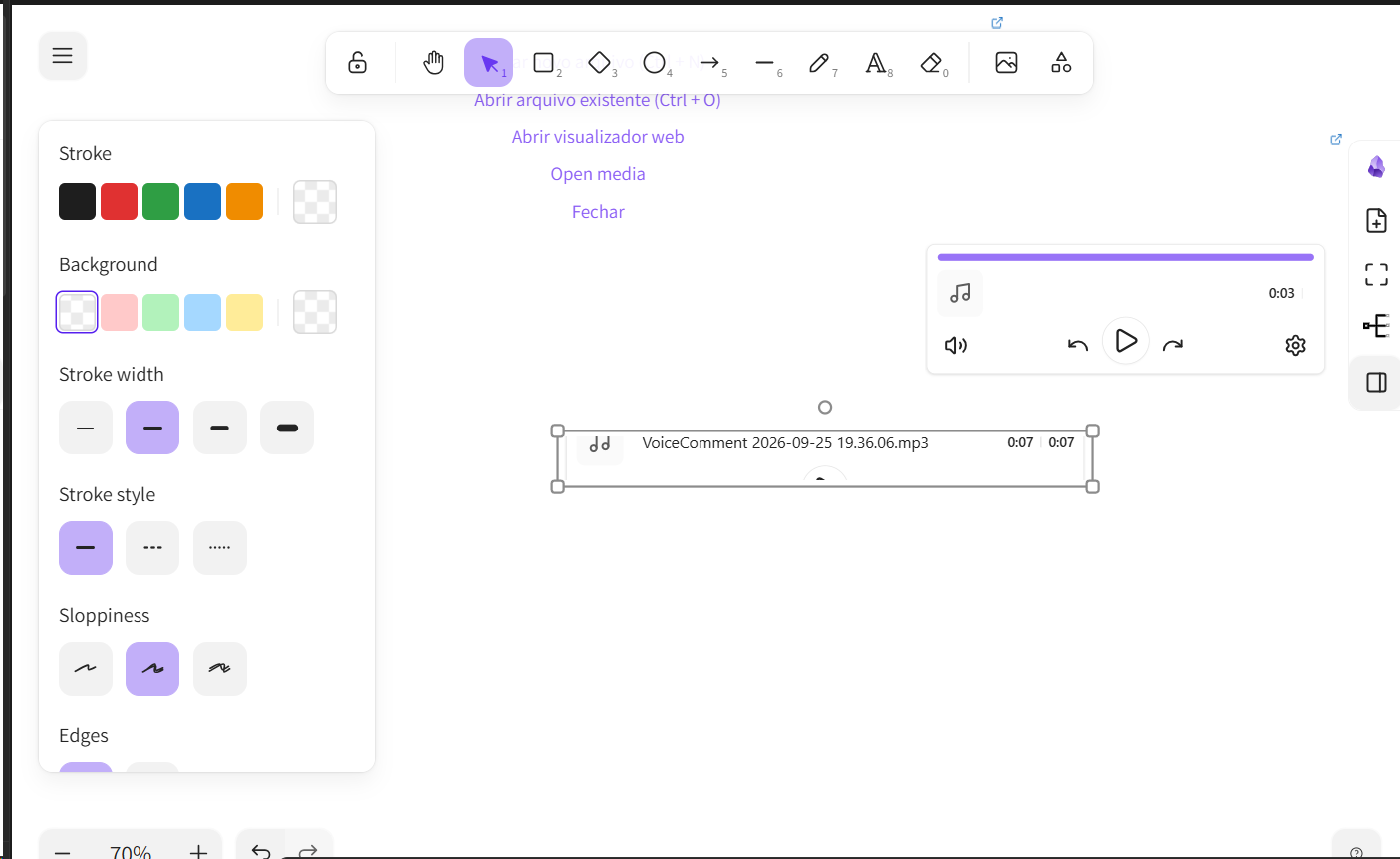
The player VoiceComment inserts into an Excalidraw drawing: the file it just recorded, playable from the scene.
Why
Neither Excalidraw nor its Obsidian plugin can record audio, and even embedding an existing audio file in a drawing is a manual workaround. Issue #2278 is still open, and the plugin's author suggests working around it by adding a card and dropping the audio link into it. VoiceComment does exactly that — automatically, with the recording included.
Features
- 🎙️ One shortcut for everything — bind a key once (say
Alt+R) and it starts and stops from anywhere - 📝 Works in Markdown notes — inserts
![[audio.mp3]]at the cursor - ✏️ Works inside Excalidraw drawings — inserts a real, playable player element in the scene
- 💾 MP3 written straight to your vault, with no external tools: the encoder ships inside the plugin
- ⏸️ Pause/resume, live level meter, timer, discard
- 📊 Status bar indicator and a floating panel showing which file you are recording into
- 🔒 100% local — nothing leaves your machine
- 🖥️ Desktop version of Obsidian
Requirements
- Obsidian 1.4.0 or newer, desktop version — the plugin opens its diagnostic log through Obsidian's Electron API, so it is marked desktop-only
- A microphone, and permission for Obsidian to use it
- For the drawing part: the Excalidraw plugin, version 2.x
Installation
Community plugins (once approved)
Settings → Community plugins → Browse → search "VoiceComment".
BRAT
Add Engenharick/voicecomment to BRAT.
Manual
Download main.js, manifest.json and styles.css from the latest release, put them in <vault>/.obsidian/plugins/voicecomment/, and enable the plugin in Settings → Community plugins.
Usage
- Open a note (in edit mode) or an Excalidraw drawing.
- Press your shortcut — or click the microphone in the sidebar, or run VoiceComment: Start/stop recording from the command palette. No shortcut yet? Assign one in Settings → Hotkeys.
- Talk. The panel shows the timer, the level meter, and the file being recorded into.
- Press the shortcut again (or ■ in the panel) to stop and save.
| Where you record | What appears |
|---|---|
| Markdown note | ![[VoiceComment 2026-09-25 18.20.33.mp3]] at the cursor |
| Excalidraw drawing | a player element in the middle of the view, selected and ready to play |
Autoplay is disabled by the browser (see #1657), so you press play once.
Without the Excalidraw plugin there is nothing to draw into, so recording with a drawing open simply inserts the audio into that note instead. Nothing breaks — the file is always saved.
Settings
| Setting | Description |
|---|---|
| Recordings folder | Vault folder for the MP3s. Created automatically if missing. |
| File name prefix | Base name; the date and time are appended to it. |
| MP3 quality | 64 / 96 / 128 / 192 kb/s, mono. |
| Insert the recording | At the cursor (edit mode) or at the end of the note. |
| Microphone icon in the sidebar | Show or hide the ribbon icon. |
| Diagnostic log | Opens .obsidian/plugins/voicecomment/voicecomment.log. |
Troubleshooting
- Nothing happens on your shortcut: it may never have been assigned (the plugin ships none), or another plugin owns it. Assign it in Settings → Hotkeys → search "VoiceComment".
- "microphone permission denied": allow microphone access for Obsidian in your OS privacy settings, then try again.
- "nothing was recorded": open the diagnostic log. It records the AudioContext state, the captured byte counts and the peak level of every recording.
- The player shows up as an empty box in a drawing: it was inserted but not activated. It renders as soon as you select it.
How it works
- Capture, in two parallel paths. Raw PCM through WebAudio (
ScriptProcessor) feeds the MP3 encoder directly, so there is a single lossy generation. At the same time aMediaRecordercaptures the same stream. If the WebAudio path delivers no samples — a suspendedAudioContextis the classic cause, and the timer keeps running anyway, which is misleading — the compressed capture is decoded withdecodeAudioDataand re-encoded, so a recording is never lost. - MP3. lamejs is bundled, so there is no ffmpeg, Python or cloud dependency. 44.1 kHz mono.
- Note. The file is written through the vault API and
![[…]]is inserted at the cursor, or appended to the note. - Drawing.
window.ExcalidrawAutomate.getAPI(view)returns an instance bound to the drawing's view;addEmbeddable(...)creates the audio element (transparent stroke and background, height measured from an offscreen<audio controls>),addElementsToView(false, true, true)persists it, and selecting it plusupdateScene({ appState: { activeEmbeddable: … } })is what makes the player render.ea.destroy()is always called.
Credits
- lamejs (LGPL-3.0) — MP3 encoding, bundled unmodified. See THIRD-PARTY-NOTICES.md.
- Excalidraw for Obsidian by Zsolt Viczián — the
ExcalidrawAutomateAPI that makes the drawing part possible.
License
LGPL-3.0 — see LICENSE.