Tome
 Mohit149 downloads
Search books across Google Books, Open Library and OpenAlex with automatic fallback, cache covers locally, generate customizable note templates, and track reading status/ratings/progress.
- Overview
- Scorecard
- Updates1
Search books by ISBN or title across Open Library, Google Books, and OpenAlex, download their covers locally, and organize everything as plain Markdown notes — ratings, reading status, and progress included. Fully frontmatter-based, so your book library works seamlessly with Dataview, Obsidian Bases, and any other plugin that reads YAML properties.
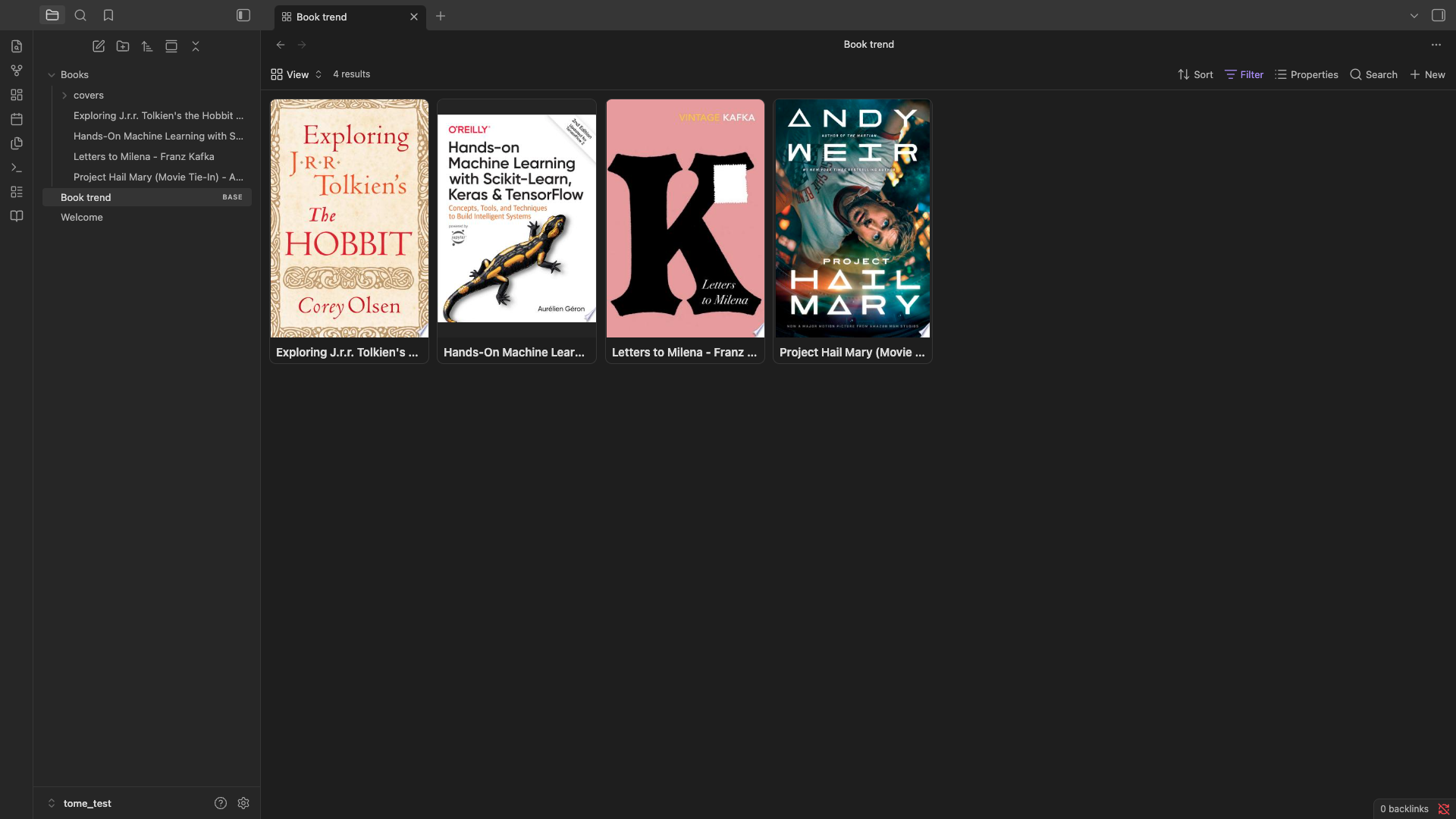
Why I built this
I wanted a proper visual library of the books I'm reading inside Obsidian — something like the card-gallery setups you see in Notion or Readwise, but native to my vault. I tried a few existing community plugins for this first, and kept running into the same wall: broken searches, covers that never actually downloaded, or note templates that didn't play nicely with Obsidian's newer Bases feature. Nothing quite worked end-to-end the way I wanted.
So I built Tome — a plugin where the entire flow, from search to a cover you can actually see in a Bases card view, just works, is transparent about its data sources, and stores everything as portable Markdown rather than locking your library into a proprietary format.
Features
- Multi-provider search — queries Open Library, Google Books, and OpenAlex, with configurable provider order and per-provider enable/disable toggles
- Local cover caching — downloads cover images into your vault so your library works offline and stays stable even if a provider changes URLs
- Frontmatter-first — every book note stores metadata (title, authors, ISBN, publisher, subjects, status, rating, progress, and more) as YAML properties, ready for Dataview or Bases
- Built-in gallery view — browse your library as a card grid without any extra setup
- Bases-ready — point an Obsidian Base at your notes folder, switch to Cards view, and covers render automatically from the
coverfrontmatter property - Customizable templates — control the exact frontmatter fields and note body layout to fit your existing vault conventions
- Rate-limit resilient — automatic retry with backoff, and an optional Google Books API key / OpenAlex contact email to raise your quota ceiling
Installation
From the Community Plugins directory
(Once published) Settings → Community plugins → Browse → search "Tome" → Install → Enable.
Manual installation
- Download
main.js,manifest.json, andstyles.cssfrom the latest release. - Create a folder
<your-vault>/.obsidian/plugins/tome/and place the three files inside. - In Obsidian: Settings → Community plugins → enable Tome.
Setup
Open Settings → Tome to configure:
- Providers — enable/disable Open Library, Google Books, and OpenAlex individually.
- Google Books API key (optional but recommended) — raises your daily quota well above the shared unauthenticated limit. Get a free key from Google Cloud Console: enable the Books API under APIs & Services, then generate an API key under Credentials.
- OpenAlex contact email (optional) — puts your requests in OpenAlex's faster "polite pool" rate-limit tier. OpenAlex is primarily a scholarly/academic metadata fallback and rarely returns cover images.
- Notes folder / Covers folder — where new book notes and downloaded cover images are stored.
- Note template — the full frontmatter + body template used for every new note. Supports Templater syntax if you have that plugin installed.
Usage
- Run Tome: Add a book from the command palette.
- Search by title or ISBN.
- Select a result, set your reading status and rating, and create the note.
- Run Tome: Open library gallery to browse your collection as cards, or set up an Obsidian Base pointed at your notes folder for a fully customizable card view.
Using with Obsidian Bases
- Create a new Base (or a new view) filtered to your book notes — e.g.
tags contains "book". - Switch the view to Cards.
- In Card view settings, set Image property to
cover.
That's it — covers render automatically, pulled straight from the frontmatter Tome writes.
Roadmap
- Distinguish "no results found" from "provider temporarily rate-limited" in the search UI
- Additional provider support
Contributing
Issues and pull requests are welcome. Please open an issue first for larger changes so we can discuss the approach.