Search...Search plugins and themes...
⌘K
Sign in
  • Get started
  • Download
  • Pricing
  • Enterprise
  • Account
  • Obsidian
  • Overview
  • Sync
  • Publish
  • Canvas
  • Mobile
  • Web Clipper
  • CLI
  • Learn
  • Help
  • Developers
  • Changelog
  • About
  • Roadmap
  • Blog
  • Resources
  • System status
  • License overview
  • Terms of service
  • Privacy policy
  • Security
  • Community
  • Plugins
  • Themes
  • Discord
  • Forum / 中文论坛
  • Merch store
  • Brand guidelines
Follow us
DiscordTwitterBlueskyThreadsMastodonYouTubeGitHub
© 2026 Obsidian

Themed Discord RPC

mouadhbendjedidimouadhbendjedidi1k downloads

A Customizable Discord RPC

Add to Obsidian
  • Overview
  • Scorecard
  • Updates9

A customizable Discord Rich Presence (RPC) plugin for Obsidian, allowing you to showcase your notes, vault, and current activity directly on your Discord profile. Tailored for super users who love personalization and aesthetics.

[!IMPORTANT] Breaking Change — v1.3.0 Starting from this version, the plugin uses theme images hosted in the repository instead of Discord's asset system. Old versions are no longer supported. Please update to v1.3.0 or above.

Preview 🖼️
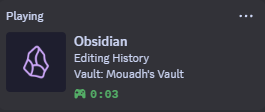
Features ✨

Enhance your Discord experience by displaying rich details about your Obsidian workflow directly on your profile. Whether you're taking notes, organizing ideas, or working on projects, this plugin keeps your presence dynamic and informative.

  • 📝 Displays active note title
  • 📂 Shows vault name
  • ⏳ Elapsed session time
  • 🎨 Customizable status messages
  • 🎭 Support for themes and icons
  • ⚡ Lightweight and optimized (2ms)

Supported Themes 🎨

  • Default (New & Old)
  • Catppuccin
  • Tokyo Night
  • Cyberglow

More in the future!

Installation 📥

Manual Installation

  1. Download the main.js and manifest.json files from GitHub Releases.
  2. Extract and move the folder to yourvault\.obsidian\plugins\themed-obsidian-discord-rpc.
  3. Enable it in Settings → Community Plugins.

From Obsidian Community Plugins

  1. Open Settings → Community Plugins.
  2. Search for Themed Discord RPC.
  3. Click Install and Enable.

How to Contribute 🤝

well you can just read my CONTRIBUTING.md file

Support 💬

  • 🐛 Report an Issue: Open an issue

Credits 💙

Built with 💻 and ☕ by Mouadh.

Star History

Star History Chart

80%
HealthExcellent
ReviewSatisfactory
About
Show your Obsidian activity on Discord with a customizable Rich Presence that displays active note title, vault name, and elapsed session time. Customize status messages, themes, and icons for a tailored presence while keeping the plugin lightweight and fast.
IntegrationsAppearanceIcons
Details
Current version
1.3.0
Last updated
2 weeks ago
Created
Last year
Updates
9 releases
Downloads
1k
Compatible with
Obsidian 0.15.0+
Platforms
Desktop only
License
MIT
Report bugRequest featureReport plugin
Author
mouadhbendjedidimouadhbendjedidi
github.com/Mouadhbendjedidi
GitHubmouadhbendjedidi
  1. Community
  2. Plugins
  3. Integrations
  4. Themed Discord RPC

Related plugins

Link Favicons

See the favicon for a linked website.

Callout Manager

Easily create and customize callouts.

Inline Callouts

Add inline callouts/badges/icons to notes.

Local REST API & MCP Server

Unlock your automation needs by interacting with your notes over a secure REST API.

Minimal Theme Settings

Control the colors and fonts in Minimal Theme.

Hider

Hide interface elements such as tooltips, status bar, titlebar, and more.

BRAT

Easily install a beta version of a plugin for testing.

Maps

Adds a map layout to bases so you can display notes as an interactive map view.

Self-hosted LiveSync

Sync vaults securely to self-hosted servers or WEBRTC.

Style Settings

Adjust theme, plugin, and snippet CSS variables.