Search...Search plugins and themes...
⌘K
Sign in
  • Get started
  • Download
  • Pricing
  • Enterprise
  • Account
  • Obsidian
  • Overview
  • Sync
  • Publish
  • Canvas
  • Mobile
  • Web Clipper
  • CLI
  • Learn
  • Help
  • Developers
  • Changelog
  • About
  • Roadmap
  • Blog
  • Resources
  • System status
  • License overview
  • Terms of service
  • Privacy policy
  • Security
  • Community
  • Plugins
  • Themes
  • Discord
  • Forum / 中文论坛
  • Merch store
  • Brand guidelines
Follow us
DiscordTwitterBlueskyThreadsMastodonYouTubeGitHub
© 2026 Obsidian

The Last Brain

justinjia0813justinjia081318 downloads

Read-only conversations with your vault, local chat history, and reviewed memories with sources.

Add to Obsidian
  • Overview
  • Scorecard
  • Updates4

从你的笔记,继续思考。

The Last Brain is a read-only AI chat plugin for Obsidian. Ask questions across your Markdown vault, inspect the sources behind each answer, and save useful insights as memories only after you review them.

Obsidian 社区插件 · 下载最新版 · 使用与隐私说明
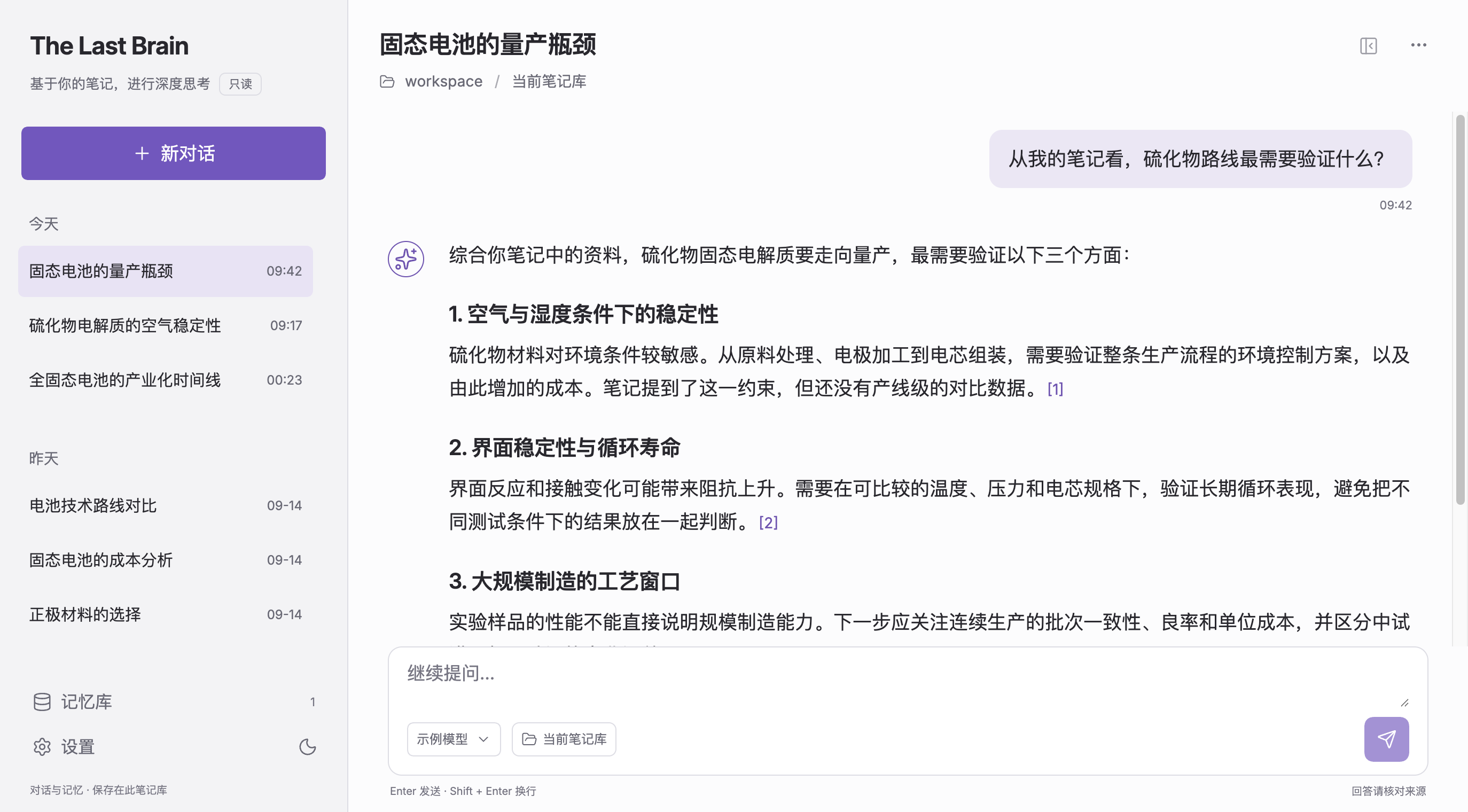
The Last Brain 在 Obsidian 中的只读问答界面,展示笔记来源与本地对话

实机界面,使用虚拟笔记与对话演示。支持深色、浅色主题和可调窗口。

让笔记成为可追问的上下文

  • 检索完整 Markdown 笔记库:按关键词在本地查找相关片段;每次请求只选取相关内容供回答使用。
  • 保留答案来源:查看引用片段和笔记路径,回到原文核对。
  • 本地保存对话与来源快照:回看每次回答当时依据的内容。
  • 由你确认记忆:审阅、编辑并确认记忆草稿,再让它参与后续问答。
  • 笔记只读:插件不创建、修改或删除笔记,也不给模型文件操作工具。
  • 自选模型服务:配置你选择的兼容服务地址、模型和密钥,也可连接本地模型服务。

快速开始

需要 Obsidian 1.11.4 或更新版本。下载并安装 最新版,在 Obsidian 设置中启用插件,然后配置模型服务并开启上下文发送。详细步骤见使用与隐私说明。

隐私摘要

笔记检索在本地进行。只有你发送问题、生成记忆草稿或主动测试连接时,插件才会联系你配置的模型服务。问答请求会发送你的问题、有限的近期对话、检索出的 Markdown 片段和相关已确认记忆;不会上传整个 vault。连接测试只发送固定问候。密钥通过 Obsidian 的密钥存储保存;对话、引用快照和记忆保存在插件数据文件中。

模型服务可能要求账户或产生费用。桌面 macOS 的合成模型流程已验证;真实服务的回答质量与移动端行为尚未验证。更多数据流和限制见使用与隐私说明。

作者:justinjia0813 · MIT License · 反馈与问题

HealthExcellent
ReviewSatisfactory
About
Chat with your vault's Markdown notes through a read-only local interface. Keep local chat history and source-linked memory drafts requiring manual confirmation; model calls go only to the endpoint you configure. Show plain-text replies and prevent model access to editing or external files.
AIMarkdown
Details
Current version
0.2.2
Last updated
5 days ago
Created
6 days ago
Updates
4 releases
Downloads
18
Compatible with
Obsidian 1.11.4+
Platforms
Desktop, Mobile
License
MIT
Report bugRequest featureReport plugin
Author
justinjia0813justinjia0813justinjia0813
GitHubjustinjia0813
  1. Community
  2. Plugins
  3. AI
  4. The Last Brain

Related plugins

OpenClaw

Chat with your OpenClaw AI agent in a sidebar. Your vault is the agent's workspace.

Linter

Format and style your notes. Linter can be used to format YAML tags, aliases, arrays, and metadata; footnotes; headings; spacing; math blocks; regular Markdown contents like list, italics, and bold styles; and more with the use of custom rule options.

Claudian

Embeds Claude Code/Codex and other local Agents as AI collaborators in your vault.

Smart Connections

Find related notes and excerpts while writing. Your AI link building copilot displays relevant content in graph + list view. A local embedding model powers semantic search. Zero setup. No API key.

Fast Note Sync

Real-time sync of your vaults across server, mobile, and web; shareable with anyone; supports REST and MCP integrations to build your personal AI knowledge base.

Custom Frames

Turn web apps into panes using iframes with custom styling. Also comes with presets for Google Keep, Todoist and more.

ChatGPT MD

A seamless integration of ChatGPT, OpenRouter.ai and local LLMs via Ollama into your notes.

Copilot

Run AI agents such as Claude Code, Codex, and OpenCode inside your vault. Turn your second brain into a smart assistant that gets knowledge work done.

Karpathy LLM Wiki

Karpathy's LLM Wiki implementation plugin for Obsidian - turns notes and PDFs into a linked, LLM-powered knowledge base with entity pages, concept pages, graph-powered Q&A, and local-first privacy.

Consistent Attachments and Links

Move note attachments and update links automatically.