Sync Trakt
 o1xhack820 downloads
Sync your Trakt.tv watchlist, watch history, favorites, and ratings into Markdown notes — with metadata localization and detailed per-episode watch timestamps.
- Overview
- Scorecard
- Updates32
Turn your Trakt.tv watch history into a richly localized Markdown library — with per-episode timestamps, metadata in 15+ languages, and quiet incremental sync that doesn't churn your vault.
🌐 English · 简体中文 · 繁體中文 · 日本語 · 한국어 · Français · Deutsch · Español · Italiano
✨ Why?
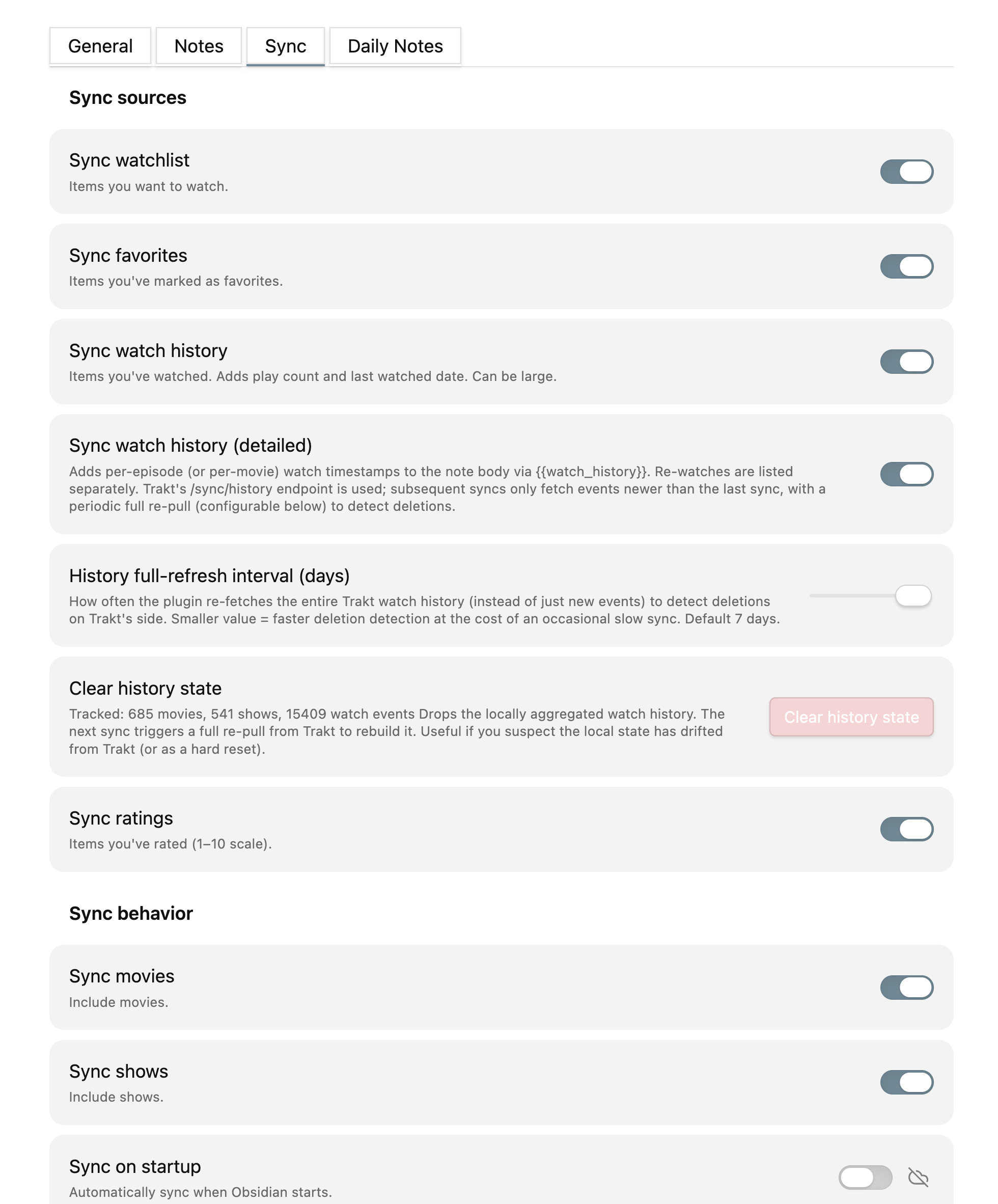
- Detailed watch history — exactly which episode you watched at what time, including re-watches, kept in sync as you keep watching
- Metadata in 15+ languages — translate titles / overviews / taglines / genres via TMDB. Built-in presets for Chinese (CN / TW / HK), Japanese, Korean, French, German, Spanish (ES / MX), Portuguese (BR), Italian, Russian — plus a custom mode for any TMDB-supported locale. Strict primary + user-defined fallback (e.g. zh-CN with English fallback) prevents silent zh-TW substitutions when the primary translation is missing. English originals always preserved in
*_original_*frontmatter fields - Flexible poster sources — choose
Auto,TMDB only, orOMDb only. Auto keeps TMDB first and falls back to OMDb by IMDb ID when TMDB has no poster. OMDb is poster-only, so it never overrides Trakt/TMDB titles, translations, genres, or ratings - Filenames follow your language — switch metadata language and existing notes auto-rename on the next sync to match the new title. Internal Obsidian links update automatically. One-shot "Rename now" button in settings for manual triggers
- Note templates in 11 languages — hand-curated bundled templates (en + zh-CN + zh-TW + ja + ko + fr + de + it + es + pt-BR + ru). Pick from the template-language dropdown; switch any time without losing customizations
- Tabbed settings UI — General / Notes / Sync / Daily Notes. Last-viewed tab remembered per device
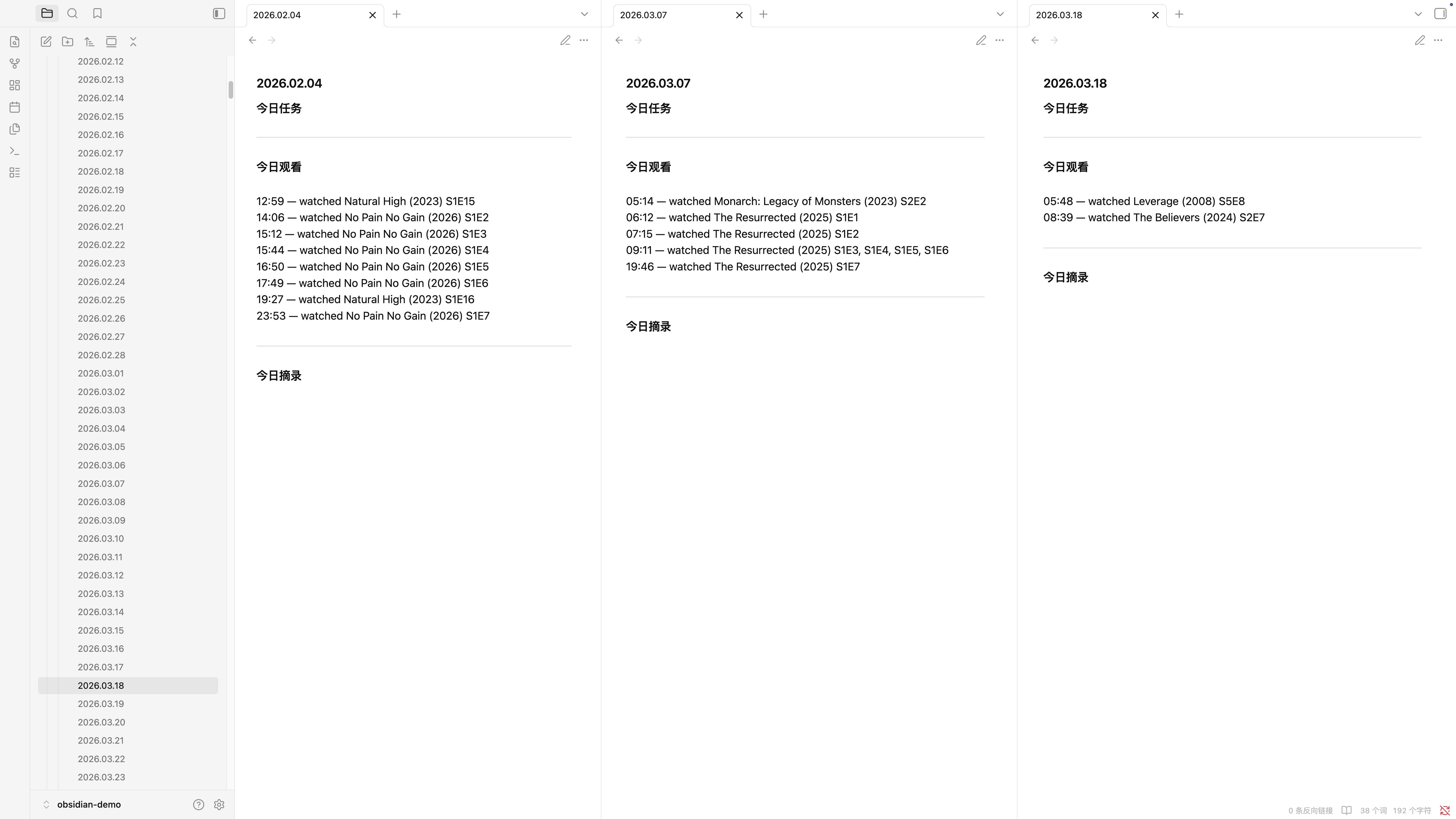
- Daily Notes integration — auto-injects per-event lines (watched / watchlist / favorited / rated) into your Daily Note on every sync, chronologically sorted, in your chosen template language. Marker-bounded region is fully isolated — content outside it is never modified. Optional incremental mode preserves your hand-written annotations inside the marker block. Manual date-range backfill with quick presets (Last 7 days / This month / etc.). Daily Notes can also run on their own auto-sync interval without rewriting media notes. See spec 0006 and spec 0011
- Fast incremental sync — first sync seeds local TMDB/OMDb caches + Trakt history state; subsequent syncs reuse cached metadata and posters. Steady-state sync time drops from minutes to single-digit seconds. See spec 0001
- Quiet writes — sync only rewrites notes whose content actually changed. After watching one new episode, a 1200-item library writes one note instead of all 1200 — your cross-device sync layer (Obsidian Sync / iCloud / Syncthing) stops re-uploading the entire library every run. See spec 0002
- Per-setting cloud toggle — pick which settings sync across devices and which stay local. Auto-sync interval, startup-sync toggle, UI language — each can be device-local so your Mac and iPhone don't fight over them. See spec 0003
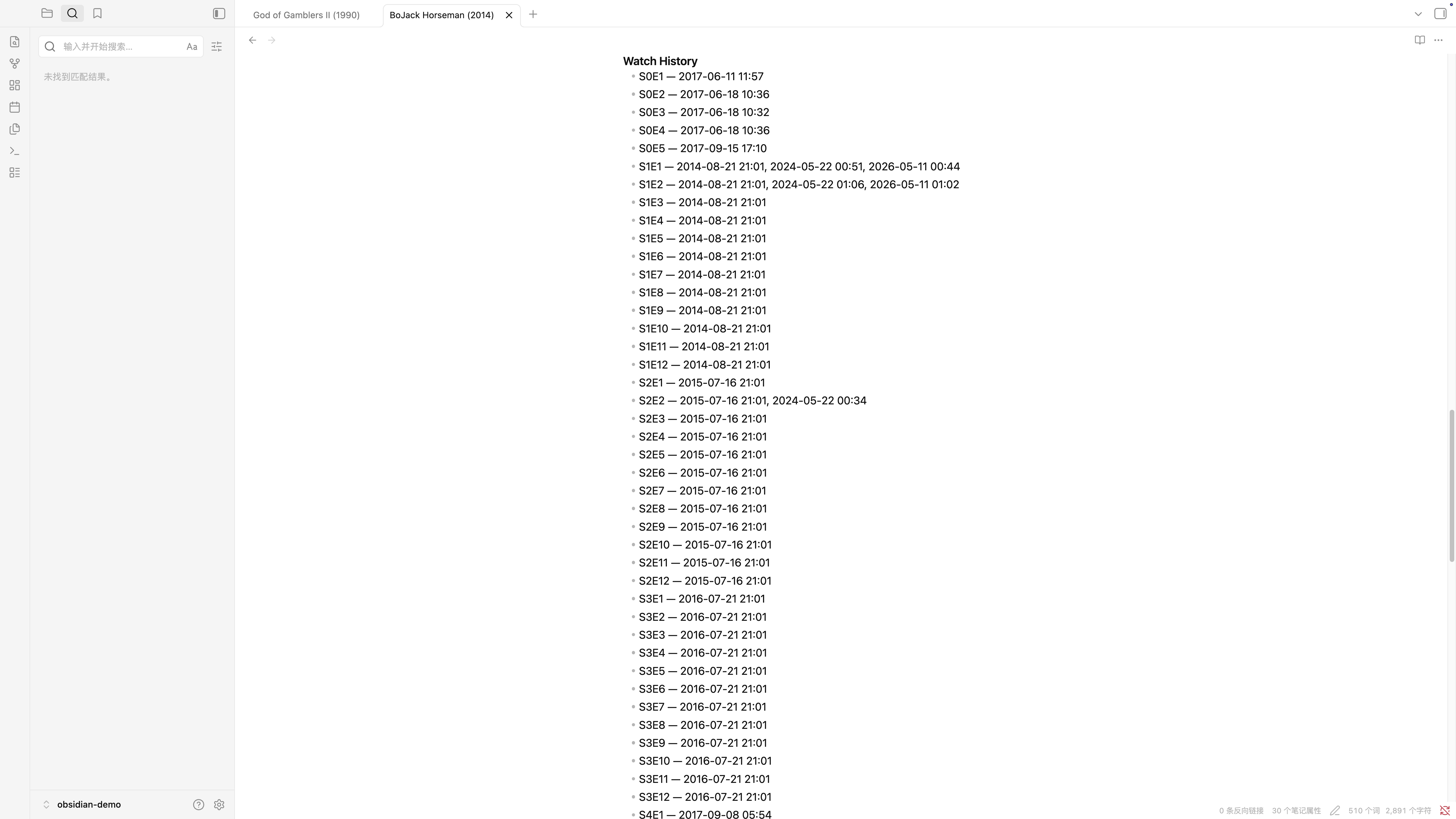
🎬 Detailed watch history
When Sync watch history (detailed) is enabled, the plugin queries Trakt's /sync/history endpoint and inlines per-episode (or per-movie) timestamps into the note body — and keeps that block updated as you watch new episodes:
## Watch History
- S1E1 — 2024-01-15 21:30, 2024-03-22 19:00
- S1E2 — 2024-01-16 22:00
- S1E3 — 2024-01-17 21:45
- S2E1 — 2024-04-02 20:00
Re-watches are listed comma-separated; episodes sort by season then episode number. The block is wrapped in %% trakt:watch-history %% markers — the plugin updates only what's between the markers, so any hand-written notes elsewhere in the body are never touched.
🌐 Metadata localization
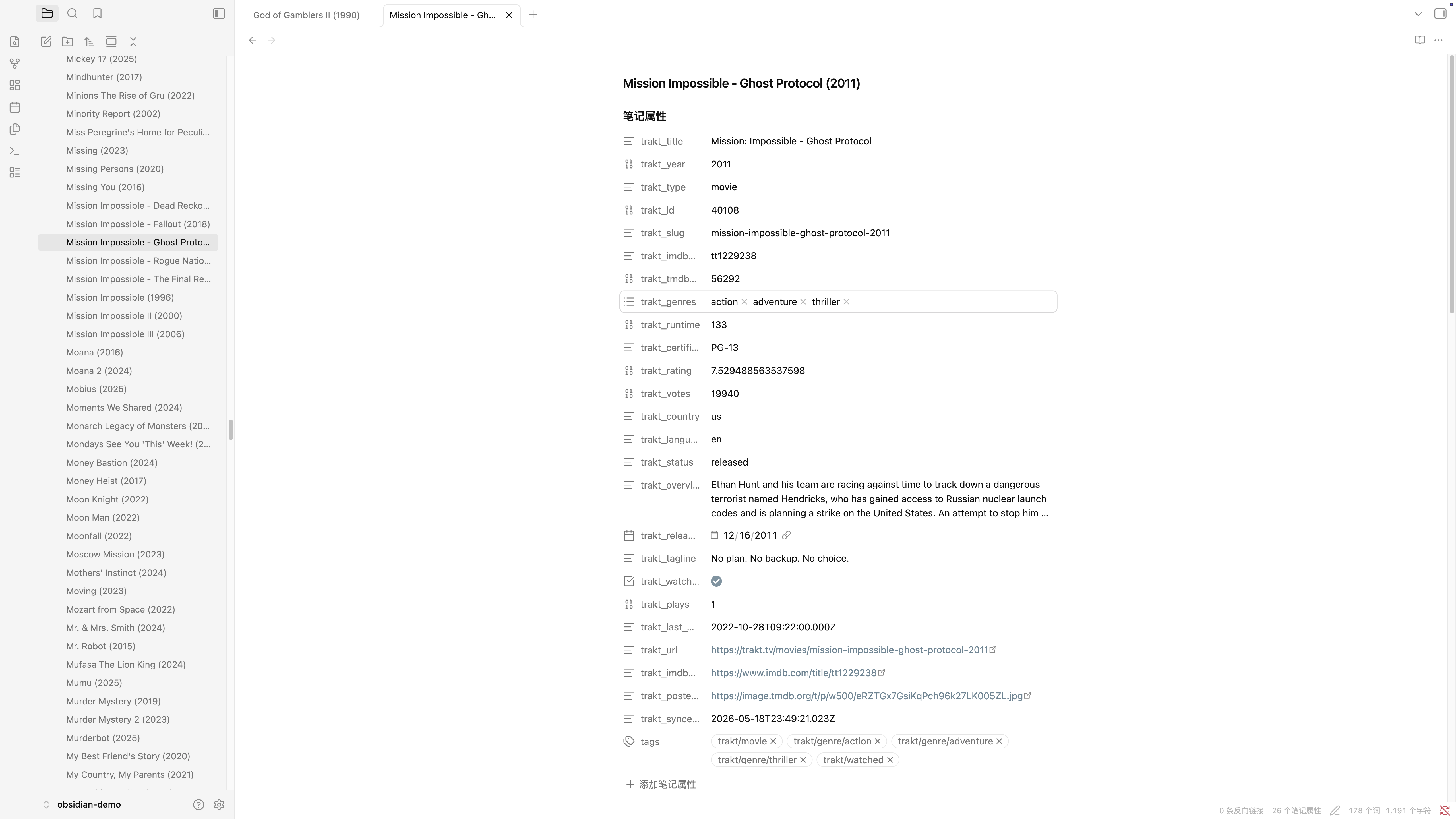
Set Metadata language to your preference and synced notes get title, overview, tagline, and genres translated via TMDB (with Trakt's translation endpoint as a fallback when no TMDB key is configured). English originals stay in trakt_original_* frontmatter fields:
trakt_title: 黑暗骑士
trakt_original_title: The Dark Knight
trakt_genres:
  - 动作
  - 犯罪
  - 剧情
trakt_original_genres:
  - Action
  - Crime
  - Drama
trakt_metadata_language: zh-CN
Tags and tag-note paths always stay in English — your existing Dataview queries keep working unchanged.
🌍 Plugin UI + note templates
Metadata localization above is one axis; the plugin's own surfaces are separate axes:
- Settings tab, command palette, notice popups speak English and 简体中文. More UI languages on demand — open an issue if you want to volunteer one.
- Bundled note templates in 11 languages — English, Simplified Chinese (zh-CN), Traditional Chinese (zh-TW / zh-HK), Japanese, Korean, French, German, Italian, Spanish, Portuguese (BR), Russian. Hand-curated, not machine-translated; section headings, bullet labels, and punctuation follow each language's conventions (full-width colons in Japanese, spaced colons in French, etc.). The template-language dropdown lists exactly these 11; locales outside the list fall back to English (rather than silently picking a sibling locale).
📅 Daily Notes integration
Auto-inserts per-event lines into your Daily Note for every sync — chronologically sorted, in your chosen template language. Covers watched episodes, watchlist additions, favorites, and ratings:
%% trakt:daily:start %%
10:00 — 看了 低智商犯罪 (2026) S1E16, S1E17
14:30 — 加入想看 黑暗骑士 (2008)
21:30 — 打分 9/10 重生 (2020)
%% trakt:daily:end %%
Each event type is gated by its corresponding sync source toggle — if Sync favorites is off, favorite events won't appear in Daily Notes either. Verbs (watched / 看了 / 視聴 / 시청 / a regardé…) follow your template language setting across all 11 bundled languages.
Safety contract: the marker region is fully isolated — content outside it is never modified. Past days are add-only by default (existing markers preserved); today is overwritten so newer events appear on later syncs. An incremental mode opt-in changes today's behavior to append-only too, so any annotations you write inside the marker block survive every sync.
Manual backfill uses a date-range picker with quick presets (Last 7 days / Last 30 days / This month / Last month). Live count shows how many Daily Notes actually exist in the picked range before you confirm. Configure folder + filename format (Moment.js syntax like YYYY-MM-DD or YYYY/YYYY.MM.DD) in Settings → Daily Notes. See spec 0006.
Daily Notes-only auto-sync can be enabled separately from full media auto-sync. It refreshes the Trakt/TMDB data needed for Daily Notes and updates existing Daily Note files, but it does not create, rename, delete, or rewrite media notes. The Daily-only timer and the full sync timer share one lock, so if they fire together, one run skips instead of writing concurrently.
🔄 Cross-device sync
Auth state — Trakt tokens, TMDB/OMDb keys, all settings — lives in <vault>/.obsidian/plugins/sync-trakt/data.json and follows your vault-sync layer. Configure auth once on Mac, share with iPhone via Obsidian Sync (with Plugin data enabled), Syncthing, iCloud + Advanced Data Protection, or Cryptomator. The plugin doesn't store anything on a server.
Large rebuildable runtime caches, including TMDB metadata, OMDb posters, and detailed watch-history aggregates, live outside the vault in each device's local Obsidian app storage. They are not uploaded to Obsidian Sync, and each device can rebuild them from Trakt/TMDB/OMDb if cleared. A small synced full-refresh coordinator keeps devices from writing detailed history from an older local cache after another device has detected Trakt-side deletions.
Any individual setting can opt out of cross-device sync via a small cloud icon next to it (currently exposed for Sync on startup / Auto-sync / Auto-sync interval / Daily Notes auto-sync / Daily Notes auto-sync interval / Plugin UI language). Useful when, e.g., you want media-note sync every few hours on Mac, Daily Notes every 15 minutes on Mac, and no automatic timers on iPhone.
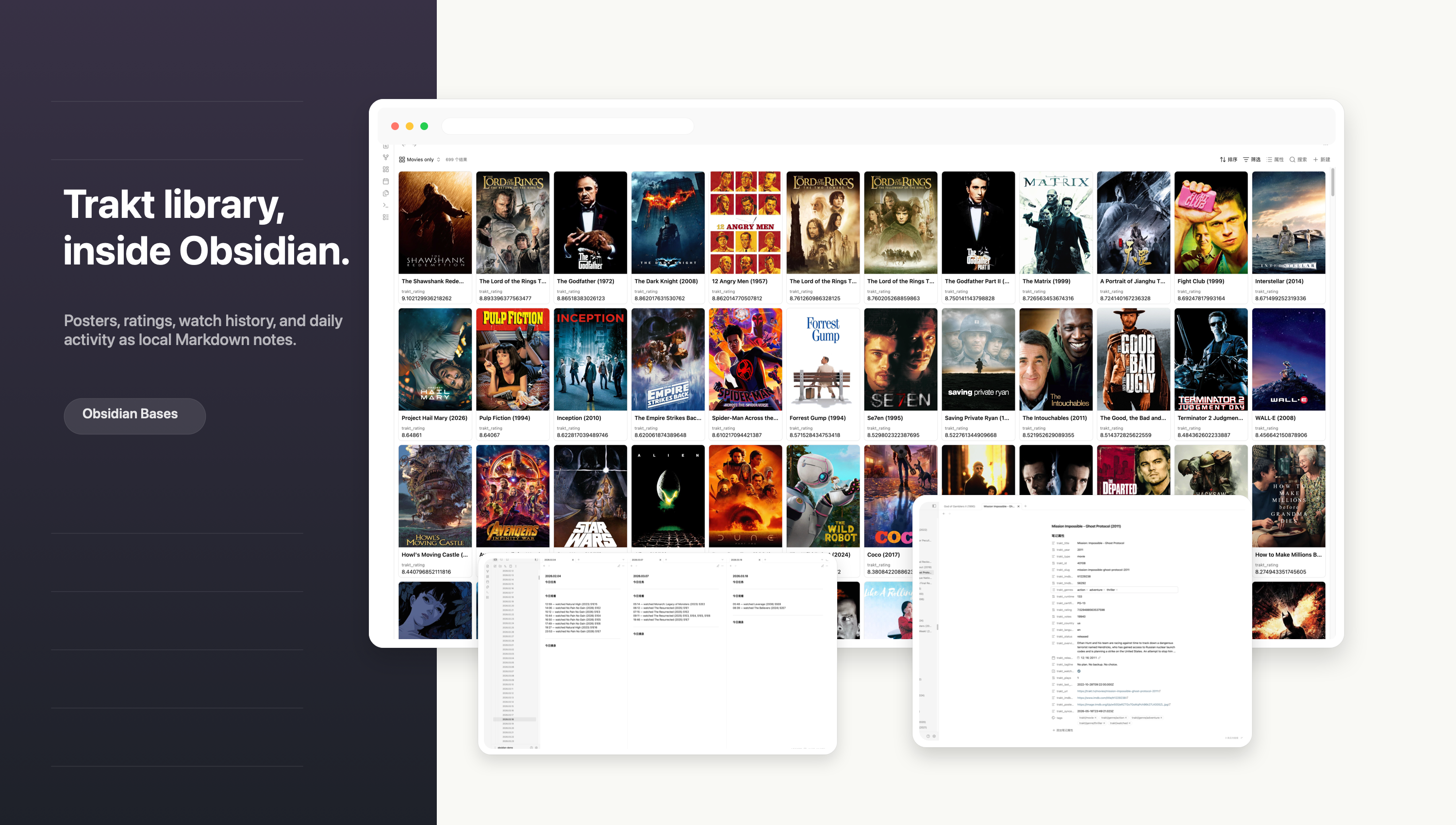
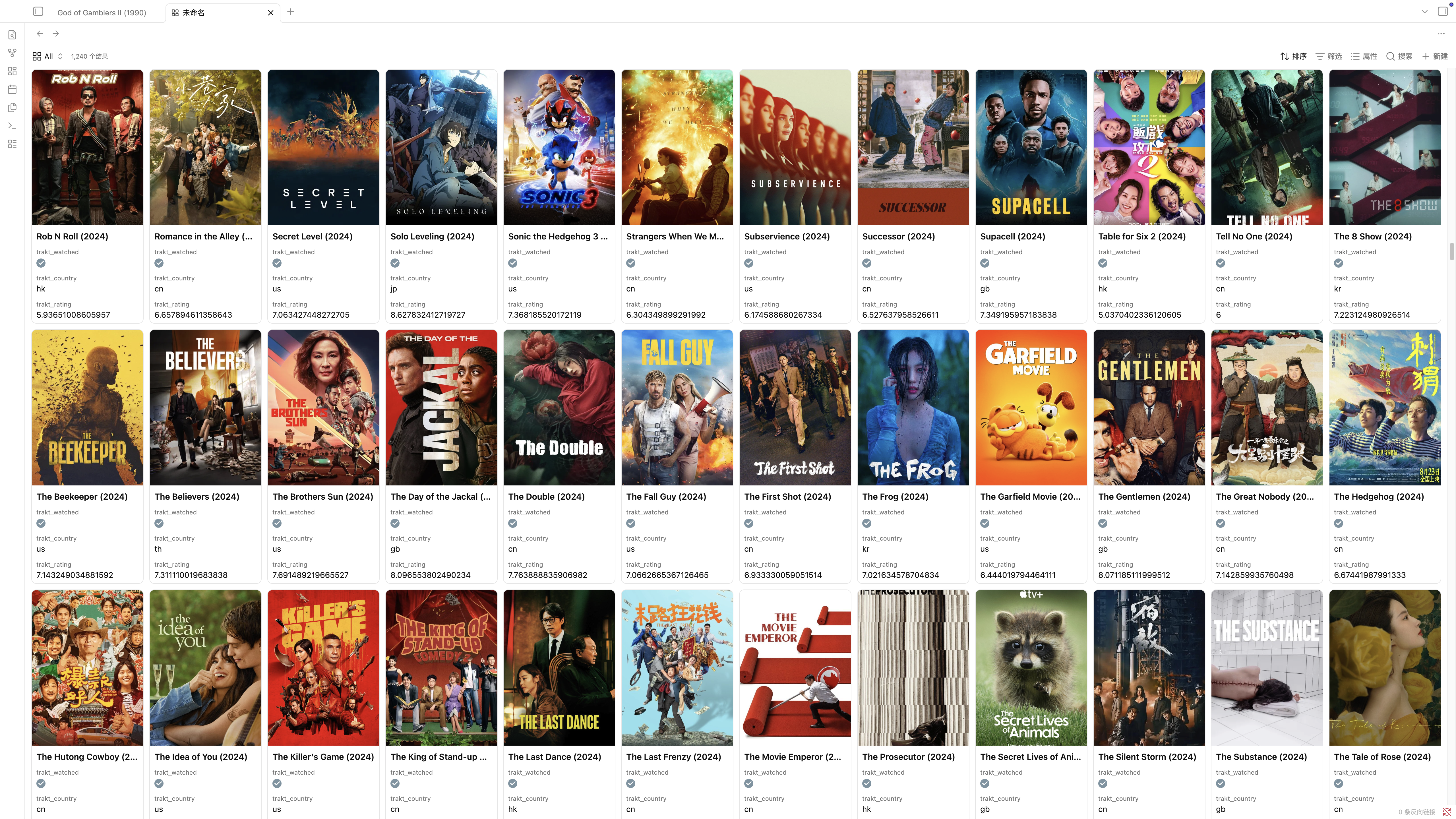
📊 View your library in Obsidian Bases
The trakt_poster_url frontmatter field works out-of-the-box with Obsidian Bases (Obsidian 1.9.3+). Build a database view of your sync folder and display posters as thumbnails:
- Card view: open Display settings → set Image property to
trakt_poster_url - Table view (1.9.4+): add a formula column with
image(note.trakt_poster_url)
Filter by trakt_type = "movie" / "show", sort by trakt_year / trakt_rating / trakt_my_rating, group by trakt_genres. The same frontmatter properties that power Dataview queries also power Bases views — no extra setup.
🚀 Quick start
- Settings → Community plugins → Browse → search for Sync Trakt → Install → Enable
- Settings → Sync Trakt → connect Trakt, then add optional TMDB / OMDb API keys as needed (SETUP guide)
- Command palette → Sync Trakt: Sync
🔑 API keys: what each one unlocks
The plugin connects to three services. Trakt is mandatory — without it, the plugin can't sync anything. TMDB is optional and provides richer localization plus the primary poster source. OMDb is also optional and is used only for poster lookup by IMDb ID.
| Feature | Trakt API (required) |
TMDB API (recommended) |
OMDb API (optional) |
|---|---|---|---|
| Sync your Trakt library (watchlist, watched, favorites, ratings) | ✅ | — | — |
| Per-episode watch timestamps | ✅ | — | — |
| Title / overview / tagline in your language | ✅ basic | ✅ higher quality | — |
| Genres in your language | ❌ | ✅ | — |
| Poster images embedded in notes | ❌ | ✅ | ✅ |
If you only want English content and no posters, Trakt alone is enough. Add a TMDB key for localized genres and TMDB posters. Add an OMDb key when you want poster-only fallback or posters without TMDB. The OMDb free key is limited to 1,000 requests per day, and Daily Notes-only sync deliberately never spends that quota.
→ Full walkthrough for all keys
📦 Install
Obsidian Community Plugins (recommended)
- Settings → Community plugins → Browse
- Search for Sync Trakt
- Click Install → Enable
Directory page: https://community.obsidian.md/plugins/sync-trakt
Development (build from source)
git clone https://github.com/o1xhack/obsidian-sync-trakt.git
cd obsidian-sync-trakt
npm install
npm run build      # produces main.js
npm run lint
npm run test:i18n  # smoke tests
Then copy main.js, manifest.json, styles.css to <vault>/.obsidian/plugins/sync-trakt/.
Local test (manual install)
- Download
main.js,manifest.json,styles.cssfrom the latest release - Place all three files in
<your-vault>/.obsidian/plugins/sync-trakt/ - Settings → Community plugins → enable Sync Trakt
📚 Documentation
| Doc | Purpose |
|---|---|
| SETUP | Trakt + optional TMDB / OMDb API key creation, first-time configuration, troubleshooting |
| MANUAL | Full settings reference, frontmatter fields, template variables, sync behavior |
| DEVELOPER | Architecture overview, data flow, how to extend (English only) |
| docs/i18n/ | Translations of README / SETUP / MANUAL into 8 additional languages |
🗺️ Roadmap
Major versions since the fork (chronological):
- 0.1 — Initial fork. Detailed watch history with per-episode timestamps, metadata localization via TMDB + Trakt fallback chain, bilingual UI (en + zh-CN), translated note templates (en + zh-CN + zh-TW), distinct plugin id from upstream so both can coexist.
- 0.2 — Incremental sync. Persistent TMDB cache (stale-while-revalidate, 90-day TTL with jitter) + Trakt history-state cursor. Steady-state sync drops from minutes to single-digit seconds. → spec 0001
- 0.3 — Diff-based writes. Only rewrite notes whose frontmatter or managed body section actually changed; cross-device sync layers stop shuffling 1200 files per sync. 0.3.x also added: TMDB API key Test button + warning banner when metadata language is set without a key, and two-tier filename disambiguation for localized-title collisions (e.g. 5 shows all called "重生" no longer fight for the same filename). → spec 0002
- 0.4 — Directory submission preparation. Plugin id renamed
obsidian-sync-trakt→sync-trakt(Obsidian directory bot rejects ids containing "obsidian"),minAppVersiontightened to 1.6.6, and transparent automatic data migration from the legacy folder on first launch. → spec 0004 - 0.5 — Device-local settings + automatic cleanup. Per-setting cloud-icon toggle so each setting can opt out of cross-device sync; auto-cleanup of the legacy folder's binary files (keeping data.json as a safety net) so users don't see two duplicate plugin entries in their settings. → spec 0003
- 0.6 — Tabbed settings UI + 11 bundled note template languages. Settings page reorganized into 4 tabs (General / Notes / Sync / Daily Notes). Note templates expanded from 3 to 11 hand-curated languages (+ ja, ko, fr, de, it, es, pt-BR, ru). Template-language dropdown filtered to only show bundled languages. → spec 0005 + spec 0007
- 0.7 — Daily Notes integration. Auto-inserts per-event lines (watched / watchlist / favorited / rated) into your Daily Note for every sync, chronologically sorted, in your chosen template language. Add-only safety for past days; today is overwritten as the day progresses. → spec 0006
- 0.8 — Daily Notes incremental sync mode. Opt-in mode where today's marker region is append-only (instead of full-replace), so any annotations you write inside survive every sync. → spec 0008 intro discusses the trade-off; the actual mode lives in spec 0006.
- 0.9 — Metadata language fallback. Adds a "fallback language" dropdown under Metadata language. When set, the primary becomes a strict match (no silent zh-TW substitution for zh-CN) and falls through to the user-chosen fallback before keeping the English original. → spec 0008
- 1.0 — Filename auto-rename + persistent What's-new modal + date-range backfill. Changing metadata language now auto-renames existing notes on the next sync (Obsidian internal links auto-update). Every new release pops a one-shot "What's new" modal showing version history since last seen. Manual backfill replaced with a date-range picker (start/end + quick presets). → spec 0009
- 1.1 — Vault-slim runtime cache architecture. Large TMDB and detailed-history caches moved outside the vault, keeping
data.jsonsmall for Obsidian Sync while preserving multi-device rebuild behavior. → spec 0010 - 1.2 — Daily Notes-only auto-sync. Daily Notes can refresh on their own interval without media-note writes, sharing the same Trakt/TMDB data path and sync lock as full sync. → spec 0011
- Future — More plugin UI translations (currently en + zh-CN) on demand; additional bundled template languages on request.
🤝 Acknowledgements
This plugin was originally inspired by sarimabbas/traktr (MIT licensed), which provided the initial Trakt OAuth scaffolding. Substantial subsequent work — detailed watch-history aggregation, metadata localization with translation-fallback chains, bilingual UI, bounded-concurrency fetching with live progress reporting, machine-managed body sections, the translation-aware template renderer, multi-language docs — has reshaped most of the codebase into a fundamentally different architecture.
Thanks to Sarim Abbas for the starting point. The original work's MIT copyright notice is preserved verbatim in LICENSE alongside this project's own.
📄 License
MIT — see LICENSE.
Author: o1xhack