Search...Search plugins and themes...
⌘K
Sign in
  • Get started
  • Download
  • Pricing
  • Enterprise
  • Account
  • Obsidian
  • Overview
  • Sync
  • Publish
  • Canvas
  • Mobile
  • Web Clipper
  • CLI
  • Learn
  • Help
  • Developers
  • Changelog
  • About
  • Roadmap
  • Blog
  • Resources
  • System status
  • License overview
  • Terms of service
  • Privacy policy
  • Security
  • Community
  • Plugins
  • Join the community
  • Discord
  • Forum / 中文论坛
  • Merch store
  • Brand guidelines
Follow us
DiscordTwitterBlueskyThreadsMastodonYouTubeGitHub
© 2026 Obsidian

Spoilers

jacobtreadjacobtread3k downloads

Hide and reveal blocks of information

Add to Obsidian
  • Overview
  • Scorecard
  • Updates6

Obsidian plugin for creating hidable blocks of content

Quickly and easily hide content in your Obsidian documents.

Spoiler blocks

Initially spoiler blocks will appear like the following:

Plain text spoiler

The first button will show/hide the content and the second button will copy the text to your clipboard

Below are the different kinds of spoiler blocks that are available

📄 Plain text blocks

You can create plain-text hidden content using the spoiler code block language:

```spoiler
This text is hidden with a spoiler
```

🔮 Markdown blocks

You can place markdown content in spoiler blocks by using the spoiler-markdown code block language:

```spoiler-markdown

## Markdown 

Markdown works within the code block.

[github.com](https://github.com)
```

When revealed the markdown will be visible
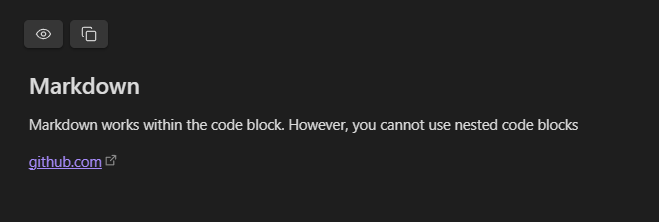
Markdown spiler

[!NOTE] Code blocks are not supported within markdown blocks

🔑 Environment variables

You can store environment variables using the spoiler-env code block language:

```spoiler-env
TEST=TEST
DOUBLE_LINE=`This is the first line
This is the second line`
```

These are parsed using dotenv and are displayed in a table:
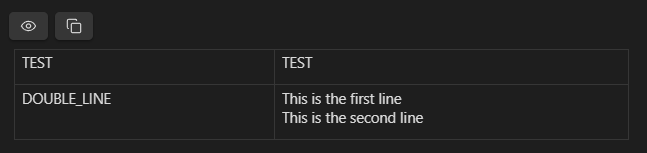
alt text

Which allows you to copy individual keys and values
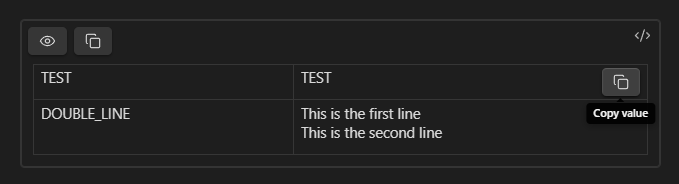
alt text

77%
HealthGood
ReviewSatisfactory
About
Create hidable spoiler blocks to hide and reveal content inline. Use plain-text, markdown, or env-variable blocks with show/hide controls and copy buttons, and copy full content or individual keys/values.
MarkdownFormattingInterface
Details
Current version
1.0.5
Last updated
3 months ago
Created
2 years ago
Updates
6 releases
Downloads
3k
Compatible with
Obsidian 1.5.12+
License
MIT
Report bugRequest featureReport plugin
Sponsor
Buy Me a Coffee
GitHub Sponsors
Author
jacobtreadjacobtread
jacobtread.com
GitHubjacobtread
  1. Community
  2. Plugins
  3. Markdown
  4. Spoilers

Related plugins

Linter

Format and style your notes. Linter can be used to format YAML tags, aliases, arrays, and metadata; footnotes; headings; spacing; math blocks; regular Markdown contents like list, italics, and bold styles; and more with the use of custom rule options.

Columns

Create columns in Markdown.

Image Captions

Add captions to images with inline Markdown and link support. The caption format is compatible with the Commonmark spec and other Markdown applications.

Tabs

Create tabs in your notes.

Hider

Hide interface elements such as tooltips, status bar, titlebar, and more.

Importer

Import data from Notion, Evernote, Apple Notes, Microsoft OneNote, Google Keep, Bear, Roam, and HTML files.

Outliner

Work with your lists like in Workflowy or Roam Research.

Meta Bind

Make your notes interactive with inline input fields, metadata displays, and buttons.

Commander

Customize your workspace by adding commands everywhere, create macros and supercharge your mobile toolbar.

Various Complements

Complete words similar to auto-completion in an IDE.