Search...Search plugins and themes...
⌘K
Sign in
  • Get started
  • Download
  • Pricing
  • Enterprise
  • Account
  • Obsidian
  • Overview
  • Sync
  • Publish
  • Canvas
  • Mobile
  • Web Clipper
  • CLI
  • Learn
  • Help
  • Developers
  • Changelog
  • About
  • Roadmap
  • Blog
  • Resources
  • System status
  • License overview
  • Terms of service
  • Privacy policy
  • Security
  • Community
  • Plugins
  • Join the community
  • Discord
  • Forum / 中文论坛
  • Merch store
  • Brand guidelines
Follow us
DiscordTwitterBlueskyThreadsMastodonYouTubeGitHub
© 2026 Obsidian

Image Captions

alangraingeralangrainger56k downloads

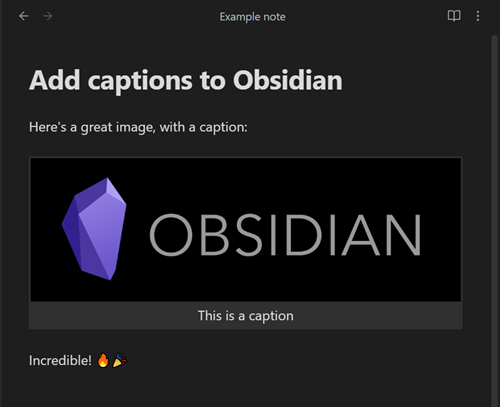
Add captions to images with inline Markdown and link support. The caption format is compatible with the Commonmark spec and other Markdown applications.

Add to Obsidian
  • Overview
  • Scorecard
  • Updates17

Add image captions

Add an image in this format:

![[image.jpg|This is a caption]]

or this format:

![This is a caption](https://raw.githubusercontent.com/alangrainger/obsidian-image-captions/HEAD/image.jpg)

and it will add the caption underneath the image, like this:
Resize images

You can use the existing Obsidian width parameter to resize your images:

![[image.jpg|This is a caption|150]]

or this format:

![This is a caption|150](https://raw.githubusercontent.com/alangrainger/obsidian-image-captions/HEAD/image.jpg)

Image alignment

You can center images or float them to the left and right, and resize also:

![[image.jpg|This is a caption|center]]

![[image.jpg|This is a caption|left]]

![[image.jpg|This is a caption|right|150]]

Markdown in captions

You can include inline Markdown and it will be rendered as part of the caption:

![[image.jpg|This is a caption with **bold text**]]

You can use Markdown links as normal:

![[image.jpg|This is a caption with [a link to Obsidian](https://obsidian.md)]]

To use Wikilinks, you'll need to swap your square brackets [[]] for angle brackets <<>>:

![[image.jpg|This is a caption with <<a Wikilink>>]]

Use filename as caption

If you want to use the image filename as the caption, specify % as the sole text of your caption, and it will replace that with the filename (without extension):

![[image.jpg|%]]

If you want to literally use the % character as the caption, you can escape it:

![[image.jpg|\%]]

If you want the filename including extension, use %.%.

Custom regex to filter caption

If you use other themes or plugins which require you to add data into the image description field, you can use a regex to remove those from the final caption. You will find this in the plugin Settings.

Two common examples would be from the ITS Theme, which lets you put |right etc to change the postion of your image.

To remove everything after the first pipe | character from your caption:

^([^|]+)

If you want to keep escaped pipes \| (in case you are using internal links), use:

^((\\\||[^|])+)

Styling

You can apply CSS styling by targeting the .image-captions-figure and .image-captions-caption classes.

Limitations

External images won't show the caption in Editing / Live Preview mode. For example:

![Not visible in Editing mode](https://obsidian.md/logo.png)

I couldn't find a reliable way of targeting them. Get in touch if you know a way to do this!

Internal images are fine.


This plugin is based on concepts from https://github.com/bicarlsen/obsidian_image_caption

76%
HealthGood
ReviewSatisfactory
About
Add captions to images by placing text in wiki-style or Markdown image syntax and render it beneath the image. Resize and align images with width and alignment parameters, include inline Markdown or links in captions, use % to insert the filename, and apply a regex to clean caption text.
ImagesMarkdownFormatting
Details
Current version
1.1.7
Last updated
6 months ago
Created
3 years ago
Updates
17 releases
Downloads
56k
Compatible with
Obsidian 0.15.0+
License
GPL-3.0
Report bugRequest featureReport plugin
Sponsor
Ko-fi
Author
alangraingeralangrainger
github.com/alangrainger
GitHubalangrainger
  1. Community
  2. Plugins
  3. Images
  4. Image Captions

Related plugins

Linter

Format and style your notes. Linter can be used to format YAML tags, aliases, arrays, and metadata; footnotes; headings; spacing; math blocks; regular Markdown contents like list, italics, and bold styles; and more with the use of custom rule options.

Columns

Create columns in Markdown.

Importer

Import data from Notion, Evernote, Apple Notes, Microsoft OneNote, Google Keep, Bear, Roam, and HTML files.

Outliner

Work with your lists like in Workflowy or Roam Research.

Various Complements

Complete words similar to auto-completion in an IDE.

Fantasy Statblocks

Create, manage and view a Fantasy Bestiary with Dungeons and Dragons style statblocks.

PlantUML

Generate PlantUML diagrams.

Admonition

Admonition block-styled content.

Auto Link Title

Automatically fetches the titles of links from the web.

Custom Frames

Turn web apps into panes using iframes with custom styling. Also comes with presets for Google Keep, Todoist and more.