Sidebar Tasks
 Alejandro G. Lacasa42 downloads
Task list view for Bases, made to live in the sidebar.
- Overview
- Scorecard
- Updates2
A Task list view for Bases, designed to sit in the sidebar so your tasks are always visible.
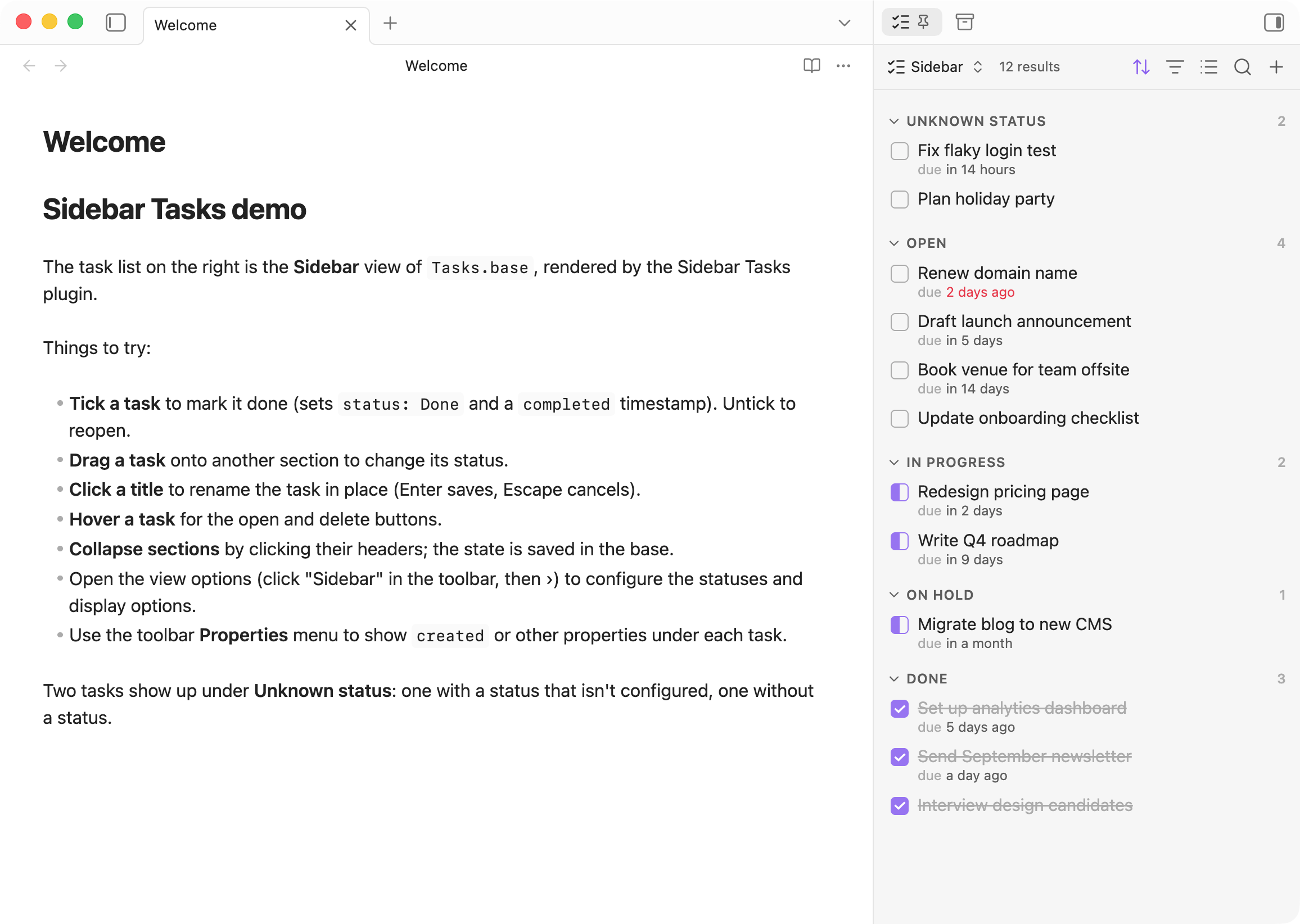
Each note in the base is a task. Its status lives in a frontmatter property (status by default).
Features
- Checkboxes that match the status: empty for open, half-filled for in progress, ticked for done. Ticking a task sets the first done status and records a
completedtimestamp. Unticking sets the first open status. - Drag and drop a task onto another section to change its status (when the view is grouped by status).
- Inline rename: click a title to rename the note. Links to it are updated.
- Open and delete buttons appear when you hover a task. Deleted tasks go to the trash set in Obsidian's "Deleted files" setting.
- Collapsible sections: collapsed state is saved in the base, and empty sections collapse automatically.
- Unknown status section at the top for tasks with no status or a status that isn't configured.
- Due dates are shown relative ("in 3 days") or absolute, and highlighted when overdue.
- Any property can be shown under a task. Links open their note, and folder links reveal the folder in the file explorer.
Getting started
- Create a base that filters your task notes, for example
file.inFolder("Tasks"). - Add a view and choose the Task list layout.
- Group the view by your status property.
- With the base open, run Sidebar Tasks: Open current base in right sidebar from the command palette. Obsidian remembers the sidebar layout from then on.
View options
Open the view options from the base toolbar (click the view name, then ›).
Display
| Option | Description |
|---|---|
| Hide done tasks | Hide tasks with a done status. |
| Keep empty groups | Show a section for every configured status, even with no tasks, so you can drop tasks into it. |
| Show property names | Prefix each property with its name, e.g. "due in 3 days". |
| Dates | Relative or absolute dates. |
Task status
| Option | Default | Description |
|---|---|---|
| Status property | status |
Frontmatter property holding the status. |
| Open statuses | To do |
Shown as an empty checkbox. The first one is used when reopening a task. |
| In progress statuses | In progress |
Shown as a half-filled checkbox. |
| Done statuses | Done |
Shown ticked. The first one is used when completing a task. |
| Completed date property | completed |
Set when a task is completed, removed when it's reopened. |
When grouped by status, sections follow the order of these lists. To choose which properties appear under each task, use the toolbar's Properties menu.
Installation
From Obsidian: Settings → Community plugins → Browse, then search for "Sidebar Tasks".
Manually: copy main.js, manifest.json and styles.css into <vault>/.obsidian/plugins/sidebar-tasks/, then enable the plugin.
Requires Obsidian 1.10.0 or later.
HealthExcellent
ReviewPassed
About
Display a persistent task list in the sidebar that treats each note in a base as a task and reads its status from a frontmatter property. Map checkboxes to status (open, in-progress, done), toggle or drag to change status and record completion timestamps, rename notes inline with links updated, and view due dates relative or absolute with overdue highlighting.Details
Current version
0.2.0
Last updated
2 weeks ago
Created
2 weeks ago
Updates
2 releases
Downloads
42
Compatible with
Obsidian 1.10.0+
Platforms
Desktop, Mobile
License
MIT