Search...Search plugins and themes...
⌘K
Sign in
  • Get started
  • Download
  • Pricing
  • Enterprise
  • Account
  • Obsidian
  • Overview
  • Sync
  • Publish
  • Canvas
  • Mobile
  • Web Clipper
  • CLI
  • Learn
  • Help
  • Developers
  • Changelog
  • About
  • Roadmap
  • Blog
  • Resources
  • System status
  • License overview
  • Terms of service
  • Privacy policy
  • Security
  • Community
  • Plugins
  • Themes
  • Discord
  • Forum / 中文论坛
  • Merch store
  • Brand guidelines
Follow us
DiscordTwitterBlueskyThreadsMastodonYouTubeGitHub
© 2026 Obsidian

Review Flow

Patrik GranlövPatrik Granlöv64 downloads

Edit documents and send them for approval through GitHub pull requests, from one simple panel without git in sight.

Add to Obsidian
  • Overview
  • Scorecard
  • Updates9

Svenska

Edit documents in Obsidian and send them for approval on GitHub, without knowing git.
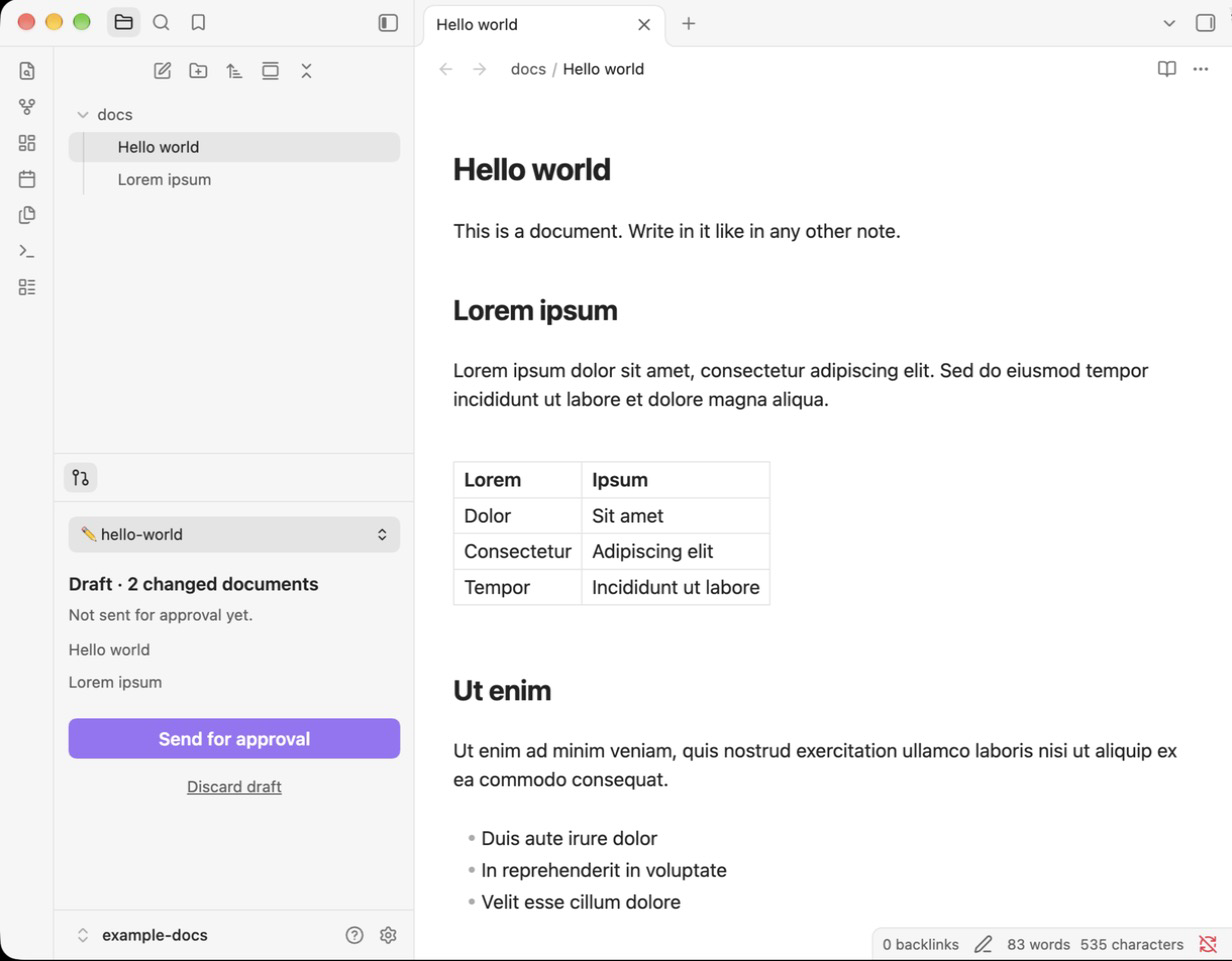
The Changes panel next to a document in Obsidian

Installation

  1. Download Obsidian.
  2. Install Review Flow.
  3. Follow the Changes panel on the left. It helps you sign in to GitHub and get the documents.

Usage

  • Write in a document. A draft is created automatically.
  • Click Send for approval. The change takes effect once it is approved on GitHub.
  • Switch between your drafts with the picker at the top of the panel.

Good to know

  • Needs a GitHub account and works on desktop only.
  • The plugin runs git and gh on your computer. They only talk to GitHub.
  • gh auth setup-git adds the GitHub sign-in to your ~/.gitconfig.
  • No telemetry, no ads.
  • Approval is enforced by GitHub. Protect the main branch so changes need approval.

Development

npm install
npm run build
npm test

The source is in src/. New version: npm version patch and git push --follow-tags.

License

MIT

HealthExcellent
ReviewSatisfactory
About
Edit Markdown files and send changes as GitHub pull requests for review and approval without needing to know git. Manage drafts from a single Changes panel: create drafts automatically while you type, send with one button, track waiting/merged status, and discard drafts as needed.
GitIntegrationsSidebar
Details
Current version
0.1.9
Last updated
2 weeks ago
Created
3 weeks ago
Updates
9 releases
Downloads
64
Compatible with
Obsidian 1.5.0+
Platforms
Desktop only
License
MIT
Report bugRequest featureReport plugin
Author
Patrik GranlövPatrik Granlövgranlov
GitHubgranlov
  1. Community
  2. Plugins
  3. Git
  4. Review Flow

Related plugins

Open in Terminal

Open your vault in a new terminal window or launch Claude Code, Codex CLI, or Gemini CLI directly from a terminal.

Claude Sidebar

Run Claude Code in your sidebar.

Notebook Navigator

A better file browser and calendar inspired by Apple Notes, Bear, Evernote and Day One.

BRAT

Easily install a beta version of a plugin for testing.

LanguageTool Integration

Advanced grammar and spell checking, powered by LanguageTool.

Self-hosted LiveSync

Sync vaults securely to self-hosted servers or WEBRTC.

Fast Note Sync

Real-time sync of your vaults across server, mobile, and web; shareable with anyone; supports REST and MCP integrations to build your personal AI knowledge base.

Tag Wrangler

Rename, merge, toggle, and search tags from the tag pane.

Local REST API with MCP

Unlock your automation needs by interacting with your notes over a secure REST API.

Custom Frames

Turn web apps into panes using iframes with custom styling. Also comes with presets for Google Keep, Todoist and more.