Rating Filter
 Niccolò Niccoli355 downloads
Add 0-5 star ratings, store ratings in YAML frontmatter/properties, and filter markdown files by rating.
- Overview
- Scorecard
- Updates2
Rating Filter is an Obsidian plugin for adding star ratings to markdown notes, saving ratings as YAML frontmatter/properties, and filtering notes by rating.
Preview
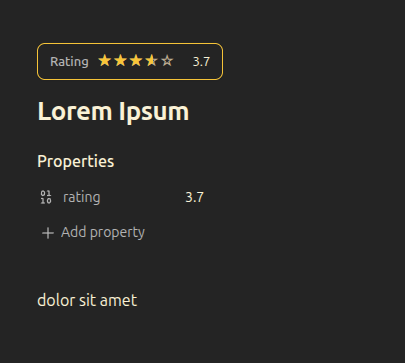
Stars in the main document:
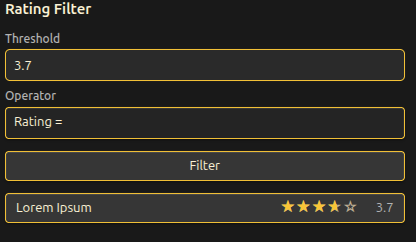
Rating Filter tab:
Why Use It?
- Rate notes from
0to5. - Show stars in the main document.
- Filter markdown notes by rating.
- Store ratings in YAML frontmatter.
- Works with Obsidian Properties.
Installation
Create this folder in your vault:
YourVault/.obsidian/plugins/rating-filter/Copy these files into that folder:
main.js
manifest.json
styles.css
In Obsidian, open
Settings -> Community plugins.Disable restricted mode if needed.
Enable
Rating Filter.
If the plugin was already enabled, reload Obsidian or disable and re-enable the plugin after replacing files.
Usage
Open a markdown note, type a rating from 0 to 5 in the status bar input, then click Rate.
Rated notes show one star rating widget at the top of the document.
Frontmatter Format
Ratings are saved in the note frontmatter as a numeric rating property:
rating: 4.5
Filtering Notes
Open the Rating Filter panel with the star ribbon icon or the Open Rating Filter panel command.
Choose:
- a rating threshold
Rating ≥,Rating ≤, orRating =
The panel lists matching markdown notes with their title, stars, and numeric rating. Click a result to open the note.
Commands
Set rating for current noteOpen Rating Filter panel
FAQ
Does it work with Obsidian Properties?
Yes. Ratings are stored as the rating property in YAML frontmatter, which Obsidian shows in Properties.
Where are ratings stored?
Ratings are stored locally inside each markdown note's frontmatter.
Does it use external services?
No. Rating Filter does not use network requests, telemetry, accounts, or external services.
Can ratings be decimals?
Yes. Ratings can be decimals from 0 to 5, such as 3.7 or 4.5.
Privacy
Rating Filter only reads and writes local markdown frontmatter in your vault.