Search...Search plugins and themes...
⌘K
Sign in
  • Get started
  • Download
  • Pricing
  • Enterprise
  • Account
  • Obsidian
  • Overview
  • Sync
  • Publish
  • Canvas
  • Mobile
  • Web Clipper
  • CLI
  • Learn
  • Help
  • Developers
  • Changelog
  • About
  • Roadmap
  • Blog
  • Resources
  • System status
  • License overview
  • Terms of service
  • Privacy policy
  • Security
  • Community
  • Plugins
  • Themes
  • Discord
  • Forum / 中文论坛
  • Merch store
  • Brand guidelines
Follow us
DiscordTwitterBlueskyThreadsMastodonYouTubeGitHub
© 2026 Obsidian

File Color

ecusticecustic195k downloads

Set colors on folders and files in the file tree.

Add to Obsidian
  • Overview
  • Scorecard
  • Updates5

Obsidian File Color Banner

What is this?

This is a plugin for Obsidian, which allows you to select colors for your files and folders in the file explorer.

Usage

Setting the color for a file or folder is done by right clicking on the file in the file explorer and selecting Set color. This opens a modal where you can select all the colors defined in the plugin palette.
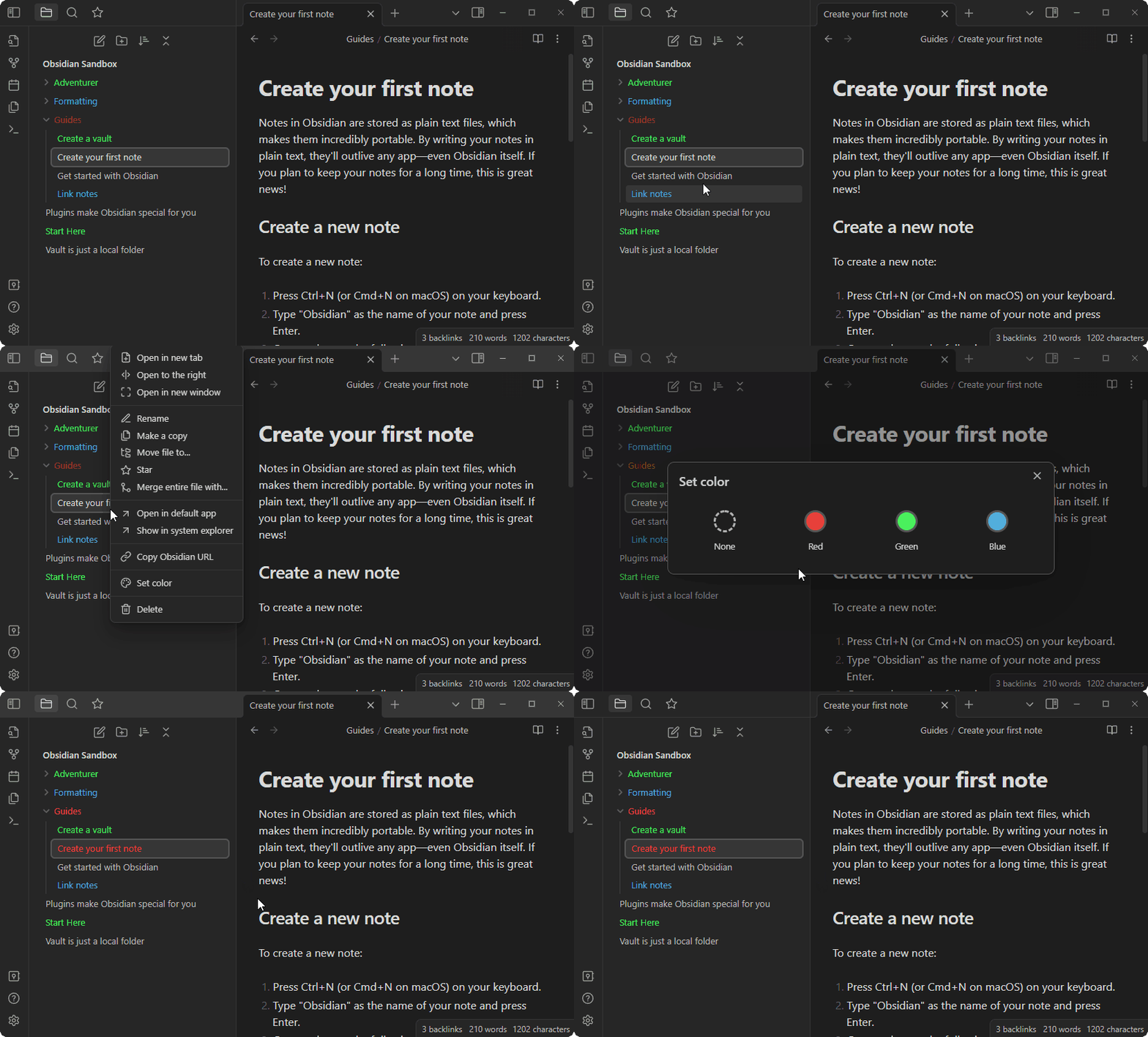
Setting a color

Changing the palette

To add colors to the palette open the plugin settings, and click the + button. Then use the color picker to select the color, and input a name for the color. Afterwards it will appear in the Set color modal. You can add as many colors as you need.
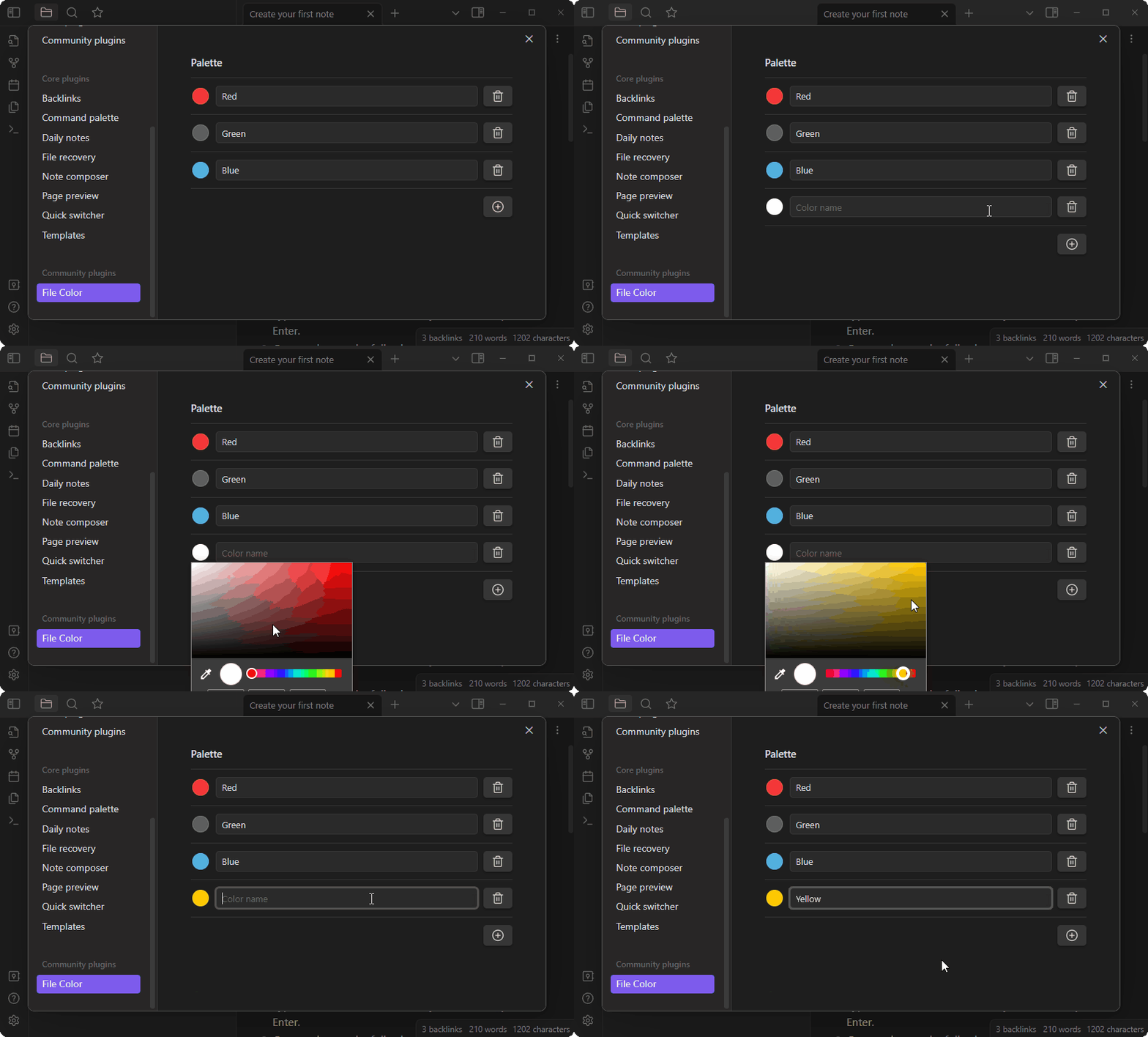
Adding a color

Options

  • Cascade Colors: if turned on, colors on folders will cascade to their children. Set colors on children to override parents.
  • Background Colors: if turned on, the background is colored instead of the text.

Compatibility

This plugin has been tested with a few other community plugins:

  • Icon Folder
    • Should work out of the box, and colors should automatically be applied to the icons as well.
  • Folder Note
    • Will also work out of the box, however the underlines added to the files will not be colored.

    • Personally I use the following CSS snippet locally:

      .nav-folder.alx-folder-with-note>.nav-folder-title>.nav-folder-title-content {
        text-decoration-style: dotted;
        text-decoration-color: inherit;
      }
      

      Which will make make the underline use the colors defined by this plugin. The result looks something like this:


      Example with icons and folder notes


52%
HealthFair
ReviewRisks
About
Color files and folders in the file explorer to visually organize notes. Create a custom palette, assign colors via right‑click modal, and enable cascading or background coloring to apply colors to children or the file background.
AppearanceFilesSidebar
Details
Current version
1.1.0
Last updated
2 years ago
Created
3 years ago
Updates
5 releases
Downloads
195k
Compatible with
Obsidian 1.2.7+
Platforms
Desktop, Mobile
License
MIT
Report bugRequest featureReport plugin
Sponsor
Buy Me a Coffee
Author
ecusticecustic
github.com/ecustic
GitHubecustic
  1. Community
  2. Plugins
  3. Appearance
  4. File Color

Related plugins

Notebook Navigator

A better file browser and calendar inspired by Apple Notes, Bear, Evernote and Day One.

Recent Files

Display a list of recently opened files.

Flexplorer

Enhance the file explorer with custom sorting, pinning, and hiding.

Custom File Explorer sorting

Manual or automatic config-driven reordering and sorting of files and folders in File Explorer.

Novel word count

Display a word count, page count, creation date, or other statistics for each file, folder and vault in the File Explorer pane.

Reveal Active File Button

Add a button to the top of the File Explorer, to reveal the active file.

File Explorer Note Count

See the number of notes in each folder within the file explorer.

File Tree Alternative

An alternative file tree view with separate folder and file panes.

Rainbow-Colored Sidebar

Automatically color your sidebar like a rainbow. No configuration needed.

Local REST API & MCP Server

Unlock your automation needs by interacting with your notes over a secure REST API.