N2O Sync Lite
 Simha272 downloads
Your Notion workspace, in your vault, as plain Markdown you own. Pulls pages, databases, properties and media, and re-pulls any time Notion changes. One way, free, no account needed.
- Overview
- Scorecard
- Updates2

N2O Sync Lite
Your Notion workspace, in your vault, in plain Markdown.
Pull pages and databases into Obsidian as clean Markdown. Free, open source, up to 100 pages.
Website / Docs / Report a bug / Request a feature
Not a Notion product. N2O Sync Lite is an independent Obsidian plugin. It is not made by, endorsed by, or affiliated with Notion Labs or Obsidian. It uses Notion's public API with a token you provide.
It only reads from Notion. Lite never writes to your Notion workspace, so there is nothing it can break over there. The only thing it changes is your vault.
The problem
You have years of work in Notion. Meeting notes, project databases, research, half-finished writing, the wiki nobody else maintains.
It lives on somebody else's server, in somebody else's format. Notion's own
Markdown export is a manual .zip you have to request, where every filename has
a 32-character UUID stapled to the end, internal links point at files that no
longer exist, and databases arrive as loose CSV. There is no incremental option
and no way to schedule it. Do it twice and you get two unrelated folders.
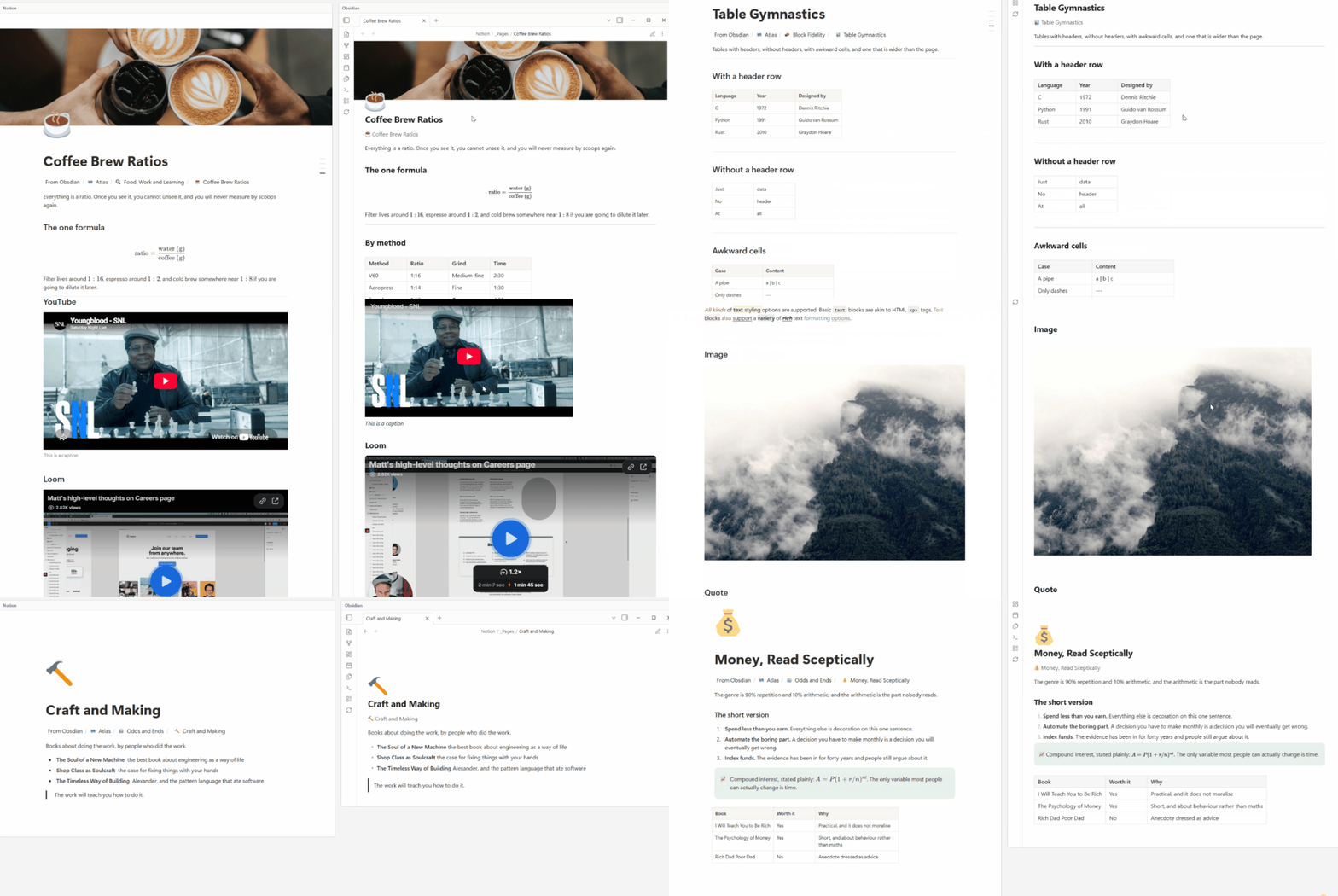
N2O Sync Lite pulls the same content into your Obsidian vault as clean Markdown, with working links, properties as frontmatter, and images on disk. Run it again next week and it updates what changed instead of dumping a second copy.
What comes across
Full mapping table, block by block: n2osync.com/docs/reference/supported-blocks
Compared to Notion's own export
| Notion Markdown export | N2O Sync Lite | |
|---|---|---|
| How you run it | Request it, wait for an email, download a .zip |
One command in Obsidian |
| Filenames | Page Title abc123def456...789.md |
Page Title.md |
| Internal links | Point at exported filenames, frequently broken | Working [[wikilinks]] |
| Databases | Loose CSV next to the pages | A folder of notes with typed frontmatter |
| Properties | In the CSV, not on the page | YAML frontmatter, queryable |
| Images | In the zip, paths often mangled | Downloaded into _files/, links correct |
| Running it again | A second unrelated folder | Updates what changed |
| Your local edits | Overwritten or duplicated | Never written over |
| Scheduling | Not possible | Re-run whenever you want |
Install
From the Obsidian community store
- Open Settings > Community plugins > Browse
- Search for N2O Sync Lite
- Install, then Enable
Your first sync
- Open the N2O panel from the ribbon or the command palette
- Choose what to sync: everything, or pick specific pages and databases
- Run N2O: Pull from Notion
Start with one database or one page tree rather than the whole workspace. It makes the first run fast and it makes it obvious what N2O is doing to your vault.
Re-running is safe. If you edited a note in Obsidian and the page also changed in
Notion, N2O does not try to combine them and does not overwrite you. Your file
stays as it is and Notion's version is written beside it as <name>.conflict.md,
so you can compare the two and keep what you want.
N2O Paper, my free Obsidian theme
Once your Notion pages are in Obsidian you have to read them somewhere, so I also make N2O Paper: a light theme built for long reading, with cream sheets, callouts taped to the page and seven palettes taken from the traditional colours of Japan. It is free, MIT, and in the community theme list.
Its 110 controls are rendered by N2O Paper Settings, also free and in the community plugin list. Neither one needs N2O, and N2O does not need either of them.
Support
- Docs and guides: n2osync.com/docs
- Bugs and feature requests: GitHub issues
When reporting a bug, it helps a lot if you include your Obsidian version, the N2O version, what you were doing, and anything the developer console shows (Ctrl+Shift+I on Windows and Linux, Cmd+Option+I on macOS).
I read everything that comes in. This is a one-person project, so response times vary, but nothing gets ignored.
Privacy
Full policy: n2osync.com/docs/legal/privacy
Licence
MIT. See LICENSE.