Note and PDF Voice Reader
 Note Reader CosyVoice Contributors460 downloads
Privacy-first plugin that can read aloud notes and text-based PDFs with fast local processing; continue from a PDF selection or read only selected text.
- Overview
- Scorecard
- Updates23
Language: English | 简体中文
A privacy-first Obsidian desktop voice reader for Markdown notes and text-based PDFs. Use local CosyVoice by default, or explicitly opt in to Microsoft Edge online voice, Microsoft Azure Speech, or OpenRouter TTS.
Highlights
- Privacy first: Local CosyVoice is the default. Each online engine requires separate, explicit consent before it can receive text.
- Confirmed, scoped audio export: Export all content, selected text only, or from the selection to the end from either a Markdown note or a text-based PDF. A mandatory confirmation shows the exact readable character count, segment/request count, scope, and planned save path before synthesis.
- Layout-aware PDF reading: Local PDF extraction uses text coordinates to read common two-column papers left column first, while preserving full-width headings and section boundaries.
- Progressive PDF start: Markdown notes and text-based PDFs are parsed locally; ordinary text-based PDFs typically yield their first speech chunk within a few seconds, while later pages continue parsing.
- Private, optional resume: Reading-position history is off by default. When enabled, it stores only bounded resume metadata and a short text anchor, never the complete note or PDF body.
- Bounded online prefetch: Online modes prepare at most one upcoming chunk by default for smoother transitions. Set prefetch to
0for strict on-demand synthesis. - Flexible PDF selection reading: Continue reading from a selected position in a PDF, or read only the selected text.
Here, a text-based PDF means a PDF with selectable embedded text. Scanned or image-only PDFs need OCR first.
Screenshots
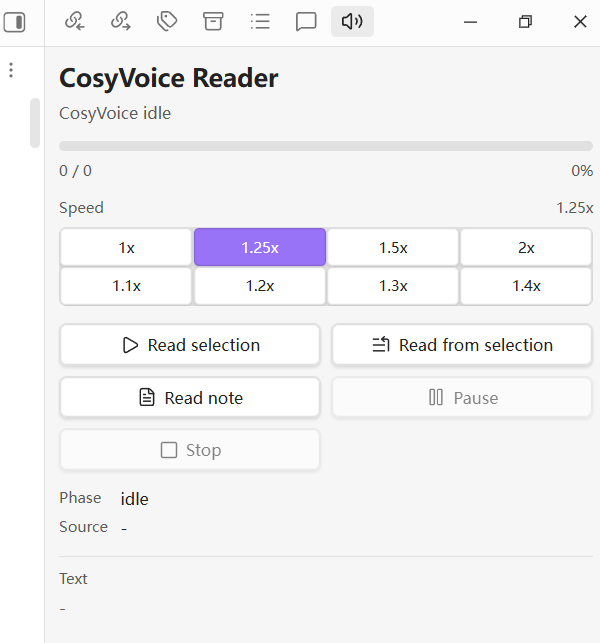
Current reader control panel, including scoped audio export actions:
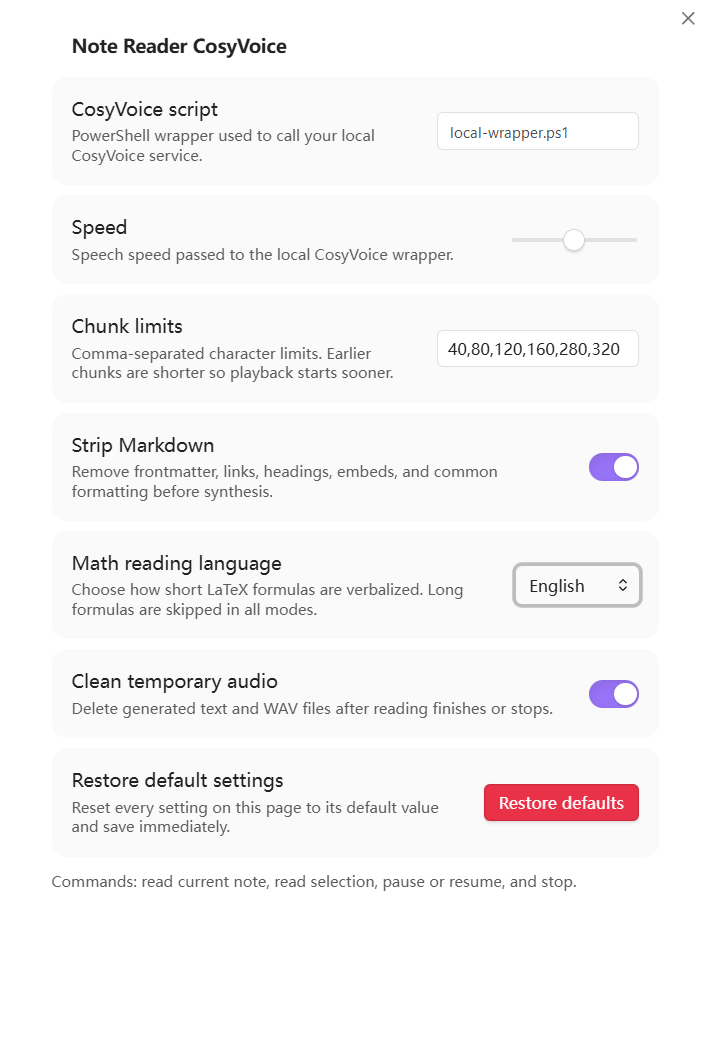
Complete settings page, assembled from sequential views of the same page. Secret values, vault names, note content, local paths, and surrounding Obsidian UI are excluded:
Speech engine comparison
Scores are relative to the experience provided by this plugin. More filled stars always mean more favorable: stronger privacy, easier setup, faster first-chunk startup, broader voice choice, less dependence on user-managed paid API quota, or better offline capability. ★★★★★ is the strongest rating and ★☆☆☆☆ is the weakest. They are usage guidance, not security, provider-policy, pricing, or latency guarantees.
| Engine | Privacy | Setup convenience | Startup speed | Voice choice | Quota friendliness | Offline |
|---|---|---|---|---|---|---|
| Local CosyVoice | ★★★★★ | ★★☆☆☆ | ★★★★☆ | ★★★☆☆ | ★★★★★ | ★★★★★ |
| Microsoft Edge online voice | ★★★☆☆ | ★★★★☆ | ★★★★★ | ★★★★★ | ★★★★★ | ★☆☆☆☆ |
| Microsoft Azure Speech | ★★★★☆ | ★★★☆☆ | ★★★★★ | ★★★★★ | ★★★★☆ | ★☆☆☆☆ |
| OpenRouter TTS | ★★★★☆ | ★★★★★ | ★★★★★ | ★★★★★ | ★★★☆☆ | ★☆☆☆☆ |
- Privacy: Local CosyVoice keeps readable text on the device. Every online mode sends text to its service provider. Edge receives three stars because Microsoft states that online Read aloud text and generated audio are encrypted in transit and deleted immediately after conversion. However, this plugin calls the service outside the Edge browser through the third-party
edge-ttspackage, which does not expose an explicit ZDR control or guarantee for plugin requests; Edge therefore remains below Azure and OpenRouter. Azure receives four stars because this plugin uses the real-time prebuilt-voice API and Microsoft states that its input text and output audio are not stored in Microsoft logs; one star is withheld because the text is still processed in Microsoft's cloud. OpenRouter also receives four stars because requests forceprovider.zdr = true, deny provider data collection, and fail instead of relaxing those restrictions when no eligible endpoint exists; it is not equivalent to local processing because text still passes through OpenRouter and an upstream provider, and account-level logging and data sharing should remain disabled for private content. - Setup convenience: OpenRouter is the shortest setup in this plugin: create an account key, store it in Obsidian SecretStorage, then select a model and voice. It needs no local helper program. Edge needs the separately installed third-party
edge-ttsexecutable. Azure receives three stars because it also uses direct HTTPS and needs no helper executable, although it still requires an Azure Speech resource, cloud, region, and key. Local CosyVoice requires a local runtime, model, and wrapper. - Quota friendliness: Local mode receives five stars because it uses local compute rather than a remote API allowance. Edge also receives five stars because this plugin needs no user API key or user-managed paid quota, although that does not promise unlimited use or a service-level guarantee. Azure receives four stars because its current Free (F0) tier lists 0.5 million neural text-to-speech characters per month; the real-time no-retention policy is a separate privacy property, not a product named "free ZDR quota," and pricing or eligibility can change. OpenRouter receives three stars because TTS is metered per input character with model/provider-dependent prices; the plugin enforces ZDR but does not assume a permanent free ZDR TTS allowance.
- Speed: This score measures time to the first playable segment after the engine is already installed and configured; first-time downloads, account provisioning, and setup work belong to setup convenience instead. Progressive chunking gives Local CosyVoice four stars, with one star withheld for hardware-dependent model warm-up. Edge, Azure, and OpenRouter receive five stars for their typical short first-request path, but this is not a claim of identical or guaranteed latency. OpenRouter says its gateway adds minimal overhead, while routing, cache state, the selected model, network conditions, and provider load can still change the result.
- Voice choice: Azure has a broad direct voice catalog. OpenRouter receives the same rating because it exposes several TTS models and their model-specific voice catalogs, not because every model shares Azure voices. Its TTS documentation identifies Azure-specific handling for MAI, while other models use their own provider-dependent voices; voice IDs are not interchangeable between models.
In practice, choose Local CosyVoice for sensitive or offline reading, OpenRouter for the shortest direct-API setup plus model choice and enforced ZDR routing, Edge when avoiding a user API key matters more than installing its helper program, and Azure when you already manage a Microsoft Speech resource.
Quick start
First install and enable the plugin, then open Settings -> Community plugins -> Note and PDF Voice Reader. Only enable an online-processing switch after deciding that the selected service may receive the text you ask the plugin to read.
1. OpenRouter TTS
- Create a dedicated key at OpenRouter API Keys, set a suitable spending limit, and make sure the account has usable quota.
- Set
Speech enginetoOpenRouter TTS, then enableAllow OpenRouter online processing. - Keep the recommended
Obsidian SecretStorage, create or select a secret containing the key, and choose a model and compatible voice. - Keep account-level input/output logging and data sharing disabled. The plugin enforces ZDR routing and denies provider data collection on every request, but text still passes through OpenRouter and an eligible upstream provider.
2. Microsoft Azure Speech
- Create an Azure Speech resource and record its cloud, region, and one subscription key.
- Set
Speech enginetoMicrosoft Azure Speech, enableAllow Azure online processing, and select the matching Azure cloud and region. - Store the key in
Obsidian SecretStorage, then choose a voice preset or enter a valid Azure voice ID.
3. Microsoft Edge online voice
- Install the third-party CLI with
pipx install edge-tts, open a new terminal, and confirm thatedge-tts --helpworks. - Set
Speech enginetoMicrosoft Edge online voice, enableAllow Edge online processing, setEdge TTS executabletoedge-ttsor its absolute path, and choose a voice. - No user API key is required by this plugin. Text is still sent online, and the
edge-ttsinterface used here does not provide an explicit ZDR guarantee for plugin requests.
4. Local CosyVoice
- Install and test a local CosyVoice runtime and model, then prepare a compatible PowerShell wrapper as described in Local CosyVoice setup.
- Set
Speech enginetoLocal CosyVoiceand enter the wrapper's absolute path inCosyVoice script. - Use
Read selectionfor a short test. This mode needs no online-consent switch and the plugin itself keeps readable text on the device, but the configured wrapper remains part of your trust boundary.
Features
- Reads the current Markdown note or text-based PDF, selected text in either view, or from a Markdown/PDF selection start to the end of the active file.
- Extracts PDF text locally with Obsidian's built-in PDF.js, uses coordinates to improve common two-column reading order, and progressively feeds speech chunks while later pages continue parsing.
- Uses paragraph-, line-, sentence-, and clause-aware chunk boundaries while keeping configured character limits as hard upper bounds.
- Can optionally remember and resume the current Markdown or PDF position. The setting is disabled by default and includes a separate clear-history control.
- Exports all, selected, or remaining content from Markdown notes and text-based PDFs as one WAV file in local mode or one MP3 file in online modes. Save it in Obsidian's attachment folder, beside the source file, or in a custom vault folder; Markdown notes also support exporting and inserting the completed attachment.
- Opens a right-side
Voice Readercontrol panel. - Shows synthesis/playback phase, whole-reading progress, percentage, and text preview.
- Supports pause, resume, stop, Space to pause or resume in the control panel, repeated Left/Right Arrow 5-second seeking, previous/next chunk buttons, and progress dragging while the current audio chunk is playing.
- Provides right-panel speed presets:
1x,1.25x,1.5x,2x,1.1x,1.2x,1.3x, and1.4x. - Lets you choose
Local CosyVoice,Microsoft Edge online voice,Microsoft Azure Speech, orOpenRouter TTSin settings. Local CosyVoice is the default. - Lets you switch the complete plugin settings page between English and Chinese.
- Requires a separate opt-in before each online engine can receive text.
- Uses separate local and online chunk limits. Online notes and PDFs default to
200,400,800, with at most one future chunk synthesized early by default. - Uses Obsidian SecretStorage for Azure and OpenRouter API keys by default on Obsidian 1.11.4 or later, with an external key-file compatibility option.
- Provides common Chinese and English voice presets, model-specific OpenRouter voice menus, and custom voice ID fields.
- Cleans Markdown before synthesis and converts Markdown tables into speech-friendly column and row descriptions while skipping empty cells.
- Reads numeric citations such as
[28],[28, 29], and[28-30]as spoken references while preserving unit labels such as[s]and[%]. - Provides a settings-page
Restore defaultsbutton for resetting all plugin settings. - Provides a settings-page link to GitHub Issues for feedback and bug reports.
- Handles common LaTeX before synthesis with a configurable
Math reading languagesetting:- Skips formulas longer than 12 non-space characters.
Englishis the default for public releases, for example$a_b$->a subscript b.Chinesekeeps Chinese math words, for example$a_b$->a 下标 b.- Converts short absolute-value notation such as
$|Y_{k,h}|$into spoken words instead of sending raw vertical bars. Skip mathskips short formulas as well as long formulas.- Leaves common Greek commands as English names, such as
\alpha->alpha,\beta->beta, and\pi->pi. - Reads common non-Greek symbols such as
\leq,\times, and_. - Unwraps style commands such as
\textbf{...},\mathbf{...}, and\boldsymbol{...}. - Reads short
\frac{a}{b}asa over bin English mode ora 分之 bin Chinese mode.
Privacy
By default, the plugin uses local TTS. In Local CosyVoice mode, the plugin itself does not send note or extracted PDF text to Microsoft, OpenAI, or another remote TTS service. The configured wrapper remains part of your trust boundary and may make its own network requests.
PDF extraction uses Obsidian's bundled PDF.js and Vault.readBinary; the PDF file itself is not uploaded by this feature. To support PDF selection commands, the plugin temporarily keeps the selection's page number, relative in-page coordinates, and up to 2,000 characters of locator text in memory only; none of this selection locator is saved to settings or diagnostic logs. When an online speech engine is selected and its consent is enabled, extracted PDF text chunks are transmitted under the same rules as note text. Scanned or image-only PDFs need OCR before the plugin can read them.
Remember reading position is off by default. If you enable it, data.json stores the file path, file timestamp, PDF page or speech-chunk index, update time, and a normalized text anchor capped at 180 characters. It does not store the complete note or PDF body. Use Clear saved reading positions to remove all saved anchors; disabling the setting stops future use and updates but does not silently delete existing history.
Edge, Azure, and OpenRouter are opt-in online modes. Edge passes each chunk to the configured edge-tts executable. Azure sends each chunk by HTTPS to the selected Azure Speech cloud and region. OpenRouter sends each chunk to OpenRouter and an eligible upstream TTS provider. The plugin will not start an online mode until its separate online-processing consent setting is enabled. OpenRouter consent permits that transmission only; it does not permit non-ZDR routing. By default, the plugin may synthesize the next chunk while the current chunk is playing, but it never prefetches more than one future chunk. Stopping early can therefore leave at most one prefetched chunk unused. Set prefetch to 0 for strict on-demand synthesis. Provider billing units vary, so this bounds avoidable work rather than guaranteeing a fixed cost reduction.
Audio export always requires a separate per-export acknowledgement before synthesis starts. For an entire PDF or a PDF export from selection, local extraction and selection matching finish before the confirmation appears. The dialog then shows the selected scope, cleaned readable character count, exact number of planned synthesis segments, and planned vault-relative save path. For an online engine, only readable text in that scope is sent through those sequential segments and may consume provider quota or incur charges. Temporary failures can trigger bounded retries, so the number of network attempts can exceed the planned segment count. Export does not prefetch playback-continuity chunks, creates no vault attachment until every segment and finalization succeed, and can be cancelled with Stop.
Temporary text and audio are stored in a vault-specific folder under the operating system temporary directory, not inside the Obsidian vault. With Clean temporary audio enabled, plaintext chunk files are removed immediately after synthesis, remaining session files are removed when reading ends or stops, and stale plugin-owned files plus the legacy in-vault cache are cleaned at startup. The deliberate exception is a post-synthesis export failure: completed audio segments are kept locally for the current plugin session so Retry merge only can reuse them without another TTS request. A successful retry, Clear temporary data, or unloading the plugin while cleanup is enabled removes them. Diagnostic logging is off by default; when enabled, it records only bounded failure metadata without note names, note text, or child-process output.
Azure and OpenRouter keys use Obsidian SecretStorage by default on Obsidian 1.11.4 or later. The plugin's data.json contains only the selected secret identifier, not the secret value. Obsidian documents SecretStorage as vault-specific local secret storage; it should not be described as a guaranteed operating-system credential manager or macOS Keychain integration. A one-line key file outside every vault remains available as a compatibility fallback, and existing key-file configurations retain that mode when upgraded. See the official Obsidian SecretStorage guide.
Microsoft states that its real-time text-to-speech API does not retain the submitted text or generated audio; the text is still transmitted to and processed by the selected Azure Speech service. Confirm the terms applicable to your cloud and subscription. See Azure Speech text-to-speech data privacy and security.
Every OpenRouter request forces provider.zdr: true and provider.data_collection: "deny"; when no endpoint satisfies those restrictions, synthesis fails rather than weakening the policy. OpenRouter states that prompt storage is opt-in by default, but account-level input/output logging or data-sharing settings can still change that behavior, and request metadata is retained. Keep those account settings disabled for private content. See OpenRouter data collection and Zero Data Retention.
Disclosures
- Network use: local mode launches your wrapper; Edge mode uses
edge-tts; Azure uses an official regional endpoint derived from the selected cloud and validated region; OpenRouter uses the fixedhttps://openrouter.ai/api/v1/audio/speechendpoint. - Shell execution: the plugin launches the configured PowerShell wrapper in local mode or the configured
edge-ttsexecutable in Edge mode. Azure and OpenRouter modes do not launch shell commands. - Direct storage access: temporary files are written under the operating system temporary directory. The plugin checks the local wrapper path and reads Azure/OpenRouter credentials from Obsidian SecretStorage or a configured key file outside the vault.
- Telemetry: the plugin does not include client-side or server-side telemetry.
- Updates: the plugin does not include a self-update mechanism.
Requirements
- Obsidian desktop.
Shared architecture
Platform-neutral text cleanup, semantic chunking, PDF coordinate ordering, reading-position anchors, and playback state live in note-reader-core. This desktop repository retains filesystem access, child processes, local CosyVoice, edge-tts, audio merging, and export handling. The separate note-reader-mobile plugin uses the same core without bundling desktop-only APIs or local executable calls.
- For
Local CosyVoice: a working local CosyVoice setup and a PowerShell wrapper compatible with:
cosyvoice-wrapper.ps1 -InputPath <txt> -OutputPath <wav> -Speed <speed>
A recommended script path is:
%LOCALAPPDATA%\note-reader-cosyvoice\cosyvoice-wrapper.ps1
For local CosyVoice installation, hardware guidance, OS-specific notes, and wrapper examples, see Local CosyVoice setup.
For Microsoft Edge online voice: install the edge-tts CLI and either make the command available on PATH or enter its absolute executable path in Edge TTS executable. The plugin calls it with --file, --write-media, --voice, and --rate.
Install And Configure Microsoft Edge Online Voice
edge-tts is a third-party Python package published on PyPI that calls Microsoft Edge's online text-to-speech service. It is not bundled with this plugin and is not a local voice model.
Recommended command-line-only install:
pipx install edge-tts
If pipx is not installed yet:
py -m pip install --user pipx
py -m pipx ensurepath
Then open a new PowerShell window and run pipx install edge-tts.
Alternative install if you manage Python packages directly:
py -m pip install --user edge-tts
After installation, open a new PowerShell window and verify that the command is available:
edge-tts --help
To list available voices:
edge-tts --list-voices
Then open Settings -> Note and PDF Voice Reader:
- Set
Speech enginetoMicrosoft Edge online voice. - Enable
Allow Edge online processing. - Set
Edge TTS executableto eitheredge-ttsor an absolute path to the executable. - Choose a common voice preset or enter a custom voice ID.
- Adjust
Speedif needed. The plugin converts this to theedge-tts --rateoption.
Common presets include zh-CN-XiaoxiaoNeural, zh-CN-YunxiNeural, zh-CN-YunyangNeural, en-US-JennyNeural, en-US-GuyNeural, and en-GB-SoniaNeural. Use edge-tts --list-voices for the complete list supported by your installed version.
If Obsidian cannot find edge-tts, use the absolute executable path in the plugin settings and fully restart Obsidian. Do not rely on an unrelated application's private virtual environment unless you intentionally trust and maintain that installation.
Privacy note: Edge mode sends each text chunk to Microsoft Edge TTS. Microsoft's Edge Read aloud privacy documentation says text and generated audio used for online conversion are deleted immediately after conversion, but the third-party edge-tts calling interface used by this plugin does not expose an explicit ZDR guarantee for plugin requests. Treat it as online processing without a guaranteed ZDR control, and keep Speech engine set to Local CosyVoice for private or sensitive notes. See User data and privacy in Microsoft Edge.
Store Azure and OpenRouter API keys
On Obsidian 1.11.4 or later, the recommended and default API key storage choice is Obsidian SecretStorage. Use the secret control on the plugin settings page to create or select a secret containing the raw API key. Only that secret's identifier is saved in this plugin's data.json; the key value remains in Obsidian's vault-specific local secret store.
For an older Obsidian release or an existing file-based setup, select External one-line key file. Create a plain-text file outside every Obsidian vault, put the key on its only non-empty line, and do not sync, commit, or share the file. An existing configuration with a key-file path is migrated to this compatibility mode automatically.
Configure Microsoft Azure Speech
Azure mode uses the official real-time Speech REST endpoint and supports Azure public cloud and Azure China operated by 21Vianet. Create a Speech resource in the intended cloud, then note its region and one subscription key. The required HTTPS request, SSML body, authentication header, and audio output header follow Microsoft's text-to-speech REST API reference.
If you select the external key-file fallback, a suitable path is:
%LOCALAPPDATA%\note-reader-cosyvoice\azure-speech-key.txt
Then open Settings -> Note and PDF Voice Reader:
- Set
Speech enginetoMicrosoft Azure Speech. - Enable
Allow Azure online processing. - Select
Azure public cloudorAzure China operated by 21Vianet. - Enter the resource region, such as
eastasia,southeastasia,chinaeast2, orchinanorth3. - Choose
Obsidian SecretStorageand create/select the Azure key secret, or choose the external file option and enter its absolute path. - Choose a common voice preset or enter a custom Azure voice ID.
Presets include Mandarin Chinese zh-CN-XiaoxiaoNeural, zh-CN-XiaoyiNeural, zh-CN-YunxiNeural, and zh-CN-YunyangNeural; Cantonese and Taiwanese Mandarin; common US English en-US-JennyNeural, en-US-GuyNeural, and en-US-AriaNeural; and common UK English en-GB-SoniaNeural and en-GB-RyanNeural. The default Edge and Azure voice is the UK male voice en-GB-RyanNeural, selected for restrained long-form and academic reading.
The plugin derives the HTTPS host from the validated region and selected cloud; it does not accept a free-form Azure endpoint. Azure China endpoint differences are documented in Azure Speech sovereign clouds. Check the current Azure Speech language and voice list if a voice is unavailable in your region.
Configure OpenRouter TTS
OpenRouter exposes an OpenAI-compatible TTS endpoint that accepts text and returns raw MP3 or PCM audio. This plugin always requests MP3 and validates the HTTP status and Content-Type before saving it. See the official OpenRouter TTS documentation.
The plugin retries temporary 408, 425, 429, 500, 502, 503, and 504 responses and transient network failures up to three total attempts with short bounded delays. It does not retry credential, model, voice, privacy-policy, malformed-request, or unexpected-content errors. A final HTTP 502 therefore indicates that OpenRouter or its upstream provider remained unavailable after the limited retries, rather than normally indicating an unsupported text character.
Create a dedicated API key in OpenRouter API Keys. Use a low spending limit and an expiration date where appropriate. If you select the external key-file fallback, a suitable path is:
%LOCALAPPDATA%\note-reader-cosyvoice\openrouter-api-key.txt
Then open Settings -> Note and PDF Voice Reader:
- Set
Speech enginetoOpenRouter TTS. - Enable
Allow OpenRouter online processing. - Choose
Obsidian SecretStorageand create/select the OpenRouter key secret, or choose the external file option and enter its absolute path. - Choose a built-in ZDR-compatible model and one of its voices, or enter custom IDs.
- Keep OpenRouter account-level input/output logging and input/output data sharing disabled.
The overall default is hexgrad/kokoro-82m with the UK English male voice bm_george, selected for restrained long-form and academic reading. When a different built-in model is selected, the plugin now chooses an English male voice where the publisher explicitly identifies one: Microsoft MAI uses the US English male Ethan, while Gemini uses the informative Charon because Google does not publish fixed gender or US/UK accent labels for its voices. Voice IDs are model-specific and are not interchangeable. OpenRouter-listed IDs and Microsoft's official MAI catalog were checked on 2026-08-27:
microsoft/mai-voice-2-flash: defaults to Microsoft-published US English maleen-US-Ethan:MAI-Voice-2-Flashand adds Microsoft-published US English and Mandarin voices as compatibility presets alongside the four IDs exposed by OpenRouter.microsoft/mai-voice-2: defaults to Microsoft-published US English maleen-US-Ethan:MAI-Voice-2; additional US English male and Mandarin ShortNames are compatibility presets because OpenRouter may accept them even when itssupported_voicesmetadata omits them.google/gemini-3.1-flash-tts-preview: defaults to informativeCharonand offers 12 curated presets from the 30 voices exposed by OpenRouter. Google describes these multilingual voices by delivery style rather than fixed gender or US/UK accent, so the plugin does not label any Gemini preset as a confirmed male or accent-specific voice.hexgrad/kokoro-82m: 12 presets, with two voices in each requested group: Mandarin Chinese female, Mandarin Chinese male, US English female, US English male, UK English female, and UK English male.
Kokoro is currently the built-in OpenRouter choice that explicitly provides both US and UK English male presets. Microsoft's published MAI catalog currently provides US English male voices but no UK English MAI voice. Compatibility presets can still fail if OpenRouter or its upstream endpoint rejects an ID that its metadata does not advertise; the custom voice field remains available for independently verified IDs.
The settings page shows a short characteristics note and only the presets for the selected model. Model, voice, and ZDR endpoint availability can change. OpenRouter's live speech + ZDR model API remains the source for advertised routing metadata, while Microsoft's MAI voice catalog supplies the official MAI ShortNames. The delivery-style names come from Google's Gemini TTS voice list, and Kokoro language/gender groups follow its upstream voice catalog. Custom model IDs remain available, but a model with no eligible ZDR endpoint returns an error because the plugin never relaxes its privacy routing rules.
Model Storage, Other TTS Engines, And Chunk Limits
This plugin does not download models. Plan storage for the local TTS runtime before installing a voice model:
- Current CosyVoice model repositories are often several GB each. As of 2026-06, public Hugging Face examples range from about
2.5 GBfor a 300M model to about9 GBfor a 0.5B CosyVoice3 model. - Reserve more than the raw model size. A practical starting point is
10-20 GBfor one model and30 GB+if you keep multiple models, source checkouts, Conda environments, and caches. - Put model files and caches on a local SSD when possible. Avoid syncing model folders through cloud-drive clients.
The configured script can call another local TTS engine instead of CosyVoice if it follows the same wrapper contract: read UTF-8 text from -InputPath, write a valid WAV file to -OutputPath, accept -Speed, and exit non-zero with a clear error on failure. Check the other model's license, language coverage, audio format, speed controls, startup latency, and whether it sends text outside your machine or trusted local network.
The Edge, Azure, and OpenRouter online modes are separate from the local wrapper contract. They write temporary MP3 files and use their corresponding voice setting. OpenRouter may ignore Speed for models whose provider does not support that parameter.
Use Local chunk limits to balance local startup latency and synthesis stability:
- CPU-only or low-end GPU: start with
30,60,90,120,160,200. - Mid-range GPU: use the default
40,80,120,160,280,320. - Faster GPU or low-latency local service: try
80,140,220,320,480,640. - If synthesis times out, fails, or the first audio takes too long, lower the numbers. If speech sounds too fragmented and your model is stable, raise them gradually.
Online chunk limits applies to both notes and PDFs in Edge, Azure, and OpenRouter modes. Its default is 200,400,800, which uses a shorter first request and longer later requests to balance startup time, continuity, and request count.
Online synthesis prefetch defaults to 1: while the current chunk is playing, the plugin may prepare the next chunk to improve continuity. It never prepares more than one future chunk, so stopping early can leave at most one prefetched request unused. Set it to 0 when avoiding every unused future request matters more than the pause between chunks.
Commands
Open voice reader controlsRead current note or PDF aloudExport audio from current note or PDFExport audio from the current note and insert itRetry pending audio export merge onlyResume reading current note or PDFRead current PDF aloudRead current PDF from selection aloudRead selection aloudRead from selection aloudPause or resume voice readingSeek backward 5 secondsSeek forward 5 secondsMove to previous reading chunkMove to next reading chunkStop voice reading
Audio Export
Open a Markdown note or text-based PDF and choose Export audio. A scope picker offers Entire document, Selected text only, and From selection to end; the latter two require an active text selection. For an entire PDF or a PDF export from selection, local parsing and reliable position matching run first. The subsequent confirmation reports the exact readable character count, selected engine, synthesis segment count, scope, and planned save path, and its checkbox must be selected before synthesis starts.
Local mode combines PCM WAV segments into one WAV file. Edge, Azure, and OpenRouter combine validated MP3 frames into one MP3 file. Audio export save location can use Obsidian's attachment folder (the default), the source file's folder, or a custom vault folder. Entire, selected, and remaining exports use filenames such as Note name - narration.mp3, Note name - selection narration.mp3, and Note name - continued narration.mp3, with a numeric suffix when needed. For Markdown, Export & insert audio embeds the result at the current cursor or appends it to the original note. PDF export saves an audio attachment only because a PDF cannot be edited to insert an Obsidian embed.
Export processes exactly the displayed chunks in sequence and does not perform playback prefetch. If synthesis fails or the task is stopped, no partial attachment is added. If every segment has already been synthesized but merging or attachment finalization fails, the control panel exposes Retry merge only; it reuses the kept local segments and makes no TTS API request. Starting another export is blocked until that retry succeeds or Clear temporary data discards the kept segments.
Keyboard And Progress Seeking
When the Voice Reader control panel is focused, Space pauses or resumes reading, and Left Arrow or Right Arrow seek backward or forward in 5-second steps while audio is available.
The triangle buttons beside the progress bar jump to the previous text chunk or the next text chunk. Already synthesized chunks are reused when possible; otherwise the target chunk is synthesized before playback.
The progress bar shows whole-reading progress across all chunks. While audio is playing, the bar can be clicked or dragged. Seeking is limited to the currently loaded audio chunk; dragging outside that chunk is clamped to the nearest point in the current chunk.
PDF Reading
Open a PDF stored in the vault, then click Read file in the control panel or run a PDF-capable command. Text extraction happens locally page by page. Once enough text for the first configured chunk is available, synthesis and playback can begin while later pages continue parsing. The Stop button cancels parsing, playback, and outstanding synthesis requests.
To start at a specific position, select text in the PDF text layer and click Read from selection, or run Read current PDF from selection aloud. The plugin starts extraction on that page and combines the selection's relative page coordinates with text matching, so repeated wording in an abstract and a later column can be distinguished. Read selection reads only the selected PDF text. If coordinates are unavailable, text matching remains as a compatibility fallback; if neither locator can be matched, the plugin displays a notice and starts at the beginning of the selected page.
The PDF must contain selectable embedded text. Password-protected, damaged, scanned, or image-only files cannot be extracted; run OCR or unlock the file first. Version 0.4.0 and later use text coordinates to recognize common two-column pages and read each vertical band left column before right column, while treating full-width headings as boundaries. Unusual layouts, rotated text, sidebars, and complex tables can still require a manual selection start or a better-tagged source PDF.
If Remember reading position is enabled, use Resume file in the control panel or Resume reading current note or PDF in the command palette. PDF resume starts on the saved page and locates the short anchor again; Markdown resume locates the same normalized anchor and falls back to the nearest saved chunk if the note changed.
Development
Source modules live under src/. Build and run all tests before publishing:
npm install
npm test
The build bundles src/main.js and its local modules into the single root main.js required by the Obsidian Community installer. obsidian remains an external runtime dependency supplied by the host application.
Shared Package Contents
The install package contains only:
manifest.jsonmain.jsstyles.cssREADME.mdINSTALL.mdLICENSE
It intentionally excludes data.json, legacy cache/last-error.log files, system temporary data, secrets, and local test files.
License
MIT.