Native Mindmap
 kevin2 downloads
Animated, keyboard-first mindmaps that live in plain Markdown notes.
- Overview
- Scorecard
- Updates4

Native Mindmap
Mindmaps that are just Markdown notes. Keyboard-first. Animated.
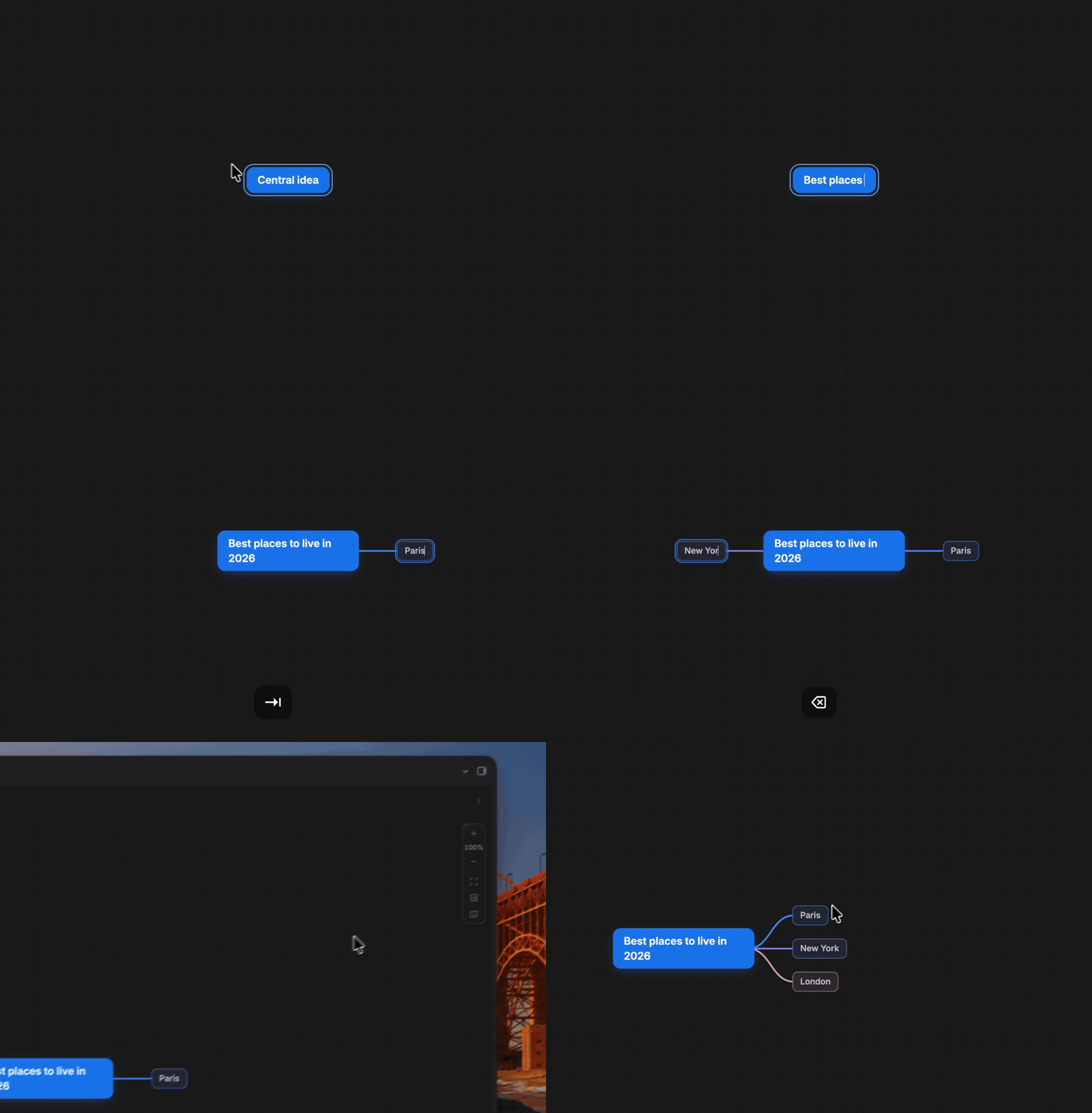
▶️ Watch the full 2-minute demo (keyboard building, Markdown sync, Canvas mode)
Install · Features · Shortcuts · Canvas mode
Why Native Mindmap?
Most mindmap tools make you choose: a beautiful editor that locks your ideas in a proprietary format, or plain text that you can't see the shape of. Native Mindmap refuses the trade-off.
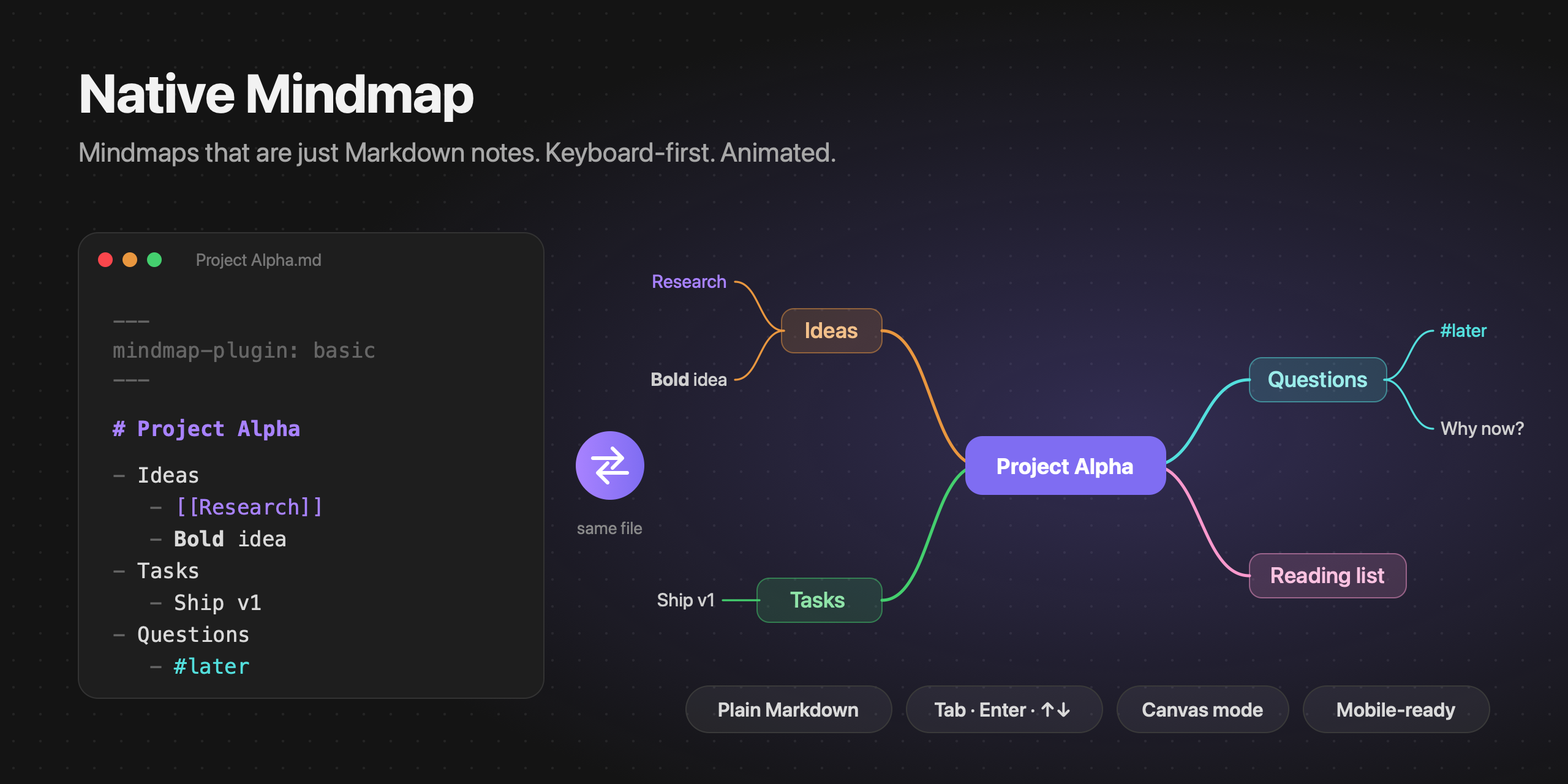
- Your map is a note. A mindmap is a regular Markdown file: the first
# headingis the central topic and the nested bullet list is the tree. It stays searchable, linkable, diffable, syncable and future-proof. No database, no lock-in, no export step. - Keyboard-first.
Tabadds a child,Enteradds a sibling, arrows navigate. You can build a whole map without touching the mouse. - Alive. Topics grow out of their parent, fold back into it, and edges morph smoothly as the layout changes. Animations respect your system's reduce motion setting.
- Truly native. Topics render real Obsidian Markdown:
[[wikilinks]]with hover preview, tags, bold,code, math. It follows your theme's palette in light and dark mode. - Works inside Canvas. Turn any Canvas card into the center of a mindmap with a single keypress.
At a glance
| Native Mindmap | |
|---|---|
| Storage | A plain .md note: heading + bullet list. No JSON, no database. |
| Editing | Directly on the map, with the keyboard (Tab, Enter, arrows) or the mouse. |
| Rendering | Real Obsidian Markdown: wikilinks with hover preview, tags, bold, code, math. |
| Layouts | Mindmap, Logic, Timeline, switchable per map with animation. |
| Canvas | Turn any Canvas card into a mindmap with Tab. |
| Platforms | Desktop, tablet, phone. |
Your map is a note
Quick start
A mindmap is a note with one frontmatter flag:
---
mindmap-plugin: basic
---

# Project Alpha

- Ideas
    - [[Some note]]
    - **Bold** idea
- Tasks
    - Ship v1
The note opens as a mindmap wherever Obsidian opens it: file explorer, links, quick switcher. Switch to the raw Markdown and back from the tab header, the "More options" menu or the command palette.
Features
- Smooth animations on add, delete, fold, move and layout change.
- Balanced branches on both sides, colored from your theme's palette.
- Drag and drop to reparent a topic (drop on it) or reorder (drop above or below).
- Multi-select with a drag rectangle,
Shiftclick orMod A, then delete, copy, fold or drag topics together. - Undo / redo, plus copy / cut / paste as Markdown lists (paste a list from anywhere to grow a branch instantly).
- Fold and unfold branches, with a count of hidden topics.
- Canvas-like navigation: pan, zoom, pinch, dot grid, floating zoom controls, zoom to fit / selection.
- Three layouts, selectable per map.
- Mobile and tablet friendly.
- Configurable: spacing, topic width, colors, grid, animation speed, scroll behavior, default layout and folder for new maps.
- Every action is a command, so you can bind your own hotkeys.
Layouts
Each map picks its own layout from the layout button (Markdown view) or the right-click menu (Canvas):
| Layout | Description |
|---|---|
| Mindmap | Branches balanced on both sides of the central topic. |
| Logic | Everything grows to the right, like a logic chart. |
| Timeline | First-level topics are chained along an axis; their details hang alternately below and above. |
Canvas mode
Inside any Obsidian Canvas, select a card and press Tab: it becomes the center of a mindmap and gets a connected child. Enter adds a sibling, arrows move between topics, Delete removes a branch, and the right-click menu switches layout or tidies the map.
Several mindmaps can live on the same canvas next to your other cards. Only edges created by the plugin (marked "mindmap": true in the .canvas file) are ever re-arranged; the rest of your canvas is left alone.
Canvas mode relies on Canvas internals (checked on Obsidian 1.14) and may need an update after a future Obsidian release. You can turn it off in the settings.
Shortcuts
| Key | Action |
|---|---|
Tab |
Add child |
Enter / Shift Enter |
Add sibling below / above |
Space, F2, double-click |
Edit topic |
Delete / Backspace |
Delete topic |
| Arrows | Navigate |
Drag empty space / Shift click / Mod A |
Select several topics |
Scroll, Space + drag, middle mouse |
Pan |
Mod + scroll |
Zoom |
Alt ↑ / ↓ |
Reorder |
Shift Tab |
Move up one level |
Esc / Home |
Clear selection / select central topic |
Mod . |
Fold / unfold |
Mod Z / Mod Shift Z |
Undo / redo |
Mod C / X / V |
Copy / cut / paste (Markdown lists) |
Shift 1 / Shift 2 |
Zoom to fit / to selection |
? |
Show all shortcuts |
Mod is ⌘ on macOS and Ctrl elsewhere.
Installation
From Community plugins
Open Settings → Community plugins → Browse, search for Native Mindmap, then select Install and Enable. You can also find it on the community directory.
From a GitHub release (manual)
- Download
main.js,manifest.jsonandstyles.cssfrom the latest release. - Put them in
<your vault>/.obsidian/plugins/native-mindmap/. - Reload Obsidian and enable Native Mindmap in Settings → Community plugins.
With BRAT
Install BRAT, then add this repository as a beta plugin.
Development
bun install            # or npm install
VAULT="/path/to/vault" bun esbuild.config.mjs   # watch mode, builds into the vault's plugin folder
bun run build          # type-check + production bundle
Then enable Native Mindmap in Settings → Community plugins. The Hot Reload plugin gives you live reloading while you develop.
Good to know
- Fold state is kept per session and isn't written to the file.
- Lines in the note that aren't part of the list are kept and written back after the list.
- Multi-line list items are joined onto one line.
Contributing & maintenance
This plugin is actively maintained. Every issue and pull request is read and gets an answer.
- 🐛 Found a bug? Open an issue with your Obsidian version and steps to reproduce.
- 💡 Have an idea? Open an issue and describe the workflow you want: real use cases shape the roadmap.
- 🔧 Want to contribute code? Pull requests are welcome, see CONTRIBUTING.md.
License
Not affiliated with Obsidian.