Mermaid Relay
 Arman123 downloads
Edit Mermaid diagrams visually while keeping portable Markdown in sync with external tools and AI agents.
- Overview
- Scorecard
- Updates3
Visual Mermaid editing over shared Markdown.
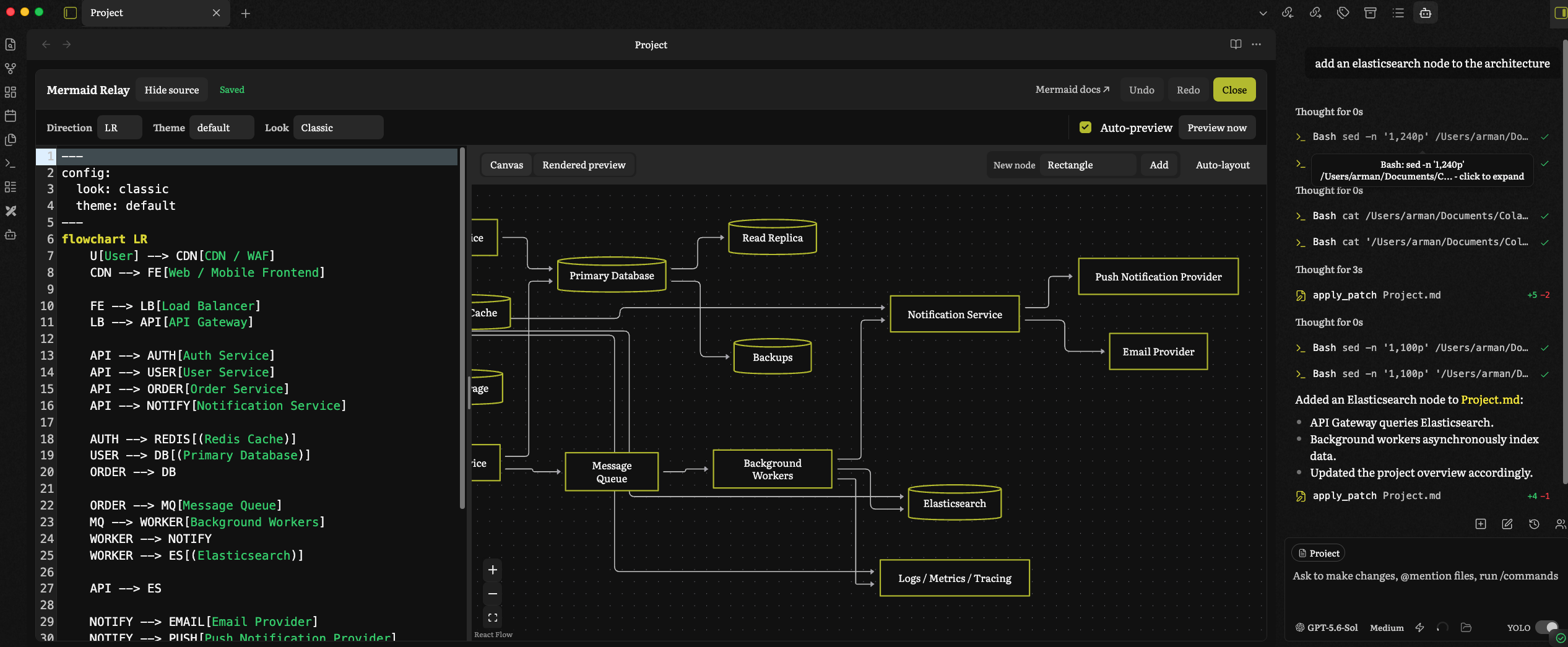
Mermaid Relay is a local, offline Obsidian plugin for editing standard mermaid code blocks as source or on a flowchart canvas. Markdown remains the source of truth, so external editors and coding agents can read and update the same diagram.
Usage
- Create a standard
mermaidfenced block, or run Insert Mermaid flowchart from the command palette. - Select Mermaid Relay above the block, or run Edit Mermaid block under cursor.
- Edit the source or use the visual canvas for supported flowcharts. Valid changes save automatically to the original Markdown block.
- Close the editor when finished. Changes made to the note by an external editor or coding agent reload automatically while the editor is open.
Coworking with AI agents
Mermaid Relay is particularly useful when diagramming with AI agents such as Claude Code, Codex, or OpenCode. You work visually while the agent reads and edits the same Mermaid block in the project Markdown file. Valid external changes reload automatically, keeping the canvas, source, and project context in sync.
To collaborate without leaving Obsidian, install a compatible chat or agent plugin such as Real Claudian or Copilot. Give the agent the relevant project context, point it to the Markdown file containing the diagram, and work together on its nodes, connections, and labels. Compatibility depends on the agent and integration you choose.
Features
- Opens a full-pane editor from Reading view, Live Preview, Source mode, or the command palette.
- Auto-saves valid drafts and reloads diagrams changed outside the plugin.
- Supports source highlighting, diagnostics, preview, undo/redo, themes, and Mermaid looks.
- Visually edits common flowchart nodes, shapes, edges, labels, directions, and layout.
- Preserves ordinary portable
mermaidfences; canvas positions are never stored. - Runs locally without accounts, telemetry, or Mermaid Chart.
Unsupported or ambiguous flowchart syntax remains editable as source, while the visual canvas becomes read-only to avoid lossy changes.
Compatibility
Mermaid Relay requires Obsidian 1.13.1 or later and supports the desktop app only.
Privacy
Mermaid Relay runs locally and makes no network requests. It has no accounts, telemetry, advertising, or paid features. Diagram source stays in ordinary Markdown notes, and the plugin stores only global UI preferences. The optional documentation link opens the Mermaid website when selected.
Install
For a manual installation, copy main.js, manifest.json, and styles.css from the same release into:
<vault>/.obsidian/plugins/mermaid-relay/
Restart Obsidian and enable Mermaid Relay under Settings → Community plugins.
Develop
npm ci
npm test
npm run lint
npm run build
To build and copy the plugin into a development vault:
./deploy.sh <vault>/.obsidian/plugins/mermaid-relay
See RELEASING.md for release steps and THIRD_PARTY_NOTICES.md for dependency notices.
Support
Report bugs and request features through GitHub Issues.