Menu Filter
 Sreenivasan AC56 downloads
Adds a type-to-filter box to long context menus. Type a few letters to narrow the menu and press Enter to run the highlighted item.
- Overview
- Scorecard
- Updates2
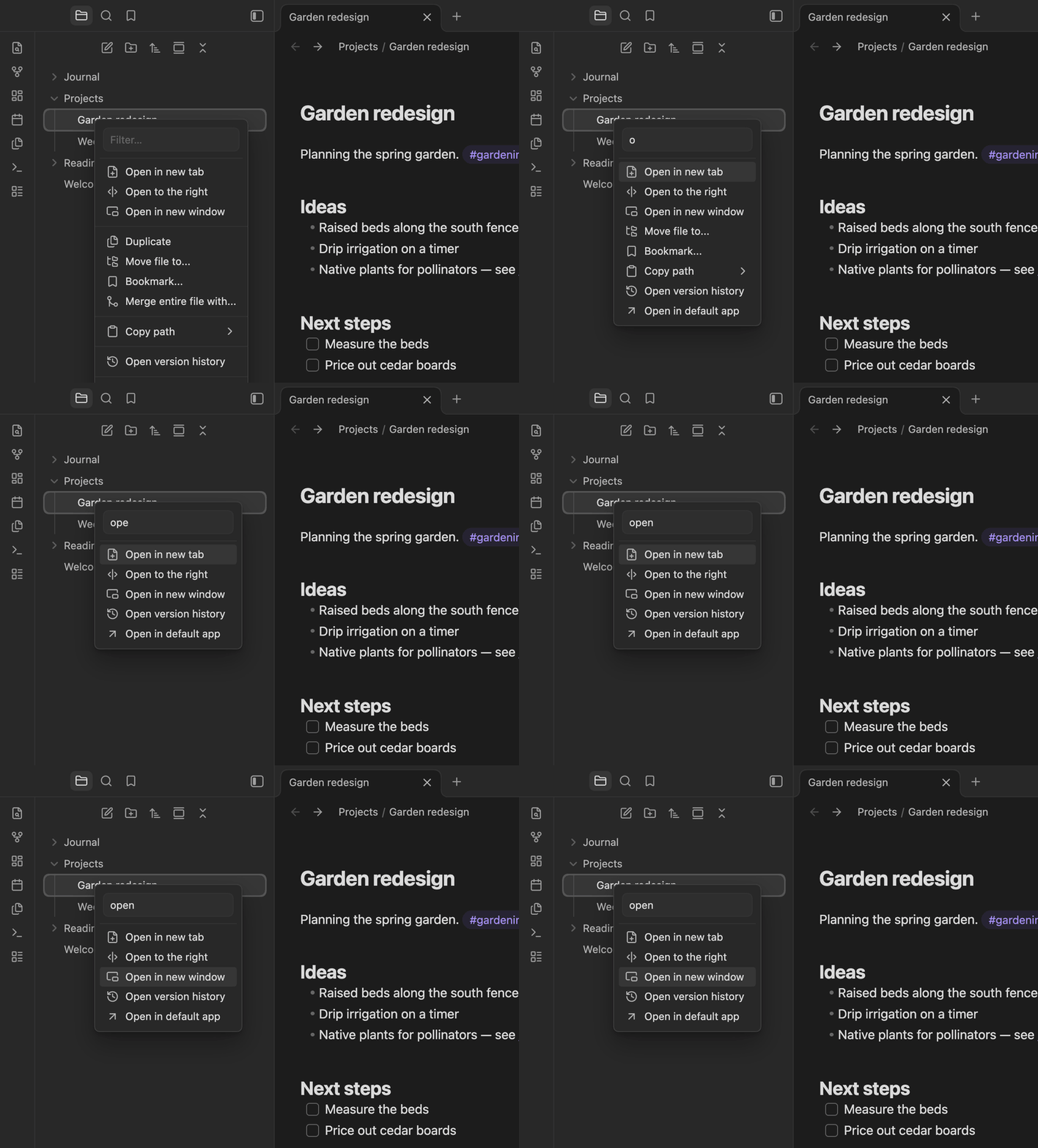
Long right-click menus are slow to scan. Menu Filter adds a filter box to the top of every long menu in Obsidian, so you can type a few letters instead of reading the whole list.
Right-click a folder, type mov, and the menu narrows to Move folder to…. Press Enter to run it.
How it works
- The filter box appears on any menu with at least 8 items (configurable). It works on menus from the file explorer, the editor, tabs and other plugins.
- The box is focused as soon as the menu opens. Just start typing.
- Matching items stay visible and the first one is highlighted.
- ↑ / ↓ move the highlight, Enter runs it, Esc closes the menu.
- Short menus are left unchanged.
Requirements
- Native menus must be off. With native menus on, the operating system draws the menus, so plugins can't change them. Turn them off in Settings → Appearance → Native menus. On macOS native menus are on by default, and the plugin's settings page warns you when they are.
- Obsidian 1.13 or later.
- Desktop only.
Settings
| Setting | Default | Description |
|---|---|---|
| Minimum menu size | 8 | Menus with fewer items don't get a filter box. |
Installation
Install it from Settings → Community plugins → Browse: search for "Menu Filter", or open its page in the plugin directory.
To install it manually, copy main.js, manifest.json and styles.css from the latest release into <your vault>/.obsidian/plugins/menu-filter/, then enable the plugin.
Development
npm install
npm run dev    # rebuilds main.js on every change
npm run build  # type-check and production build
npm run lint
License
HealthExcellent
ReviewSatisfactory
About
Add a filter box to long context menus so you can type a few letters to narrow choices and quickly run the matching command. Focus the box on open, highlight matches, navigate with up/down and press Enter to execute.Details
Current version
1.1.0
Last updated
2 weeks ago
Created
2 weeks ago
Updates
2 releases
Downloads
56
Compatible with
Obsidian 1.13.0+
Platforms
Desktop only
License
MIT