Maguilanote
 Lucas Coutinho1k downloads
Milanote-like visual workspace boards inside Obsidian: infinite canvas, notes, images, links, columns, to-do lists, arrows and more.
- Overview
- Scorecard
- Updates5

A Milanote-style visual workspace for Obsidian: notes, images, links, files, columns, to-do lists, color swatches, comments, audio recordings, nested boards and arrows on an infinite canvas, entirely inside your vault.
Local-first by design. Each board is a single .board JSON file in your vault. There's no account, no server, and no real-time collaboration; sync your vault however you already do (Obsidian Sync, Git, Syncthing, a shared folder...). Cloud collaboration is out of scope for this project, not a missing feature.
Demo
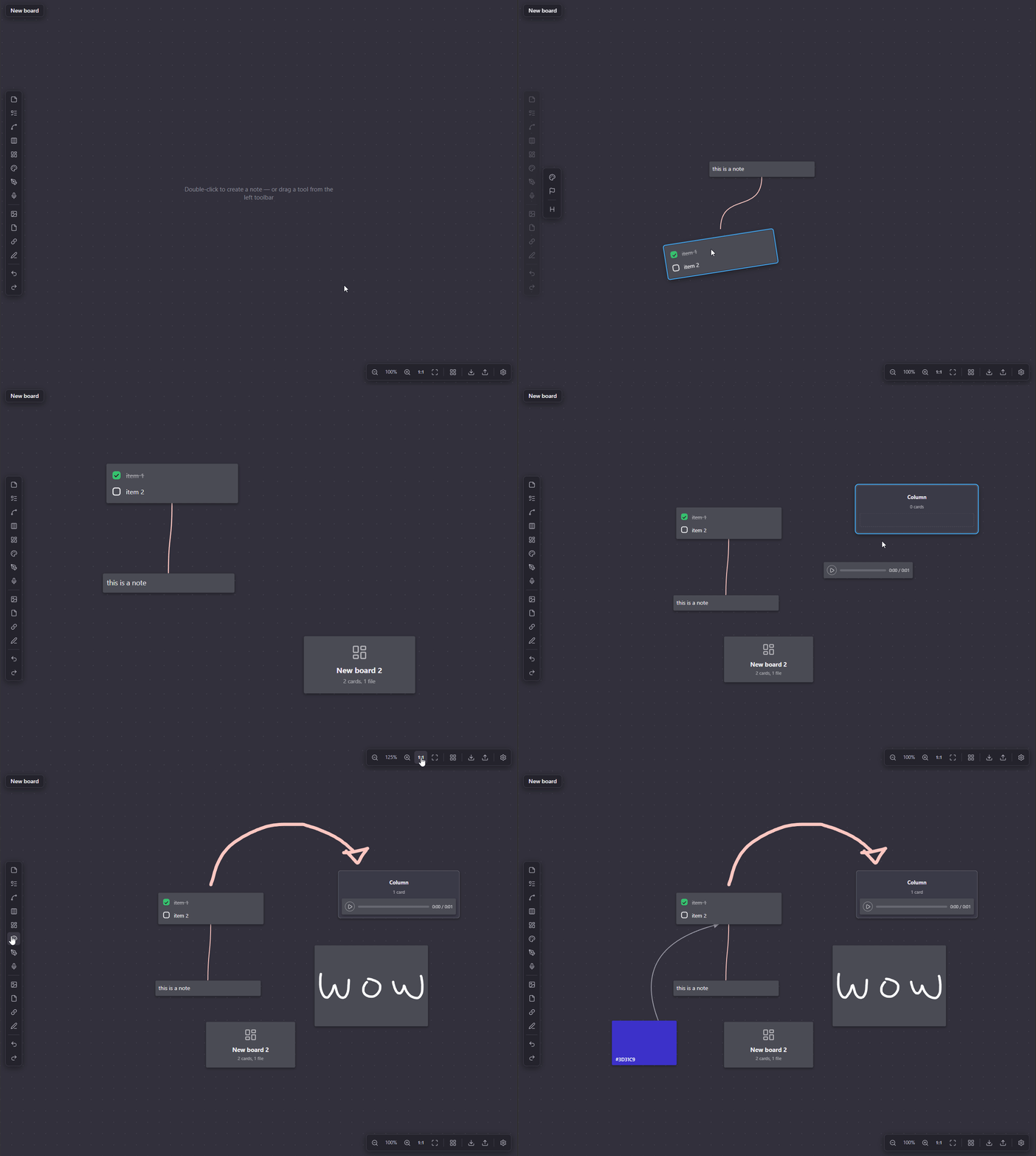
Features
Boards
- Infinite canvas, nested boards with breadcrumb, board-to-board shortcuts
- Broken-link detection, card previews, item locking, move/duplicate across boards
- Built-in and custom templates
Card types
- Text note, image, link (auto title, YouTube embed), file (any type, audio/video player)
- Vault file drag & drop, to-do list, column, color swatch, comment, document note
- Record: drag onto the board, double-click to open the recording popup (pick a microphone, record, play back); the card's contextual toolbar → "Transcribe text" sends it to the OpenAI Whisper API (requires an API key in Settings) and drops the result into a connected note card
Drawing
- Draw: freehand on the board (pen/select/eraser, color, stroke size, pen-pressure), strokes grouped into editable drawings on save
- Sketch: a card you draw inside via a popup canvas; shows a preview on the board
Connections
- Line tool: drag it onto the board, then drag either endpoint onto a card to anchor it (or leave it free)
- Card-hover blue dot: drag to another card to draw an arrow (drop on empty canvas for a free end)
- Two routing modes, switchable per line from its right-click menu: Free (straight, drag its middle dot to curve it) and Smart (auto-routed around cards)
- Arrows, solid/dashed, arrowhead toggle, reversible, labels, color
- Rubber-band select works on lines too (both ends must be inside the selection box); Delete removes selected lines
Text editing
- Full Markdown: headings, bold/italic/strikethrough, lists, quotes, code, links,
[[wikilinks]] - Card background colors, plus an independent accent color (left-side stripe)
Contextual toolbar
- Selecting a card opens its options in the same lateral slot used by the Draw toolbar: card color, accent color, show/hide title, and type-specific actions (replace reference, transcribe recording)
- Right-click keeps only structural actions: lock/unlock, duplicate, bring to front/back, delete
Canvas
- Select/drag, multi-select, group move, resize
- Alt+drag duplicate, snap-to-grid, undo/redo, cut/copy/paste
- Zoom controls
Settings
- Gear icon next to the breadcrumb trail opens the Settings panel
- Customization: separate body/heading fonts (pick a preset or any Google Font by name), dark/light theme, and per-theme colors (board background, default card background, each card color preset)
- Shortcuts: rebind any keyboard shortcut (click to record, reset to default), plus a collapsible mouse/gesture reference
Search & export
- In-board search, export to Markdown, import from OS/vault
Collaboration
- Local comment cards, unlimited local storage (it's your disk)
Manual installation
- Copy
main.js,manifest.jsonandstyles.csstoYOUR_VAULT/.obsidian/plugins/maguilanote/. - In Obsidian → Settings → Community plugins, enable Maguilanote.
Usage
- The ribbon icon or the "Maguilanote: New board" command creates a
.boardfile. - Double-click the canvas to create a note. The left toolbar adds every other card type — drag a tool onto the canvas to create it where you drop it (a plain click on a drag-only tool just shakes it as a hint). Draw is the exception: click it (or press
D) to enter draw mode. - Click a card to select it; drag to move. Inputs inside a card only activate once it is selected. Double-click to edit/open.
- Drag files from the OS or from Obsidian's file explorer straight onto the board (
.boardfiles become nested boards). - Alt+drag duplicates. The bottom bar has zoom controls, 1:1, fit, and a snap-to-grid toggle (Ctrl while dragging inverts snap).
- Click the gear icon next to the breadcrumb trail to open Settings (fonts, theme, colors, shortcuts).
Building from source
With npm available:
npm install
npm run build
Without npm (Node 22+ only):
node build-local.mjs
Both produce main.js at the project root. See docs/DEVELOPMENT.md for details.
Documentation
This README covers the essentials. For everything else, see docs/:
- ARCHITECTURE.md — how the plugin is built: source layout, data model, rendering and build pipeline.
- DEVELOPMENT.md — full dev setup, build commands, verification checklist.
- DEPENDENCIES.md — dependency pinning policy and current versions.
- FAQ.md — "how do I change X" answers (colors, defaults, card types, shortcuts, and more).
- CHANGELOG.md — living log of significant project changes.
Docs are a living part of this project: significant changes must update the relevant doc and get a changelog entry in the same change, not as a follow-up. See the documentation policy in .claude/CLAUDE.md.