Keyboard Analyzer
 noname-oni29k downloads
See and analyse your keyboard hotkeys and shortcuts.
- Overview
- Scorecard
- Updates6
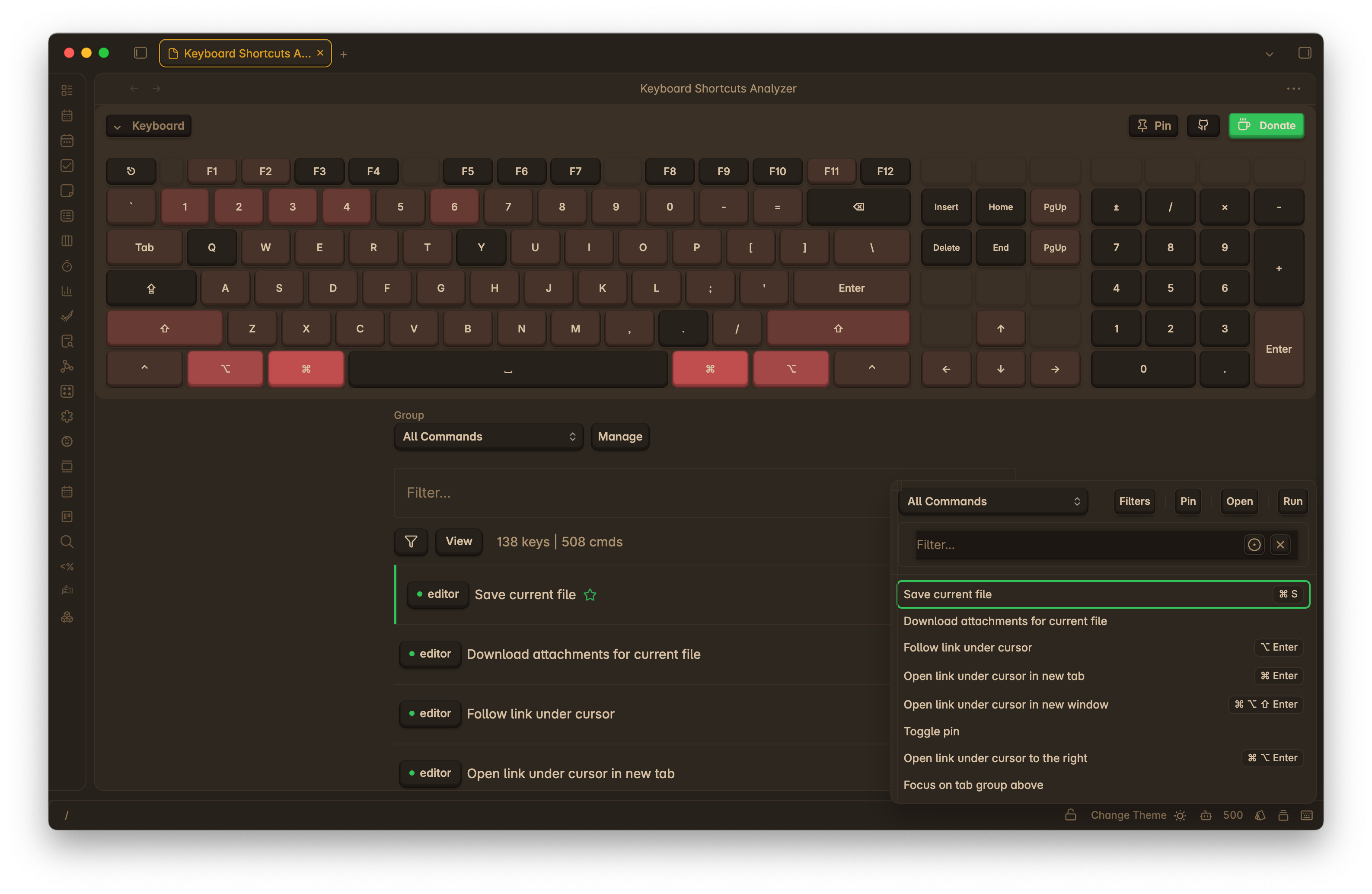
Visualize, search, and analyze your Obsidian hotkeys on a keyboard layout. Quickly spot duplicates and gaps, filter by scope, and optionally include system/editor defaults so you don’t assign over common shortcuts.
Install from Community Plugins: https://obsidian.md/plugins?id=keyboard-analyzer
Features
- Visual keyboard
[REFACTOR]: see which keys are used and by which commands - Hotkey eduit mode
[ALPHA]: test feature for editing hotkeys - Powerful search: by key combo (e.g.,
Ctrl+K), command name, plugin - Duplicates and gaps: highlight conflicts and unassigned areas
- Grouping
[NEW][WIP]: Assign commands to groups, configure group settings and filtration - Quick View Popup
[NEW]: Quick access to commands list with option run commands (Run command twice to start with key listener enabled) - Modifier activation mode
[NEW]: Option to select how active key listener tracks modifier keys - On hold or toggle - Key listener scope
[NEW]: Allow to set key listener scope (e.g., global, plugin view) - System default overlay: avoid colliding with OS/editor shortcuts (See default keys)
- Status-bar entry: click to open quick commands popup
Roadmap
- Hotkey assignment management: allow users to create, edit, and delete hotkey assignments
- Settings migration: persist user settings across updates
- Visual Keyboard Configuration: allow users to customize the visual keyboard layout
- Additional key support: allow support of F13-F24, Meh and Hyper Keys
Installation
Recommended — Community Plugins
- Obsidian → Settings → Community plugins → Browse
- Search “Keyboard Analyzer” (or open the link above)
- Install and enable
Alternative — BRAT / Manual
- BRAT: install Obsidian42 BRAT → “Add beta plugin” → paste repo URL → enable
- Manual: download
main.js,styles.css,manifest.jsonfrom Releases and place in[Vault]/.obsidian/plugins/obsidian-keyboard-analyzer/
More details: docs/installation.md.
Using the Plugin
Open
- Status bar: click the keyboard icon to open quick commands popup
- Command palette: “Keyboard Analyzer: Open Shortcuts View”
Search and filter
- Search by combo (e.g.,
Cmd+Shift+K), command name, plugin, or scope - Toggle: Filter → “Include system defaults” to overlay common OS/editor shortcuts
- Highlights show duplicates and unassigned areas
Compatibility & Privacy
- Platforms: Windows, macOS, Linux.
- Privacy: no analytics; nothing leaves your machine.
Changelog
See CHANGELOG.md for release notes.
Contributing & Support
- Found a bug or have an idea? Please open an issue.
- If this plugin helps you, a Ko‑fi is appreciated 🤍.
Thanks
- Inspiration and help from the Obsidian community, including @SkepticMystic, @HEmile, @pjeby, @Fevol, and others.
MIT License — see LICENSE.
HealthGood
ReviewCaution
About
Visualize and search Obsidian hotkeys on an interactive keyboard layout to spot duplicates, conflicts, and unassigned keys. Filter by scope and optionally overlay system/editor defaults to avoid common shortcuts. Open a quick commands popup to view and run bindings.Details
Current version
0.4.1
Last updated
Last year
Created
5 years ago
Updates
6 releases
Downloads
29k
Compatible with
Obsidian 0.12.10+
Platforms
Desktop, Mobile
License
GPL-3.0
Sponsor