Completed Task Display
 heliostatic58k downloads
Controls for displaying or hiding completed tasks.
- Overview
- Scorecard
- Updates13
An Obsidian plugin that allows you to toggle the visibility of completed tasks globally across your vault.
Features
- Toggle completed tasks - Hide or show completed
[x]tasks with a single click - Ribbon button - Quick access from the Obsidian ribbon
- Command palette - Use
Toggle Completed Task Viewcommand - Status bar indicator - Shows current state (Hiding/Showing Completed Tasks)
- Settings panel - Configure status bar visibility and sub-bullet hiding
- Hide sub-bullets - Optionally hide indented items beneath completed tasks (Edit/Live Preview mode only)
- Persistent state - Remembers your preferences between sessions
- Custom task status support - Only hides
[x]and[X], preserving custom statuses like[?],[!],[/] - Cross-platform - Works on desktop and mobile
Demo
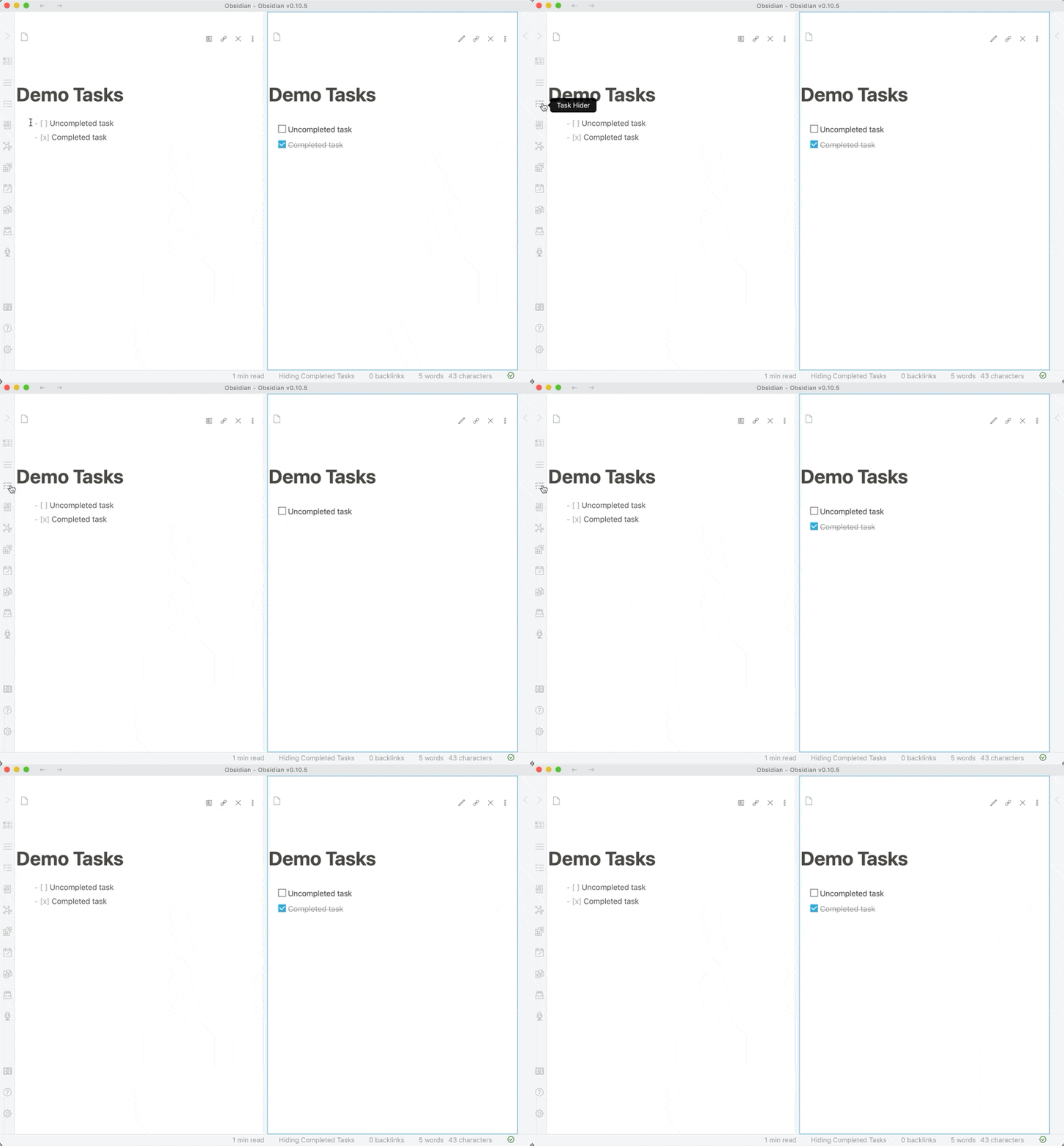
Installation
From Obsidian Community Plugins
- Open Obsidian Settings
- Go to
Community Pluginsand disableRestricted mode - Click
Browseand search for "Completed Task Display" - Click
Install, thenEnable
Manual Installation
- Download the latest release
- Extract the files into
<vault>/.obsidian/plugins/completed-task-display/ - Reload Obsidian
- Enable the plugin in Settings > Community Plugins
Usage
Toggle Completed Tasks
Using the Ribbon:
- Click the tasks icon in the left ribbon
Using Command Palette:
- Press
Ctrl/Cmd + P - Search for "Toggle Completed Task View"
Status Bar:
- Check the status bar at the bottom to see current state
Supported Task Formats
The plugin only hides truly completed tasks:
[x]- Completed (hidden)[X]- Completed (hidden)
All other task statuses remain visible:
[ ]- Uncompleted[?]- Possible task[!]- Urgent task[/]- In-progress task[-]- Cancelled task- Any other custom status
Settings
Access settings via Settings → Community Plugins → Completed Task Display:
Show status bar message
- Toggle the status bar indicator on/off
- Shows "Hiding/Showing Completed Tasks" in the status bar
Hide sub-bullets (Edit/Live Preview mode only)
- When enabled, hides indented items (sub-bullets) beneath completed tasks
- Only works in Edit and Live Preview modes
- In Reading view, sub-bullets are automatically hidden with their parent task
- Useful for cleaning up nested task lists while editing
Development
Prerequisites
- Node.js 20.x or later
- npm
- An Obsidian vault for testing
Setup
Clone the repository:
git clone https://github.com/heliostatic/completed-task-display.git
cd completed-task-display
Install dependencies:
npm installBuild the plugin:
npm run build
Development Workflow
Link to your test vault:
# Create a symlink to your vault's plugins folder
ln -s /path/to/completed-task-display /path/to/vault/.obsidian/plugins/completed-task-display
Start development mode:
npm run devThis will watch for changes and rebuild automatically.
Reload the plugin in Obsidian:
- Open Command Palette (
Ctrl/Cmd + P) - Run "Reload app without saving"
- Or manually disable and re-enable the plugin
- Open Command Palette (
Project Structure
completed-task-display/
├── main.ts           # Main plugin code
├── styles.css        # Plugin styles
├── manifest.json     # Plugin manifest
├── versions.json     # Version compatibility mapping
├── package.json      # NPM dependencies
├── tsconfig.json     # TypeScript configuration
└── rollup.config.js  # Build configuration
Building
- Development build:
npm run dev(watches for changes) - Production build:
npm run build
Testing
Copy built files to a test vault:
cp main.js manifest.json styles.css /path/to/vault/.obsidian/plugins/completed-task-display/Reload Obsidian and test:
- Toggle completed tasks on/off
- Test with various task statuses
- Verify state persistence after restart
Technical Details
Compatibility
- Obsidian API: v1.10.0
- Minimum Obsidian Version: 0.10.0
- Node.js: 20.x (for development)
- TypeScript: 5.9.3
How It Works
The plugin uses CSS classes to toggle visibility:
- Adds
hide-completed-tasksclass to document body when active - CSS selectors target completed tasks in both Reading and Edit modes
- State is persisted using Obsidian's data storage API
Dependencies
Runtime:
- Obsidian API (provided by Obsidian)
Development:
- TypeScript 5.9.3
- Rollup 4.52.5
- Various Rollup plugins for bundling
See package.json for complete dependency list.
Contributing
Contributions are welcome! Please see CONTRIBUTING.md for guidelines.
Reporting Issues
- Check existing issues first
- Use issue templates when available
- Include Obsidian version and plugin version
- Provide steps to reproduce bugs
Pull Requests
- Fork the repository
- Create a feature branch
- Follow the existing code style
- Test your changes thoroughly
- Update documentation as needed
- Submit a pull request with a clear description
License
MIT License - see LICENSE file for details.
Changelog
v1.0.7 (2025-10-21)
- 🐛 Fix: Only hide
[x]and[X]tasks, not all custom statuses - Fixes support for Tasks plugin custom statuses
- Resolves issues #3, #13, #19
v1.0.6 (2025-10-21)
- 🐛 Fix: CSS syntax error
- 🐛 Fix: Error handling for corrupted data
- 🐛 Fix: Line number display in edit mode (#28)
- 🔧 Update package.json metadata
- 🚀 Modernize dependencies (TypeScript 5.9.3, Rollup 4.52.5)
- 🚀 Modernize GitHub Actions workflow
- 📄 Add MIT LICENSE file
v1.0.5
- State persistence between sessions
See full changelog for all versions.
Credits
Created by Ben Lee-Cohen